
Bambu Lab A1 3D Printer
4.7Editor score
High-speed precision printing
Full-auto calibration system
Quiet operation for home use
Discover the top 3D printers for cosplay in October 2026. We compare speed, build volume, and multi-color capabilities to help you create stunning props.
Cosplay enthusiasts need reliable tools to bring their characters to life. A high-quality 3D printer allows you to create detailed armor, masks, and accessories with precision. Choosing the right machine depends on your budget, skill level, and the complexity of your designs.
We evaluated ten leading models based on speed, build volume, and material compatibility. Our analysis focuses on features that matter most to cosplayers, such as multi-color printing and ease of use. Each product was selected for its ability to handle diverse filaments and large props.
Every pick highlights key strengths and potential trade-offs for your workflow. Ratings reflect user feedback and technical performance data. Keep in mind that availability and pricing can change frequently, so verify current details before purchasing your next machine.
4.7Editor score

4.5Editor score

4.5Editor score
This side-by-side comparison highlights the core specifications of each model. Use this table to quickly identify build volumes, speeds, and key features that align with your cosplay project requirements.





The Bambu Lab P1S stands out as a top choice for cosplayers needing speed and reliability. It boasts a 4.5 rating from users who appreciate its ready-to-use nature. The enclosed design and auto bed leveling make it accessible for various skill levels while ensuring high-quality prints.
We may earn a commission when you buy through this link, at no additional cost to you.
Its standout feature is the ability to handle up to 16 colors when connected to the AMS system. This is crucial for multi-part props that require distinct colors without painting. The 500mm/s speed significantly reduces production time for large armor pieces or detailed masks.
While highly capable, it requires the AMS add-on for true multi-color printing. Also, it is not recommended for carbon or glass fiber reinforced polymers, which limits some engineering applications. However, for standard cosplay materials like PLA and PETG, it performs exceptionally well.
Cosplayers seeking a balance of speed and quality will find this machine ideal. It minimizes setup time and maximizes creative output. We recommend it for those ready to invest in a system that grows with their hobby.
The AMS connection enables vibrant multi-material printing perfect for layered designs and detailed prop finishes.
Users can start printing in as little as 15 minutes, reducing downtime between project phases.
We may earn a commission when you buy through this link, at no additional cost to you.
The Bambu Lab P2S Combo offers enhanced precision with a 4.7 rating. It includes the AMS 2 Pro, making multi-color printing ready out of the box. This setup is perfect for cosplayers who need consistent results on complex designs without manual tuning.
We may earn a commission when you buy through this link, at no additional cost to you.
Key strengths include the 600 mm/s speed and active flowrate compensation. These features ensure sharp corners and smooth layers essential for visible prop surfaces. The combo setup eliminates the guesswork of compatibility between printer and AMS units.
The main trade-off is the higher initial cost compared to standalone units. Additionally, the base P2S does not support multi-color without the AMS. However, the included AMS 2 Pro justifies the investment for serious creators needing reliability and speed.
We recommend this for those prioritizing workflow efficiency. It streamlines the transition from design to finished prop. Ideal for workshops or individuals aiming to produce multiple costumes efficiently.
Active compensation ensures consistent extrusion for precise details on armor and intricate accessories.
The AMS 2 Pro adds drying and seamless color switching capabilities straight from the box.
We may earn a commission when you buy through this link, at no additional cost to you.
The Creality K2 Combo brings multicolor capabilities to the table with a 4.0 rating. It supports up to 16 colors via CFS units, which is great for detailed character props. The step-servo motors provide quiet operation and precision during long prints.
We may earn a commission when you buy through this link, at no additional cost to you.
Features like 600mm/s speed and smart auto leveling enhance usability. The K2 includes one CFS unit, allowing users to start multi-color printing immediately. This is beneficial for teams needing to print diverse props quickly without post-painting.
Trade-offs include a slightly lower rating compared to other premium models. The CFS units are an added cost if you need more than the included one. However, the build volume and speed make it a competitive option for large projects.
Cosplayers wanting a pre-assembled machine with color potential will find this appealing. It balances performance and ease of use. Consider it if you value speed and multi-color flexibility in your production line.
Step-servo motors keep noise levels low, perfect for shared living spaces or studios.
A 260mm build volume covers most standard prop sizes without needing to slice parts.
We may earn a commission when you buy through this link, at no additional cost to you.
The Sovol SV08 MAX targets large-scale cosplay needs with a 4.0 rating. Its 500x500x500mm volume allows printing full-sized props in one piece. The CoreXY kinematics support 700mm/s speeds for rapid production of bulky items.
We may earn a commission when you buy through this link, at no additional cost to you.
Advanced features include an eddy current sensor for contactless leveling. The 300°C nozzle handles a wide range of advanced filaments like PC or PA. This versatility is key for durable props that must withstand convention conditions.
Trade-offs involve the higher price point and extra cost for heated chamber upgrades. It is not as plug-and-play as some competitors. However, for large projects, the unmatched size and speed justify the investment.
We recommend this for professional or advanced hobbyists. If you need to print massive armor or props without assembly, this is the tool. It excels in industrial-grade applications.
The massive build volume reduces part assembly time for large costumes and props.
300°C nozzle temperature supports engineering filaments for strong, durable props.
We may earn a commission when you buy through this link, at no additional cost to you.
The FLASHFORGE Adventurer 5M Pro offers solid performance with a 4.0 rating. It features a 600mm/s CoreXY speed and enclosed design for consistent prints. The 3-second quick-swap nozzle allows rapid changes between projects.
We may earn a commission when you buy through this link, at no additional cost to you.
Key strengths include the dual filtration system and high-temp extruder. This combination ensures clean air and compatibility with engineering materials like ABS. The enclosed chamber maintains thermal stability for reliable results.
Trade-offs are the slightly lower user rating and fewer multi-color options. It focuses more on speed and ease of use than advanced features. However, it remains a strong contender for standard cosplay printing.
Ideal for beginners or those needing a quiet, efficient machine. The auto leveling and quick nozzle changes save time. We suggest it for focused, single-color projects.
Dual filtration keeps the environment clean and safe during long print sessions.
3-second nozzle swaps reduce downtime when changing between print materials.
We may earn a commission when you buy through this link, at no additional cost to you.
The Bambu Lab A1 offers high-end features at a budget-friendly price with a 4.7 rating. It delivers speed and precision suitable for smaller cosplay parts. Full-auto calibration removes manual tuning steps for new users.
We may earn a commission when you buy through this link, at no additional cost to you.
Its key strength lies in reliability and ease of use. Active flow rate compensation ensures smooth prints without clogs. The quiet operation makes it ideal for shared spaces like home offices or bedrooms.
Trade-offs include the need to buy AMS lite separately for multi-color. The build volume is also smaller than premium models. However, for its price, it offers incredible value for beginners.
We recommend this for those starting their cosplay journey. It balances cost and performance well. Ideal for printing masks, jewelry, or smaller accessories efficiently.
Full-auto calibration ensures perfect first layers without manual adjustments.
Low noise levels make it perfect for home environments without disturbing others.
We may earn a commission when you buy through this link, at no additional cost to you.
The Snapmaker U1 stands as a premium option for complex cosplay needs. It features four independent toolheads, enabling true multi-material printing. This allows combining flexible and rigid parts in one build for functional props.
We may earn a commission when you buy through this link, at no additional cost to you.
Key strengths include the 5-second tool changer and 500 mm/s speed. This drastically reduces time compared to standard multi-color systems. The CoreXY system ensures stability during high-speed printing.
Trade-offs are the high price and complexity of managing multiple tools. It is best suited for professionals or serious hobbyists. However, the versatility it offers is unmatched in the market.
We recommend this for advanced users needing flexible joints or multi-material props. It justifies the cost for those seeking top-tier versatility. Ideal for creating functional costumes.
5-second tool changes ensure continuous printing with different materials.
Combine rigid armor and flexible joints in a single seamless print process.
We may earn a commission when you buy through this link, at no additional cost to you.
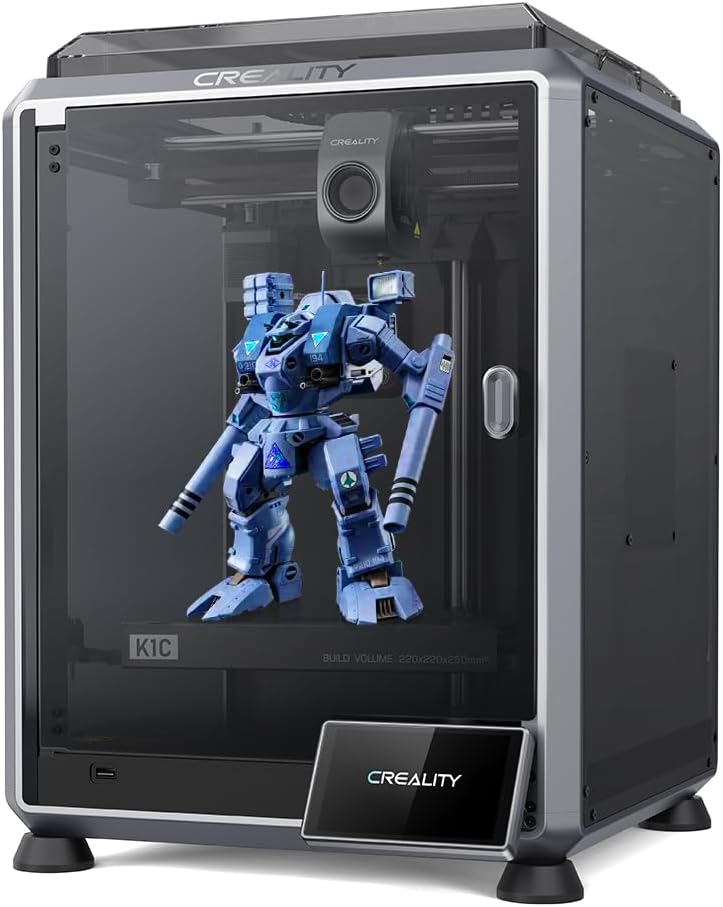
The Creality K1C is designed for high-performance materials with a 4.3 rating. It supports carbon fiber filaments thanks to a specialized direct extruder. This makes it excellent for durable props requiring stiffness.
We may earn a commission when you buy through this link, at no additional cost to you.
Features like 600mm/s speed and AI camera monitoring enhance reliability. The pre-assembled design saves setup time significantly. Auto calibration ensures precision without manual intervention.
Trade-offs include a smaller build volume and lack of multi-color support. It focuses on material strength and speed. However, for specialized durable props, it is a strong choice.
We recommend this for users prioritizing strength. If you need props that withstand heavy handling, this machine delivers. Ideal for engineering-focused cosplay.
Handles tough materials like carbon fiber for durable props.
Smart camera detects failures to save time and material waste.
We may earn a commission when you buy through this link, at no additional cost to you.
The Creality K2 Plus Combo offers a large build volume with multi-color support. It has a 4.0 rating and features 350mm dimensions for large props. The CFS units allow 16-color printing, ideal for complex costumes.
We may earn a commission when you buy through this link, at no additional cost to you.
Key strengths include the 600mm/s speed and dual AI cameras. These features ensure speed and monitoring for large prints. The 350mm volume reduces the need to slice parts.
Trade-offs are the high price and complexity of setup. It requires more management than simpler models. However, the capabilities offer unmatched value for large projects.
We recommend this for those with large prop needs. It combines color and size effectively. Ideal for advanced cosplay workshops.
Dual AI cameras monitor prints to catch failures and ensure quality.
350mm build volume allows printing large props in fewer pieces.
We may earn a commission when you buy through this link, at no additional cost to you.
The Anycubic Kobra X supports up to 19 colors and features LeviQ 3.0 leveling. With a 4.2 rating, it promises ease of use and speed. The AI monitoring system ensures reliable prints for long projects.
We may earn a commission when you buy through this link, at no additional cost to you.
Key strengths include the 600mm/s performance and adaptive extrusion. These features handle various materials seamlessly. The large build volume supports diverse cosplay prop sizes.
Trade-offs include the newness of the system and accessory costs. However, for color versatility, it offers significant value. It is a strong choice for creative printing.
We recommend this for those needing color variety. It simplifies the printing process. Ideal for those ready to experiment with colors.
LeviQ 3.0 ensures perfect first layers every time automatically.
Adaptive extrusion handles different material types smoothly.
We may earn a commission when you buy through this link, at no additional cost to you.
Selecting the right 3D printer involves evaluating build volume, speed, and material compatibility for your specific cosplay needs.
Build volume determines the size of props you can print without slicing. Large armor pieces require machines with at least 260mm in each dimension.
For full props, consider models with 350mm or larger volumes to reduce assembly time.
Higher print speeds like 600mm/s reduce production time significantly. Cosplayers often need multiple parts quickly before events.
Prioritize machines with fast speeds if you have tight deadlines for costume completion.
Multi-color systems allow for detailed props without painting. Look for machines supporting AMS or CFS units for vibrant results.
Ensure compatibility with filament systems before purchasing to avoid additional costs later.
Some projects need durable materials like PETG or ASA. Ensure the printer supports engineering-grade filaments.
Check if the hotend temperature supports high-temp materials for stronger props.
Auto leveling and calibration features simplify setup for beginners. These reduce frustration and failed prints.
Choose models with auto features to save time on maintenance.
Quiet operation is important for home or shared environments. Look for models designed with low-noise fans.
Consider noise if you plan to print late at night.
Begin by calibrating the printer bed according to the manual. Proper leveling ensures strong adhesion and prevents failed prints.
Regularly clean the nozzle and extruder to maintain print quality. Remove any filament debris to avoid clogs during long sessions.
Store filament in a dry environment to prevent moisture absorption. This ensures smooth printing and consistent results.
Yes, machines with large build volumes allow printing full armor pieces. This reduces assembly time significantly for complex costumes.
PETG and ASA are excellent choices for strength and durability. They resist breakage better than standard PLA materials.
Not always, but multi-color systems save time on painting. It depends on your design complexity and time constraints.
High-speed models produce parts in hours rather than days. This is ideal for tight event deadlines or multiple costumes.
It helps beginners and ensures consistency. Manual leveling takes time which can slow down production.
Yes, advanced printers support TPU for flexible parts. This is useful for straps and joints needing movement.
These top 10 printers offer a range of options for speed and precision. Choosing the right one depends on your budget and project scale.
Prioritize features like build volume and multi-color support based on your workflow. Investing in the right tool pays off in quality and speed.
Always verify current prices and availability before purchasing. Technology evolves rapidly, so check for the latest updates.