
Tomee 16MB Memory Card for Wii/Gamecube
4.7Editor score
251 Blocks Storage
Budget-Friendly Price Point
Simple Plug-and-Play Design
This guide compares the top GameCube Memory Card options for saving your classic progress on original hardware.
Finding the right GameCube Memory Card is essential for preserving your saved progress in beloved classic titles. Without reliable storage, hours of gameplay and hard-earned achievements can vanish instantly upon console shutdown.
We evaluated ten third-party memory cards based on compatibility, block count, build quality, and user feedback. Our analysis ensures you select a device that works seamlessly with your specific console model.
Each pick highlights key features and potential trade-offs to help you make an informed decision. Prices and availability may change, so verify current details before purchasing your next accessory.
4.7Editor score

4.7Editor score

4.8Editor score
The following table provides a side-by-side comparison of the top ten memory cards. It highlights key specifications to help you identify the best match for your needs.
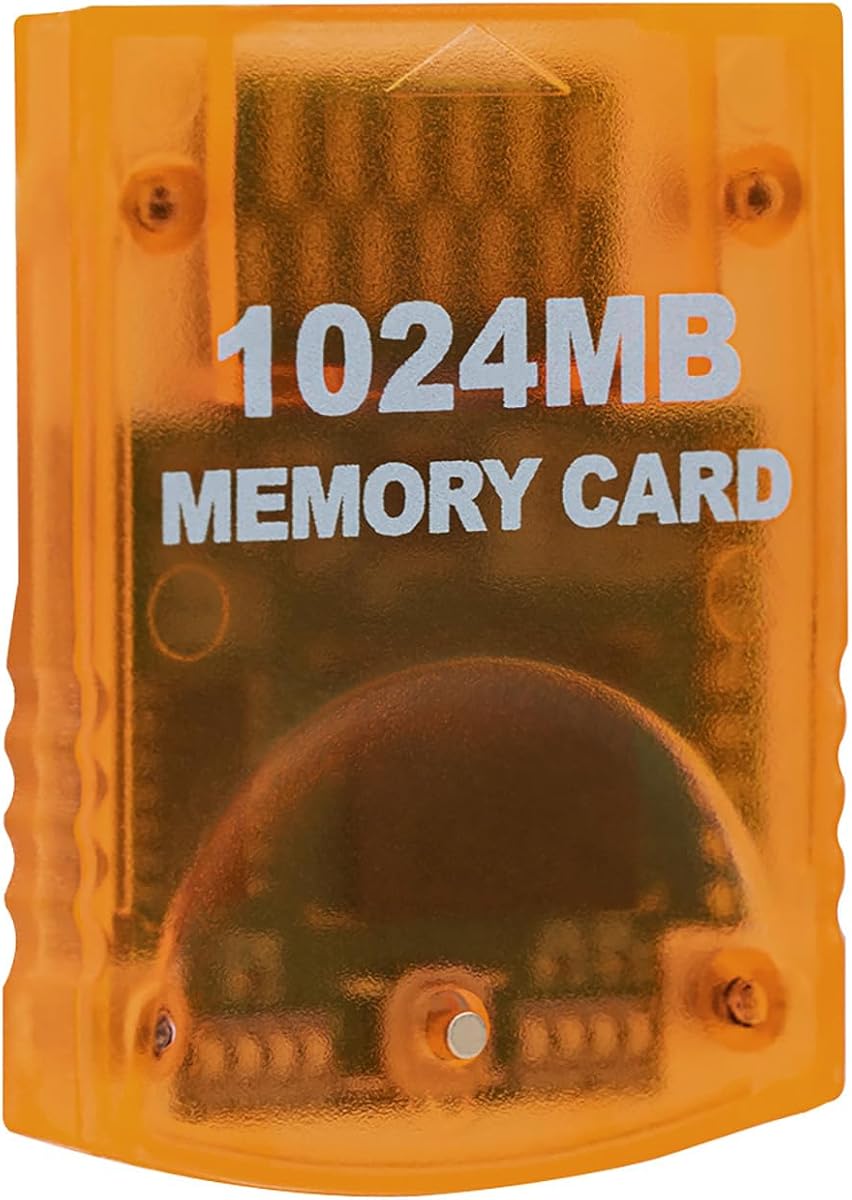


This Tolesum card offers massive 16344 block capacity with eight independent storage areas. It stands out for using real uncompressed blocks, ensuring compatibility with all standard GameCube titles.
We may earn a commission when you buy through this link, at no additional cost to you.
The eight indicator lights help you quickly identify the active storage area. Pressing the front button cycles between them, making organization seamless for collectors managing multiple save files.
While it lacks official branding, user feedback suggests it performs reliably across various games. The translucent orange design adds a retro flair without compromising functionality or durability.
This is the top choice for serious gamers needing extensive save space. Prioritize checking your console model number to ensure it matches the RVL-001 requirements before buying.
Unlike compressed cards, this unit guarantees the stated block count is real, preventing save failures in sensitive titles.
Dividing space into eight distinct sections allows easy categorization without overwriting existing save data accidentally.
We may earn a commission when you buy through this link, at no additional cost to you.
The Tomee card provides a straightforward solution with 16MB of storage. It offers 251 blocks, enough for several titles without needing multiple cards for casual gamers.
We may earn a commission when you buy through this link, at no additional cost to you.
Users praise its ability to handle load, save, copy, and delete operations smoothly. It works fully with GameCube games that have a save option, ensuring your progress is never lost.
The trade-off is limited capacity compared to larger cards. If you play one game at a time, this cost-effective choice saves money while delivering trusted functionality.
Ideal for budget-conscious players or secondary consoles. It remains a solid backup option if your primary card gets full or damaged during regular gameplay sessions.
With a low entry price, this card delivers the essential saving features without unnecessary extra storage costs.
The 251 block count follows the standard GameCube format, guaranteeing compatibility with any title requiring a memory card.
We may earn a commission when you buy through this link, at no additional cost to you.
MAYFLASH delivers a high-quality 512MB card with a rare 4.8 rating. It splits storage into four areas, each holding 2043 blocks, offering flexibility for organizing various game saves.
We may earn a commission when you buy through this link, at no additional cost to you.
The blue design looks premium and fits neatly into the console slot. Switching areas involves pressing a button on the card, allowing quick access to different profiles without data loss.
While it lacks the massive capacity of 1GB cards, the quality and reliability justify the choice. It is perfect for collectors who value stability over sheer volume of saved data.
Choose this if you want a trusted brand with a proven track record. It balances cost and performance well for those needing more than basic 16MB storage options.
512MB provides ample space for dozens of saves without reaching the high price point of maximum capacity cards.
Simple button press controls allow you to manage different storage zones without complex menu navigation on the console.
We may earn a commission when you buy through this link, at no additional cost to you.
The Mcbazel card offers 16344 blocks divided into eight 128MB parts. Users report high speed and efficiency, making it suitable for saving data from hours of gameplay sessions.
We may earn a commission when you buy through this link, at no additional cost to you.
Pressing the button on the card allows switching between the eight distinct storage parts. This design ensures you can isolate saves for different games without accidental overwrites or confusion.
It is made by a third party, so expectations should align with unofficial accessories. Most users find it reliable, but verifying your console model is crucial before purchase.
This option is great for power users needing maximum space. It provides a practical way to store many saves across multiple titles on a single card.
Breaking memory into eight parts simplifies data management and reduces the risk of corrupting unrelated game saves.
Efficient processing reduces the time needed for save operations, keeping gameplay interruptions to an absolute minimum.
We may earn a commission when you buy through this link, at no additional cost to you.
This 512MB Tolesum card provides eight 128MB parts for organizing your data. It is designed for plug-and-play use, ensuring you can start saving immediately without setup steps.
We may earn a commission when you buy through this link, at no additional cost to you.
The real 8192 blocks are non-compressed, which maintains integrity across various titles. Users appreciate the straightforward design that prioritizes function over unnecessary features.
While not an official item, it serves as a reliable replacement. The blue casing is visually distinct, helping you locate it easily when swapping cards in your console.
Consider this if you need more than 16MB but not the full 1GB. It offers a balanced approach for casual gamers managing a few favorites titles effectively.
Real block counts prevent issues with games that struggle to read compressed or virtual memory space on cheaper cards.
No configuration is required. Just insert the card while the console is off and start playing immediately.
We may earn a commission when you buy through this link, at no additional cost to you.
This black 16MB card offers 251 blocks for basic storage needs. It features a shock-resistant build to protect data during accidental drops or power outages.
We may earn a commission when you buy through this link, at no additional cost to you.
Users highlight its seamless operation with GameCube and Wii consoles. It is engineered for durability, preventing lag during saves and ensuring a smooth experience during marathon sessions.
The limited capacity is acceptable for single-game players. However, if you own multiple titles, you might need multiple cards to store all your progress simultaneously.
Pick this for simple replacement needs or secondary setups. Its budget-friendly nature makes it accessible for anyone needing essential save functionality quickly.
The shock-resistant construction adds a layer of physical protection often missing from standard third-party memory accessories.
It works with both GameCube and Wii RVL-001, making it versatile for owners of either console hardware.
We may earn a commission when you buy through this link, at no additional cost to you.
This pink card offers 256MB split into two 128MB sections. It is designed for plug-and-play convenience, allowing you to save data efficiently without complex setup steps.
We may earn a commission when you buy through this link, at no additional cost to you.
Pressing the button switches between banks, with LEDs showing the active section. This organization tool helps keep saves for different genres separated and easy to locate.
The high-speed chip ensures quick data transfers. Users note that it processes saves rapidly, reducing wait times and keeping the gameplay experience fluid and uninterrupted.
Ideal for those who appreciate a distinct look. It balances color and function, offering more space than 16MB cards while remaining affordable for most users.
Two independent banks let you segregate save files, reducing clutter and simplifying the process of managing progress.
Visual cues confirm which bank is active, preventing accidental data loss during switching operations.
We may earn a commission when you buy through this link, at no additional cost to you.
This card provides 16MB of flash memory in a classic design. It stores 251 blocks for saving game settings and progress with ease.
We may earn a commission when you buy through this link, at no additional cost to you.
Users appreciate its straightforward functionality for basic storage. It maintains full compatibility with GameCube titles requiring memory cards, ensuring no issues with save operations.
While capacity is limited, the reliability is a strong point. It serves well for owners who prefer simplicity and want a functional card for one or two titles.
Choose this for retro authenticity or simple needs. It offers a proven solution that has been trusted by gamers for decades of console play.
Uses flash memory to retain data reliably without power, ensuring saved files are safe when the console is off.
Insert the card and let the console handle the rest, requiring no software or driver installation on your part.
We may earn a commission when you buy through this link, at no additional cost to you.
Suncala offers a 1024MB card with eight storage sections for massive capacity. It features an upgraded chip that claims to process saves 20% faster than older versions.
We may earn a commission when you buy through this link, at no additional cost to you.
The 60-month warranty provides peace of mind often missing in third-party accessories. Users can insert and remove the card easily thanks to the sleek package design.
While it is third party, the warranty signals strong manufacturer confidence. It is a good pick for long-term use where reliability and support matter to you.
Select this if you need maximum storage with a safety net. The extra warranty time makes it a safer investment compared to other unbranded high-capacity options.
A five-year warranty adds significant value, protecting your investment against potential hardware failures over time.
Upgraded processing allows for faster save and load times, minimizing interruptions during intense gameplay moments.
We may earn a commission when you buy through this link, at no additional cost to you.
This adapter lets you use Micro SD cards in your GameCube. It supports cards up to 512GB, allowing storage of hundreds of games and saves via homebrew software.
We may earn a commission when you buy through this link, at no additional cost to you.
It requires tools like Swiss or GCloader Lite to function. The transparent body offers a clear look, showing the inserted SD card within the adapter casing.
Note that standard memory saves may not be fully compatible without additional software. This option is best for users already familiar with homebrew environments.
Pick this for massive storage via homebrew. It expands your console capabilities far beyond standard memory card limits when paired with the right tools.
Designed to work with homebrew loaders, enabling a modern storage solution using widely available Micro SD cards.
The transparent shell lets you see when the SD card is properly seated inside the adapter for secure connection.
We may earn a commission when you buy through this link, at no additional cost to you.
Selecting the right memory card requires understanding your console model and storage needs. This guide covers essential factors to ensure compatibility and performance.
Your GameCube or Wii model dictates which cards work. The RVL-001 Wii supports these cards, but the Wii Mini and Family Edition do not have a slot. Always check the model number on the bottom of your console before purchasing.
Verify your console has a memory card slot on the top near controller ports. Without this, third-party cards cannot be used, making compatibility the first step in your decision.
Capacity varies from 16MB to 1GB. If you play one or two titles, a 16MB card suffices. For collectors with many saves, 1GB cards provide eight times the space.
Assess how many games you play simultaneously. Larger capacity reduces the need to delete old saves or buy multiple cards for different genres.
Some cards claim high block counts via compression, which can cause compatibility issues. Real uncompressed blocks ensure titles recognize the full storage space as expected.
Always verify the listing specifies 'real blocks' or 'uncompressed'. This distinction guarantees you get the storage space advertised without risking save errors.
Cards with multiple areas allow separating saves by game or profile. This prevents accidental overwrites and makes it easier to manage progress across different titles.
Look for cards with at least two to eight areas if you play multiple games. Independent areas streamline organization and reduce frustration.
Shocks and power outages can corrupt data. Cards with shock-resistant designs protect files better than cheap alternatives. Durability ensures your hard-earned progress remains safe over time.
Choose units made from sturdy materials. A strong build is a small price for long-term peace of mind regarding your saved data.
Official cards are rare and expensive. Most available options are third-party but still function well. Check user reviews to ensure reliability before buying.
Reputable third-party brands often offer better value than official ones. They provide similar functionality at a fraction of the cost.
Prices vary by capacity. Higher capacity cards cost more but offer better value per block for heavy users. Balance your budget with your storage requirements.
Don't overpay for features you don't need. A standard 16MB card is affordable and sufficient for casual players managing a single title.
Some brands offer warranties, which is rare for accessories. A warranty signals manufacturer confidence and provides recourse if the card fails early.
Check seller ratings and warranty terms before purchasing. Long support periods indicate a reliable product that stands behind its build quality.
Insert the card into the console only when the power is completely off. This prevents data corruption during write operations and ensures the save file remains intact on the card.
Use the button on the card to switch between storage areas. LEDs indicate the active section. Always save your current progress before switching to avoid overwriting unwanted data.
Store the card in a cool, dry place when not in use. Avoid bending or dropping the card to maintain its structural integrity and prevent internal memory chip failure.
Yes, only the original RVL-001 Wii console includes a GameCube memory card slot. The Wii Mini and Family Edition lack this hardware entirely, so these cards will not work on those models.
16MB provides 251 blocks. A standard game save takes one to three blocks. This means you can store roughly 80 to 250 saves depending on the game size.
No, these cards come pre-formatted for GameCube use. Simply insert them into the console, and the system recognizes them immediately without manual formatting steps.
No, the Wii U does not have GameCube memory card slots. It relies on internal memory and SD cards for save data, making these cards incompatible with that system.
This can corrupt the save file on the card. Always ensure stable power and never remove the card during a save operation to prevent data loss or file corruption.
Cards with multiple areas have LED lights. The lit LED indicates the active section. Press the button on the card to cycle through and select different storage areas.
Official cards are rare and often sold at premium prices. Third-party options are widely available and provide comparable performance, making them the practical choice for most users.
The Tolesum 1024MB card stands out for its massive capacity and uncompressed blocks. It ensures compatibility and reliability for serious collectors managing multiple game saves.
For budget users, the Tomee 16MB card offers essential functionality at a low cost. If you need more flexibility, the MAYFLASH 512MB balances capacity with a high reliability score.
Check your console model before buying. Always verify you have an RVL-001 or original GameCube system. Confirm current stock and details before finalizing your purchase.