
8-in-1 External Blu-ray Drive
4.2Editor score
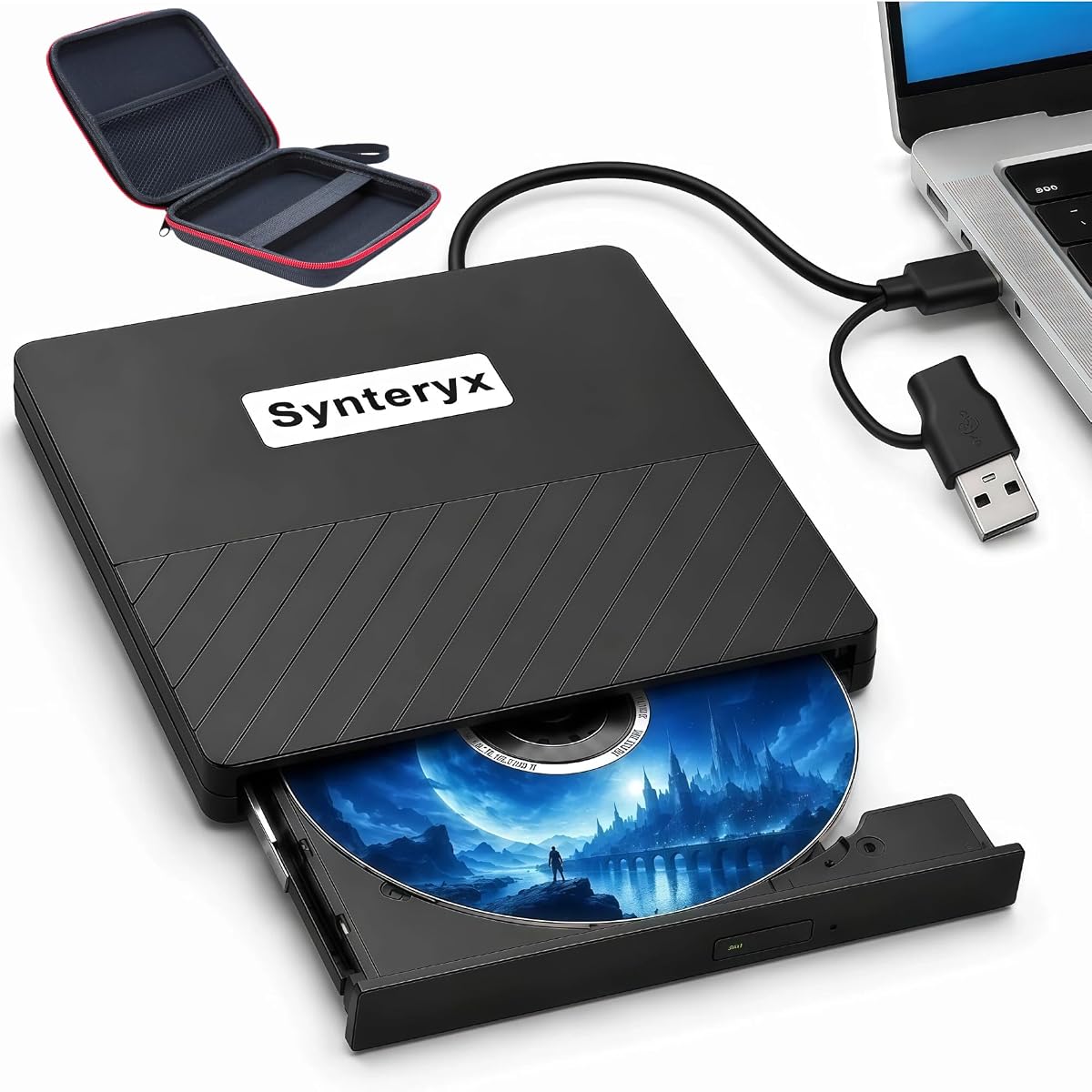
USB hub with multiple ports
SD and TF card reader
Ultra-slim portable design
Supports BD-R up to 50GB
This guide compares the top external Blu Ray burners for Mac to help you choose the best optical drive for playback and burning needs.
Modern Macs often lack built-in optical drives, making external solutions essential for media playback and data archiving. Finding a reliable external Blu Ray burner for Mac requires careful consideration of compatibility, speed, and build quality to ensure seamless integration with your workflow.
We evaluated ten leading models based on real-world performance, user feedback, and technical specifications. Our analysis focuses on compatibility with macOS, read write speeds, connectivity options like USB-C, and overall durability to provide you with a comprehensive ranking of the current market leaders.
Each pick highlights specific strengths such as portability, M-DISC support, or multi-format compatibility. While we aim for accuracy, product availability and pricing can fluctuate frequently. Always verify the latest details directly with the retailer before making your final purchase decision to ensure you get the best value.
4.2Editor score

4.7Editor score

4.4Editor score
The following table provides a side-by-side comparison of all ten reviewed drives. It highlights key specifications such as connection types, supported formats, and warranty details to help you quickly identify the model that best fits your specific Mac setup.




The BUFFALO 6X Portable Blu-ray Drive stands out as our top recommendation for Mac users seeking reliability and performance. With a high rating of 4.7 stars, it consistently delivers smooth playback and burning capabilities across various disc formats. Its construction from a reputable manufacturer ensures long-term durability.
We may earn a commission when you buy through this link, at no additional cost to you.
Key strengths include its 6x read and write speeds for BD media and 8x for DVD, which facilitate efficient data transfer. The drive includes a USB-C adapter making it easy to connect to modern MacBooks without extra dongles. M-DISC support allows for archiving data that can last up to 1000 years.
While the price is higher than budget options, the build quality and US-based support justify the investment. Some users might find the lack of bundled software slightly inconvenient requiring third-party tools for playback. However, this is a common standard for external optical drives in this category.
This drive is ideal for professionals and home users who need a reliable solution for media playback and long-term storage. Whether you are archiving family photos or playing high-definition movies, the BUFFALO 6X offers a robust solution that integrates seamlessly with your Mac setup.
Support for M-DISC technology ensures your data remains intact for centuries by using rock-like inorganic layers instead of traditional organic dyes.
Designed to work seamlessly with macOS systems ensuring you can read and write discs without complex driver installations or configuration hurdles.
We may earn a commission when you buy through this link, at no additional cost to you.
The 8-in-1 External Blu-ray Drive offers exceptional value for Mac users needing versatile connectivity on a budget. With a solid 4.2 star rating, it combines disc burning with hub functionality and card reading capabilities. This makes it a unique all-in-one solution for various peripheral needs.
We may earn a commission when you buy through this link, at no additional cost to you.
Its standout feature is the integration of a USB hub with multiple ports alongside the optical drive. You can connect keyboards, mice, or other devices while still having access to CD DVD and BD media. The included card reader slot allows quick photo transfers from cameras to your Mac.
Although it lacks some premium features like 4K playback support, it handles standard HD content well. The drive requires third-party software for Blu-ray playback which is typical for external drives in this price range. The slim design ensures it fits easily into any laptop bag.
This model is perfect for students and budget-conscious professionals who need portability and multiple connectivity options. It bridges the gap between needing an optical drive and expanding your Mac's USB ports. Overall it provides a practical and affordable entry point into external optical burning.
Equipped with multiple USB ports and card slots this drive acts as a hub allowing you to connect multiple peripherals simultaneously without extra adapters.
Weighing just 300 grams with a slim profile this drive is designed for frequent travel keeping your workflow mobile and efficient everywhere you go.
We may earn a commission when you buy through this link, at no additional cost to you.
The ASUS SBW-06D5H-U represents the premium end of the market with a focus on durability and high-speed data transfer. Rated 4.4 stars, it is built to handle heavy workloads with its USB 3.1 interface. The design is ultra-slim fitting perfectly into professional travel kits.
We may earn a commission when you buy through this link, at no additional cost to you.
A major advantage is its support for BDXL discs which allow for storage capacities up to 100GB. This is crucial for users archiving large datasets or high-definition video projects. The inclusion of both USB-A and USB-C cables ensures compatibility with older and newer Mac ports without needing to buy extra adapters.
While it is more expensive than standard burners, the build quality and feature set justify the cost. Users should note that playback software is not included requiring a separate purchase for Blu-ray movie viewing. However the raw hardware performance remains excellent for burning and data integrity.
This drive is recommended for power users and creative professionals who need reliable high-capacity burning capabilities. It offers the best balance of speed and storage options for those willing to invest in quality hardware. Whether for backups or media creation it stands as a top-tier choice.
Supports BDXL discs enabling storage of up to 100GB on a single disc which is ideal for large file backups and extensive media libraries.
Comes with two types of cables to connect to USB 3.1 ports ensuring you can use it on both older desktops and modern laptops seamlessly.
We may earn a commission when you buy through this link, at no additional cost to you.
The archgon Premium Aluminum External USB 3.0 UHD 4K Blu-Ray Writer is built with a focus on physical durability and data integrity. It earns a 4.2-star rating for its robust construction which helps dissipate heat and protect internal components during operation. The aluminum body gives it a premium feel.
We may earn a commission when you buy through this link, at no additional cost to you.
For Mac users this drive supports M-DISC BD-R which ensures long-term data stability. While it is labeled as UHD compatible it is important to note that Mac does not support UHD playback with current software. Regular Blu-ray and DVD burning work reliably making it great for standard media.
The drive requires third-party software like CyberLink PowerDVD for playback which must be purchased separately. This adds a slight step to the setup process compared to plug-and-play solutions. However the hardware itself performs consistently without overheating issues even during extended sessions.
Ideal for users who prioritize build quality and archival storage needs this drive offers a reliable experience. It is well-suited for professional environments where the device might be used frequently. The sturdy design ensures it withstands travel and daily handling better than plastic alternatives.
Constructed with a CNC aluminum body this drive is designed to resist heat and physical wear ensuring a longer operational lifespan.
Support for M-DISC technology allows you to write data that resists environmental degradation keeping your files safe for decades.
We may earn a commission when you buy through this link, at no additional cost to you.
This External Blu Ray CD DVD Drive is designed for users who need a lightweight solution for travel. It holds a 4.2-star rating and is praised for its slim profile and cable management system. The embedded cable ensures you never lose the connection cord while moving between locations.
We may earn a commission when you buy through this link, at no additional cost to you.
It supports both USB 3.0 and Type-C connections making it versatile for different Mac models. The drive is plug-and-play on Mac OS meaning you do not need to install extra drivers to start using it. This convenience saves time and technical headaches for non-tech users.
While it does not support 4K Ultra HD discs, it handles standard BD and DVD content well. Like many budget drives, it requires you to purchase your own software for playback. The included one-year guarantee provides peace of mind for potential hardware issues during normal use.
Best suited for digital nomads and students who need basic optical capabilities on the go. The design prioritizes portability and ease of connection without sacrificing core functionality. It remains a solid choice for those who value convenience and simple setup in their workflow.
The embedded cable design keeps the wire tucked inside the drive body preventing tangles and loss during transit or storage.
No drivers are needed to operate this drive on macOS allowing you to connect and start burning or reading discs immediately.
We may earn a commission when you buy through this link, at no additional cost to you.
The Dainty External Blu ray Drives offers robust storage capabilities handling BD discs up to 100GB. With a 3.9-star rating, it is an option for those who need higher capacity than standard discs provide. The dual USB power design helps ensure stable burning by preventing power shortages.
We may earn a commission when you buy through this link, at no additional cost to you.
This drive is compatible with Mac OS and Linux making it versatile for cross-platform environments. It supports error correction and has a strong USB 3.0 bandwidth for quick data syncing. However, users should note that it may require an external power adapter for optimal performance.
While the rating is lower due to some connectivity quirks, the hardware itself is capable of handling heavy data loads. Playback software is not included so you must install third-party apps to watch Blu-ray movies. This setup step is common but worth noting for new buyers.
If your main goal is backing up large files to high capacity discs, this model offers a cost-effective solution. It is best suited for users who understand the need for external power and have patience for setup nuances. Overall it delivers functional performance for archival needs.
Supports BD discs up to 100GB allowing you to store significantly more data on a single disc compared to standard formats.
Includes an additional USB power cable to ensure the drive receives enough energy for smooth operation especially on laptops.
We may earn a commission when you buy through this link, at no additional cost to you.
This External blu ray Drive is a solid choice for those interested in 3D content. Rated 4.0 stars, it allows you to read 3D Blu-ray discs for an immersive viewing experience. The matte finish is scratch-resistant giving it a professional look on your desk.
We may earn a commission when you buy through this link, at no additional cost to you.
Anti-skid rubber feet keep the drive secure during operation preventing it from sliding around. It connects easily via USB and does not require complex driver setups on most systems. The drive supports a wide array of formats including BD-R and DVD-RW.
While 3D playback is a strong selling point, it requires professional third-party software to function correctly. Some users have noted compatibility issues with certain Windows 11 versions though Mac support remains stable. The device is designed primarily for daily reliable tasks rather than high-end editing.
It is best for movie enthusiasts who want to access 3D libraries without internal hardware upgrades. The durable exterior and stable connection make it a dependable tool for regular media consumption. For Mac users it offers a convenient way to enjoy physical media collections.
Supports reading of 3D Blu-ray discs allowing you to watch compatible movies with high definition clarity on your computer screen.
Rubber feet and a matte finish keep the drive in place and protected from scratches during everyday use on your desk.
We may earn a commission when you buy through this link, at no additional cost to you.
External blu ray Drive Model 2 is a strong contender with a high 4.7 rating. It stands out for including both USB-A and Type-C connection cables ensuring you can connect to almost any port. This makes it versatile for older Macs and modern ones alike.
We may earn a commission when you buy through this link, at no additional cost to you.
The drive supports 3D playback and offers a slim profile that fits easily into a bag. It is engineered to work with Mac OS and Linux which broadens its utility for technical users. The matte finish adds to its durability against scratches and wear.
While it lacks an extra power cable, most Mac laptops provide sufficient power for smooth operation. Users must purchase playback software separately which is a standard requirement for Blu-ray burning drives. The high rating suggests that most users find the performance meets their daily needs.
If you need a drive that works seamlessly across different devices and systems this is an excellent choice. It balances portability with connectivity options making it a convenient tool for home and office use. For Mac users it simplifies the process of using physical media.
Comes with both USB-A and Type-C cables so you can plug it into various computers without needing to buy extra adapters.
Designed to work with Linux and Mac OS ensuring you can use it on multiple systems without driver conflicts.
We may earn a commission when you buy through this link, at no additional cost to you.
The LG 6X WP50NB40 is a comprehensive bundle that includes both a drive and a 100GB BDXL disc. With a 4.3-star rating, it offers a complete package for users who want everything in one purchase. It also includes Cyberlink burning software which simplifies the setup process.
We may earn a commission when you buy through this link, at no additional cost to you.
The drive itself is ultra-slim and portable fitting well with Mac workflows. It offers 6x burn speeds for BD-R and 8x for DVD making it reasonably fast for standard tasks. The 4MB buffer helps prevent errors during burning by managing data flow efficiently.
One limitation is the use of USB 2.0 which is slower than USB 3.0 on newer drives. While acceptable for standard burning, it may take longer for large data transfers. The price is higher but the included media and software add significant value to the package.
Ideal for users who want a ready-to-use solution without extra software purchases. The brand reputation ensures quality and reliability for everyday burning tasks. For Mac users it provides a convenient way to handle large files and media creation.
Includes a 100GB BDXL disc and Cyberlink burning software allowing you to start archiving immediately after purchase.
4MB buffer with buffer under-run prevention ensures your discs are burned correctly without errors due to data flow interruptions.
We may earn a commission when you buy through this link, at no additional cost to you.
This External Blu-ray Drive is a simple budget option for basic burning needs. It holds a 3.3-star rating which indicates some variability in performance but remains an affordable choice. It supports 6X BD-RE burning and includes a hidden cable slot for organization.
We may earn a commission when you buy through this link, at no additional cost to you.
The drive supports 3D playback and offers both USB-C and USB 3.0 interfaces for compatibility. Anti-slip pads keep it stable on your desk during operation. While it requires an external power cable for best performance it ensures the drive has enough energy to work correctly.
It supports a wide range of formats including BD-ROM and DVD-RAM making it versatile for standard tasks. The low power consumption is beneficial for laptop users. While the rating is lower, it remains a functional solution for casual users who need occasional disc access.
For those who want a basic drive without unnecessary features this model fits the bill. It is best for backup and occasional media playback. Mac users should note the need for external power to ensure consistent performance.
Features a hidden cable slot in the base which prevents cable loss and keeps your workspace neat and organized.
Supports BD-ROM BD-R RE and DVD-RAM formats giving you flexibility for reading and burning different types of discs.
We may earn a commission when you buy through this link, at no additional cost to you.
Selecting the right external Blu Ray burner involves understanding key technical factors that affect performance and usability with macOS.
Ensure the drive explicitly supports macOS to avoid driver issues. Most modern drives use plug-and-play standards but always check product details for specific version support like macOS 10.6 or later.
Look for drives that advertise seamless Mac support to ensure you can write and read discs without installing complex software or relying on unsupported drivers.
Modern Macs primarily use USB-C ports so verify if the drive includes a USB-C cable or adapter. Older USB-A ports may require a separate dongle which can be inconvenient.
USB 3.0 or 3.1 speeds are preferable for faster data transfer compared to slower USB 2.0 connections which can delay large burn tasks.
Check which formats the drive supports such as BD-R BD-RE DVD and CD. If you need long-term archival consider models that support M-DISC or BDXL formats for higher capacity and longevity.
Ensure the drive can handle dual-layer discs if you need more than 4.7GB of storage per DVD or 25GB for single-layer Blu-rays.
Higher read and write speeds such as 6x for BD make the burning process faster and more efficient. Slower drives may take significantly longer to complete large data transfers.
Aim for at least 6x write speeds for Blu-ray to ensure a smooth experience without frequent interruptions or buffer errors during writing.
If you travel frequently choose a drive with a slim and lightweight design that fits in a laptop bag. Embedded cables are a huge plus as they prevent loss and tangling.
Durability features like metal casing or anti-slip pads protect the drive from scratches and ensure it stays stable on your desk during use.
Some drives require an external power adapter for stable operation especially when burning discs. Bus-powered drives work well with Macs but check if the model includes extra cables.
Ensure your Mac provides enough power through its USB ports. If using a hub you might need to connect the drive directly to the computer for reliability.
Look for manufacturers offering at least a one-year warranty to protect against hardware failures. US-based support can be helpful if you encounter technical issues.
Check if the company provides accessible customer service channels for troubleshooting which is vital if the drive stops being recognized by your system.
Most external drives do not include playback software so be prepared to buy or download third-party apps like VLC or Leawo for watching Blu-ray movies.
Verify if the drive comes with burning software which saves you from needing to purchase additional tools to create your own discs.
Connect the drive directly to your Mac's USB port rather than a hub to ensure sufficient power for stable operation. Install any necessary drivers if required though most modern drives work immediately after plugging in.
To burn discs insert a disc into the tray and use compatible software to write data. Keep the tray clean of dust to prevent read errors and ensure smooth mechanical operation over time.
Always eject the disc through the software interface before removing it from the drive to avoid data corruption. Store the drive in a dry case when not in use to protect it from scratches and humidity.
Most external drives work with modern Macs via USB-C or USB-A ports but you may need an adapter for older Macs with only USB-A. Always check product details for macOS version compatibility.
Yes macOS does not support native Blu-ray playback so you must install third-party software like VLC or PowerDVD to watch Blu-ray movies on your Mac.
Yes most external Blu-ray burners are multi-functional and can also read and write standard DVD and CD formats without requiring additional hardware.
BD-R discs are write once meaning you can write to them once while BD-RE discs are re-writable allowing you to erase and write data multiple times.
It depends on the model. Some drives are bus-powered via USB but others recommend an external power adapter for stable burning especially if your Mac port provides less power.
Burn times vary by speed and capacity. A 25GB disc at 6x speed typically takes about 25 to 30 minutes but larger 50GB or 100GB discs will take longer.
We have reviewed the top ten external Blu Ray burners for Mac users covering a range of budget and premium options. From the reliable BUFFALO 6X to the versatile 8-in-1 hub drives there is a solution for every need.
When choosing prioritize compatibility with your Mac's ports and the specific features you need like M-DISC support or high-speed burning. Consider whether you need bundled software or prefer a simple hardware-only option.
Prices and availability may change so verify the latest details before buying. Investing in a reliable drive ensures your Mac remains capable of handling physical media and data archiving for years to come.