
Raywego 49 Inch Curved Ultrawide Gaming Monitor
4.6Editor score
165Hz refresh rate
1500R curvature
DQHD resolution
Finding the right display can transform your virtual driving experience. A 49 Inch Ultrawide Monitor for SIM Racing offers an immersive field of view that mimics real cockpit surroundings. It helps you judge speeds and corners more accurately than standard screens.
We evaluated ten top models based on resolution, response time, and curvature. Each option supports high refresh rates and adaptive sync for smooth gameplay. Our list covers various budgets while focusing on features that matter most to simulation racers.
Each pick includes detailed specifications and real-world performance insights. You will see how each monitor handles racing titles and multitasking. Remember that prices and stock fluctuate, so verify current availability before making your final purchase decision.
4.6Editor score

4.3Editor score

4.4Editor score
As an Amazon Associate we earn from qualifying purchases.
The following table provides a side-by-side look at all ten models. It highlights key specifications like refresh rates and panel types to help you quickly identify the best fit for your racing simulator setup.




The Raywego monitor offers an incredible balance of performance and price for sim racing enthusiasts. It features a massive 49 inch display that replaces two standard screens without bezels. Its high refresh rate ensures smooth motion which is crucial for fast racing games.
We may earn a commission when you buy through this link, at no additional cost to you.
This model shines with its DQHD resolution providing sharp details across the track. The VA panel delivers deep blacks and vibrant colors enhancing immersion during night races. Adaptive sync support reduces tearing ensuring a fluid visual experience even on lower end PCs.
While the HDR400 support is present it does not offer the brightness of premium models. The stand is functional but lacks premium adjustability options like pivot or full swivel. Despite these minor drawbacks the core viewing experience remains strong for the price.
We recommend this monitor for buyers seeking immersion without breaking the bank. It handles racing simulations and productivity equally well. For those prioritizing smooth gameplay and wide views this model stands out as a top contender.
The 32:9 aspect ratio provides a panoramic view that mimics a real cockpit windshield effectively.
With 165Hz and 1ms response time this monitor keeps motion blur to a minimum during high speed turns.
We may earn a commission when you buy through this link, at no additional cost to you.
The Samsung OLED G9 represents the pinnacle of visual technology for sim racing. Its QD-OLED panel delivers colors and contrast that traditional panels cannot match. This creates a stunningly realistic environment where shadows and highlights look natural and deep.
We may earn a commission when you buy through this link, at no additional cost to you.
Gamers will appreciate the 0.03ms response time which eliminates motion blur completely. This speed is essential for competitive racing where split second reactions matter. The 144Hz refresh rate ensures fluid motion throughout the entire screen.
However the premium nature comes with a higher cost and some risks. OLED panels can suffer from burn-in if static elements are displayed for too long though mitigation features exist. You must weigh the visual benefits against the potential long term concerns.
We suggest this monitor for users who want the absolute best image quality available. It excels in dark racing environments and high fidelity graphics. If budget is not a constraint this device offers an unmatched gaming experience.
The OLED technology allows individual pixels to turn off creating perfect blacks in dark racing scenes.
With 110 pixels per inch this screen delivers incredible detail without pixelation even up close.
We may earn a commission when you buy through this link, at no additional cost to you.
The INNOCN 49C1R offers a blend of productivity and gaming features ideal for dual-purpose desks. Its 5K2K resolution provides sharp visuals while the USB-C port simplifies connections for laptops. This makes it a convenient choice for mixed usage scenarios.
We may earn a commission when you buy through this link, at no additional cost to you.
Racing performance remains competitive thanks to a 120Hz refresh rate and Adaptive Sync. The 1800R curvature is gentler on the eyes than tighter curves yet still provides immersion. Built-in speakers add convenience though external audio is preferred for serious sims.
The main trade-off is the slightly lower refresh rate compared to top gaming models. Response times are decent but might show minor ghosting in very fast action. For casual racers or those who also edit video these compromises are acceptable.
We recommend this unit for users needing a single screen for work and play. The connectivity options and adjustability make it stand out. It provides a balanced experience without the aggressive gaming aesthetic of other monitors.
The USB-C port supports data and power delivery allowing a clean single cable setup for laptops.
The 1800R curve reduces strain during long sessions making it suitable for extended work or play.
We may earn a commission when you buy through this link, at no additional cost to you.
The Samsung G9 Series is built for speed and deep immersion in virtual racing. Its 240Hz refresh rate is unmatched in this category allowing for incredibly fluid motion. The 1000R curvature wraps around your vision creating a true sense of being inside the car.
We may earn a commission when you buy through this link, at no additional cost to you.
Brightness is a major highlight with HDR 1000 ensuring details pop even in sunlit tracks. CoreSync technology projects on-screen colors to the back of the monitor enhancing the atmosphere. This extra layer of immersion helps you feel more connected to the game world.
However the aggressive 1000R curve might feel unnatural for those used to flat screens. It requires a specific desk setup and seating position to view correctly. If you cannot adjust your setup you may find the sides too distorted for general use.
We advise this monitor for hardcore racers prioritizing speed and immersion above all. The high refresh rate and deep curve are powerful tools for competitive play. Ensure your space supports the curvature before purchasing this specialized display.
The 240Hz rate ensures your actions translate instantly to the screen giving you a competitive edge.
HDR 1000 brightness allows you to see details in shadows and bright spots clearly.
We may earn a commission when you buy through this link, at no additional cost to you.
This G91F model builds on Samsungs legacy with refined features for 2025. It maintains the iconic 1000R curve that wraps around your field of view effectively. The HDR 600 certification ensures good contrast levels which improves visual fidelity in games.
We may earn a commission when you buy through this link, at no additional cost to you.
The 144Hz refresh rate is sufficient for most players though not as fast as the 240Hz variant. Auto Source Switch+ detects when you turn on your PC and changes inputs automatically. This saves time and keeps the focus on getting straight into the race.
Pricing remains steep for what is essentially a refined version of previous generations. The ergonomic stand offers better adjustability but takes up significant desk space. It is a solid choice but may not justify the cost over other options for everyone.
We suggest this model for fans of the Samsung ecosystem who want a reliable experience. It offers a great balance of immersion and performance. Check for bundle deals to find the best value when considering this specific iteration.
Auto Source Switch+ recognizes new devices instantly removing the hassle of manual input switching.
The DQHD resolution keeps track details sharp even during high speed cornering on the screen.
We may earn a commission when you buy through this link, at no additional cost to you.
The CRUA monitor delivers impressive specs for those watching their budget closely. It features a 165Hz refresh rate and DQHD resolution similar to much more expensive units. This allows for smooth gameplay and detailed visuals without the premium price tag.
We may earn a commission when you buy through this link, at no additional cost to you.
Color performance is highlighted by 120% sRGB coverage ensuring images look vivid. The 1500R curve strikes a balance between immersion and usability. It does not distort the screen as much as tighter curves while still expanding the view.
Support and build quality may not match top tier brands like Samsung. There is no official HDR certification though contrast ratios are good. For gamers focused purely on frame rates and viewing angles these compromises are minor.
We recommend this model for entry level sim racers or secondary setups. It provides the core benefits of ultrawide immersion without high costs. If you plan to use it primarily for gaming this unit meets essential needs well.
Getting 165Hz at this price point allows many more people to enter the ultrawide racing scene.
With 120% sRGB you get rich track colors that help distinguish different elements in the game.
We may earn a commission when you buy through this link, at no additional cost to you.
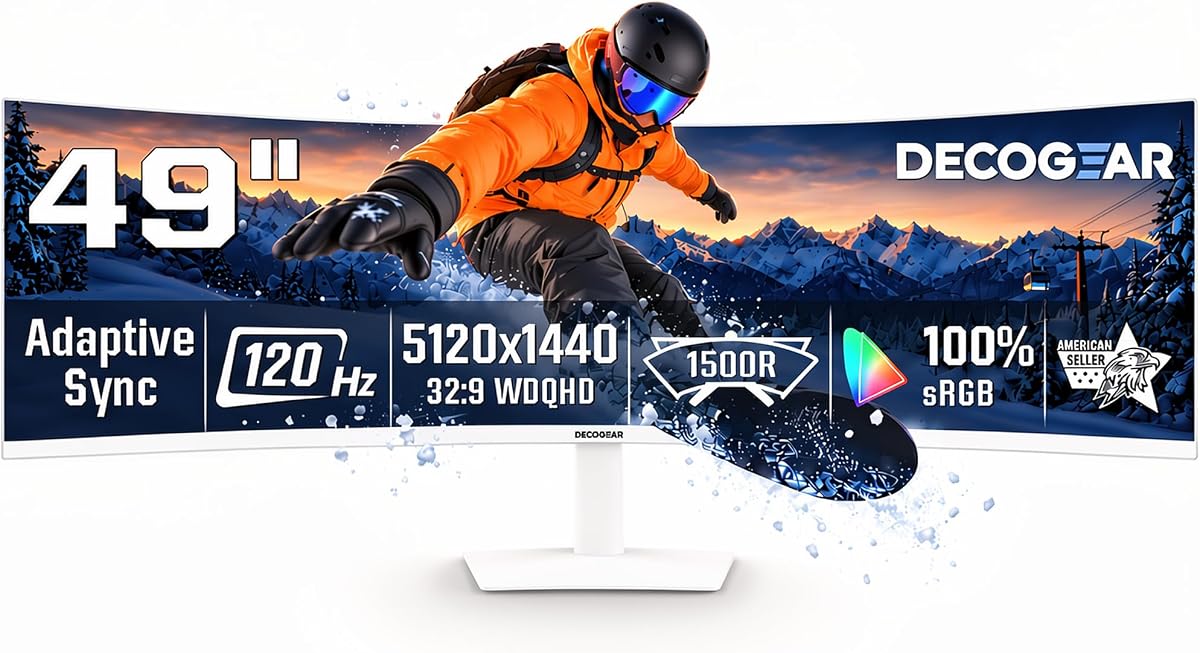
Deco Gear focuses on utility offering features often missing in dedicated gaming monitors. The USB-C port allows power delivery up to 65W which can charge a laptop while driving. This simplifies the desk setup significantly for laptop users.
We may earn a commission when you buy through this link, at no additional cost to you.
Racing performance is adequate with 120Hz refresh rate and FreeSync support. While not the fastest it handles standard racing games well. The PIP/PBP functionality lets you view other apps alongside your game which is great for strategy guides.
The panel quality is functional but lacks the vibrancy of premium options. Response times are acceptable but not competitive. If you need a multitasking tool that can also handle casual racing this fits the bill well.
We suggest this monitor for hybrid users needing connectivity and display features. It bridges the gap between work and play effectively. Prioritize this if you need USB-C power delivery and split screen options over raw speed.
The 65W USB-C port eliminates extra adapters by powering your device directly.
PIP/PBP modes let you view a phone or tablet guide while playing your main racing game.
We may earn a commission when you buy through this link, at no additional cost to you.
This ASUS model brings a trusted brand to the ultrawide market at a competitive level. It features a 144Hz refresh rate and DFHD resolution providing solid performance. The ROG branding assures good build quality and gaming specific features.
We may earn a commission when you buy through this link, at no additional cost to you.
The 1800R curve offers a comfortable viewing experience for long races. Eye care tech reduces strain allowing extended gaming sessions without fatigue. GamePlus overlays help with crosshairs or timers which can be useful in competitive racing.
Resolution is lower than modern DQHD models which might feel less sharp. It is an older design so it lacks newer connectivity like USB-C. This makes it a legacy choice compared to newer high spec monitors.
We recommend this for users prioritizing brand reliability and comfort. If you need a robust monitor that handles games and work well this works. However new buyers should consider higher resolution options for future proofing.
Flicker-free backlighting and blue light filters protect your eyes during marathon racing sessions.
GamePlus features offer overlays that help track timing and position in real time.
We may earn a commission when you buy through this link, at no additional cost to you.
The Z-Edge model stands out with a 240Hz refresh rate at a mid-range price. This high speed ensures fluid visuals during fast turns and collisions. It combines performance specs that are usually reserved for much more expensive units.
We may earn a commission when you buy through this link, at no additional cost to you.
Color accuracy is supported by 99% sRGB coverage and DQHD resolution. This provides clear track details and vibrant visuals. The inclusion of USB-C adds versatility for modern laptops and connectivity options.
Build quality is decent but the brand has less recognition than major players. The stand offers basic adjustments which might require a VESA mount. Still the core display performance competes well with high-end models.
We suggest this monitor for those wanting top tier speed without the premium cost. It is a strong contender for competitive racers. Verify warranty terms before buying to ensure peace of mind with this model.
240Hz refresh rate delivers smooth motion that enhances reaction times during races.
99% sRGB ensures that track and car colors are represented accurately and vividly.
We may earn a commission when you buy through this link, at no additional cost to you.
This G93SC combines OLED benefits with high refresh rate performance for racing. The 240Hz speed ensures smooth motion while OLED provides perfect blacks and colors. It is a powerhouse for those wanting both speed and image quality.
We may earn a commission when you buy through this link, at no additional cost to you.
HDR True Black 400 makes night racing look incredibly realistic and deep. G-Sync compatibility ensures tear free visuals across different systems. The design is thin and modern fitting well into any high-end setup.
Like other OLEDs it carries a higher price and risk of burn-in. Static HUDs in games can affect the panel over time if not managed. This requires careful usage habits to maintain the display long term.
We recommend this for enthusiasts willing to invest in top tier technology. It offers a unique blend of speed and immersion. If you take care of the panel it will deliver stunning visuals for years.
OLED allows for perfect black levels which makes night races look incredibly deep and clear.
The 240Hz rate combined with OLED speed creates an ultra responsive gaming experience.
We may earn a commission when you buy through this link, at no additional cost to you.
Selecting the right monitor involves balancing speed resolution and curve to match your sim rig setup.
For sim racing a high refresh rate like 144Hz or 240Hz is vital for smooth motion tracking. Response times under 1ms ensure that your controls feel immediate without input lag.
Always prioritize high refresh rates to maintain clarity during fast turns and braking.
The 32:9 aspect ratio provides a panoramic view essential for racing immersion. Curvature like 1000R or 1800R wraps the image around you to block out room distractions.
Choose a curve that fits your desk depth to avoid eye strain over long sessions.
DQHD 5120×1440 is the standard sweet spot for 49 inch monitors ensuring sharp track details. Lower resolutions may appear pixelated while higher ones require powerful graphics cards.
Aim for at least DQHD resolution to see road details clearly without scaling issues.
VA panels offer great contrast and deep blacks suitable for dark scenes. OLED panels provide perfect blacks and faster response but cost more and risk burn-in.
Select a panel based on your budget and need for contrast versus brightness.
HDR support enhances dynamic range making sunlit tracks and shadows look more realistic. Color gamut coverage like 120% sRGB ensures vibrant and accurate images.
Look for HDR400 at minimum to get better dynamic range in your racing scenes.
Adaptive sync technologies like FreeSync and G-Sync eliminate screen tearing during frame drops. This is crucial for maintaining a smooth visual experience across varying frame rates.
Verify your GPU supports the sync technology included with the monitor you choose.
Ensure the monitor has enough DisplayPort or HDMI slots for your GPU and console. USB-C ports add convenience for charging and video input from laptops.
Check input options to ensure compatibility with your PC and console devices.
Racing wheels often clash with bulky monitor stands so VESA compatibility is key. A flexible stand allows tilt and height adjustment to fit your specific chair.
Prioritize VESA mounts to clear desk space for wheel pedals and base units.
Position the monitor so the center aligns with your eyes to avoid neck strain. Ensure the curve matches your eye distance for the best viewing angle during races.
Keep the screen clean with a soft microfiber cloth to maintain clarity. Avoid harsh chemicals that might damage the anti-glare coating or panel surface.
Adjust the height and tilt to match your seating position. Use VESA mounts if your wheel base conflicts with the built-in stand.
A 49 inch monitor needs a deep desk of at least 30 inches for the right view. It can dominate a small setup so measure your space before buying.
Most 49 inch monitors support HDMI 2.1 or 2.0 which works with consoles. Check resolution and refresh limits to ensure compatibility.
A powerful GPU like an RTX 3080 or higher is recommended to drive the DQHD resolution at high frame rates.
Yes the 32:9 aspect ratio replaces dual monitors making it ideal for spreadsheets and coding alongside racing.
Curved screens can distort straight lines slightly but they enhance immersion for racing. It is usually not an issue for gaming.
Use a clamp style wheel mount on your desk instead of attaching to the monitor. The monitor needs a VESA mount to clear space.
We have reviewed ten top 49 Inch Ultrawide Monitor for SIM Racing options ranging from budget to premium picks. Each model offers unique strengths to help you find the right fit for your sim rig.
Prioritize refresh rate and response time if you care about competitive racing performance. For immersion look at curvature and panel contrast to get the best visual experience.
Always check current prices before buying as costs fluctuate often. Find the monitor that fits your budget while meeting your key requirements.