
Moread 4K DisplayPort to HDMI Adapter
4.6Editor score
Supports 4K at 30Hz and 1080p at 120Hz
Secure latching DisplayPort connector
Five-year warranty coverage
This guide compares ten top HDMI output to input adapter for laptop solutions to help you find the right converter for your display needs and budget.
Connecting your laptop to external displays is essential for modern work and entertainment. An HDMI output to input adapter for laptop allows you to extend your screen or mirror content seamlessly. Choosing the right adapter ensures stable video quality and reliable performance for your specific setup.
We evaluated ten leading adapters based on resolution support, build quality, and compatibility. Our analysis covers USB-C, DisplayPort, and legacy VGA options to suit diverse hardware configurations. Each product was selected for its ability to deliver clear visuals and smooth audio transmission.
This list highlights the best picks for different needs, including budget-friendly and high-performance models. Each entry details key specifications and real-world performance insights. Remember that product availability and pricing can change, so verify details before purchasing.
4.6Editor score

4.6Editor score

4.4Editor score
The following table provides a side-by-side comparison of all ten adapters evaluated in this guide. It highlights key specifications, resolution support, and unique features to help you make an informed decision based on your laptop and display requirements.




The Anker USB C to HDMI Adapter stands out as a top choice for users seeking reliable video output from modern laptops. With a rating of 4.6 stars, it consistently delivers crisp 4K video at 60Hz for smooth viewing experiences. Its premium aluminum construction ensures efficient heat management during extended use.
We may earn a commission when you buy through this link, at no additional cost to you.
This adapter leverages USB-C DP Alt Mode to convert signals seamlessly without requiring drivers or software installation. The reinforced braided-nylon cable resists daily wear and tear, making it suitable for frequent travel. Users appreciate the lightweight design that fits easily into laptop bags.
While it lacks Power Delivery charging, this trade-off allows for a compact form factor focused purely on video output. The lack of PD means you must use your laptop's original charger simultaneously if charging is needed. This is acceptable for most presentations or home setups where power access is available.
Ideal for professionals and students who need a dependable connection for monitors or projectors. The Anker advantage includes a worry-free 18-month warranty and responsive customer service. This makes it a safe investment for anyone prioritizing stability and quality over additional features.
The lightweight aluminum casing dissipates heat effectively, preventing overheating during long sessions.
Supports USB4 and Thunderbolt connections for broad device compatibility across laptops and tablets.
We may earn a commission when you buy through this link, at no additional cost to you.
The BENFEI DisplayPort to HDMI Adapter offers a practical solution for older laptops equipped with DisplayPort outputs. Its 4.5-star rating reflects consistent performance for presentations and basic entertainment needs. The compact design allows you to tuck it into a pocket for on-the-go use.
We may earn a commission when you buy through this link, at no additional cost to you.
Built-in advanced IC chips ensure stable signal conversion from DisplayPort to HDMI. The gold-plated connectors resist corrosion and abrasion, enhancing longevity. The latching mechanism on the DisplayPort connector provides a secure fit that prevents accidental disconnection during use.
One limitation is the refresh rate cap at 30Hz for 4K resolution, which may affect high-motion content. However, for standard 1080p at 60Hz, it performs excellently. The unidirectional nature means it cannot convert HDMI to DisplayPort, so verify your device ports before buying.
Best suited for office environments where budget and reliability are key. The 18-month warranty adds peace of mind for business users. If you need basic video extension without gaming requirements, this adapter delivers solid value for the price.
Latches on the DisplayPort connector ensure a stable link that won't slip during presentations.
Lightweight and small enough to carry easily in a bag for travel or daily commutes.
We may earn a commission when you buy through this link, at no additional cost to you.
The Moread 4K DisplayPort to HDMI Adapter is a standout budget option with a strong 4.6 rating. It supports impressive refresh rates up to 120Hz at 1080p, making it great for casual gaming or smooth video playback. The reinforced ABS housing protects against physical damage during transit.
We may earn a commission when you buy through this link, at no additional cost to you.
Gold-plated connectors on both ends ensure reliable signal transmission and resist oxidation. The latching DisplayPort connector prevents accidental disconnections, enhancing usability in active environments. Most users find it plug and play without any driver installations needed.
While 4K is capped at 30Hz, this adapter excels at lower resolutions where refresh rates matter more. The five-year warranty is significantly longer than industry standards, offering long-term protection. This makes it a low-risk choice for those watching their spending.
Ideal for students or home users needing a reliable secondary display connection. Configure your monitor to Mirror or Extend mode easily for productivity. The combination of performance, durability, and warranty makes this a top recommendation for budget-conscious buyers.
An unconditional five-year warranty ensures long-term satisfaction and customer support availability.
Strain relief and reinforced housing withstand repeated plugging and bending over time.
We may earn a commission when you buy through this link, at no additional cost to you.
The Highwings USB C to HDMI Adapter is designed for home office setups requiring consistent 4K output. With a 4.5-star rating, it delivers clear video at 60Hz for meetings and media consumption. The SR flexible strain relief protects the cable junction from bending stress during daily use.
We may earn a commission when you buy through this link, at no additional cost to you.
This adapter sends video and audio one-way from your USB-C device to an HDMI display. The 24K gold-plated connectors and braided nylon jacket ensure long-term reliability. Most users report plug-and-play functionality without needing additional drivers or software.
Be sure your device supports DP Alt Mode before purchasing, as not all USB-C ports output video. The chip may become warm during high-resolution transmission, which is normal but worth noting. This is typical for passive adapters handling high bandwidth.
Best for remote workers extending their desktop to a large TV or monitor. The 24-month warranty provides ample coverage for typical usage. If you need a straightforward connection for streaming or presentations, this adapter offers strong value and performance.
Braided nylon and gold-plated connectors resist wear for frequent plug-in scenarios.
A two-year warranty ensures protection against defects for home office reliability.
We may earn a commission when you buy through this link, at no additional cost to you.
The Anker HDMI Switch offers a unique solution for managing multiple video sources on a single display. With a 4.4 rating, it supports 4K at 60Hz for cinematic experiences without needing multiple cables. A single button allows hassle-free transitions between game consoles or laptops.
We may earn a commission when you buy through this link, at no additional cost to you.
This switch connects two HDMI inputs to one output, making it versatile for home theaters or workstations. The compact design fits easily into pockets or bags for mobile presentations. It is compatible with a wide range of devices from TVs to VR headsets.
Limitations include manual switching only without automatic signal detection. Simultaneous dual display output is not supported, so you switch between one source at a time. Also, HDMI CEC support is absent, meaning remote control passthrough won't work.
Ideal for users with multiple consoles or devices sharing one screen. It simplifies cable management and reduces clutter on your desk. The 18-month warranty and Anker support make it a reliable choice for premium functionality in a small package.
Switch between game or movie sources with a single button press without unplugging cables.
Integrates laptops, consoles, and screens seamlessly for diverse media consumption setups.
We may earn a commission when you buy through this link, at no additional cost to you.
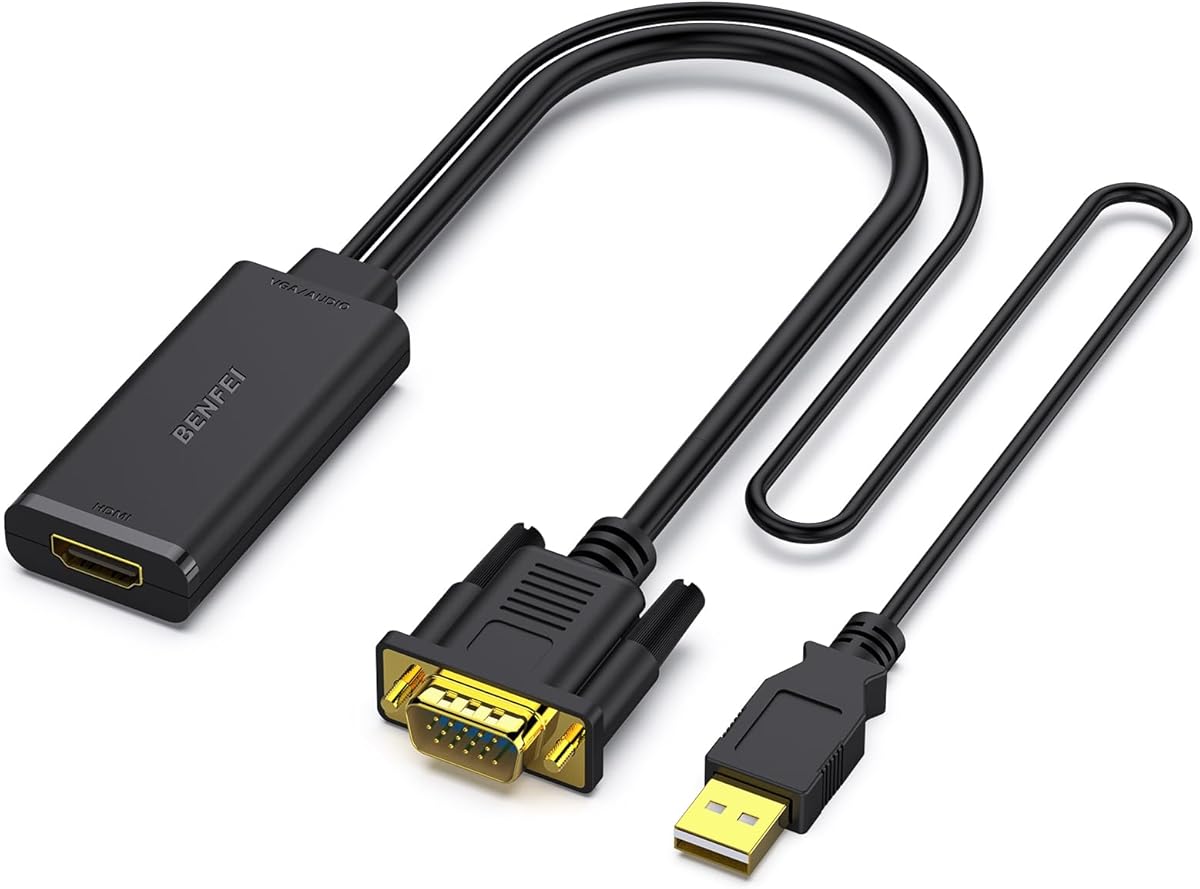
The BENFEI VGA to HDMI Adapter bridges the gap between older computers and modern HDMI displays. It has a 4.5-star rating for reliably converting analog signals to digital video. Built-in IC chips ensure stable conversion for presentations and general home use.
We may earn a commission when you buy through this link, at no additional cost to you.
Since VGA does not carry audio, this adapter includes an integrated USB cable for digital audio output. You can configure this in your system sound settings to route audio to the display. This feature is crucial for multimedia presentations without external speakers.
Performance is limited to 1080p and analog conversion may slightly affect sharpness compared to native HDMI. It is strictly unidirectional, meaning it cannot convert HDMI to VGA. Ensure your device has a VGA port before purchasing to avoid compatibility issues.
Best for offices or schools with legacy hardware needing display updates. It allows older laptops to connect to modern projectors or TVs effortlessly. The compact size fits easily in bags, making it ideal for travel or classroom use.
Integrated USB cable carries audio alongside video to support multimedia presentations.
Connects older computers with VGA ports to new HDMI-enabled monitors and TVs.
We may earn a commission when you buy through this link, at no additional cost to you.
The USB C to HDMI Multiport Adapter expands laptop functionality with three essential ports. It offers a 4.4-star rating for reliable performance across video and data transfer tasks. You can mirror your screen to a TV while charging your device and connecting peripherals simultaneously.
We may earn a commission when you buy through this link, at no additional cost to you.
Supports up to 100W input for efficient power delivery while maintaining video output. The aluminum body aids heat dissipation during intensive use. USB-A 3.0 ports allow fast file transfers up to 5 Gbps for keyboards, mice, or flash drives.
Note that the PD charging port does not support video output. Also, you can only connect one HDD or SSD at a time due to power limits. These constraints are minor compared to the convenience of consolidating ports in one compact hub.
Perfect for travelers needing a single solution for screen, storage, and power. The lightweight design ensures easy portability without sacrificing utility. For those with USB-C laptops lacking multiple ports, this hub is a valuable productivity tool.
Simultaneous HDMI video, USB data transfer, and charging for a clutter-free setup.
Works with most modern laptops and tablets with fully functional USB-C ports.
We may earn a commission when you buy through this link, at no additional cost to you.
The Mini HDMI to HDMI Adapter delivers exceptional high-resolution support for compact devices like DSLRs or Raspberry Pi. With a 4.7 rating, it supports 8K at 60Hz and 4K at 144Hz for ultra-smooth visuals. The aluminum alloy housing enhances heat dissipation during heavy usage.
We may earn a commission when you buy through this link, at no additional cost to you.
Gold-plated connectors resist oxidation and maintain signal integrity over time. Designed for plug-and-play use, it requires no drivers. The value pack includes two adapters for flexible use or backup, making it a great deal for tech enthusiasts.
Ensure your device uses Mini HDMI, not Micro HDMI, as this adapter won't fit. The high refresh rates are ideal for gaming monitors or content creation work. This adapter is specifically tailored for devices with smaller ports needing full HDMI output.
Ideal for photographers and gamers connecting compact devices to large screens. The build quality withstands thousands of plug cycles for long-term reliability. If you need future-proof resolution and durability, this adapter stands out among smaller converters.
Advanced HDMI 2.1 standards deliver ultra-high definition for demanding visual tasks.
Tested to withstand 10,000 cycles ensuring long-term reliability in active use.
We may earn a commission when you buy through this link, at no additional cost to you.
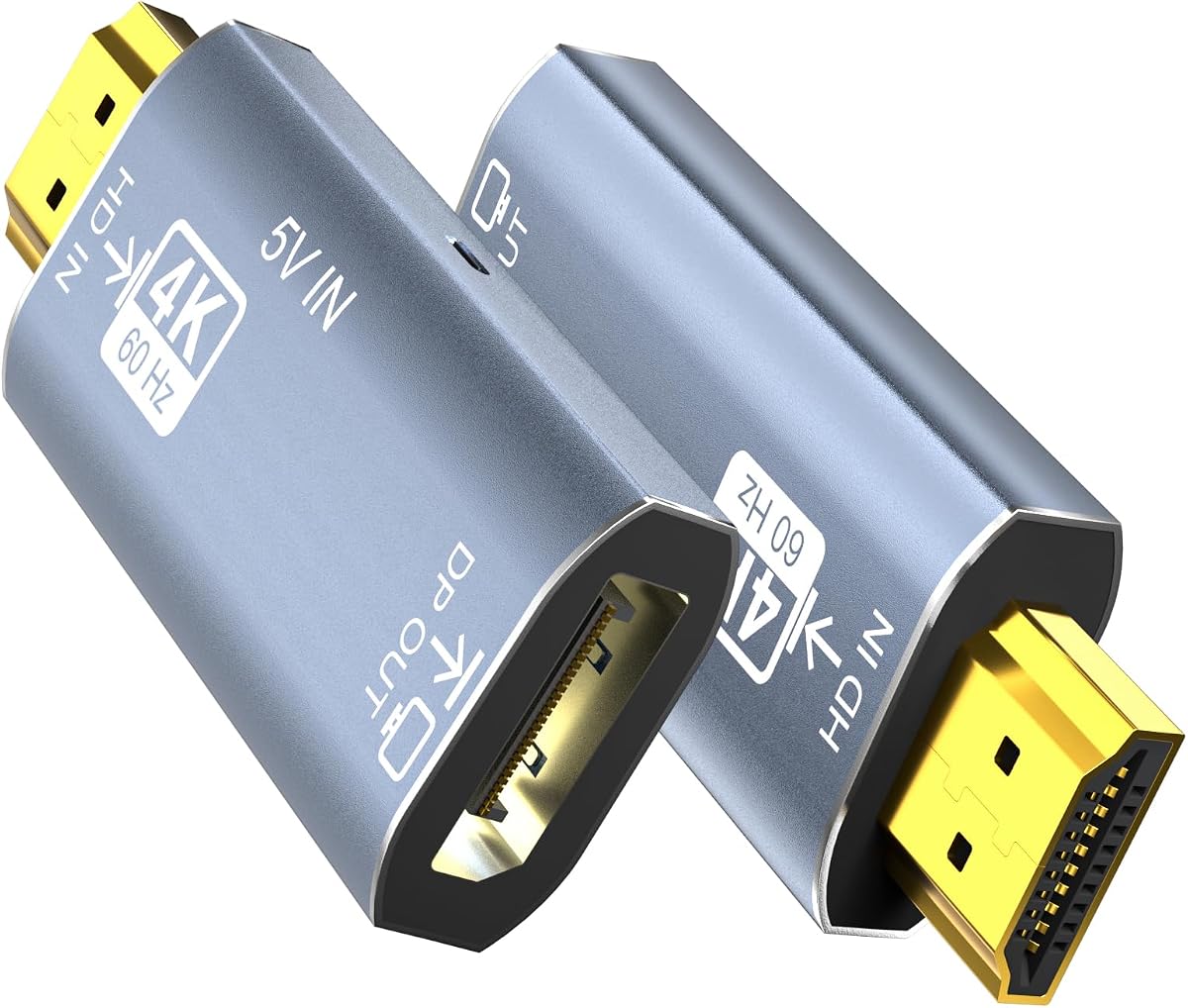
The BENFEI HDMI to DisplayPort Adapter is an innovative solution for connecting HDMI sources to DP monitors. It has a 4.3 rating for enabling high refresh rates up to 165Hz at 1080p. This makes it ideal for gamers using modern consoles with high-end monitors.
We may earn a commission when you buy through this link, at no additional cost to you.
The adapter requires external USB power to convert the signal actively. Premium aluminum alloy casing provides heat insulation during continuous operation. It supports 8-channel digital audio for immersive sound during gaming or media playback.
Be prepared to plug in a USB power cable before use for stable performance. The cable is braided for durability but adds slight bulk to your setup. The higher cost reflects the active chipset needed for high-performance signal translation.
Best for PC builders or console users with DP monitors who need HDMI input. The 18-month warranty ensures reliability for high-demand applications. If you need to utilize high refresh rates without replacing your monitor, this adapter solves the compatibility issue effectively.
Enable smooth gaming up to 165Hz on modern DisplayPort monitors with HDMI sources.
Supports 8-channel digital audio for rich sound experiences during media use.
We may earn a commission when you buy through this link, at no additional cost to you.
The Active HDMI to DisplayPort Adapter is engineered for professional multi-screen setups requiring high reliability. With a 4.0 rating, it provides stable 4K at 60Hz transmission for day traders and remote workers. The aluminum housing ensures excellent heat dissipation during continuous operation.
We may earn a commission when you buy through this link, at no additional cost to you.
It offers zero latency video processing for fast-paced gaming or simulator setups. The hardware-level decoding design ensures driver-free plug and play across Windows and macOS systems. A premium DP 1.2 cable is required for optimal resolution without signal degradation.
Limitations include lack of HDR or VRR G-Sync support which limits use for high-end gaming. External USB power is required to activate the conversion chip. Ensure direct connection to the host without extra extension cables to avoid signal errors.
Best for corporate environments or specialized home office screens needing extended displays. It allows seamless expansion for efficient multi-tasking without software configuration. If you prioritize stable visuals and hardware reliability over gaming features, this adapter serves well.
Instant response times ensure smooth visuals for fast-paced tasks and immersive experiences.
Aluminum alloy housing and industrial chipset satisfy IT professionals and system administrators.
We may earn a commission when you buy through this link, at no additional cost to you.
Selecting the right adapter involves understanding your laptop ports and display requirements. This guide outlines key factors to consider for optimal performance and compatibility.
Verify your laptop has a compatible output port like USB-C with video support, DisplayPort, or VGA. Not all USB-C ports transmit video signals so check device specs carefully.
Matching the input type of your monitor ensures proper connection without needing extra converters.
Check the adapter supports your desired resolution like 4K at 60Hz for smooth video. Lower refresh rates at 4K may affect motion clarity in fast-paced content.
Prioritize adapters matching your screen capabilities for the best visual experience.
Active adapters converting HDMI to DisplayPort often need external USB power for stable operation. Passive adapters typically draw power from the source port without extra cables.
Ensure you have available power sources if your adapter requires external electricity.
Look for durable materials like aluminum housings and braided nylon cables for longevity. Gold-plated connectors resist corrosion and improve signal transmission over time.
Strong build quality reduces the risk of damage during frequent travel or use.
Some adapters carry audio seamlessly over HDMI while others require separate USB cables. Confirm audio passes through to your display for uninterrupted multimedia experiences.
Integrated audio support simplifies setup for presentations and entertainment.
A longer warranty like one year or more indicates manufacturer confidence in durability. It provides protection against defects and ensures customer support availability.
Check warranty terms to protect your investment against premature failures.
Trusted brands often offer better quality control and reliable customer service. Reading reviews helps gauge real-world performance beyond marketing claims.
Choose established companies with a track record of producing durable adapters.
Connect the adapter securely to your laptop port and plug the HDMI cable into the adapter and monitor. Ensure all connections are firmly seated to prevent loose signals.
For active adapters, connect the USB power cable to a power source before turning on the display. Wait a moment for the signal to establish on your screen.
Store adapters in protective cases to avoid bends or damage to the cable. Keep connectors clean from dust and avoid wrapping tightly around the adapter.
Not every USB-C port supports video. Look for USB-C ports with DP Alt Mode, Thunderbolt, or explicit video output icons to ensure compatibility with HDMI adapters.
DisplayPort to HDMI adapters are typically passive and cheaper. HDMI to DisplayPort often require active chips and external power because the signals differ fundamentally in structure.
Check cable connections firmly, verify your laptop port supports video, and restart your devices. Ensure the adapter has power if required and your display is set to the correct input.
Most laptops support multiple displays via docking stations or hubs. However, direct chaining adapters rarely works unless your device explicitly supports multiple video outputs.
HDMI adapters generally only transmit video and audio signals. Touch functionality requires a separate USB data connection for touch controllers to communicate with your laptop.
Yes, if the adapter supports 4K at 60Hz and your HDMI cables are high speed. Lower quality cables may cause signal drops or limit resolution to 30Hz.
Most modern adapters are plug and play without drivers. Windows and macOS usually detect them automatically though updating graphics drivers may improve performance.
Choosing the right adapter enhances your laptop's versatility for work and entertainment. Our top picks cover budget and performance needs ensuring you find a match.
Prioritize port compatibility and resolution support to avoid purchase issues. Durability and warranty length should also factor into your final decision.
Remember to verify current prices and availability before buying. These factors ensure you get the best value and performance for your specific setup.