
Yealink SP92 Conference Speaker
4.1Editor score
AI noise cancellation technology
Compact and portable design
Up to 20 hours call time
This comprehensive guide compares the top ten Bluetooth speakerphones for home offices, evaluating audio quality, microphone performance, and connectivity to
Finding the right Bluetooth speakerphone for the home office is essential for maintaining professional communication standards. A good device ensures clear audio capture and playback, reducing fatigue during long conference calls and enhancing overall productivity in remote work environments.
We have analyzed ten leading models based on microphone arrays, noise cancellation capabilities, battery life, and platform compatibility. This list covers portable and desktop options, ensuring you find a solution that fits your specific workspace setup and conferencing needs effectively.
Each pick highlights key strengths, real-world performance details, and ideal use cases for different team sizes. Please note that specific pricing and availability may change over time, so verify current details before making your final purchasing decision for your office.
4.1Editor score
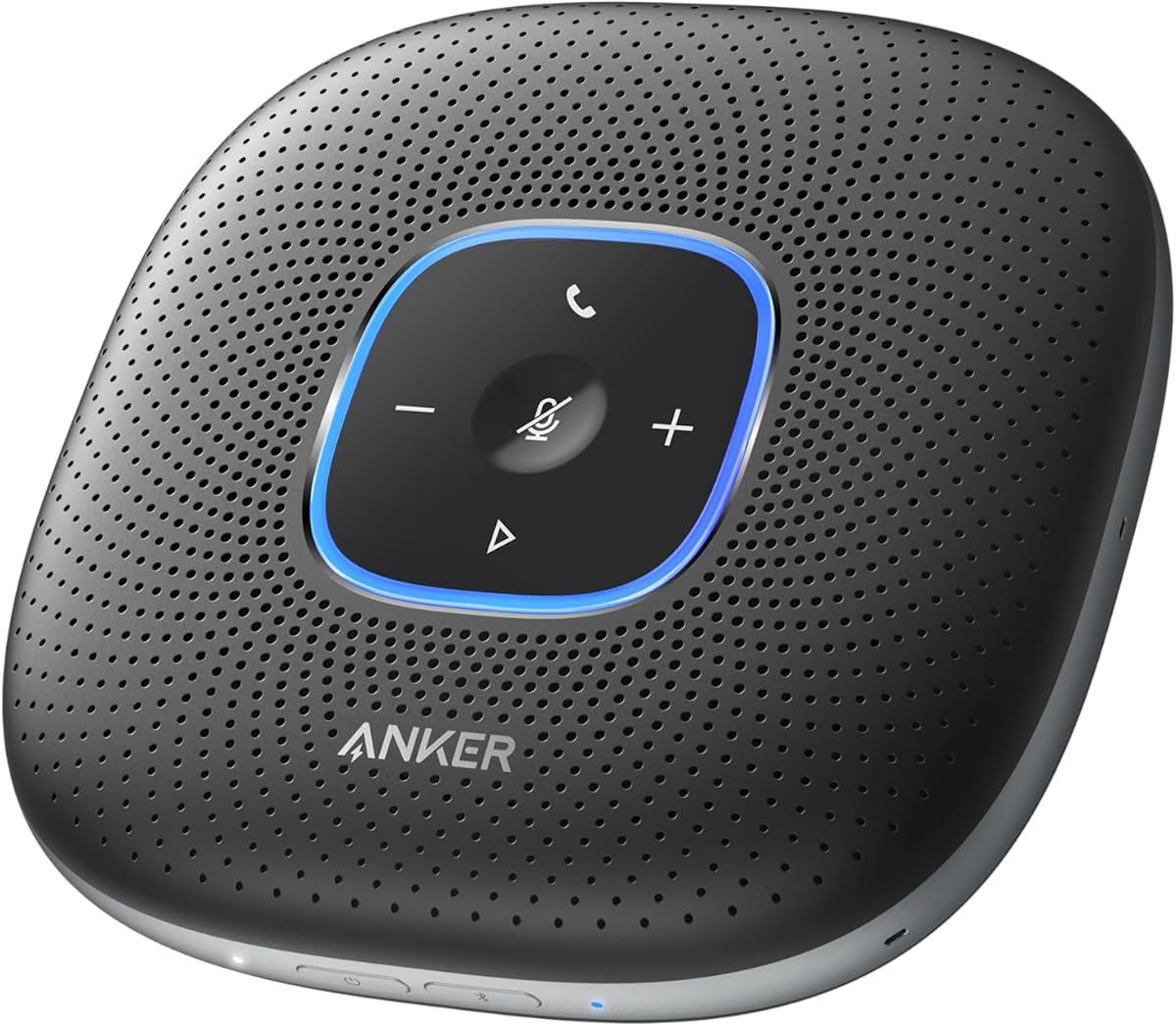
4.4Editor score

4.6Editor score
The following table provides a side-by-side comparison of all ten reviewed speakerphones, highlighting their key specifications and core features to help you quickly identify the model that best matches your home office requirements and budget constraints.

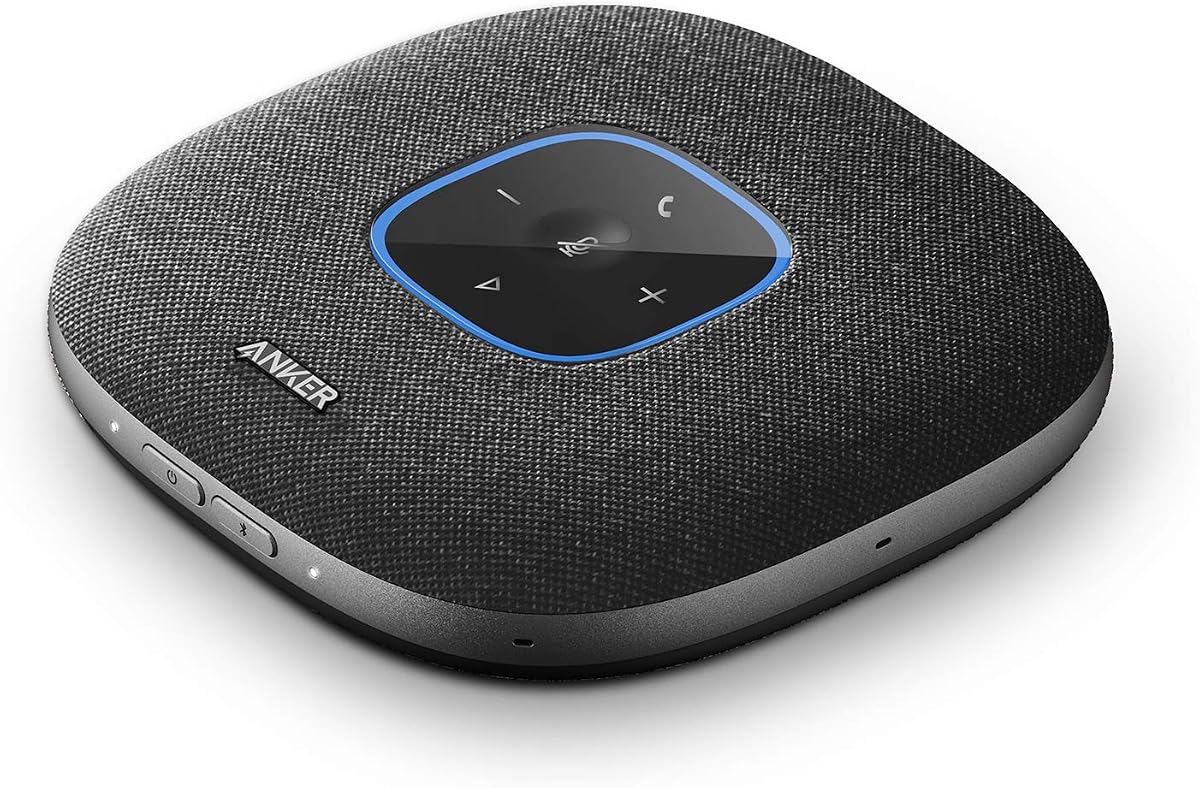


The Anker PowerConf Speakerphone stands out as the Editor's Choice due to its exceptional combination of sound quality and intelligent noise management. With a rating of 4.4 stars, it delivers consistent performance that users appreciate during daily conference calls.
We may earn a commission when you buy through this link, at no additional cost to you.
Its six-microphone array ensures that voices are captured clearly from any direction within the room, while Voice Radar 3.0 technology actively filters out background disturbances like typing or ambient chatter to maintain audio clarity for everyone on the line.
The only trade-offs involve its physical size and cost, but these are acceptable given the professional-grade features. The integrated battery allows for all-day use without tethering to a power outlet, which is vital for flexible home office setups.
This speakerphone is highly recommended for professionals who need reliable, clear audio for virtual meetings without compromising on portability or ease of use across multiple platforms.
The six microphones work together to ensure no voice goes unheard, making it ideal for small team meetings or solo work sessions where clarity is paramount.
Voice Radar 3.0 uses AI to distinguish between speech and background noise, ensuring that your voice remains the primary focus during every call.
We may earn a commission when you buy through this link, at no additional cost to you.
The Anker PowerConf S330 is designed for users who prioritize simplicity and stability in their connection. It achieves a solid 4.4 rating by focusing on delivering high-quality audio without the complexity of extensive setup procedures.
We may earn a commission when you buy through this link, at no additional cost to you.
Its four microphones provide excellent voice coverage within a three-meter range, ensuring clear communication for small meetings. The smart voice enhancement feature optimizes your voice in real-time to ensure you sound professional regardless of your environment.
While it lacks the extensive wireless capabilities of other models, the wired USB-C connection ensures a stable link free from interference. This makes it a dependable choice for desktop-focused workstations where portability is less critical.
Choose this model if you need a straightforward, reliable solution that integrates seamlessly with your computer for daily video conferencing needs without requiring constant battery management.
The plug-and-play design means you can connect via USB-C and start meeting immediately without installing additional drivers or software tools.
Built-in enhancement technology ensures your voice cuts through background noise, maintaining a professional tone throughout your conversations.
We may earn a commission when you buy through this link, at no additional cost to you.
The Anker PowerConf S3 offers a robust balance of features with its six microphones and long battery life, earning a consistent 4.4 rating from users. It is designed to provide crystal-clear audio across all major conferencing platforms.
We may earn a commission when you buy through this link, at no additional cost to you.
Real-time voice optimization ensures that even if participants are at different distances, their voices are balanced effectively. The app control adds a layer of customization that allows you to fine-tune settings to suit your specific office acoustics.
While the app might require a brief learning period, the ability to adjust settings remotely is a significant advantage for tech-savvy users. The 24-hour battery life ensures you can work through multiple meetings without worrying about recharging.
This speakerphone is ideal for professionals who need versatile connectivity and customization options to maintain high-quality communication throughout the workday.
Use the dedicated app to adjust microphone sensitivity and volume levels to match your room's unique acoustic properties.
The built-in battery supports up to 24 hours of talk time, ensuring uninterrupted service during long conference days.
We may earn a commission when you buy through this link, at no additional cost to you.
The Jabra Speak 510 is a well-regarded classic that maintains a high 4.7 rating due to its simplicity and reliability. It is perfect for users who prioritize portability and quick setup over advanced noise cancellation features.
We may earn a commission when you buy through this link, at no additional cost to you.
Its portable design allows you to easily carry it between home offices and travel destinations without hassle. The audio quality remains sharp and professional, ensuring that your voice is heard clearly even in moderately noisy environments.
While it may lack some of the advanced AI features found in newer models, its straightforward functionality is often preferred for basic meeting needs. It supports both Bluetooth and USB connections for flexible pairing options.
Select this speakerphone if you need a trusted, portable device that gets you connected quickly for meetings on the go without complicated settings.
Its compact size makes it easy to pack in a laptop bag for business trips or hot-desking scenarios.
Connect via Bluetooth or USB in seconds, allowing you to start your meeting immediately without technical delays.
We may earn a commission when you buy through this link, at no additional cost to you.
The Yealink Sp92 offers impressive value for those seeking essential features without a high cost, earning a 4.1 rating. It is certified for Microsoft Teams and includes AI noise cancellation to handle common office background disturbances.
We may earn a commission when you buy through this link, at no additional cost to you.
Its omnidirectional microphone provides clear audio for small groups within a four-meter radius, which is sufficient for most solo or duo home offices. The 20-hour battery life ensures you can work through the day without interruption.
While the range is smaller than premium models, the cost efficiency makes it an attractive option for budget-conscious users. It balances practical features with an affordable price point to deliver good performance for everyday calls.
This device is perfect for freelancers or small teams who need a reliable speakerphone that integrates well with popular platforms like Teams or Zoom.
Despite its affordable price, it delivers solid audio quality and essential noise cancellation features that enhance call clarity.
Being certified for Microsoft Teams ensures seamless integration and optimized performance with that specific ecosystem.
We may earn a commission when you buy through this link, at no additional cost to you.
The Lenovo Speakerphone is built for enterprise environments with eight beamforming microphones that prioritize voice clarity over ambient noise. It holds a 4.5 rating for its robust performance and professional build quality.
We may earn a commission when you buy through this link, at no additional cost to you.
Full duplex audio allows multiple people to speak simultaneously without cutting off, which is vital for collaborative discussions. The dedicated Teams button provides quick access to call controls, streamlining workflows for Microsoft users.
Its durability is enhanced by an IP54 dust and splash rating, making it resilient against daily wear and tear. While it may be larger and pricier, the reliability makes it worthwhile for busy office settings.
Choose this model if you need a rugged, high-performance device that supports complex meeting scenarios and integrates tightly with enterprise software.
Full duplex audio ensures that everyone in the room can talk at once without interruptions or dropped words during discussions.
The dedicated Teams button allows instant access to key call functions, saving time during busy meeting schedules.
We may earn a commission when you buy through this link, at no additional cost to you.
The Jabra Speak2 55 represents a modern approach to conference audio with its four beamforming microphones and voice level normalization. It earns a 4.4 rating for delivering consistent sound quality across various meeting environments.
We may earn a commission when you buy through this link, at no additional cost to you.
Its loudspeakers and mics ensure that voices from all directions are captured evenly, so remote participants hear everyone clearly. It is fully compatible with Microsoft Teams and complements video solutions for a complete setup.
The 12-hour battery life covers standard work hours, though it may fall short of all-day users. Including a dedicated charging adapter in the box adds to its convenience for long-term reliability.
This speakerphone is best suited for modern teams who value sleek design and reliable audio for regular video conferencing sessions.
Voice level normalization equalizes voices from all directions, ensuring that participants at the far end of the table are heard.
The inclusion of a USB-C charging adapter ensures you can keep the device powered up easily with standard modern cables.
We may earn a commission when you buy through this link, at no additional cost to you.
The Jabra Speak 510 MS is a legacy model that continues to perform well with a 4.6 rating due to its robust HD voice capabilities. It offers 15 hours of talk time which is excellent for extended workdays.
We may earn a commission when you buy through this link, at no additional cost to you.
Its compatibility with older Microsoft platforms makes it a stable choice for organizations that rely on specific software versions. The dual connectivity options allow you to switch between devices easily during meetings.
While it may not have the latest AI noise cancellation features, its consistent performance ensures clear audio transmission. It remains a trusted option for users needing reliable voice quality without unnecessary complexity.
This device is suitable for businesses that value stability and legacy software compatibility over cutting-edge audio processing technology.
HD voice support ensures that conversations are rich and clear, reducing the strain of listening during long calls.
With up to 15 hours of talk time, you can attend multiple meetings without needing to recharge the device.
We may earn a commission when you buy through this link, at no additional cost to you.
The Jabra Speak 710 delivers an immersive audio experience with an omnidirectional microphone that captures voices effectively. With a 4.6 rating, it is highly regarded for its sound quality and platform compatibility with Zoom and Google Meet.
We may earn a commission when you buy through this link, at no additional cost to you.
The Link 370 USB adapter ensures a reliable connection to your laptop without requiring additional drivers. Its portable design means you can use it comfortably in different rooms or while traveling for work.
While it is priced higher than basic models, the audio performance justifies the cost for professional use. The intuitive setup makes it accessible even for non-technical users who need immediate functionality.
This speakerphone is ideal for teams who prioritize high-fidelity audio and seamless integration with major conferencing tools.
The speaker produces rich sound that makes meetings feel more natural and engaging for all participants on the call.
The included Link 370 adapter provides a hassle-free plug-and-play connection to your PC for reliable calling.
We may earn a commission when you buy through this link, at no additional cost to you.
The YAMAHA YVC-330 is a premium choice designed for professional environments where audio fidelity is paramount. It features SoundCap technology and a 4.6 rating, ensuring exceptional clarity even in large spaces.
We may earn a commission when you buy through this link, at no additional cost to you.
Three unidirectional microphones focus on human voices to eliminate background noise effectively. The self-silence feature automatically mutes the mic when no one is speaking to prevent unnecessary transmission noise.
NFC connectivity allows for quick pairing with compatible devices, streamlining the setup process. While it is one of the more expensive options, the performance and build quality justify the investment for serious users.
Choose this model if you require the highest standard of audio technology and professional features for your critical business meetings.
The self-silence feature ensures that background noise is not transmitted when participants are silent, keeping the call clean.
SoundCap technology actively removes noise beyond a short range, ensuring that only voices near the device are picked up clearly.
We may earn a commission when you buy through this link, at no additional cost to you.
Selecting the right speakerphone involves evaluating several key factors to ensure you get a device that fits your specific workspace and meeting habits effectively.
The number and arrangement of microphones determine how well the device captures voices across a room. Look for models with at least four microphones to ensure reliable pickup for multiple speakers or larger office spaces.
A 360-degree microphone array is ideal for home offices where participants might sit at different angles or distances during virtual meetings.
Background noise such as typing, pets, or street sounds can disrupt meetings. Advanced AI-powered noise cancellation filters out these distractions to keep your voice clear and professional throughout the call.
Prioritize devices that explicitly mention AI or deep learning algorithms for noise reduction to ensure high-quality audio transmission.
Different speakers offer various ways to connect, including Bluetooth, USB-C, or USB-A. Ensure the device supports the connection type your computer or phone uses to avoid needing extra adapters.
Models with dual connectivity allow you to switch between your laptop and mobile phone easily, adding flexibility to your setup.
A long-lasting battery ensures you can attend multiple meetings without worrying about running out of power. Look for units that offer at least 15 to 24 hours of talk time for all-day reliability.
Fast charging capabilities are also beneficial if you need to recharge quickly between long back-to-back conference sessions.
Certification by platforms like Microsoft Teams or Zoom guarantees optimized performance and seamless integration. Certified devices often have dedicated buttons for call controls specific to those apps.
Checking certification ensures that the speakerphone works flawlessly with the software you use daily for your business communication.
If you move between home offices or travel frequently, a lightweight and compact design is essential. A portable speakerphone with a carrying case makes it easy to transport without damage.
Also consider the physical footprint on your desk to ensure it fits comfortably within your workspace without cluttering the area.
Full duplex audio allows multiple people to speak at the same time without cutting off the audio stream. This feature is critical for natural, uninterrupted conversations during group calls.
Without full duplex, the device might mute one person when another speaks, leading to fragmented and frustrating meeting experiences.
A durable build ensures the speakerphone withstands daily handling and occasional bumps. Look for models with splash or dust resistance ratings for extra protection in varied environments.
Higher quality materials also often correlate with better sound engineering and a longer lifespan for your investment.
To begin, place the speakerphone on a flat, central surface to ensure it picks up all voices equally. Avoid placing it behind heavy objects or in corners where sound reflection might distort audio quality.
Connect the device using either Bluetooth for wireless freedom or a USB cable for a stable, direct link. Follow the manufacturer's instructions to pair it with your computer or phone before starting your first call.
Regularly clean the microphone ports and speaker grills with a soft cloth to prevent dust buildup that could affect sound. Keep the battery charged and store it in a cool, dry place when not in use to extend its lifespan.
Yes, most modern speakerphones are compatible with Zoom and other major platforms. Ensure your device is certified or supports standard audio inputs to guarantee seamless integration with the application settings.
Many models support plug-and-play functionality via USB so no drivers are needed. However, checking the product specifications is wise to confirm if any software installation is required for specific features.
Most standard models have a pickup range of three to five meters. For larger rooms, consider devices with advanced beamforming microphones to capture voices clearly from a greater distance.
Yes, most models allow you to play music for breaks or casual listening. However, their primary design is optimized for speech clarity, so music quality may vary compared to dedicated music speakers.
You can usually mute the mic using a physical button on the device or through your conferencing software interface. Some models also offer voice-activated mute features for added convenience.
Absolutely, they are designed to work with laptops using either Bluetooth or USB connections. Ensure your laptop has the necessary ports or wireless capabilities to pair the speakerphone effectively.
If the battery runs out, many speakerphones can continue functioning when plugged directly into a power source via USB. Always keep a charging cable handy to ensure uninterrupted communication.
Expensive models often offer superior audio quality and better noise cancellation which is crucial for professional settings. Investing in a high-end unit can significantly improve your meeting experience and productivity.
This guide highlights ten top-rated speakerphones ranging from budget-friendly options to premium professional tools. Each model offers unique strengths that cater to different needs like portability, audio quality, or battery life.
When making your decision, prioritize factors such as microphone count and platform compatibility to ensure the device fits your specific workflow. The best choice depends on your budget and the complexity of your daily meeting requirements.
Remember that prices and availability are subject to change so always verify the latest details before purchasing. With the right speakerphone, you can ensure clear communication and a professional presence in every virtual interaction.