
NetumScan USB 1D Barcode Scanner
4.4Editor score
Wired USB connection
Durable anti-shock design
Supports ISBN codes
This guide compares the top barcode scanners for library use, focusing on connectivity, durability, battery life, and compatibility with common library
Libraries require reliable tools to manage their vast collections efficiently. A good barcode scanner ensures quick checkouts and accurate inventory tracking without frustrating delays for patrons.
We evaluated ten top-rated models based on connectivity options, scanning speed, durability, and battery life. Each product was assessed for its suitability in quiet library environments.
Every pick highlights key strengths and potential limitations to help you choose wisely. Please note that product prices and availability can change frequently on retail platforms.
4.4Editor score

4.4Editor score

4.3Editor score
This table provides a side-by-side comparison of the top ten barcode scanners evaluated for library environments, highlighting key specifications and connectivity options.




This Bluetooth barcode scanner offers a powerful combination of versatility and performance tailored for library environments. With a high rating, it stands out for its ability to handle diverse scanning tasks efficiently.
We may earn a commission when you buy through this link, at no additional cost to you.
Its 2500 pixel CCD sensor rapidly decodes various 1D codes including ISBNs even when they are worn or damaged. The 2600mAh battery ensures continuous operation for weeks making it ideal for busy checkout counters.
While it supports multiple connection modes the setup requires scanning specific barcodes which might be slightly inconvenient initially. Additionally it is not compatible with some modern POS systems like Square limiting broader retail use.
Libraries seeking a reliable wireless scanner will appreciate its programmable features and quiet operation capabilities. It is a top choice for managing book inventories and patron checkouts effectively.
The high-resolution CCD sensor ensures accurate reads even with damaged or tightly spaced barcodes commonly found on library materials.
With a 2600mAh battery it can last up to a month on a single charge reducing downtime for frequent scanning tasks.
We may earn a commission when you buy through this link, at no additional cost to you.
For libraries needing a cost-effective solution this USB barcode scanner delivers reliable performance without breaking the budget. Its sturdy construction and plug-and-play setup make it an accessible choice for smaller institutions.
We may earn a commission when you buy through this link, at no additional cost to you.
The advanced CCD sensor captures 1D codes from paper and screens quickly ensuring efficient processing. Its ergonomic design withstands repeated drops which is useful in busy or high-traffic areas.
The main limitation is the wired connection which restricts mobility compared to wireless models. However for fixed workstations this ensures a stable and uninterrupted connection without battery concerns.
Libraries prioritizing value and durability will find this model a practical choice for daily inventory and checkout tasks.
Designed to withstand drops from 2 meters this scanner guarantees a long service life even in active environments.
The USB wired connection ensures reliable connectivity without the need for additional software installation or configuration.
We may earn a commission when you buy through this link, at no additional cost to you.
This premium scanner stands out with its unique on-device screen allowing users to customize settings directly on the scanner. It supports both 1D and 2D codes adding flexibility for diverse library needs.
We may earn a commission when you buy through this link, at no additional cost to you.
The included charging cradle and large 2500mAh battery ensure seamless all-day operation. Its advanced imaging technology handles challenging barcodes with high accuracy and speed.
The interface might be complex for simple use cases and the price is higher than basic models. However the convenience of on-device configuration justifies the investment for advanced users.
Libraries needing a versatile and feature-rich scanner will appreciate the premium capabilities and reliable performance it offers.
The unique screen design allows users to adjust language volume and connection options without external tools.
Superior global CMOS imaging handles difficult barcodes including those on reflective materials or driver licenses.
We may earn a commission when you buy through this link, at no additional cost to you.
Designed for portability this mini scanner weighs only 35 grams making it easy to carry around the library. It supports Bluetooth 2.4G wireless and USB connections ensuring flexibility in use.
We may earn a commission when you buy through this link, at no additional cost to you.
Its vibration mode is particularly useful for quiet library environments where audible beeps might disturb patrons. The advanced scanning technology captures most common 1D codes including damaged or distorted ones.
The battery life is shorter compared to bulkier models but adequate for daily portable tasks. Users should note it does not support 2D QR codes or screen scanning.
For librarians needing a lightweight and unobtrusive scanner this model offers excellent convenience and reliable performance.
Weighing only 35 grams this scanner fits easily in a pocket making it ideal for mobile inventory checks.
The adjustable volume and vibration mode allow for silent scanning to maintain a quiet library atmosphere.
We may earn a commission when you buy through this link, at no additional cost to you.
This wireless scanner offers an impressive transmission range of up to 328 feet allowing staff to scan items across large library sections. The battery indicator light eliminates anxiety about unexpected power loss.
We may earn a commission when you buy through this link, at no additional cost to you.
Its IP54 technology protects against dust which is beneficial in environments with frequent movement of materials. The extended curved handle and flat trigger provide a comfortable grip during prolonged use.
The scanner is designed for 1D barcodes only and may lack some advanced features found in higher-end models. However its robustness and range make it suitable for extensive inventory tasks.
Libraries requiring a dependable wireless scanner with clear battery status will find this model highly functional for large spaces.
With a transmission distance up to 328 feet in barrier-free environments staff can scan items from a distance.
The unique battery indicator light shows remaining power levels to prevent interruptions during critical scanning tasks.
We may earn a commission when you buy through this link, at no additional cost to you.
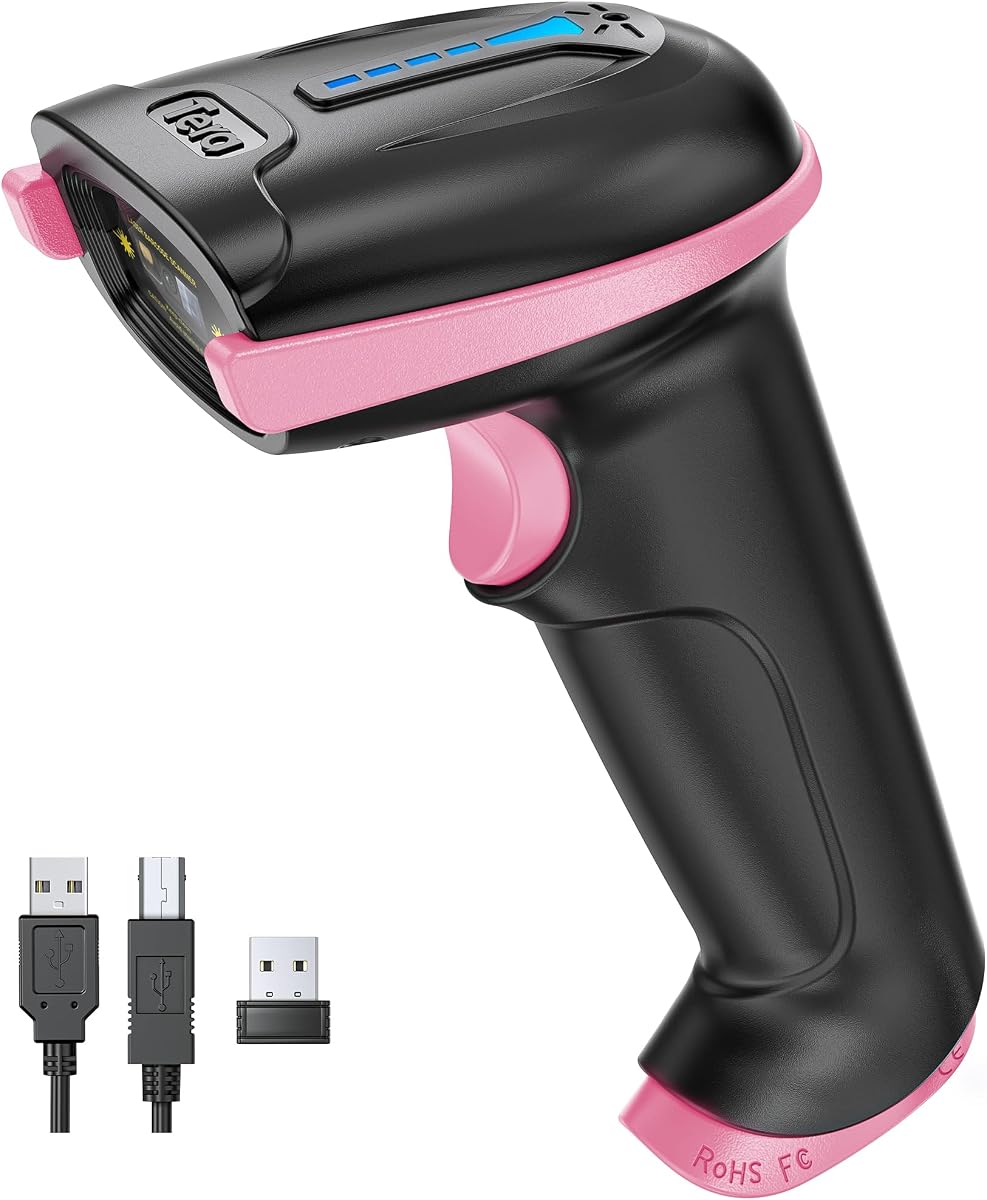
This version of the Tera scanner features a distinctive pink design appealing to users who prefer a more colorful tool. It retains the same robust functionality and range as its purple counterpart.
We may earn a commission when you buy through this link, at no additional cost to you.
The wireless range and battery indicator provide reliable performance ensuring staff can work efficiently across the library. Its IP54 protection adds durability against environmental factors like dust.
While it lacks 2D scanning capabilities the 1D performance is strong and suitable for standard library barcodes. The stylish design adds a touch of personality to professional equipment.
Libraries wanting a blend of functionality and style will appreciate this model's reliable features and unique appearance.
The unique pink design offers a fresh look while maintaining all the essential performance features of the standard model.
Enjoy seamless scanning across the library with a wireless range that extends up to 328 feet without obstacles.
We may earn a commission when you buy through this link, at no additional cost to you.
This laser scanner delivers an impressive scanning speed of 200 scans per second enabling rapid processing of book checkouts. It supports a wide range of barcode types including ISBN and ISSN codes.
We may earn a commission when you buy through this link, at no additional cost to you.
The wired USB connection ensures a stable link to the computer which is ideal for fixed checkout stations. Its compact design and simple setup make it easy to integrate into existing library systems.
While it lacks wireless mobility the speed and reliability compensate for this limitation in stationary workflows. The configurable settings allow customization to fit specific library needs.
Libraries focused on high-speed checkout operations will value this scanner's efficiency and robust performance.
With a scanning speed of 200 scans per second this model significantly reduces wait times for patrons.
The plug-and-play USB connection allows immediate use without the need for complex software installation or drivers.
We may earn a commission when you buy through this link, at no additional cost to you.
This wireless scanner offers a versatile 2-in-1 connection option combining 2.4GHz wireless and USB wired modes for flexible use. It supports a range of up to 328 feet facilitating scanning across large areas.
We may earn a commission when you buy through this link, at no additional cost to you.
The 2000mAh battery provides substantial standby time ensuring the device remains ready for use over several days. Its offline storage mode allows scanning without connectivity syncing data later.
Compatibility with some POS systems is limited which may restrict certain retail applications but works well for libraries. The setup is straightforward with automatic pairing for the wireless receiver.
Libraries seeking an affordable wireless solution with reliable performance will find this scanner a practical and efficient choice.
With a transmission distance of up to 328 feet staff can scan items without returning to a central hub.
The ability to store up to 100,000 barcodes offline ensures data is captured even without immediate connectivity.
We may earn a commission when you buy through this link, at no additional cost to you.
Designed with a vibrant pink color this portable scanner adds a cheerful touch to daily library tasks. It connects via Bluetooth 2.4G wireless or USB offering flexible usage scenarios.
We may earn a commission when you buy through this link, at no additional cost to you.
The lightweight design makes it comfortable to carry during mobile inventory checks across the library. It supports various 1D barcode types including damaged or distorted ones with high decoding capability.
While the battery life is moderate it is sufficient for typical daily use and can be easily recharged. The compact size ensures it fits easily in pockets or bags for on-the-go use.
Libraries looking for a stylish yet functional portable scanner will find this model an attractive and practical solution.
The unique pink color makes this scanner a pleasant tool for users who value aesthetics alongside functionality.
With three connection modes this scanner adapts easily to different devices and work environments within the library.
We may earn a commission when you buy through this link, at no additional cost to you.
This scanner includes an adjustable stand enabling hands-free operation which is ideal for fixed checkout desks. It supports both 1D and 2D barcodes adding flexibility for diverse inventory needs.
We may earn a commission when you buy through this link, at no additional cost to you.
The CMOS sensor decodes most barcode types accurately from paper screens or labels. Its plug-and-play setup ensures quick integration into existing library management systems without extra configuration.
While the wired connection limits mobility the stand design provides convenience for staff focused on desk-based tasks. The ability to enable or disable specific barcode types offers customization for specific needs.
Libraries needing a reliable hands-free scanner for main checkout stations will find this model a practical and efficient choice.
The included adjustable stand allows for hands-free scanning improving efficiency at fixed checkout points.
Beyond standard 1D barcodes this scanner can also read 2D QR codes providing more versatility for modern needs.
We may earn a commission when you buy through this link, at no additional cost to you.
Selecting the right barcode scanner involves evaluating various factors to ensure it meets your library's specific needs effectively.
Libraries benefit from scanners offering flexible connectivity such as Bluetooth 2.4G wireless or wired USB. Wireless models provide mobility for shelf scanning while wired options ensure stability at fixed checkouts.
Choose a scanner with multiple connectivity modes to adapt to different tasks and environments efficiently.
CCD sensors are ideal for reading codes from paper and screens making them versatile for library use. Laser scanners offer speed but are generally limited to paper-based codes and specific angles.
Prioritize scanners with high-resolution CCD sensors to handle damaged or worn barcodes commonly found on library materials.
For wireless models battery capacity directly impacts operational time. Look for scanners with at least 2000mAh batteries to ensure continuous use throughout the workday without frequent recharging.
Models with battery indicators help prevent interruptions by alerting staff before the power runs low.
Library scanners often face regular handling and occasional drops. Scanners with anti-shock designs and protective covers withstand physical stress better ensuring longevity and reduced maintenance costs.
Opt for models with IP ratings for dust and water resistance to protect against environmental hazards.
Advanced scanners allow customization such as adding prefixes or suffixes to scanned data or disabling audible beeps. These features enhance integration with library software and reduce disturbances to patrons.
Check if the scanner supports custom configurations that match your library's workflow requirements.
Ensure the scanner supports all necessary barcode types including ISBN ISSN and UPC codes. Some models also support 2D QR codes which may be increasingly relevant for digital inventory systems.
Select a scanner with broad barcode decoding capabilities to avoid compatibility issues with various library materials.
Comfortable ergonomic handles reduce strain during prolonged scanning sessions. Lightweight models are preferable for staff who frequently move around the library with the scanner.
Consider the size and weight of the scanner to ensure it is comfortable for extended daily use.
Balance the cost with the features offered to find the best value for your budget. Higher-end models may offer premium features like screens or 2D support but may not be necessary for all libraries.
Invest in a model that meets your primary needs without unnecessary extra costs.
To set up your scanner connect it via USB or pair it via Bluetooth following the manufacturer's instructions. For wireless models ensure the receiver is properly installed and the scanner is charged before use.
When scanning hold the device steadily at a comfortable distance from the barcode. Aim the scanner beam directly at the code and press the trigger or allow auto-sensing mode to activate the read.
Maintain your scanner by keeping the lens clean and free of dust. Store it in a dry place when not in use and regularly check the battery level to ensure readiness for future tasks.
For libraries a CCD scanner with Bluetooth connectivity is ideal as it reads codes from paper and screens. It supports ISBN codes and offers mobility for inventory management and checkout processes.
Battery life varies by model but typical wireless scanners last between 8 to 20 hours on a single charge. Models with larger batteries can last several days to weeks depending on usage intensity.
Some advanced scanners support 2D QR codes but many basic models only read 1D barcodes. Check the product specifications to ensure it supports the barcode types you need.
Wireless scanners provide greater mobility for scanning books on shelves while wired models offer stable connections at fixed stations. The choice depends on your library's workflow and needs.
Most modern scanners operate as plug-and-play devices without needing additional software. They function as keyboards or USB HID devices compatible with standard library management systems.
Use a soft dry cloth to wipe the lens and exterior gently. Avoid using harsh chemicals or abrasive materials that might damage the scanner's sensitive components or sensor.
High-quality scanners with CCD sensors can often read damaged or faded barcodes. Look for models advertised with strong decoding abilities for reliable performance on worn materials.
Most barcode scanners are compatible with macOS as they function as standard USB devices. Ensure the scanner supports HID or SPP modes for seamless integration with Mac systems.
Choosing the right barcode scanner for your library involves balancing connectivity options durability and features to match your workflow needs effectively.
Prioritize models with reliable wireless connectivity and strong battery life if mobility is important for your staff or consider wired options for fixed checkout points.
Always check current prices and availability on retail platforms before purchasing to ensure you get the best value for your library's needs.