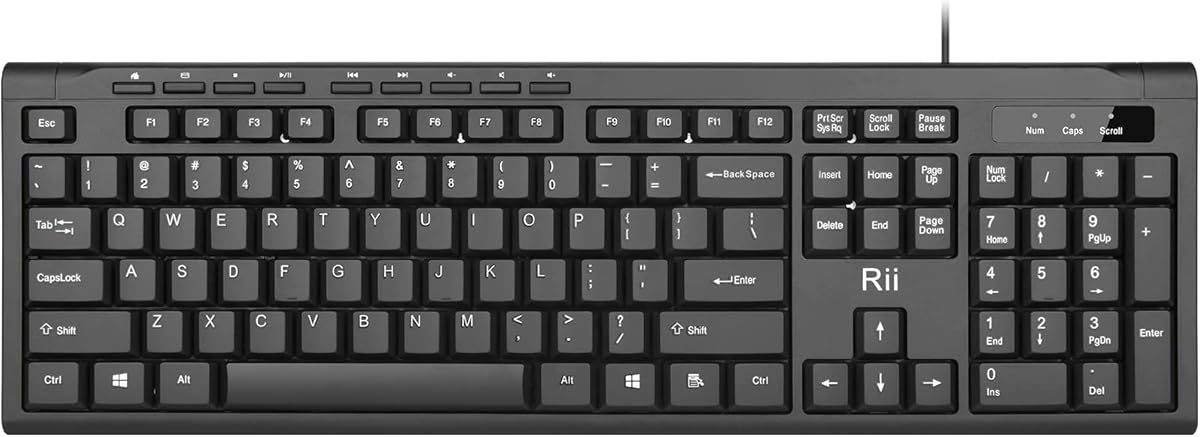
Rii RK907
4.5Editor score
Ultra-slim low-profile design
Plug-and-play USB connection
Splash resistant for office use
This guide compares the top lightweight keyboards for travel and office use, evaluating portability, battery life, and typing comfort to help you choose the
Finding a lightweight keyboard is essential for anyone who values portability and efficiency in their daily workflow. Whether you are a digital nomad, a student, or a professional who travels frequently, having a compact and easy-to-carry typing solution can significantly enhance your productivity. These devices are designed to reduce bulk without sacrificing the core functionality you need for writing, coding, or browsing.
To create this comprehensive list, we analyzed numerous models based on weight, build quality, connectivity options, and user feedback. We focused on keyboards that offer a balance between durability and slim profiles, ensuring they fit easily into bags or backpacks. Our comparison includes various connection types, such as Bluetooth and wireless USB, to cater to different device ecosystems and user preferences.
Each pick in this guide highlights specific strengths, from budget-friendly options to premium models with advanced features like backlighting and multi-device switching. You will find detailed insights into battery life, key feel, and overall design to help you make an informed decision. Please note that product availability and pricing may change over time, so verify current details before purchasing.
4.5Editor score

4.4Editor score

4.3Editor score
The following table provides a side-by-side comparison of all ten selected keyboards, highlighting their key specifications and unique attributes to help you quickly identify the best fit for your needs.



The GEODMAER 65% Gaming Keyboard stands out as an excellent entry-level option for users seeking a lightweight and compact typing solution. With a solid 4.3 rating from users, it delivers a functional experience without the bulk of a full-size board. Its ultra-compact design makes it ideal for gaming setups or office spaces where desk real estate is limited.
We may earn a commission when you buy through this link, at no additional cost to you.
Key strengths include its durable construction, boasting a lifespan of over 10 million keystrokes per key. The LED backlit keycaps ensure visibility in low-light environments, and the wired Type-C connection provides a stable, low-latency link to your device. Additionally, the anti-ghosting feature ensures that multiple key presses are registered accurately, which is crucial for fast-paced tasks.
While it lacks wireless flexibility, the trade-off is a reliable connection that requires no batteries. The membrane keys offer a quiet typing experience, though they may not satisfy enthusiasts who prefer mechanical switches. For budget-conscious buyers needing a lightweight keyboard for daily use or light gaming, this model offers impressive value.
Ultimately, this keyboard is best suited for students or gamers who prioritize portability and cost-effectiveness over advanced connectivity. If you need a simple, durable, and space-saving input device that fits easily into a backpack, the GEODMAER 65% is a strong recommendation.
The 65% layout removes the numpad while keeping arrow keys, allowing it to fit in smaller bags without losing essential navigation functions.
Using a detachable Type-C cable ensures a constant connection with ultra-low input latency, making it reliable for gaming and productivity tasks.
We may earn a commission when you buy through this link, at no additional cost to you.
The Logitech Pebble Keys 2 K380s is a versatile wireless keyboard designed for users who juggle multiple devices daily. Its slim profile and lightweight build make it easy to carry, while the ability to switch between three connected devices with a single button press enhances workflow efficiency. With a 4.3 rating, it is well-regarded for its reliability and comfort.
We may earn a commission when you buy through this link, at no additional cost to you.
This model excels in battery performance, offering up to three years of use on a single charge set thanks to auto-sleep power-saving features. The quiet scissor-switch keys provide a laptop-like typing experience that is gentle on fingers and ears, making it suitable for shared workspaces. Additionally, its construction includes significant recycled plastic, aligning with eco-friendly preferences.
Although it lacks backlighting, the clear key legends and responsive design compensate well for typical office or home lighting conditions. The compact size might feel tight for users with large hands, but the ergonomic shape helps mitigate fatigue during extended typing sessions. It is a fantastic choice for professionals using both laptops and tablets.
For anyone needing a portable keyboard that seamlessly integrates with various operating systems without frequent charging, this is a top contender. Its combination of longevity, connectivity options, and environmental consciousness makes it a smart investment for modern mobile work.
Easy-Switch buttons allow instant transitions between Windows, macOS, and mobile devices, streamlining workflows without interrupting focus.
The three-year battery life means you can use the keyboard for years without needing to replace batteries or worry about charging.
We may earn a commission when you buy through this link, at no additional cost to you.
The Arteck 2.4G USB Wireless Keyboard combines a full-size layout with a surprisingly lightweight build, making it a unique option for those who need a numpad but still value portability. With a 4.4 rating, users appreciate its durable stainless steel construction and comfortable typing experience. It is designed for professionals who require detailed numeric input without the bulk of traditional boards.
We may earn a commission when you buy through this link, at no additional cost to you.
Its rechargeable lithium battery offers up to six months of usage on a single charge, reducing the need for constant battery replacements. The low-profile keys ensure quiet and comfortable typing, while the slim profile allows it to slide easily into laptop sleeves. The 2.4G wireless connection provides a stable link up to a standard range without latency issues.
While the stainless steel adds to the weight slightly compared to plastic alternatives, it contributes to a premium feel and durability. The setup is straightforward with a nano USB receiver, though you should ensure your device has a USB-A port. For office work involving data entry, this keyboard offers the best balance of functionality and portability.
If you frequently work with spreadsheets or financial data on the go, this model provides the necessary keys without compromising on ease of transport. Its robust build and long battery life make it a reliable companion for both desktop and mobile setups.
Includes a complete numeric keypad and arrow keys, allowing for efficient data entry and navigation in professional environments.
The heavy-duty stainless steel body provides a premium tactile feel and resists wear and tear from daily use.
We may earn a commission when you buy through this link, at no additional cost to you.
The ProtoArc XK01 is a standout choice for travelers who refuse to compromise on typing comfort. Its tri-fold design allows it to fit into a compact package while still offering a full-size layout with a numpad and navigation keys. With a 4.3 rating, it is praised for its innovative engineering and reliable performance in diverse environments.
We may earn a commission when you buy through this link, at no additional cost to you.
The keyboard uses Bluetooth 5.1 to connect to up to three devices, making it easy to switch between a laptop and a tablet. Internal aluminum hinges are tested for over 10,000 folds, ensuring long-term durability despite frequent use. The USB-C rechargeable battery provides up to 150 days of standby time, so it is always ready when you need it.
Scissor-switch keys offer a quiet, controlled typing experience, which is ideal for coffee shops or open offices. However, the unfolding process requires a few seconds compared to traditional keyboards, and the price is higher than basic options. For frequent flyers who need a desktop-quality typing experience on the move, this is a premium solution.
This keyboard is best suited for professionals who travel regularly and need a versatile input device that does not limit their workflow. Its ability to collapse into a small form factor while retaining full functionality makes it an essential tool for digital nomads.
The unique folding mechanism reduces the size by half, allowing it to fit into standard backpacks and carry-ons easily.
Internal aluminum hinges withstand thousands of folding cycles, ensuring the keyboard remains stable during regular travel use.
We may earn a commission when you buy through this link, at no additional cost to you.
The TECKNET 2.4G Wireless Keyboard offers an excellent balance of cost and functionality for users seeking a lightweight solution. With a 4.4 rating, it is popular for its simplicity and reliability. The compact design makes it easy to carry, while the media hotkeys add convenience for multimedia tasks without needing additional accessories.
We may earn a commission when you buy through this link, at no additional cost to you.
Its battery life extends up to twelve months, which is impressive for a budget model. The plug-and-play setup requires only a nano USB receiver, and the receiver stores neatly on the back of the keyboard when not in use. This feature keeps the setup clean and prevents loss during transport. The quiet, smooth typing action ensures comfort during long sessions.
Note that the keyboard uses standard AAA batteries which are not included, and the Enter key layout differs from full-size boards, which might require a short adjustment period. For users needing a no-frills, portable keyboard for home or office, these minor points are negligible compared to the value provided.
This keyboard is ideal for students or casual users who want a lightweight, reliable input device without spending much. Its durability and long battery life make it a practical choice for everyday use in various settings.
Dedicated hotkeys allow quick control of volume and playback, enhancing the experience for media consumption and presentations.
The nano USB receiver stores inside the battery slot on the back, ensuring you always have the receiver when you travel.
We may earn a commission when you buy through this link, at no additional cost to you.
The Rii RK907 is a top contender for those prioritizing simplicity and budget. With a high 4.5 rating, it delivers a quiet, comfortable typing experience in an ultra-slim package. It is designed for desktop use but can be moved easily due to its light weight and compact form factor.
We may earn a commission when you buy through this link, at no additional cost to you.
Its low-profile keys provide a quiet keystroke, making it suitable for environments where noise is a concern. The splash-resistant design offers added protection against accidental spills, increasing its longevity in busy offices. The USB connection ensures a stable input stream without needing batteries or pairing, keeping maintenance to zero.
The only limitation is the wired connection, which may restrict movement compared to wireless models. Additionally, the layout is minimalist, which could limit advanced users needing function keys. However, for basic typing and browsing, this keyboard exceeds expectations for its price point.
This model is best for home offices or students who need a reliable, lightweight keyboard without the complexity of wireless setups. Its durability and cost-effectiveness make it a practical daily driver for essential computing tasks.
Low-profile keys reduce noise significantly, making it ideal for quiet study rooms or shared workspaces.
The keyboard is built to resist minor liquid spills, protecting internal components from common accidents.
We may earn a commission when you buy through this link, at no additional cost to you.
The Logitech MX Keys Mini is a premium lightweight keyboard that combines high-end features with a portable form. With a 4.4 rating, it is celebrated for its smart illumination and ergonomic design. The keys are shaped for fingertips, offering a tactile experience that rivals full-size boards despite the smaller footprint.
We may earn a commission when you buy through this link, at no additional cost to you.
Its smart backlight system adjusts based on lighting conditions and your hand proximity, saving battery while ensuring visibility. The ability to pair with up to three devices via Bluetooth allows seamless workflow transitions between computers. The USB-C rechargeable battery offers up to ten days of use with backlighting, reducing waste and cost.
The premium price might be a barrier for some, but the build quality and features justify the investment for professionals. While it lacks a numpad, the compact layout is perfect for those focused on general typing and navigation. It stands out for its attention to detail and user experience.
For creatives and professionals who value aesthetics and performance, this is a top-tier choice. Its combination of smart lighting, long battery life, and robust build makes it an excellent upgrade for daily work.
Backlighting activates when hands approach and adjusts to ambient light, conserving power while maintaining visibility.
Switch between three devices effortlessly via Bluetooth, ideal for users managing multiple computers or tablets simultaneously.
We may earn a commission when you buy through this link, at no additional cost to you.
The ProtoArc XK04 is designed specifically for mobile users who need to type on phones and tablets. With a 4.4 rating, it is praised for its extreme portability. The two-fold design allows it to fit into a pocket or small bag, while the integrated PU leather cover protects the keys from scratches and wear.
We may earn a commission when you buy through this link, at no additional cost to you.
Bluetooth 5.1 connectivity supports up to three devices, enabling quick switches between your phone and tablet. The USB-C rechargeable battery ensures it stays ready for use, with auto-sleep features extending standby time significantly. The compact layout fits well on airplane trays and cafe tables, making it versatile for travel.
The keys are smaller than standard keyboards, which may require adjustment for touch typists, but the design is optimized for mobile efficiency. For users who need to draft emails or notes on the go, this keyboard provides physical keys that screen keyboards lack. Its lightweight nature makes it a seamless companion for mobile work.
This model is best for travelers and mobile professionals who need a lightweight input device for smaller screens. Its protective cover and compact size make it a practical tool for productivity on the move.
Folds into a form factor that fits easily into bags and pockets, ensuring you always have a physical keyboard available.
The integrated PU leather cover shields keys from damage while adding a sleek look to the device.
We may earn a commission when you buy through this link, at no additional cost to you.
The Arteck 2.4G Stainless Steel Keyboard offers a refined look and feel with a lightweight build. With a 4.4 rating, users appreciate its durable construction and quiet typing. The ultra-thin profile provides a sleek aesthetic that complements modern laptops and desks while maintaining a full-size layout for productivity.
We may earn a commission when you buy through this link, at no additional cost to you.
Its stainless steel body gives it a heavy-duty feel, yet it remains light enough for travel. The rechargeable battery lasts up to six months, reducing the need for frequent replacements. The nano USB receiver ensures a stable connection, and the low-profile keys offer comfort during extended sessions.
While it weighs slightly more than plastic alternatives, the premium materials justify the difference in quality. The layout includes essential keys for office work without sacrificing space. For those who prefer a metallic finish and reliable performance, this is a strong option.
This keyboard is suitable for professionals who need a full-size experience in a slim package. Its combination of aesthetics, battery life, and portability makes it a versatile choice for home and office environments.
The steel body provides a modern, durable look that resists scratches and adds a premium touch to any setup.
Uses a nano USB receiver for a stable 2.4G connection that does not drain device battery like Bluetooth might.
We may earn a commission when you buy through this link, at no additional cost to you.
The Logitech K400 Plus is uniquely designed for controlling PCs connected to TVs, offering a lightweight solution for entertainment setups. With a 4.4 rating, it is a favorite for home theaters due to its integrated touchpad, which eliminates the need for a separate mouse. Its compact yet functional design makes it easy to hold and use.
We may earn a commission when you buy through this link, at no additional cost to you.
Battery life is exceptional at up to eighteen months, ensuring you rarely need to change batteries. The spill-resistant design protects the keyboard from accidental drinks during media sessions. The keys are quiet, preventing noise from disrupting movies or shows, and the wireless range provides freedom to move around the room.
While it is less suited for heavy typing compared to other options, its focus on media control makes it perfect for smart TV navigation. The touchpad allows precise control over interfaces without needing to switch devices. For living room setups, it is a highly practical tool.
This keyboard is best for users who want a simplified control center for their home entertainment system. Its combination of touchpad integration and long battery life makes it a convenient and reliable choice for media consumption.
The built-in touchpad acts as a mouse, providing precise navigation without needing extra hardware.
With an 18-month runtime, you can use it for years without battery replacement, reducing maintenance.
We may earn a commission when you buy through this link, at no additional cost to you.
Selecting the right lightweight keyboard involves considering several key factors that match your specific workflow and environment. Understanding these elements helps you find a model that balances portability with performance.
When evaluating lightweight keyboards, pay close attention to the overall weight and dimensions. A truly portable model should be easy to slide into a backpack or carry-on without adding significant load. Look for materials like aluminum or reinforced plastics that maintain durability while keeping mass low.
Aim for a keyboard that weighs under 15 ounces for maximum mobility. This ensures you can carry it daily without strain while still having enough build quality to withstand travel wear.
Choose between Bluetooth and wired options based on your device needs. Bluetooth offers versatility for connecting multiple devices without cables, which is ideal for tablets and modern laptops. Wired connections provide stable power and input but limit mobility due to cables.
For most portable needs, Bluetooth or wireless 2.4G is preferable. Ensure the keyboard supports your operating system and offers easy switching if you use multiple devices frequently.
Battery performance is critical for wireless keyboards used on the go. Models with rechargeable internal batteries reduce waste and ensure readiness without buying disposable cells. Look for capacity ratings that promise months of use on a single charge.
Prioritize keyboards with at least six months of battery life. If possible, select models with auto-sleep modes to conserve power when not in use for extended periods.
The layout determines how quickly you can adapt to the device. Full-size boards with numpads offer efficiency for data entry but add weight. Compact layouts like 60% or 65% save space but may remove function rows.
Consider your typing needs; if you need a numpad, look for foldable or thin full-size options. Otherwise, a smaller layout maximizes desk space and transportability.
Durable materials ensure the keyboard survives regular transport. Stainless steel or high-quality plastics offer resistance to scratches and bumps. Splash-resistant features add extra protection against accidental spills.
Invest in keyboards with tested hinges or sturdy frames. This ensures longevity and consistent performance even when carried frequently.
Low-profile scissor switches are common in lightweight models, offering a balance between comfort and thickness. Test the key travel distance to ensure it suits your typing style without causing fatigue.
Choose ergonomic designs that support wrist posture. Comfort is essential for productivity during long sessions away from a fixed desk.
Lightweight keyboards vary significantly in price depending on features. Budget options offer essential typing, while premium models include backlit keys and multi-device switching. Decide how much you need to invest for your usage.
Balance your budget with required features. A mid-range keyboard often offers the best value, combining good build quality with essential portability features.
Ensure the keyboard supports your specific operating system and device type. Some models work better with Windows, while others are optimized for macOS or Android tablets. Check for dedicated function keys if needed.
Select a keyboard that matches your primary devices. Compatibility ensures seamless setup and full functionality without extra software or drivers.
To set up your keyboard, connect it via Bluetooth or insert the USB receiver into your computer. Pairing typically involves pressing a dedicated switch button or holding a specific key combination. Once connected, test a few keys to ensure responsiveness.
Keep your keyboard clean by wiping it with a soft, dry cloth regularly. Avoid storing it in humid environments to prevent internal damage. For rechargeable models, charge fully before first use to optimize battery health.
Store the keyboard in a protective case or sleeve when traveling to prevent scratches. If it has a folding mechanism, ensure it is locked securely before packing. Avoid placing heavy objects on it to maintain key alignment.
A lightweight keyboard typically uses materials like aluminum or thin plastics to reduce weight. It also features compact layouts and low-profile keys to minimize bulk, making it easy to carry and fit into bags.
Yes, wireless keyboards are highly reliable for general typing and productivity tasks. Modern Bluetooth and 2.4G connections offer stable links with minimal latency, suitable for most work and creative environments.
Battery life varies by model, ranging from months to years on a single charge. Many rechargeable options offer six to twelve months, while disposable battery models can last even longer depending on usage.
Most lightweight keyboards are designed to be compatible with tablets via Bluetooth. They pair easily with iPadOS, Android, and ChromeOS, providing physical typing capability for mobile devices.
Some models include numpads, but many compact versions omit them to save space. If you need a numpad, look for foldable or thin full-size keyboards that integrate this feature without adding much weight.
Many are built with rugged materials and protective designs to withstand travel wear. Look for models with splash resistance or reinforced hinges to ensure they last longer when carried frequently.
Use a soft, dry cloth to wipe the keys and surface regularly. Avoid liquids and use compressed air to remove dust from between the keys without damaging the internal components.
The best size depends on your needs. Compact layouts like 60% save space, while 75% or 96% layouts offer more keys. For maximum portability, choose a keyboard under 15 ounces.
Choosing the best lightweight keyboard depends on your specific balance of portability, battery life, and layout needs. The Logitech MX Keys Mini offers premium features, while the GEODMAER 65% provides budget-friendly compact performance.
Prioritize what matters most to you, whether it is a foldable design for travel or a full-size layout for productivity. Evaluate your devices and usage patterns to find the perfect match.
Remember that availability and pricing may change, so always check current details before purchasing. With the right model, you can enhance your workflow without sacrificing mobility or comfort.