
Universal for All Hisense TV Remote
4.5Editor score
No programming required for easy setup
Works over thirty five feet range
Durable ABS material construction
This guide compares the top Hisense TV Replacement Remote options for 2026, analyzing compatibility, features, and value to help you choose the perfect control.
Finding a reliable replacement for your lost or broken Hisense TV remote can be frustrating. This guide reviews the best options available to restore full control over your smart TV experience effortlessly.
We evaluated each remote based on compatibility, build quality, button layout, and ease of use. Our team analyzed user feedback and technical specs to ensure every recommendation meets high standards for performance and reliability.
Each pick highlights key features and potential drawbacks to help you decide quickly. Prices and availability change frequently, so check the links for the latest deals before making your final purchase decision today.
4.5Editor score

4.4Editor score

4.2Editor score
The following table offers a side-by-side comparison of all ten recommended remotes. We highlight key specifications and unique features to help you quickly identify which model suits your specific Hisense TV needs best.


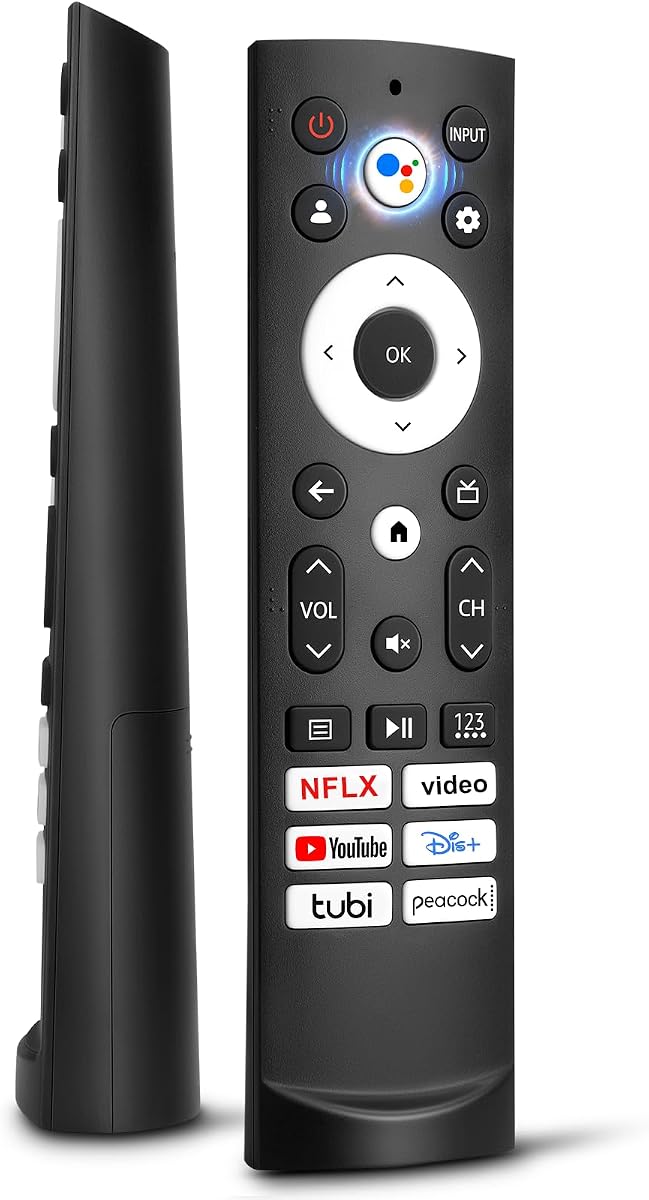
This universal remote is an affordable solution for replacing lost or broken controllers on most Hisense Android TVs. With a 4.5-star rating, users praise its reliability and ease of use without requiring any setup steps.
We may earn a commission when you buy through this link, at no additional cost to you.
It features four quick-launch buttons for instant channel access and works from over 35 feet away. The durable ABS material ensures it withstands daily drops, while the infrared technology maintains consistent responsiveness across the room.
The main limitation is that it does not work with Hisense Fire or Roku TVs, which use different protocols. However, for standard Android models, the lack of programming makes it a hassle-free replacement that delivers solid performance.
Ideal for budget-conscious buyers who need a straightforward replacement for their older Hisense models. It offers excellent value without sacrificing core functionality, making it a top recommendation for standard smart TV setups.
Simply insert batteries and start using it immediately without pairing or coding steps.
The remote maintains signal strength over long distances, ensuring reliable control from the couch.
We may earn a commission when you buy through this link, at no additional cost to you.
Designed specifically for Hisense Google TV series, this remote offers a balanced mix of features and reliability. With a 4.4-star rating, it stands out for its ergonomic design and dedicated streaming buttons that simplify navigation.
We may earn a commission when you buy through this link, at no additional cost to you.
The remote includes six shortcut keys for Netflix, YouTube, and other popular apps, giving you instant access to your content. Its narrow top and wide bottom design allow it to stand upright on a table, preventing it from getting lost easily.
While it offers excellent performance and quick response times, it does not support Google Chromecast or streaming devices. Users should ensure their TV model matches the compatibility list before purchasing to avoid any inconvenience.
This is our top pick for most Google TV users who want a reliable replacement with smart features. It combines build quality with functional shortcuts, making daily TV watching more convenient and enjoyable for the whole family.
Six dedicated hotkeys provide one-touch access to your favorite streaming platforms.
The wide base keeps the remote upright, while the button layout feels comfortable in hand.
We may earn a commission when you buy through this link, at no additional cost to you.
This premium voice remote brings advanced control to your Hisense Google TV with intelligent speech recognition. Rated 4.2 stars, it is engineered for high-end models like ULED and QLED, offering fast activation and a robust build.
We may earn a commission when you buy through this link, at no additional cost to you.
With a dedicated microphone button, you can search content or control menus hands-free. It operates reliably up to 50 feet with a 0.2-second command activation, ensuring smooth interactions even from across the room during movies or gaming.
The voice feature depends on your TV having a built-in assistant, which may not be available on older models. Additionally, the higher price reflects the advanced tech, so it might not be necessary for basic users without voice needs.
Best for tech enthusiasts who want the most convenient and modern way to control their TV. If your setup supports voice commands, this remote delivers a superior experience with its speed, range, and high-quality construction.
Search and control your TV using natural language for a hands-free experience.
A 50-foot operating range ensures you never lose control even from the far end of the room.
We may earn a commission when you buy through this link, at no additional cost to you.
This remote offers extensive compatibility with older Hisense LCD and LED models, backed by a generous one-year warranty. With a 4.4-star rating, it provides peace of mind through its long-term protection and straightforward functionality.
We may earn a commission when you buy through this link, at no additional cost to you.
It supports models like 55H6B and EN2A27, making it a great choice for owners of legacy sets. The remote features hotkeys for Netflix and YouTube, allowing quick access without navigating complex menus on your TV screen.
While it lacks support for Roku-based Hisense TVs, it works reliably on standard Android and LED models. The warranty adds significant value, ensuring you are covered if the unit fails or malfunctions within the first year.
Ideal for buyers with older Hisense TVs who want a reliable replacement with added protection. Its combination of broad compatibility, warranty coverage, and easy setup makes it a trustworthy choice for standard smart TV owners.
A full year warranty ensures you are supported against defects or failures without extra cost.
Works with a vast range of older models, extending the life of your existing TV investment.
We may earn a commission when you buy through this link, at no additional cost to you.
Rated an impressive 4.7 stars, this IR remote is designed specifically for Hisense Roku TV series like H4030F1 and R6ER8F. It provides a straightforward, reliable replacement for users who need to control their Roku interface without extra features.
We may earn a commission when you buy through this link, at no additional cost to you.
The remote supports basic navigation and media control functions needed for Roku TV operation. It uses infrared technology, which requires a clear line of sight, but ensures consistent performance without the complexity of Bluetooth pairing or voice commands.
Users should note that it lacks voice control, which may be a downside for those used to smart assistants. Also, it might have slight button differences compared to the original, but it covers all essential functions for daily use.
Best for Roku TV owners who want a simple, highly-rated replacement that just works. It offers excellent value for a reliable controller that handles the basics perfectly without unnecessary complications.
Tailored specifically for Roku TV series to ensure all navigation buttons work as expected.
A 4.7-star rating confirms consistent performance and satisfaction among satisfied users.
We may earn a commission when you buy through this link, at no additional cost to you.
This 2-pack remote offers excellent value for households with multiple Roku TVs across different brands. With a 4.3-star rating, it works seamlessly with Hisense, TCL, and other Roku-enabled sets, saving you money while ensuring every room has a working controller.
We may earn a commission when you buy through this link, at no additional cost to you.
It features shortcut buttons for Netflix and Disney, making it easy to launch apps quickly. The remote responds within 0.3 seconds and works over 35 feet, providing reliable control for large living rooms or master bedrooms.
Keep in mind that it is designed for Roku TVs only, not for standalone streaming sticks like Roku Express. For families with multiple TVs, having two remotes in one box ensures you always have a spare available for guests or replacement needs.
Ideal for multi-TV households that need cost-effective replacements for Roku TVs. It combines versatility, quantity, and solid performance to meet the needs of busy homes with various entertainment setups.
Works with a wide range of brands including Hisense, TCL, and Sharp for maximum flexibility.
Getting two remotes in one purchase saves money and ensures you always have a backup ready.
We may earn a commission when you buy through this link, at no additional cost to you.
This remote is designed to work with a wide range of Hisense Android and Google TV models, including ULED and Laser TVs. With a 4.4-star rating, it offers a balanced mix of usability and performance for modern smart TV owners.
We may earn a commission when you buy through this link, at no additional cost to you.
It includes six shortcut buttons for popular apps and delivers a 0.5-second response time. The remote works immediately out of the box with standard batteries, ensuring you do not need to wait for complicated setup processes or pairing.
While it lacks voice control features, it covers all standard navigation needs effectively. Users appreciate its straightforward design and ability to handle complex setups like Laser TVs without any configuration headaches.
Best for owners of modern Android Hisense TVs who need a reliable and versatile replacement. It provides all the necessary controls without unnecessary complexity, making it a solid choice for everyday use.
Designed to work with Hisense Laser TV models for full feature support and seamless control.
No pairing or coding required, so you can start using it immediately after inserting batteries.
We may earn a commission when you buy through this link, at no additional cost to you.
This 2-pack offers excellent value for homes with multiple Hisense Google TVs. With a 4.4-star rating, it provides two high-quality remotes that work seamlessly with Google TV series, ensuring every room has reliable control without extra cost.
We may earn a commission when you buy through this link, at no additional cost to you.
The remote features six shortcut keys and ultrafast silicone buttons for a comfortable grip. It delivers a 0.2-second response time and maintains signal stability up to 40 feet, ensuring quick and consistent commands during daily use.
It does not support voice features, so it is best for standard navigation needs. However, the inclusion of two units makes it perfect for couples or families who need multiple controllers for different rooms or backups.
Ideal for Google TV owners looking for a cost-effective bulk solution. It balances functionality and convenience, making it a smart purchase for maintaining control across multiple devices in your home.
Two remotes in one package save money and ensure every room has a functioning control.
Upgraded silicone buttons and a non-slip design make holding the remote comfortable for long periods.
We may earn a commission when you buy through this link, at no additional cost to you.
This remote is designed for Hisense smart TV models like A6G and U6G, offering broad compatibility for older sets. With a 4.4-star rating, it provides a reliable solution for replacing lost remotes on standard smart TVs without complex pairing steps.
We may earn a commission when you buy through this link, at no additional cost to you.
It features six hotkeys for popular apps and works right out of the box. The infrared technology ensures consistent performance within line of sight, making it a solid choice for users who prioritize simplicity over advanced features.
Note that it does not support voice commands or newer Google TV interfaces. If your TV is an older smart model without voice assistant features, this remote offers a straightforward and effective replacement solution at an affordable price.
Best for owners of standard Hisense smart TVs looking for a simple, reliable replacement. It covers all essential functions and offers great value for budget-conscious users with older device setups.
Designed specifically to ensure older smart models remain fully functional with modern controls.
Delivers reliable control at a low cost, making it an efficient choice for everyday use.
We may earn a commission when you buy through this link, at no additional cost to you.
This voice remote offers intelligent speech recognition for Google TV users. With a 4.3-star rating, it allows hands-free search and control, making it a strong choice for those who want modern smart features in their TV experience.
We may earn a commission when you buy through this link, at no additional cost to you.
It includes one-click shortcuts for major apps and features durable ABS construction tested for 100,000 clicks. The pairing process is simple, and the remote delivers reliable performance for searching content or checking schedules without typing.
Users need to pair it initially by holding the back and home buttons, which takes a few seconds. While it costs more than basic remotes, the voice features provide significant convenience for users who prefer speaking over typing.
Best for smart TV owners who want voice control capabilities. It brings modern convenience to your TV, allowing you to search and manage your entertainment more easily using natural language.
Search for movies, shows, or information using your voice for a faster and easier experience.
Built to withstand 100,000 clicks, ensuring long-term reliability and consistent button performance.
We may earn a commission when you buy through this link, at no additional cost to you.
Choosing the right remote depends on your TV model and desired features. Understanding key factors helps you avoid compatibility issues and find a controller that suits your needs perfectly.
The most critical factor is ensuring the remote matches your specific Hisense TV model. Some remotes work only on Android models, while others support Roku, Google TV, or older LED sets. Check your TV series and original remote model number to avoid mismatches.
Always verify the product description lists your exact TV series to ensure full functionality and button alignment.
Voice features allow hands-free control but require specific TV capabilities. If you want to search content with your voice, choose a remote designed for Google TV with an integrated microphone. Standard IR remotes cannot support voice commands.
Voice remote support is essential for users who prefer natural language search over typing on-screen keyboards.
Most modern remotes work right out of the box without complex setup. However, Bluetooth voice remotes require a pairing process. Infrared models are easier to set up, requiring only battery installation to start working immediately.
Consider your technical comfort level and choose a remote with a setup process that matches your skills and preferences.
Standard remotes use two AAA batteries, which should be easily available. Some models offer longer battery life through energy-efficient design. Check if the batteries are included in the package or need to be purchased separately.
Batteries are often not included, so you may need to purchase them separately upon receipt of the remote.
Infrared remotes need a direct line of sight and typically work up to 35 feet. Some newer models offer stronger signals or Bluetooth connectivity that works around corners. Consider your seating distance when choosing a remote.
A range of 35 feet is standard for most IR remotes, but Bluetooth models can offer better coverage for large rooms.
Many remotes include dedicated buttons for popular streaming apps like Netflix or YouTube. These hotkeys simplify navigation and save time. Check if the remote includes shortcuts to your most used services before purchasing.
Shortcut buttons provide one-touch access to favorite apps, reducing the need for complex menu navigation on your TV.
Remotes made with ABS plastic tend to be more durable and resistant to drops. Silicone buttons offer a softer tactile feel and better grip. Look for quality materials that will withstand daily use over time.
High-quality ABS and silicone materials ensure the remote remains functional and comfortable through years of regular use.
A solid warranty can protect you against defects. Some sellers offer one-year coverage for remote replacements. Check the seller policy to understand what is covered and how to claim support if issues arise.
Look for products offering at least a one-year warranty to ensure protection against manufacturing defects or failures.
Insert the included batteries into the compartment at the back of the remote, ensuring correct polarity. Align the positive and negative ends as indicated inside the battery housing to power the device properly.
For infrared remotes, always point the front of the remote directly at the TV sensor for commands to register. Bluetooth or voice models may need pairing with the TV by pressing a specific combination of buttons upon first use.
Keep the remote clean by wiping it with a dry cloth to prevent dust buildup. Avoid exposing it to liquids or extreme heat to maintain long-term performance and battery life.
No, compatibility depends on the TV model series. Some remotes are designed for Android TVs while others work for Roku or Google TVs. Always check the product description to ensure it supports your specific TV series before purchasing.
Most replacement remotes work right out of the box without programming. Simply insert batteries and they should work immediately. However, Bluetooth voice remotes may require a pairing process before first use.
Voice remotes require your TV to support voice assistant features. If your TV model lacks built-in voice capabilities, a standard infrared remote is a better choice. Check your TV specifications to confirm voice support.
Most Hisense replacement remotes use two AAA batteries. The batteries are typically not included in the package, so you will need to purchase them separately. Always check the product details for specific battery requirements.
Ensure the batteries are inserted correctly and fresh. Check that you are pointing the remote directly at the TV sensor for IR models. Try resetting the remote by removing the batteries for a few minutes and reinserting them.
Most replacement remotes have fixed hotkeys that cannot be customized. They are pre-programmed to open specific apps like Netflix or YouTube. For customization, you would need a universal remote with advanced coding capabilities.
Many sellers offer warranties ranging from one to three years. Check the product listing to confirm the warranty terms and how to claim support if the remote malfunctions during the coverage period.
Yes, if you have multiple Hisense TVs of the same series, one remote can control them all. However, different brands or systems like Roku and Google TV require different remotes for full functionality.
We reviewed ten top options ranging from basic IR remotes to advanced voice-enabled controllers. Each model offers unique strengths depending on your TV type and personal preferences for control and features.
For most users, the Google TV remote with hotkeys offers the best balance of convenience and affordability. Voice remote users should look for models with intelligent speech support, while budget buyers can trust universal options for reliable performance.
Before buying, confirm your TV series compatibility and check for current deals. Prices and availability change frequently so always verify the latest information to ensure you get the best value for your specific setup today.