
Redragon K585 Wired One-Handed RGB Gaming Keypad
4.4Editor score
Swap switches without soldering needed
7 onboard macro keys for combos
Detachable wrist rest for comfort
Discover the top 10 gaming keypads for October 2026. We compare features, ergonomics, and performance to help you find the perfect one-handed controller for
Gaming keypads offer a streamlined alternative to full keyboards, letting you focus on the mouse while keeping essential commands under your fingers. These devices are ideal for MMOs, MOBAs, and competitive shooters where macro efficiency matters. A good keypad blends comfort, speed, and customization to match your playstyle.
We evaluated ten top-rated models based on switch technology, layout ergonomics, and software flexibility. Our analysis covers wired and wireless options, including mechanical, membrane, and Hall Effect variants. Each pick balances build quality and features to suit different budgets and gaming genres.
Every review highlights real-world strengths, trade-offs, and ideal use cases for each model. Ratings reflect community feedback and technical specs rather than personal testing. Prices and availability shift often, so check current listings before purchasing to ensure you get the best value today.
4.4Editor score

4.3Editor score

4.3Editor score
This side-by-side comparison outlines the core specifications and unique selling points of each model. Use it to quickly identify which keypad matches your preferred switch type, connectivity, and ergonomic needs before diving into detailed reviews.




The Razer Tartarus V2 stands out as a top-tier choice for players wanting console-style controls on PC. Its 32 programmable keys and analog thumbpad deliver intuitive access to abilities and movement without cluttering your desk. Community ratings praise its comfort and customization depth for extended sessions.
We may earn a commission when you buy through this link, at no additional cost to you.
This keypad shines with its mecha-membrane switches that mimic mechanical tactility while reducing finger fatigue. The 8-way thumbpad supports console-oriented movement, making it ideal for RPGs and MOBAs. Hypershift lets you layer commands, effectively doubling your input capacity for complex macros.
While it relies on Razer Synapse for full functionality, this requirement ensures deep integration with Chroma lighting and game profiles. The lack of hot-swappable switches limits modding, but the factory tuning is solid for most users. Build quality remains durable despite the soft-cushioned key design.
Buy this if you value ergonomics and RGB sync with your existing setup. It suits gamers who prefer a hybrid between a keypad and game controller. With its balance of features and comfort, it justifies its place as a leading option for serious one-handed gaming.
The 8-way directional thumbpad allows for more natural controls for console-oriented players and provides a more ergonomic experience during long sessions.
Razer Hypershift allows for all keys and keypress combinations to be remapped to execute complex commands with a single press.
We may earn a commission when you buy through this link, at no additional cost to you.
The Redragon K585 offers exceptional value for budget-conscious gamers seeking a reliable one-handed setup. Its 42-key layout and hot-swappable switches let you tailor the tactile feel without soldering. High user ratings reflect its durability and flexibility for MMOs and MOBAs.
We may earn a commission when you buy through this link, at no additional cost to you.
Seven onboard macro keys allow you to bind multiple commands for instant ability rotations. The USB pass-through port keeps your desk tidy by letting you plug peripherals directly into the keypad. Detachable wrist rest improves portability and comfort during extended play.
RGB lighting covers 16.8 million colors with five modes, though software is less advanced than premium rivals. Lack of wireless connectivity means cable management is needed. Still, the modularity and build quality exceed expectations at this price tier.
This is the ideal starting point for newcomers to one-handed gaming. If you want to experiment with switches and macros without overspending, the K585 delivers. Its practical design and cost-efficiency make it a strong contender for value-focused buyers.
The upgraded socket accepts almost any 3-pin or 5-pin switch, so you can tune the feel of your off-hand keypad to match your main board.
Bind multiple commands to each of the 7 keys so MMO and MOBA ability rotations fire with a single press instead of fumbling for a full keyboard.
We may earn a commission when you buy through this link, at no additional cost to you.
The AZERON Cyborg II redefines one-handed gaming with its Hall Effect analog thumbstick and customizable ergonomics. It replaces the traditional keyboard entirely for left-hand use while keeping mouse control on the right. Ratings highlight its unique adjustability and analog movement capabilities.
We may earn a commission when you buy through this link, at no additional cost to you.
The thumbstick eliminates stick drift and supports WASD or 360-degree analog movement in compatible games. You can customize dead zones and cone angles for precise control. Each of the 30 inputs is individually connected without matrices, ensuring consistent register.
Software allows deep customization including diagonal keybinds and analog smoothing. Build relies on 3D printed components for a tailored fit. While powerful, the setup requires time to calibrate. Price places it beyond casual users seeking entry-level gear.
Choose this if you demand analog precision and ergonomic customization unmatched by standard keypads. It suits competitive FPS players and hobbyists wanting a unique setup. Its advanced features justify the investment for those prioritizing performance and personalization.
The new Hall Effect thumbstick eliminates stick drift and supports WASD or 360-degree analog movement in compatible games with adjustable sensitivity.
The redesigned main board allows future software updates and modular enhancements to keep the device current as your needs evolve.
We may earn a commission when you buy through this link, at no additional cost to you.
The Redragon K585 PRO brings wireless freedom to the popular K585 design. Using Bluetooth and 2.4GHz, it lets you place the keypad anywhere on your desk. Ratings reflect satisfaction with connectivity stability and switch customization options for off-hand control.
We may earn a commission when you buy through this link, at no additional cost to you.
It retains the 42-key layout and hot-swap sockets allowing you to tune switch feel. The 7 macro keys streamline ability rotations. Battery offers 15 to 20 hours of continuous play. Detachable wrist rest maintains comfort while reducing footprint.
Wireless adds minor latency compared to wired but remains negligible for most games. RGB lighting may shorten battery life during extended sessions. Still, the flexibility outweighs this trade-off for clutter-free setups. It bridges the gap between budget and mid-tier options.
Opt for this if wireless mobility is a priority without sacrificing switch modularity. It fits gamers who switch between devices or prefer clean desks. With solid battery performance and familiar features, it stands out as a top wireless contender.
BT and 2.4GHz connectivity lets you set the keypad anywhere on your desk backed by 15 to 20 hours of continuous play on a single charge.
The upgraded socket accepts almost any 3-pin or 5-pin switch and stock Red switches are rated for 50 million keypresses.
We may earn a commission when you buy through this link, at no additional cost to you.
The RedThunder One Handed prioritizes portability and simplicity for gamers on the go. Its 35-key layout fits easily in bags while keeping essential controls accessible. High ratings point to reliable anti-ghosting and fast response suitable for casual and competitive play.
We may earn a commission when you buy through this link, at no additional cost to you.
A built-in game chip delivers 3ms response speed for fluid gameplay. Macro recording via FN keys lets you create custom sequences quickly. The ergonomic wrist rest provides support despite the small footprint. RGB offers multiple colors and modes for visual flair.
Driver-free operation ensures compatibility across Windows and Mac without setup. Compact size saves desk space but limits key count compared to larger models. Still, for travelers or LAN party attendees, this balance of features and size is unmatched.
Buy this if you need a travel-ready solution that doesn't sacrifice performance. It suits students or commuters wanting a dedicated one-handed unit. With its plug-and-play design and fast response, it delivers practical value for budget-aware users.
Built-in game chip provides 3ms faster response speed making it more fluent for playing games and perfect for enthusiasts.
FN plus F1 and F2 serve as macro recording keys allowing you to bind sequences without external software.
We may earn a commission when you buy through this link, at no additional cost to you.
The Keychron C0 HE targets competitive FPS players with Hall Effect magnetic switches and Rapid Trigger. These features allow ultra-low latency and instant key reset for precise movement. Community feedback notes its responsiveness in titles like Valorant and CS2.
We may earn a commission when you buy through this link, at no additional cost to you.
Actuation can be adjusted with 0.01 mm precision letting you fine-tune sensitivity. The 8K polling rate ensures 0.125ms response time for flawless inputs. Web-based configurator removes software installation needs. Per-key RGB adds visual customization without bloat.
While powerful, Rapid Trigger benefits are specific to certain genres. Web setup is convenient but may lack advanced profile features. Still, for speed-focused gamers, the magnetic switch tech provides a measurable edge. Build quality supports consistent high-frequency inputs.
Choose this if competitive FPS performance is your top priority. It suits players seeking rapid inputs and adjustable actuation. With cross-platform support and modern switch tech, it delivers a premium experience for serious tacticians.
Rapid Trigger Hall Effect magnetic switches enable ultra-low latency and instant key reset for precise movement control.
Customize key mapping and actuation settings through a browser-based configurator without software installation required.
We may earn a commission when you buy through this link, at no additional cost to you.
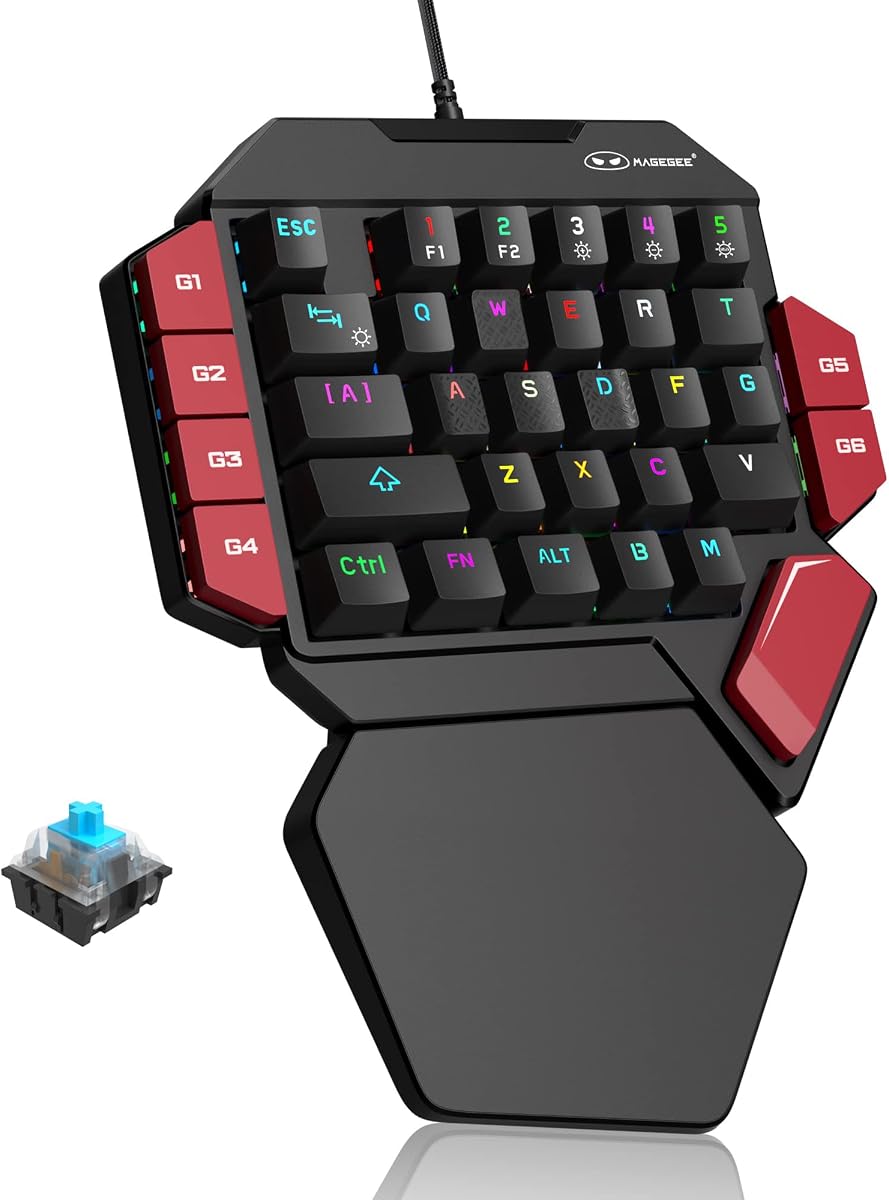
The MageGee One Handed delivers a classic mechanical experience in a compact layout. Its blue switches provide loud clicks and crisp feedback favored by typists and gamers. Ratings reflect satisfaction with build quality and macro capabilities for daily use.
We may earn a commission when you buy through this link, at no additional cost to you.
All 35 keys are non-conflict ensuring reliable input. Six macro keys simplify binding complex sequences. RGB offers static and dynamic modes with brightness controls. Big palm rest reduces wrist fatigue during long sessions. Plug-and-play compatibility spans most operating systems.
Blue switches may be too loud for shared spaces. RGB customization is limited compared to software-heavy rivals. However, the tactile feedback and simplicity appeal to those avoiding complex setups. Durability and service life meet expectations for mechanical switches.
Buy this if you prefer tactile mechanical switches without bloat. It suits users wanting straightforward macros and reliability. With its ergonomic design and solid feedback, it remains a strong option for mechanical enthusiasts.
Blue switches make a loud click sound and provide precise tactile feedback for gaming and typing.
Press FN plus G1 through G6 to record macros with clear visual indicators during setup.
We may earn a commission when you buy through this link, at no additional cost to you.
The AJAZZ AK029 maximizes desk space with an ultra-compact 29-key layout. Using Hall Effect switches it offers zero dead zones and rapid trigger for clean inputs. Top ratings highlight its tournament-grade performance and sturdy aluminum-reinforced chassis.
We may earn a commission when you buy through this link, at no additional cost to you.
Actuation adjusts from 0.1mm to 3.5mm with 0.01mm precision. The 8KHz polling rate ensures fast response when paired with a high-performance PC. Web-based driver allows customization without installation. 20 RGB modes provide visual variety with double-shot PBT keycaps.
Key count limits complex macro setups compared to larger models. Web driver may require browser access for profile changes. Still, the magnetic tech and build durability provide a premium feel. Gasket mount design adds cushioning without sacrificing responsiveness.
Choose this if space is tight but performance matters. It suits FPS players and editors needing quick commands. With magnetic switches and aluminum build, it delivers consistent speed and style for focused sessions.
Bingyu Hall Effect magnetic switches provide zero dead zone and no debounce delay for consistent tournament-grade performance.
Ultra-compact 29-key one-handed design saves 60 percent desk space freeing your mouse for low-sensitivity FPS play.
We may earn a commission when you buy through this link, at no additional cost to you.
This variant of the Razer Tartarus V2 focuses on seamless RGB synchronization. Its mecha-membrane keys offer tactile feedback with soft cushioning. Community ratings point to reliability and broad software support. Razer ecosystem integration is a major draw for enthusiasts.
We may earn a commission when you buy through this link, at no additional cost to you.
Chroma RGB syncs with games and gear for immersive lighting. Hypershift expands input capacity through layered key commands. Build supports long sessions with ergonomic palm rest. Wired connection ensures stable performance without battery concerns.
Synapse software is required for full feature access which may deter minimalists. No analog thumbpad means movement remains keyboard-based. Still, the lighting ecosystem and key reliability justify its place for users invested in Chroma gear.
Buy this if you prioritize RGB aesthetics and Razer ecosystem compatibility. It suits players wanting immersive lighting and solid macro tools. With dependable performance and wide support, it remains a top choice for style-focused gamers.
Fully syncs with popular games Razer hardware Philips Hue and gear from 30 plus partners.
Allows for all keys and keypress combinations to be remapped to execute complex commands.
We may earn a commission when you buy through this link, at no additional cost to you.
The Redragon RM104 blends gaming and daily use with a multifunction smart control knob. Its tri-mode wireless options support seamless switching between devices. Ratings highlight battery life and knob versatility for volume and lighting control without mouse reliance.
We may earn a commission when you buy through this link, at no additional cost to you.
A 4000mAh battery supports extended use. Companion software allows macro assignment and profile creation. RGB syncs with other Redragon gear for cohesive aesthetics. Anti-ghosting ensures reliable input during intense gaming. Pink and white design offers distinct style.
Size exceeds typical one-handed layouts making it less portable. Software required for full customization may add setup time. Still, its multimedia features bridge gaming and productivity. The knob simplifies audio management during streaming or casual use.
Choose this if you value multimedia control alongside gaming. It suits streamers and multi-taskers needing quick adjustments. With strong battery life and wireless versatility, it delivers broad utility beyond standard keypads.
Rotate to adjust volume press for instant mute and hold to cycle RGB modes for smoother control.
Enjoy seamless switching between Bluetooth 2.4GHz wireless and USB-C for flexible connectivity.
We may earn a commission when you buy through this link, at no additional cost to you.
Choosing the right gaming keypad involves balancing switch type, ergonomics, and software capabilities. The following factors help you narrow options to match your playstyle and setup needs.
Switch type defines tactile feedback and durability. Mechanical switches offer distinct actuation points while membrane keys reduce noise. Hall Effect switches provide adjustable actuation and rapid trigger for competitive precision.
Match switch feel to your primary games. Competitive shooters benefit from rapid reset while RPGs favor tactile feedback for macro execution.
Key count varies from 29 to 42 keys influencing macro capacity and footprint. Compact models save desk space but limit bindings. Larger layouts accommodate complex rotations for MOBAs.
Select based on how many macros you need. Minimalists prefer fewer keys while MMO players benefit from more programmable inputs.
Ergonomic design affects long-term comfort. Look for wrist rests thumbpads and adjustable angles. Contoured shapes reduce strain during marathon sessions.
Prioritize padding and natural hand position. Comfort prevents fatigue and keeps focus on gameplay.
Wired models ensure zero latency while wireless options reduce desk clutter. Bluetooth and 2.4GHz offer different trade-offs. Battery life matters for wireless choices.
Competitive gamers lean wired for stability. Casual users prefer wireless for flexible placement.
Software depth determines macro complexity. Some devices rely on onboard memory while others need full suites. Driver-free setups appeal to minimalists.
Ensure software supports your OS. Advanced profiles benefit frequent binders but may complicate simple setups.
RGB lighting enhances immersion. Sync with other gear or use static modes. Per-key customization allows creative patterns.
Choose lighting that matches your battlestation. Aesthetic cohesion improves setup satisfaction without affecting performance.
Materials impact durability and weight. Aluminum plates reduce flex. Double-shot keycaps resist wear. Gasket mounts cushion impact.
Inspect frame rigidity and key durability. A solid build ensures longevity despite heavy use.
Prices range from budget to premium tiers. Entry models suit beginners. Advanced features like analog sticks justify higher cost.
Balance features with spending limits. Invest only in capabilities you will actually use.
Begin by installing any required software or drivers. Configure macro keys to match your favorite abilities. Calibrate analog thumbpads if included to suit your movement preferences.
Keep the keypad clean using compressed air and soft cloths. Avoid liquid spills and store in dry environments. Remove detachable wrist rests periodically to check for dust.
Update firmware regularly to maintain compatibility. Replace keycaps or switches if they wear out. Adjust lighting modes to save battery when using wireless options.
Yes many models support WASD movement and macros for utility skills. Hall Effect thumbsticks add analog control for precise aiming. Competitive players benefit from rapid trigger switches that reset keys instantly.
Some keypads use onboard memory and require no software while others rely on companion suites. Always check the specs before purchasing. Driver-free models offer plug-and-play simplicity.
Modern 2.4GHz wireless delivers near-wired latency for most games. Bluetooth adds slight delay but works for casual play. Check polling rate if competitive speed is your priority.
Hot-swappable models let you change switches without soldering. Non-hot-swappable boards require soldering skills or factory service. Check the product data for socket compatibility before buying.
Wireless keypads last between 15 to 40 hours on a single charge depending on RGB usage. Some models offer fast charging for quick top-ups. Disable lighting to extend runtime during long sessions.
Most support macOS through USB or Bluetooth connections. Software compatibility varies so verify before purchase. Look for cross-platform configurations or web-based tools for broader OS support.
Hall Effect switches allow adjustable actuation and rapid trigger for faster resets. They reduce latency and physical wear compared to mechanical contacts. Ideal for competitive FPS titles needing quick input response.
The Razer Tartarus V2 Redragon K585 and AZERON Cyborg II lead our rankings for comfort value and advanced tech. Each offers distinct strengths depending on whether you prefer RGB ecosystems modularity or analog precision.
Prioritize ergonomics and switch type to match your playstyle. Competitive players should favor Hall Effect switches while casual gamers may prefer tactile membranes. Wireless options suit clutter-free desks but consider latency needs.
Always check current prices and availability before buying since stock fluctuates. The best model balances features with budget constraints to enhance your setup without overspending.