
Cudy R700
4.4Editor score
OpenWRT support for customization
Five gigabit Ethernet ports
Automatic failover capability
This guide compares the top dual wan router options for businesses and remote workers, evaluating performance, security, and reliability to help you choose the
Finding a reliable dual wan router is essential for maintaining uninterrupted internet connectivity in modern business environments. These devices allow you to connect multiple internet sources, ensuring that your operations continue smoothly even if one connection fails. Whether you manage a small office or a remote workspace, having redundant internet access is crucial for productivity.
Our team has analyzed ten leading dual wan router models based on their features, security capabilities, and overall performance. We examined port configurations, VPN support, and load balancing options to determine which devices offer the best value and reliability. This list covers a range of budgets and technical requirements to suit diverse networking needs.
Each selection highlights key strengths and potential limitations to help you make an informed decision for your specific setup. Keep in mind that availability and specifications can change over time, so verify the details before purchasing. We aim to provide clear, objective information to guide your investment in network infrastructure.
4.4Editor score

4.4Editor score

4.2Editor score
The following table provides a side-by-side overview of the key specifications and capabilities for each dual wan router model included in this guide. Use this comparison to quickly identify which device meets your port requirements and performance expectations.



The TP-Link ER605 stands out as a top contender for small to medium businesses needing reliable internet redundancy. It supports multiple WAN connections and includes advanced security features without a high cost. Its ability to handle various VPN protocols makes it versatile for remote access needs.
We may earn a commission when you buy through this link, at no additional cost to you.
This router offers three WAN ports which allow for flexible load balancing and failover configurations. The USB WAN port provides an additional layer of redundancy through mobile broadband modems. Security is addressed with SPI firewall and DoS defense to protect your network perimeter effectively.
While it lacks built-in wireless capabilities, this is often expected in dedicated routing hardware. Users must pair it with an access point for Wi-Fi coverage. The web interface is functional but may feel basic compared to more modern cloud-managed options.
Businesses looking for a cost-effective solution to ensure continuous connectivity should consider this model. It balances performance and features well for the price. We recommend it for users who prioritize wired reliability and security over wireless convenience.
The combination of WAN and LAN ports allows you to tailor the network to your specific bandwidth needs.
Support for multiple VPN types ensures you can connect remote employees securely to your office network.
We may earn a commission when you buy through this link, at no additional cost to you.
The Peplink B-One is designed for enterprise branch offices that require high-speed internet and seamless redundancy. It combines dual WAN capabilities with robust Wi-Fi 6 support for comprehensive connectivity. The SpeedFusion technology ensures smooth video calls and application performance even during connection changes.
We may earn a commission when you buy through this link, at no additional cost to you.
This model integrates well with various internet providers including Starlink for satellite backup. Its architecture is built to maintain uptime without frequent resets or manual interventions. Automatic firmware updates help keep the network secure and performing at peak levels over time.
The higher price point reflects its enterprise-grade features and reliability. Setup can be more involved than consumer routers but offers greater control for IT professionals. Users seeking a reliable all-in-one solution for branch offices will find significant value here.
Ideal for businesses needing both wired and wireless redundancy with high throughput. It is suitable for environments where uptime is critical. We suggest evaluating your specific bandwidth needs to justify the investment in this premium router.
Combining wired WAN and wireless LAN in one device simplifies network infrastructure for smaller branches.
SpeedFusion technology optimizes traffic to ensure consistent performance for latency-sensitive applications.
We may earn a commission when you buy through this link, at no additional cost to you.
The NETGEAR PR60X offers cutting-edge performance with 10G multi-gigabit ports for modern high-bandwidth environments. It provides cloud-based management for easy remote oversight of network health and settings. This router is built for professionals who need robust security and scalable architecture.
We may earn a commission when you buy through this link, at no additional cost to you.
Features include support for numerous VLANs and secure remote access via various VPN protocols. The hardware supports a high number of concurrent device connections making it suitable for larger SMEs. Insight subscription provides ongoing monitoring tools for proactive network maintenance.
The premium pricing reflects the advanced capabilities and future-proof hardware. Users should consider the ongoing costs associated with cloud management services. However, the performance and administrative flexibility make it a strong choice for demanding enterprise needs.
Best for organizations requiring top-tier speed and remote manageability. It is recommended for tech-savvy users or IT departments managing complex setups. We suggest checking all subscription details before purchase to align with your budget.
Multi-gigabit ports ensure the router can handle increasing bandwidth demands over the years.
Cloud management allows you to oversee multiple sites or network segments from a single dashboard.
We may earn a commission when you buy through this link, at no additional cost to you.
The Cudy R700 delivers exceptional value for users needing multi-WAN capabilities on a tight budget. It supports OpenWRT allowing for deep customization and advanced network management. The five gigabit ports provide ample connectivity for various wired devices and internet sources.
We may earn a commission when you buy through this link, at no additional cost to you.
Security is handled through a complete VPN suite and professional firewall rules. You can configure custom QoS policies and VLAN segmentation to manage traffic effectively. Community support for OpenWRT ensures access to a wide range of additional packages and tools.
This device requires some technical knowledge to maximize its potential compared to plug-and-play routers. The lack of integrated Wi-Fi means you will need separate access points. Despite this, it offers professional-grade control for an entry-level price.
Ideal for tech enthusiasts or small businesses needing flexibility without high costs. It works well for those who enjoy tinkering with network settings. We recommend it for budget-conscious buyers who prioritize performance and customization.
OpenWRT compatibility gives you full control over network traffic and security rules beyond standard settings.
Five gigabit ports allow diverse connection options for modems, switches, and direct device links.
We may earn a commission when you buy through this link, at no additional cost to you.
The Omada ER707-M2 is designed for networks requiring multi-gigabit internet speeds and centralized management. It integrates with the Omada ecosystem for seamless control across multiple devices and sites. The router supports a high number of concurrent sessions ideal for busy offices.
We may earn a commission when you buy through this link, at no additional cost to you.
Security is robust with extensive VPN support and reliable failover mechanisms. USB ports allow for storage sharing and LTE backup for additional redundancy. The five-year warranty provides long-term confidence in the hardware reliability and support.
This model works best within the broader Omada product line for optimal management features. The cost is higher than basic routers but justified by the performance and support. It is suitable for growing businesses planning to scale their network infrastructure.
Recommended for users needing future-ready speeds and integrated management tools. We suggest considering the Omada access points for a unified system. This router offers a strong balance of speed and administrative ease.
Cloud access allows you to manage your network from anywhere without needing local controllers.
Support for over 500,000 concurrent sessions ensures smooth performance even with many users.
We may earn a commission when you buy through this link, at no additional cost to you.
The ASUS RT-BE88U brings next-generation WiFi 7 technology with robust dual WAN capabilities for high-performance homes. It features dual 10G ports for extreme wired throughput and AI-driven WAN detection for reliability. The router includes comprehensive security and parental controls for family safety.
We may earn a commission when you buy through this link, at no additional cost to you.
Wireless performance is boosted by Multi-Link Operation and 4096-QAM for faster speeds. AI WAN detection helps maintain always-on internet through versatile configuration options. Mesh compatibility allows you to extend coverage across large properties easily.
This router is priced at a premium level reflecting the latest technology. Most clients may not yet support WiFi 7 but the hardware is future-proof. It suits users with high-speed internet plans and demanding networking requirements.
Best for tech enthusiasts and large homes needing top wireless speeds and redundancy. We recommend it for those ready to invest in cutting-edge standards. Expect significant performance gains with compatible devices.
WiFi 7 capabilities ensure you can take full advantage of next-generation internet services.
Versatile WAN options allow you to adapt the router to various ISP setups easily.
We may earn a commission when you buy through this link, at no additional cost to you.
The ASUS ExpertWiFi EBG15 focuses on commercial-grade security with intrusion prevention and Layer 7 firewall. It offers three WAN ports for robust failover and load balancing to keep businesses online. VLAN assignment adds security by segmenting traffic across different Ethernet ports.
We may earn a commission when you buy through this link, at no additional cost to you.
Remote management is simplified through a mobile app with Bluetooth setup features. USB port backup allows you to maintain connectivity via a mobile hotspot if primary lines fail. The included security subscription enhances protection against malicious traffic and threats.
User ratings are mixed indicating potential variability in performance or support experience. The interface is straightforward but may lack advanced options for complex networks. It suits small businesses needing basic security and redundancy without enterprise complexity.
Recommended for small offices needing reliable WAN redundancy and security basics. We suggest testing the failover functionality upon setup to ensure reliability. This router offers practical tools for maintaining uptime.
VLAN support helps you isolate different network segments for better security and performance.
App control makes it easy to manage your network without needing to access a web browser.
We may earn a commission when you buy through this link, at no additional cost to you.
The D-Link DSR-250V2 is built for secure remote work with enterprise-grade encryption and compliance standards. It follows TAA and NDAA regulations making it suitable for government and regulated industries. The dual WAN failover ensures continuous connectivity for hybrid teams relying on remote access.
We may earn a commission when you buy through this link, at no additional cost to you.
Security features include strong encryption and various VPN protocols for client and site access. Management is simplified through web tools offering clear visibility and control over network policies. The limited lifetime warranty provides long-term peace of mind for infrastructure investments.
Ratings are lower than other models which may indicate older software or usability issues. Users should verify the current firmware version for security patches. It remains a solid option for compliance-focused environments prioritizing security over speed.
Ideal for agencies and businesses needing regulated secure connections. We recommend it for those requiring specific compliance certifications. Ensure you update the system immediately for best security.
Meeting TAA and NDAA standards ensures the device is safe for government and restricted sectors.
Enterprise encryption keeps your data safe when employees access resources from home.
We may earn a commission when you buy through this link, at no additional cost to you.
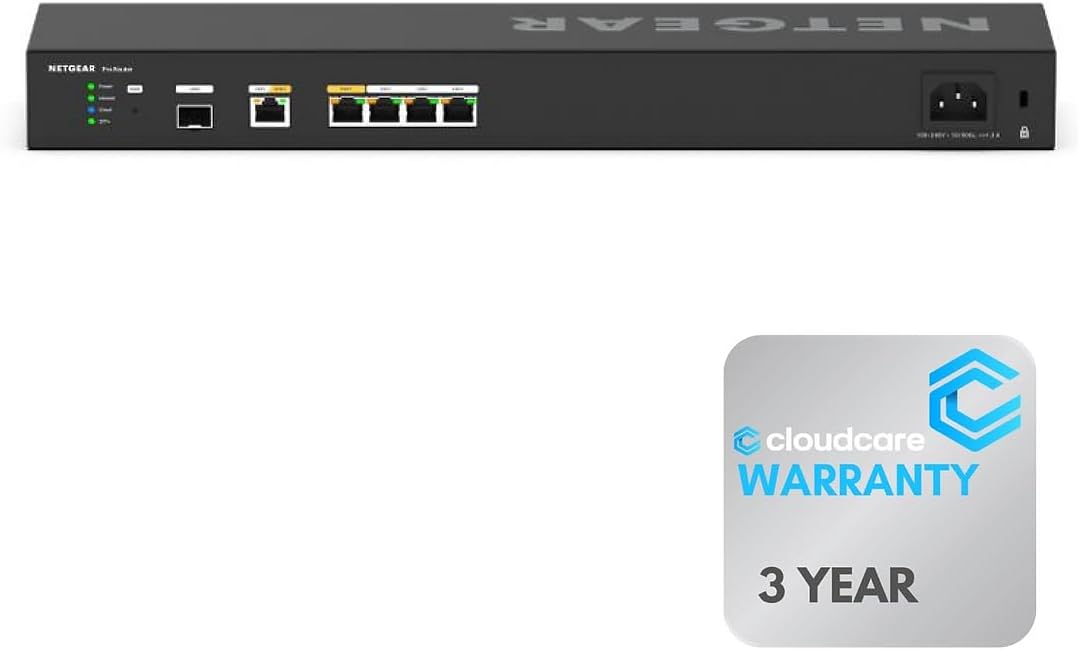
This NETGEAR PR60X variant offers six 10G ports for extensive wired connectivity in professional setups. It supports wall and rack mounting to organize equipment efficiently in server rooms. Cloud management via Insight provides remote visibility and control for IT admins.
We may earn a commission when you buy through this link, at no additional cost to you.
The device maintains continuous connectivity with load balancing and failover for dual WAN. Cloud Care warranty options offer additional support beyond standard manufacturer terms. It is designed for environments where physical organization and high bandwidth are critical.
Like the standard PR60X it comes with a high price tag and subscription requirements. The added port count and mounting options justify the cost for dense network environments. We suggest ensuring you need six 10G ports before purchasing.
Best for enterprise offices needing maximum wired throughput and organization. It is recommended for network managers who prefer cloud oversight. This model excels in professional rack or desktop environments.
Wall-mountable design helps keep network gear tidy and accessible in server closets.
Cloud tools let you track performance and troubleshoot issues remotely without site visits.
We may earn a commission when you buy through this link, at no additional cost to you.
The Linksys LRT224 is a workhorse business router focused on reliable dual WAN failover and security. It supports up to 50 IPsec tunnels for secure site-to-site and client connections. Load balancing ensures optimized bandwidth usage across multiple internet links.
We may earn a commission when you buy through this link, at no additional cost to you.
Firewall throughput and session counts meet the needs of small to medium businesses. The feature set meets a wide range of network requirements without unnecessary complexity. It is known for stability and straightforward management for business users.
The design is older compared to modern cloud routers but remains functional. Port selection is standard for gigabit speeds which may limit high-speed fiber adoption. It suits businesses prioritizing proven reliability over cutting-edge features.
Recommended for businesses needing dependable connectivity and strong VPN support. We suggest it for those who value simplicity and stability. This router delivers consistent performance for daily operations.
Multiple IPsec tunnels allow secure connections to multiple branch offices or remote clients.
Load balancing makes sure you utilize all available internet lines efficiently for better speed.
We may earn a commission when you buy through this link, at no additional cost to you.
Selecting the right dual wan router depends on your specific connectivity needs, security requirements, and budget. Understanding the key factors will help you avoid common pitfalls and choose a device that grows with your network.
Ensure the router has enough WAN and LAN ports to match your internet sources and devices. Some models offer configurable ports that can switch between WAN and LAN roles to provide flexibility.
Choose a unit with at least two WAN ports plus sufficient LAN ports to avoid extra switches.
Check if the router supports automatic failover so traffic switches to a backup line instantly if one fails. Load balancing capabilities help distribute traffic across connections to improve overall performance.
Prioritize routers with easy-to-configure failover settings for uninterrupted business operations.
Look for built-in firewalls, DoS protection, and intrusion prevention systems to guard against threats. Enterprise-grade encryption ensures your data remains safe when transmitting between sites or remote users.
Verify the router includes essential security protocols relevant to your industry compliance needs.
Count the maximum number of VPN tunnels the router can handle to accommodate remote access needs. Support for various protocols like IPsec, OpenVPN, and WireGuard ensures compatibility with your security setup.
Select a model with a tunnel capacity that exceeds your current and future device count.
Decide between local web interfaces and cloud management for ongoing maintenance and oversight. Remote management tools allow you to troubleshoot and update settings from anywhere without being on-site.
Cloud options often simplify managing multiple locations but may come with subscription costs.
Match the router's throughput capacity to your internet plan speeds to avoid bottlenecks. Multi-gigabit ports are necessary if you have fiber connections exceeding standard gigabit limits.
Ensure the firewall and CPU can handle your bandwidth requirements under peak load.
Review the warranty terms and available technical support to protect your investment over time. Some manufacturers offer lifetime warranties which provide added confidence in hardware longevity.
Longer warranties reduce long-term costs for business networks requiring stability.
Verify compatibility with other network devices like switches and access points for seamless operation. Check if the router supports integration with providers or specific setups like Starlink if needed.
Ensure firmware supports any specific modem or ISP requirements you might have.
Begin by connecting your primary and secondary internet sources to the designated WAN ports on the router. Configure the failover and load balancing settings through the web interface or mobile app to define how traffic is managed.
Regularly update the firmware to ensure you have the latest security patches and performance improvements. Check the system logs periodically to monitor connection stability and identify any recurring issues early.
Place the router in a well-ventilated area away from direct sunlight to prevent overheating. Clean the vents occasionally with compressed air to maintain proper airflow and device longevity.
The main benefit is maintaining internet connectivity even if one of your internet lines fails. This ensures business continuity by automatically switching traffic to the backup connection without manual intervention.
Yes, dual wan routers are suitable for home offices or smart homes needing reliable internet. They work well with multiple ISPs or a mix of cable and mobile broadband connections.
Some models include built-in wireless while others are wired-only. Check the specifications carefully if you need integrated Wi-Fi coverage.
It depends on how many remote connections you require. For small offices ten to twenty tunnels might suffice, but larger businesses may need fifty or more.
Setup complexity varies by model. Basic plug-and-play options are easy, while advanced models require network knowledge for VLAN and routing configurations.
Yes, many cloud-managed routers require a subscription for ongoing access to monitoring tools and features. Some offer free tiers with limited capabilities.
We hope this guide helps you identify the right dual wan router for your specific connectivity and security needs. Each product offers unique strengths suited to different environments and technical requirements.
Prioritize features like failover reliability, port count, and security protocols that matter most to your workflow. Balancing performance with budget will ensure you get a solution that serves you well.
Always verify the latest availability and specifications before purchasing as details can change over time. We recommend comparing current models against your needs to make the best choice.