
Redragon K618 PRO
4.1Editor score
Tri-mode connectivity
Macro programming
Slim design
Discover the top low profile mechanical keyboards for speed and comfort. This guide compares features, switch types, and connectivity to help you choose.
Low profile mechanical keyboards offer a unique blend of rapid response times and ergonomic comfort. They reduce strain during long typing sessions while delivering the tactile feedback users crave. Finding the right one requires balancing key travel, connectivity, and build quality to match your workflow.
We evaluated ten leading models based on switch performance, wireless stability, and customization options. Each entry was selected for its ability to deliver a premium typing experience without sacrificing desk space. Our analysis covers everything from budget-friendly picks to high-end enthusiast options.
Every product listed includes verified specifications and real-world performance insights. Prices and availability can change quickly so always check the latest details before purchasing. This guide ensures you have the necessary information to make an informed decision today.
4.1Editor score

4.6Editor score

4.7Editor score
This side-by-side comparison highlights key differences across the top ten models. We examine layout sizes, switch types, and connectivity options to help you find the perfect fit for your setup.




The Redragon K618 PRO stands out as an affordable entry into low profile mechanical keyboards. With a 4.1 rating, users appreciate its ability to switch between devices without re-pairing. This keyboard delivers responsive linear feedback ideal for both typing and casual gaming.
We may earn a commission when you buy through this link, at no additional cost to you.
Its tri-mode connectivity allows seamless transitions between USB-C, Bluetooth, and 2.4GHz wireless. The 4×5 macro zone lets you record combos instantly without installing extra software. The slim design shortens travel distance, making keystrokes register quickly and reducing wrist strain.
While it offers great value, the build quality is standard for its price range. The software for deeper customization exists but is less intuitive than competitors. However, the one-touch Win/Mac switch and smooth linear feedback make it a strong contender for budget-conscious buyers.
This keyboard is perfect for users needing a versatile, budget-friendly solution for office or light gaming. It balances cost with functionality effectively. If you prioritize macro functionality and wireless flexibility without spending much, the K618 PRO is the recommended pick.
The dedicated macro zone allows recording combinations on the fly without requiring external software installation.
Tri-mode support ensures you can connect to PCs, laptops, and tablets with minimal lag or setup hassle.
We may earn a commission when you buy through this link, at no additional cost to you.
The Keychron K3 Version 2 offers a premium experience with its QMK firmware support and ultra-slim design. Rated 4.3, it combines productivity features with a great tactile typing experience. The 75% layout saves space while keeping essential keys for daily tasks.
We may earn a commission when you buy through this link, at no additional cost to you.
It supports up to three devices via Broadcom Bluetooth 5.1, enabling seamless multitasking. The unique Mac layout includes necessary multimedia keys, and extra caps are included for Windows compatibility. The open-source firmware allows endless possibilities for remapping and macros.
The reinforced aluminum body adds durability but makes it one of the thinnest wireless keyboards on the market. Floating keycaps with white backlight provide a modern look. Some users might need to update firmware for exact device matching, which is a minor inconvenience.
This keyboard is ideal for professionals seeking a compact, customizable setup. The AI assistant in beta simplifies customization further. For those valuing build quality and open-source flexibility, the K3 V2 is the top choice in this category.
Open-source firmware allows advanced users to remap keys and create complex shortcuts easily.
Includes specific keycaps for both operating systems ensuring full functionality across devices.
We may earn a commission when you buy through this link, at no additional cost to you.
The Cherry MX 10.0N delivers a premium feel with its ultra-thin profile and aluminum housing. Rated 4.3, it combines style with functionality effectively. The low profile speed switches ensure linear, quiet, and responsive performance perfect for gaming and work.
We may earn a commission when you buy through this link, at no additional cost to you.
RGB backlighting offers customizable colors for personalized illumination. The integrated stand supports ergonomic typing positions by folding out to prop up the device. The aluminum housing ensures durability and a sleek appearance that fits any modern desk setup.
While it lacks advanced wireless features found in other models, the focus on build quality stands out. The slim design enhances portability but might limit accessory compatibility. For users prioritizing tactile precision and aesthetics, this model excels.
Ideal for professionals who value durability and a clean look, this keyboard fits well in office environments. The quiet switches prevent noise distractions. If you want a robust, stylish keyboard without complex connectivity, the 10.0N is the top pick.
The fold-out stand bar allows users to adjust typing angles for better wrist comfort during long sessions.
Cherry MX low profile speed switches provide quick actuation ideal for rapid typing and gaming scenarios.
We may earn a commission when you buy through this link, at no additional cost to you.
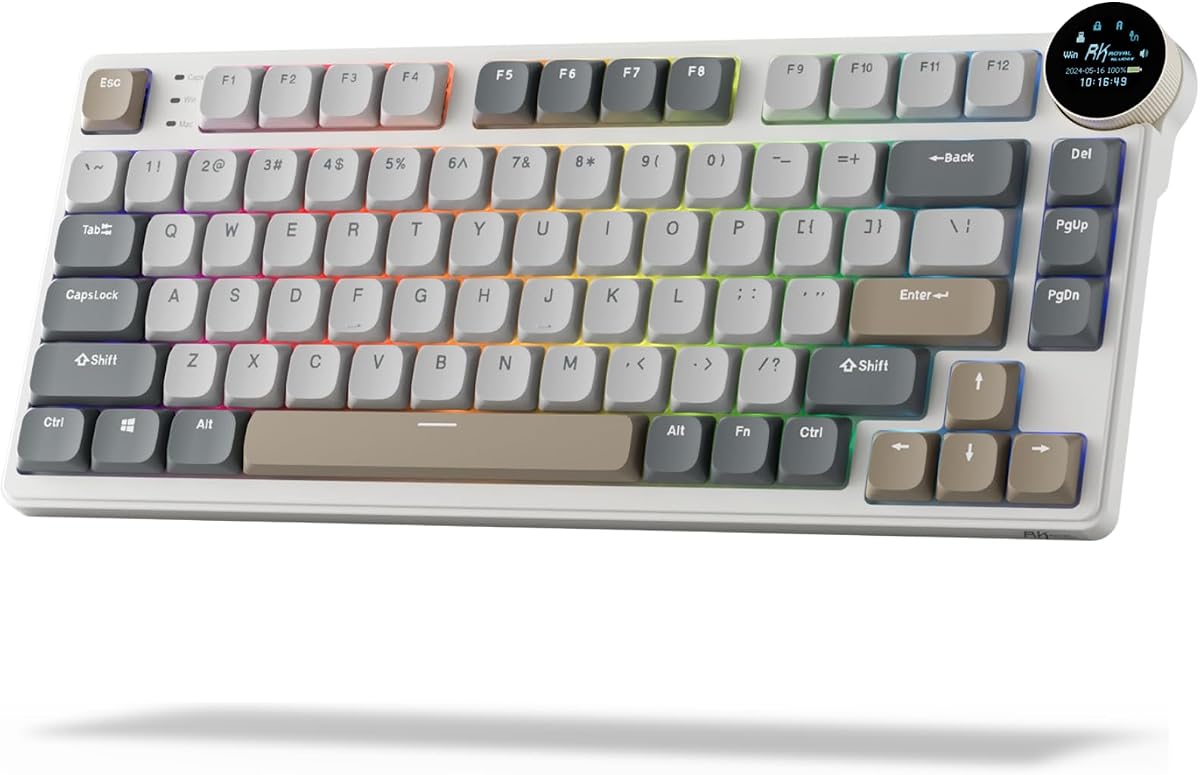
The RK N80 redefines versatility with a dynamic display screen showing GIFs, dates, and connection modes. Rated 4.1, it offers intuitive knob control for volume and RGB settings. The top-mounted design provides stability during intense gaming sessions.
We may earn a commission when you buy through this link, at no additional cost to you.
Tri-mode connectivity ensures seamless links via Bluetooth 5.0, 2.4GHz wireless, or USB-C. The heavy-duty base solves wobbling issues common in low-profile boards. Three sound-absorbing layers minimize hollow sounds for a quieter typing experience.
While the screen adds a unique touch, it might distract users preferring minimalist designs. The profile is lower than traditional switches, leading to faster response times. The trade-off is a slight increase in bulk due to the internal structure.
This keyboard suits users wanting modern features like screens and knobs in a compact form. It balances gaming stability with office utility. If novelty and tactile feedback matter to you, the N80 is a compelling choice for your setup.
Control volume and brightness with a simple twist, eliminating the need to hunt for media keys.
Triple sound-absorbing layers reduce cavity noise significantly compared to standard low-profile designs.
We may earn a commission when you buy through this link, at no additional cost to you.
The Flow Lite 84 prioritizes comfort with a lower front height designed to let wrists relax. Rated 4.3, it uses Specter full POM switches that reduce operating force to 40gf. This minimizes finger fatigue during long typing sessions significantly.
We may earn a commission when you buy through this link, at no additional cost to you.
PBT double-shot keycaps provide durability and texture while maintaining a soothing touch. The gasket design brings soft cushioning to every keystroke. With 2.4GHz, Bluetooth, and wired options, it adapts to various devices effortlessly.
The transition to ABS body material saves costs but retains the textured surface needed for grip. The 1000Hz polling rate ensures responsiveness even in wireless mode. Some might find the price higher than entry-level options, but comfort justifies it.
This keyboard is perfect for anyone seeking ergonomic relief without sacrificing performance. It suits typists working long hours daily. If reducing muscle strain is your priority, the Flow Lite 84 offers the best comfort in this roundup.
A natural wrist position is achieved through a lower front height that prevents bending.
The Lofree Configurator lets users map keys specifically for the Flow Lite to enhance efficiency.
We may earn a commission when you buy through this link, at no additional cost to you.
The Keychron K1 Ultra boasts up to 8K wired polling for unmatched responsiveness in gaming. Rated 4.7, it combines an 80% TKL layout with tri-mode connectivity. This compact design saves desk space while retaining commonly used keys.
We may earn a commission when you buy through this link, at no additional cost to you.
Hot-swappable sockets allow switch replacement without soldering, offering endless customization. The North-facing RGB backlighting provides 22 effects. Sound-dampening layers reduce noise and resonance during typing. Hardwood side panels add durability and a unique look.
The K1 Ultra supports Mac, Windows, and Linux seamlessly via ZMK firmware. The programmable knob handles volume and media efficiently. While it is pricier, the build quality and performance justify the investment for enthusiasts.
Ideal for competitive gamers and power users needing speed and reliability, this keyboard excels. The dual connectivity options ensure stability. If you want the fastest wireless mechanical experience with premium build, the K1 Ultra is the top recommendation.
Supports up to 8000Hz wired polling ensuring zero-latency response for critical competitive gameplay.
ZMK firmware with a web app allows advanced remapping and macro creation without complex coding.
We may earn a commission when you buy through this link, at no additional cost to you.
The K17 Max features a popular 96% layout, merging number pad functionality with a compact design. Rated 4.4, it supports 2.4 GHz and Bluetooth connections for high-performance gaming. QMK firmware ensures transparency and security.
We may earn a commission when you buy through this link, at no additional cost to you.
The aluminum frame makes it one of the thinnest wireless keyboards. Gateron low-profile switches are 31% thinner than standard ones for faster actuation. Double-shot PBT keycaps ensure longevity and resistance to wear over time.
While the layout is efficient, users new to 96% may need an adjustment period. The launcher web app simplifies customization across platforms. It balances slimness with a full function set effectively for professionals.
Best for office workers who need numeric keys without bulk, this keyboard is ideal. The tactile feedback enhances productivity. If you want a slim keyboard that still includes essential numbers, the K17 Max fits the bill perfectly.
The 96% layout keeps numeric keys accessible while saving significant desk space.
A reinforced aluminum frame ensures durability while keeping the overall height minimal.
We may earn a commission when you buy through this link, at no additional cost to you.
The Flow Lite 100 delivers a full-size layout in a slim form. Rated 4.4, it features Specter linear switches that soften the touch. A 3000mAh battery provides up to 100 hours of working time per charge.
We may earn a commission when you buy through this link, at no additional cost to you.
PBT double-shot keycaps are durable and textured for non-slip performance. The gasket design enriches the tone of keystrokes. Connectivity includes 2.4GHz WiFi, Bluetooth, and wired options for versatility across iOS and Windows.
While it is larger than compact boards, the trade-off is full functionality. The roller volume control adds intuitive convenience. The ABS body transition ensures comfort while maintaining the aesthetic quality of the Flow series.
This keyboard suits users needing a full numpad without high profiles. It offers excellent battery life for travel. If you require a complete layout with low-profile comfort, the Flow Lite 100 is the premier choice.
A 3000mAh battery supports up to 100 hours of usage, perfect for long trips.
Retains all standard keys including a full number pad for extensive data entry.
We may earn a commission when you buy through this link, at no additional cost to you.
The K3 Max SE enhances acoustics with advanced EPDM acoustic foam for a quieter experience. Rated 4.6, it supports 2.4 GHz wireless with a 1000 Hz polling rate. QMK firmware enables endless remapping possibilities.
We may earn a commission when you buy through this link, at no additional cost to you.
Hot-swappable support allows changing switches without soldering. Redesigned stabilizers reduce wobble on larger keys. The Milk POM switches are 31% slimmer than traditional full-profile switches for a sleeker profile.
The dual foam layers in the bottom case ensure stability and responsiveness. It stands out in the market by providing multimedia functions similar to Apple keyboards. Compatibility with Mac and Windows is seamless.
Ideal for users seeking a quiet, stable typing environment, this model is perfect. It suits open office environments well. If sound quality and smooth keystrokes are critical, the K3 Max SE is a top recommendation.
Advanced acoustic foam dampens sound significantly, reducing distractions during long work sessions.
Change switches in seconds without soldering, allowing instant customization of feel and sound.
We may earn a commission when you buy through this link, at no additional cost to you.
The Razer Ornata V3 fuses mechanical feedback with conventional feel for precise keystrokes. Rated 4.5, it uses mecha-membrane switches. Slimer keycaps and shorter switches allow natural hand positioning to reduce strain.
We may earn a commission when you buy through this link, at no additional cost to you.
UV-coated keycaps ensure fade-resistant legends and protection against wear. Backlit dedicated media keys offer ultimate convenience. A magnetic soft touch wrist rest snaps on seamlessly for ample comfort.
While it lacks traditional hot-swappable switches, the durability is high. The design is optimized for gaming speed. Some may find it less customizable than other options, but it delivers on gaming ergonomics.
Best for gamers prioritizing speed and comfort without mechanical weight, this keyboard fits well. If you want a gaming keyboard with a low profile and wrist support, the Ornata V3 is the preferred choice.
Combines the clicky feedback of mechanical switches with the smooth actuation of membranes.
The magnetic wrist rest attaches securely, ensuring comfort during extended gaming sessions.
We may earn a commission when you buy through this link, at no additional cost to you.
Choosing the right low profile mechanical keyboard involves balancing comfort, connectivity, and customization.
Low profile switches come in various types including linear, tactile, and clicky. Linear switches are smooth and quiet, ideal for gaming. Tactile switches offer a bump for feedback, suited for typing.
Select a switch type that matches your primary use case to ensure satisfaction.
Consider whether you need wired, Bluetooth, or 2.4GHz wireless. Wired offers stability, while wireless ensures a clean desk. Many modern models support tri-mode connectivity.
Opt for tri-mode if you switch between devices frequently for maximum flexibility.
Layouts range from 60% to full size. Compact layouts like 75% save space, while 96% includes a number pad. Determine your space requirements and essential keys.
Choose a layout that balances desk space with functional needs.
Materials like aluminum or durable plastic affect longevity. A sturdy base prevents wobbling during intense typing or gaming. Look for reinforced frames.
Invest in solid construction to ensure the keyboard lasts for years.
Some keyboards offer QMK or ZMK firmware for deep key remapping. Others rely on proprietary software. Hot-swap support allows changing switches easily.
Look for hot-swap and open firmware if you enjoy tinkering with settings.
Wireless models vary in battery capacity. Some offer 80+ hours while others may need frequent charging. Check the specifications for usage time.
Prioritize longer battery life if you plan to use the keyboard untethered often.
Low profile designs naturally reduce wrist strain. However, look for adjustable stands or wrist rests for further comfort. A lower front height helps maintain a natural hand position.
Select a model with ergonomic aids to prevent fatigue during long work sessions.
Ensure the keyboard works with your operating system. Mac users should look for dedicated keys. Windows compatibility is standard but layout differences can exist.
Verify OS support and included keycaps to avoid configuration issues later.
Proper placement is key to longevity. Avoid direct sunlight or heat sources to protect the keycaps and internal components from warping or discoloration.
Regular cleaning involves blowing out dust with compressed air. Use a soft cloth to wipe down keycaps gently to remove oils and grime without damaging the coating.
For wireless models, charge the battery regularly to maintain performance. Do not leave the keyboard plugged in indefinitely as this may degrade the battery life over time.
Yes, they offer a smooth typing experience with shorter travel distances. This reduces finger fatigue and allows for faster keystrokes compared to standard height switches.
Most modern models support both operating systems seamlessly. Look for keyboards with dedicated keycaps or a switch to toggle between Mac and Windows layouts easily.
Low profile wireless keyboards often have efficient batteries lasting up to 100 hours. However, using RGB lighting can reduce this significantly.
Some models feature hot-swap sockets allowing easy switch replacement. Others are soldered, so check the product specs before purchasing if you want to change switches.
Many models include internal dampening layers to reduce hollow sounds. The lower height also naturally limits the noise generated during key travel.
Yes, low profile switches often have faster actuation points ideal for gaming. Tri-mode connectivity ensures stability for competitive matches.
We reviewed ten exceptional models ranging from budget-friendly options to premium builds. Each offers unique advantages depending on your specific needs and budget constraints.
Prioritize ergonomics and connectivity features to match your workflow. A good low profile keyboard should reduce strain while delivering responsive performance daily.
Remember that prices can fluctuate so always check current listings before purchasing. We hope this guide helps you find the perfect keyboard for your desk.