
Canon PIXMA TR7120
4.3Editor score
Compact design
Auto duplex printing
AirPrint support
Finding the right all in one printer for MacBook Air is essential for seamless productivity. You need reliable wireless connectivity, high-quality output, and intuitive software that integrates well with macOS. This guide explores models designed to fit your workflow effortlessly.
We evaluated each printer based on compatibility, speed, print quality, and ease of use. Our analysis focuses on how well these devices pair with Apple ecosystems and handle everyday tasks like document printing and scanning. Every product was selected for its proven performance in home and office environments.
Each pick highlights key strengths and ideal use cases to help you decide quickly. We included detailed specs and real-world performance notes so you can compare value and functionality. Please note that prices and availability change frequently, so check current listings before purchasing.
4.3Editor score

3.9Editor score

4.3Editor score
As an Amazon Associate we earn from qualifying purchases.
This side-by-side comparison highlights the core specifications and capabilities of each top-rated printer. Use this table to quickly identify which model meets your specific needs for speed, ink efficiency, and smart features.





The HP OfficeJet Pro 8125 stands out for its professional-grade features tailored to home offices. It scores highly on speed and connectivity, offering rapid print speeds and robust wireless performance. This printer is designed to handle diverse document needs without slowing down your workflow.
We may earn a commission when you buy through this link, at no additional cost to you.
Key strengths include the HP AI feature that optimizes print formatting to save paper and improve layout precision. The dual-band Wi-Fi ensures stable connections, while the HP App simplifies remote printing and scanning tasks. Security is also a priority with HP Wolf Essential Security protecting your network from threats.
Trade-offs include reliance on original HP chips which may limit cartridge options for some users. The Instant Ink trial expires after three months, so ongoing costs should be considered. However, the savings from optimized printing and reliable performance often offset these considerations.
Buy this if you value speed, security, and smart features in a compact all-in-one printer. It is ideal for small offices needing reliable color prints and efficient document handling. The seamless integration with mobile devices makes it a top choice for modern professionals.
HP AI removes unwanted content from web pages and emails to reduce waste and improve formatting accuracy.
Dual-band Wi-Fi automatically detects and resolves connection issues for uninterrupted printing from any device.
We may earn a commission when you buy through this link, at no additional cost to you.
The Epson EcoTank ET-2903 offers exceptional value with ink included for up to three years. This supertank system eliminates frequent cartridge replacements, making it ideal for high-volume users. Its high-resolution output ensures stunning photo quality alongside sharp text documents.
We may earn a commission when you buy through this link, at no additional cost to you.
Strengths include the refillable ink tanks that reduce plastic waste and lower long-term costs. The Heat-Free technology provides reliable performance with a durable permanent printhead. Mobile printing via the Epson Smart Panel app and AirPrint support adds convenience for Mac users.
Drawbacks involve slower print speeds compared to laser or higher-end inkjet models. Refilling tanks requires care to avoid spills, though the keyed bottles simplify the process. Despite this, the cost savings and eco-friendly design make it a compelling choice.
Buy this if you print frequently and want to minimize ongoing ink expenses. It suits home offices or creative setups needing high-quality photos. The upfront investment pays off quickly through reduced consumable costs over time.
Join millions of EcoTank owners reducing millions of pounds of plastic waste by switching to refillable ink tanks.
With 5760 x 1440 dpi resolution, this printer delivers vibrant colors and fine details on photos and media.
We may earn a commission when you buy through this link, at no additional cost to you.
The Canon PIXMA TR7120 is a budget-friendly option that doesn't compromise on essential features. It delivers crisp text and vibrant colors thanks to its hybrid ink system. Setup is effortless with quick smartphone pairing and seamless mobile printing options.
We may earn a commission when you buy through this link, at no additional cost to you.
Key benefits include the auto document feeder for scanning multi-page documents and automatic duplex printing to save paper. The dual-band Wi-Fi ensures stable connections while the OLED display provides intuitive control. Its compact design fits well in small spaces without sacrificing performance.
Trade-offs include a smaller paper tray requiring frequent refills and limited advanced features compared to pricier models. However, for basic home or hybrid work needs, it offers exceptional value. The combination of speed and quality at this price point is hard to beat.
Buy this if you need a reliable printer for everyday tasks on a tight budget. It works well for students or light office use where cost efficiency matters. The simple operation and strong mobile support make it user-friendly for all skill levels.
This system delivers sharp text and vivid colors with fewer cartridge changes while maintaining quality output.
Print directly from smartphones using Canon PRINT App, Apple AirPrint, or Mopria Print Service seamlessly.
We may earn a commission when you buy through this link, at no additional cost to you.
The Canon PIXMA TS6520 is designed for users prioritizing aesthetics and compact size. It offers high-quality prints for documents and photos in a space-saving footprint. Setup is intuitive with wireless connectivity that pairs easily with Mac devices.
We may earn a commission when you buy through this link, at no additional cost to you.
Strengths include automatic duplex printing to reduce paper usage and a monochrome OLED display for easy monitoring. The printer supports borderless photos up to 8.5 x 11 inches allowing creative flexibility. Its quiet operation makes it suitable for shared workspaces.
Drawbacks include the lack of an auto document feeder and slower print speeds. Users scanning multi-page documents must place pages individually which adds time. Despite this, the design and print quality remain strong selling points for home environments.
Buy this if you want a stylish printer that fits discreetly into home decor. It suits light users needing photo capabilities without heavy scanning demands. The balance of form and function makes it a standout choice for casual printing tasks.
Print photos up to 8.5 by 11 inches with vivid colors and sharp details using the hybrid ink system.
Dual-band Wi-Fi ensures smooth printing from anywhere in your home or office without connection issues.
We may earn a commission when you buy through this link, at no additional cost to you.
The Brother Work Smart 1360 combines compact design with strong cloud integration features. It allows printing and scanning to apps like Google Drive and Dropbox directly from the device. This flexibility supports modern workflows requiring seamless file management.
We may earn a commission when you buy through this link, at no additional cost to you.
Key features include a 20-sheet auto document feeder and automatic duplex printing for efficiency. The 1.8-inch color display simplifies navigation while the Brother Mobile Connect app provides mobile control. Fast print speeds ensure tasks complete quickly without sacrificing quality.
Trade-offs include limited ink cartridge choices and basic control options compared to premium models. Users may find fewer advanced settings available for customization. However, for general home office needs, the cloud connectivity and speed offer substantial value.
Buy this if you need a printer that simplifies cloud document handling. It is suitable for users who rely on digital storage and frequent scanning. The compact size and straightforward interface make it accessible for all skill levels.
Print from and scan to popular apps like Google Drive Dropbox Box and OneDrive with ease.
Monitor ink usage and navigate menus on your mobile device using the Brother Mobile Connect app.
We may earn a commission when you buy through this link, at no additional cost to you.
The HP Envy 6155 is tailored for home users seeking vibrant photo and document output. Its True-to-Screen technology ensures prints match screen colors accurately for consistent results. The 2.4-inch touchscreen offers smooth navigation with an intuitive interface for all users.
We may earn a commission when you buy through this link, at no additional cost to you.
Strengths include dual-band Wi-Fi for stable wireless performance and AI features that optimize print formatting. The HP App supports mobile printing and scanning allowing tasks to be completed remotely. Its compact design fits easily into home office spaces.
Drawbacks involve slower color print speeds compared to black and reliance on specific HP cartridges. Ongoing ink costs may add up after the trial period. Nevertheless, the print quality and user experience justify the investment for creative tasks.
Buy this if you prioritize color accuracy and ease of use in a home printer. It is ideal for families printing photos and documents regularly. The integration of smart features ensures a seamless experience with Mac devices.
Print documents and photos that look as vibrant as they do on your screen with P3 technology.
HP AI removes unwanted content from web pages and emails to save paper and improve layouts.
We may earn a commission when you buy through this link, at no additional cost to you.
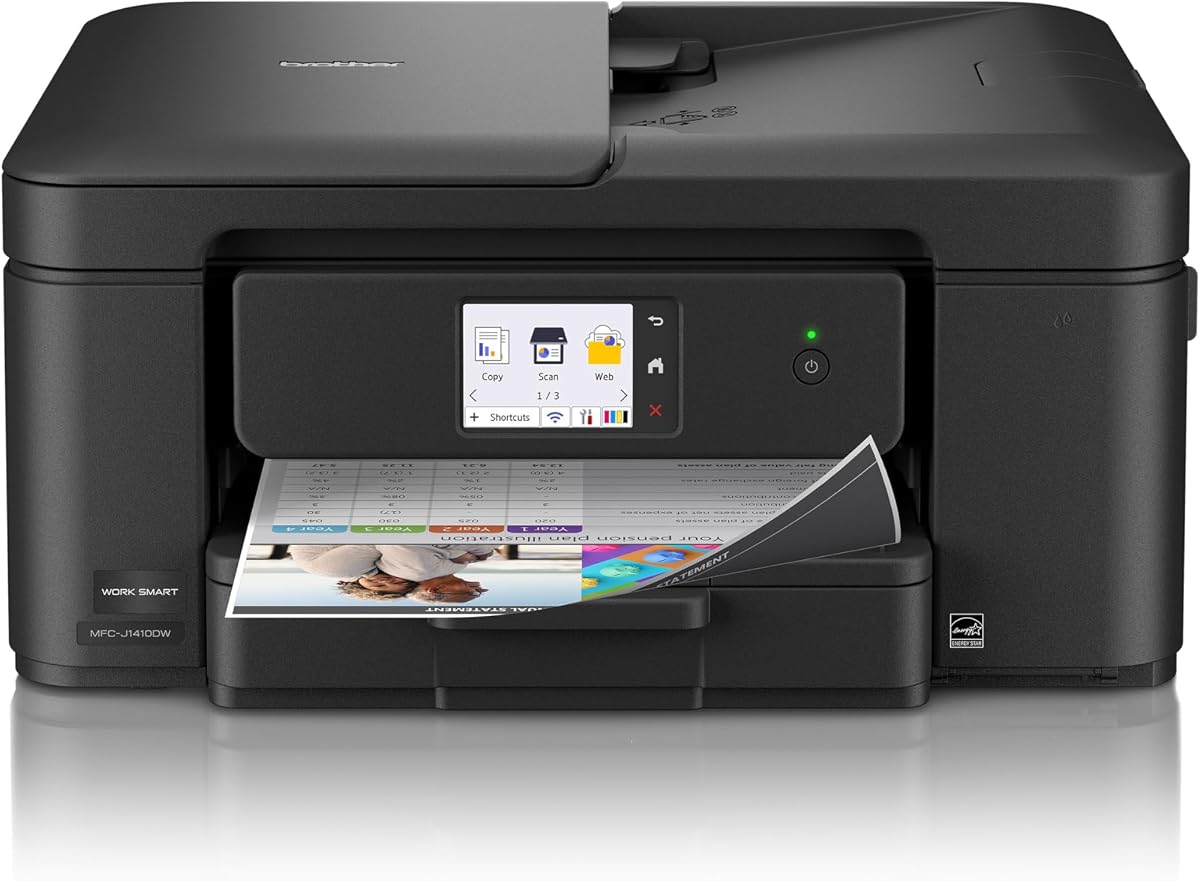
The Brother Work Smart 1410 offers robust features suited for small offices and power users. It delivers fast print speeds and a large touchscreen for intuitive operation. Cloud app integration enables flexible printing from multiple sources without complex setups.
We may earn a commission when you buy through this link, at no additional cost to you.
Key features include a 20-sheet auto document feeder and automatic duplex printing to boost productivity. The Brother Mobile Connect app simplifies management and ink monitoring. Genuine LC501 ink cartridges ensure reliable performance and print quality.
Trade-offs include the physical footprint which is larger than compact models and subscription trial limitations. Users may need to manage ink renewals after the trial ends. However, the speed and cloud capabilities provide significant value for daily tasks.
Buy this if you need a reliable printer for moderate to high volume printing. It is ideal for small teams requiring efficient scanning and duplex options. The combination of speed and connectivity makes it a strong contender for office use.
A clear 2.7-inch display simplifies navigation and settings adjustments for all users.
Seamlessly print and scan using Google Drive Dropbox Box OneDrive and other cloud services.
We may earn a commission when you buy through this link, at no additional cost to you.
The HP OfficeJet 3830 integrates voice commands and instant ink services for convenience. It supports fax capabilities alongside standard printing and scanning functions. Setup is straightforward and it pairs well with smartphones for remote tasks.
We may earn a commission when you buy through this link, at no additional cost to you.
Strengths include the Alexa integration allowing print commands via voice. The Quiet mode minimizes noise in shared spaces. Instant Ink readiness ensures supplies arrive before running out maintaining uninterrupted productivity.
Drawbacks include basic features and older specifications compared to newer models. Users may find slower speeds and limited smart features. Despite this, the value and voice control make it a practical option for casual users.
Buy this if you want a budget printer with voice command capabilities. It suits light home users needing fax and reliable printing. The convenience of auto-ordered ink adds significant long-term value.
Use Alexa to manage prints and receive notifications directly from your smart home system.
Optional quiet mode keeps noise to a minimum during printing tasks in shared environments.
We may earn a commission when you buy through this link, at no additional cost to you.
The Canon PIXMA TR8620a combines fax scanning and printing into one robust unit. It offers smart reorders via Alexa to prevent ink shortages automatically. This printer is designed for users needing comprehensive document handling without multiple devices.
We may earn a commission when you buy through this link, at no additional cost to you.
Key features include a Micro SD slot for direct photo printing and fast print speeds. The auto duplex function saves paper while the dual trays support high-volume work. AirPrint ensures seamless connectivity with Apple devices.
Trade-offs include a larger physical footprint and more complex initial setup. Users may spend time configuring smart features. However, the functionality and reliability make it a strong choice for busy home offices.
Buy this if you need a multifunction printer with smart inventory management. It is ideal for users managing frequent documents and photos. The integration of fax and SD slots adds versatility for diverse printing needs.
Alexa ensures you never run out of ink by placing smart orders automatically without subscriptions.
Print photos directly from SD cards without needing a computer or smartphone connection.
We may earn a commission when you buy through this link, at no additional cost to you.
The Canon PIXMA TR4720 is an entry-level printer offering fax capabilities essential for some users. It provides auto duplex printing and an auto document feeder for efficiency. Wireless connectivity supports mobile printing through smartphone apps.
We may earn a commission when you buy through this link, at no additional cost to you.
Strengths include the built-in fax function and Energy Star certification for low power consumption. The printer handles borderless prints up to 8.5 x 11 inches for photos. Setup is straightforward making it accessible for home users.
Drawbacks involve slower print speeds and basic feature sets compared to advanced models. Users needing high-speed printing may find it limiting. However, the inclusion of fax and duplex at this price point offers strong value.
Buy this if you need fax functionality without a high budget. It is suitable for home offices with occasional document needs. The energy efficiency and compact design make it practical for small spaces.
Send and receive faxes directly from your printer without needing a separate telephone line.
Energy Star certification ensures low power consumption during operation and standby modes.
We may earn a commission when you buy through this link, at no additional cost to you.
Selecting the right printer involves weighing multiple factors to match your specific usage patterns. This guide outlines key considerations to help you find a device that balances cost performance and compatibility with your MacBook Air setup.
Ensure the printer supports AirPrint or has dedicated macOS drivers for seamless wireless integration. Look for dual-band Wi-Fi to maintain stable connections in busy households or offices where multiple devices connect simultaneously.
Always verify macOS support before purchasing to avoid driver installation issues during setup.
For document work, resolutions of 1200 dpi and higher provide sharp text. Photo printing benefits from inkjet models with higher DPI ratings to capture fine details and accurate colors essential for creative tasks.
Choose inkjet for photos and laser or high-resolution inkjet for detailed documents to meet your specific output needs.
Speeds range from 8 to 20 pages per minute depending on the model. Evaluate your daily page volume and select a printer with a duty cycle that matches your workload to ensure longevity and performance consistency.
Prioritize faster speeds if you frequently print long documents or multiple files to save time.
Total cost of ownership includes cartridge prices and page yields. Supertank systems offer long-term savings with refillable tanks while traditional cartridges may have higher recurring costs despite lower initial prices.
Calculate cost per page based on your usage to determine which ink system fits your budget.
An auto document feeder (ADF) speeds up multi-page scanning tasks significantly. Models without ADF require placing pages individually which can be time-consuming for larger document sets.
Choose a printer with an ADF if you frequently digitize multi-page documents for digital storage.
Mobile apps and cloud integration allow printing from anywhere without opening files on your computer. Look for support for AirPrint Mopria or manufacturer apps for added convenience in remote workflows.
Mobile printing capabilities are essential for users who manage documents from tablets or phones.
Compact printers save desk space which is crucial in small offices or home setups. Consider dimensions and aesthetic design to ensure the unit complements your workspace without cluttering the area.
Measure your available space before purchasing to ensure the printer fits comfortably on your desk.
Smart features like voice control or security software add convenience and protection for your data. Evaluate which features align with your workflow such as fax capabilities or automated ink management systems.
Select smart tools that genuinely enhance productivity rather than adding unnecessary complexity to your setup.
Set up your printer by downloading the manufacturer's app or using macOS system preferences for driver installation. Connect your MacBook Air to the same Wi-Fi network as the printer to enable wireless printing instantly.
Print documents by selecting print from the application menu and choosing the printer from the available devices. Use the HP App Epson Smart Panel or Canon PRINT apps for mobile printing directly from your phone or tablet.
Maintain your printer by running cleaning cycles periodically to prevent clogged nozzles and using genuine ink cartridges. Store the printer in a dry area and cover it when not in use to prolong the life of internal components.
Some printers block non-genuine cartridges to ensure quality and protect the warranty. For example HP and Canon may require original chips. Check the product description for cartridge restrictions before purchasing third-party ink.
Most models listed include AirPrint support allowing seamless printing from Apple devices without extra drivers. Verify compatibility on the manufacturer's site if you are unsure about your specific macOS version requirements.
Clean the print heads every two to three months or if you notice streaks in prints. Use the printer's maintenance menu to run cleaning cycles which prevent clogs and ensure consistent ink flow.
Yes all featured models support automatic duplex printing to save paper and reduce costs. This feature prints on both sides of the page automatically and is standard across budget and premium options.
Cartridge printers use disposable cartridges that are replaced when empty. Supertank models use refillable tanks offering lower long-term ink costs and less plastic waste.
Yes most models support borderless printing up to 8.5 by 11 inches for photos. Check the paper size limits in the specifications to ensure the printer meets your photo printing needs.
Install the manufacturer's scanning software or use macOS Image Capture. Select the printer on your Wi-Fi network and choose scan to save files directly to your computer or cloud storage.
Yes these printers are designed for home and small office environments with compact footprints and reliable connectivity. They balance cost and features to meet everyday document printing and scanning demands.
The HP OfficeJet Pro 8125 Epson EcoTank ET-2903 and Canon PIXMA TR7120 offer distinct advantages depending on whether you prioritize smart features ink savings or budget. Each provides seamless integration with Apple devices for efficient home office workflows.
Prioritize your needs by evaluating speed ink costs and physical size before making a decision. Consider long-term costs including ink replacements to avoid unexpected expenses after your initial purchase.
Prices and promotions change frequently so check current listings before finalizing your order. Use this guide to compare key specs and ensure you select the right printer for your MacBook Air setup.