
Logitech G203 Wired Gaming Mouse
4.6Editor score
8000 DPI optical sensor
Six-button comfortable design
RGB lighting customization
This guide compares the top 10 analog gaming mice for precision, comfort, and features to help you choose the best gaming mouse for your needs in October 2026.
Finding the right analog gaming mouse is essential for competitive play and daily comfort. These devices offer precise tracking and customizable buttons to enhance your gaming experience significantly.
We evaluated ten top models based on sensor performance, build quality, and ergonomic design. Each product was analyzed to ensure it meets the demands of serious gamers and casual users alike.
Our picks highlight key features like DPI settings, button layout, and lighting options. Remember that availability and pricing can change, so check current details before making your final decision.
4.6Editor score

4.6Editor score

4.6Editor score
This side-by-side comparison highlights the unique strengths of each analog gaming mouse. Consider your preferred grip style and game genres when reviewing these specifications.




The Logitech G502 Hero stands out as a top contender in the analog gaming mouse category. It boasts a HERO Gaming Sensor that delivers precision tracking up to 25600 DPI without smoothing or acceleration.
We may earn a commission when you buy through this link, at no additional cost to you.
Its 11 programmable buttons provide extensive customization for complex gameplay. The dual-mode hyper-fast scroll wheel and LIGHTSYNC technology add versatility and immersive visual feedback during sessions.
While the mouse features a robust build, the cable design might limit movement range compared to wireless options. Some users may find the default weight substantial despite the adjustable weight system.
Ideal for gamers seeking precision and control, the G502 Hero is highly recommended. Its combination of sensor quality and customization makes it a standout choice for competitive play.
The HERO sensor ensures sub-micron level detection, providing accurate cursor movement essential for competitive gaming environments.
With 11 buttons and adjustable weights, you can tailor the mouse to your unique playstyle and grip preferences effortlessly.
We may earn a commission when you buy through this link, at no additional cost to you.
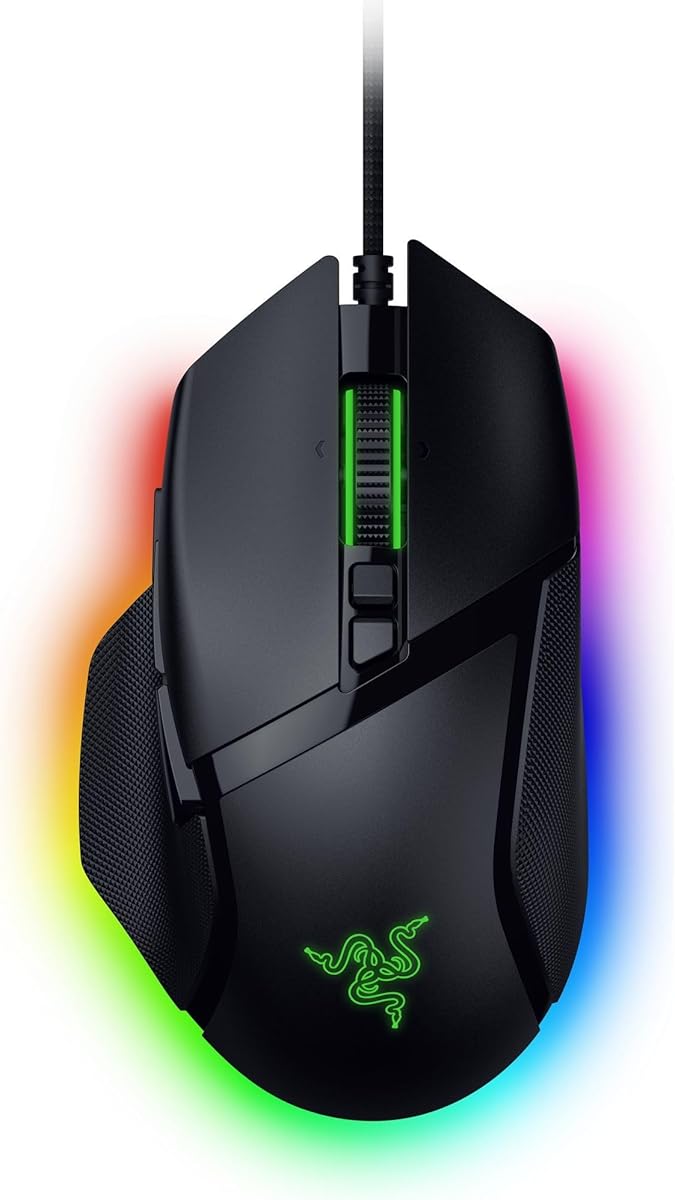
The Razer Basilisk V3 is celebrated for its ergonomic design and versatile scroll wheel. It features 10+1 programmable buttons for limitless configurations across various game genres and applications.
We may earn a commission when you buy through this link, at no additional cost to you.
Its HyperScroll Tilt Wheel offers both smooth free-spin scrolling and tactile cycling, enhancing productivity and gaming alike. The optical switches ensure fast response times with zero unintended misclicks.
Though highly rated, full utilization of lighting and macro features requires software installation. Some users might find the initial setup time-consuming before accessing the full potential of the device.
This mouse is perfect for gamers prioritizing comfort and customization. The ergonomic thumb rest supports long sessions, making it a reliable companion for extensive use.
The iconic ergonomic design with thumb rest ensures effortless use and lasting comfort even during intense gaming marathons.
Assign essential actions like push-to-talk across programmable buttons to streamline your workflow and improve in-game efficiency.
We may earn a commission when you buy through this link, at no additional cost to you.
The Logitech G403 Hero delivers a balance of performance and comfort with its Hero 16K sensor. It supports DPI settings up to 16000, ensuring precision tracking for various gaming styles.
We may earn a commission when you buy through this link, at no additional cost to you.
Weighing only 87 grams, this mouse is designed for lightweight use without sacrificing durability. Its ergonomic shape and rubber grips provide a secure hold during intense gameplay.
While the sensor performance is strong, the number of programmable buttons is lower compared to other models. Users relying heavily on macros might need to consider options with more inputs.
Recommended for gamers preferring lightweight tools, the G403 Hero offers reliable performance. Its on-board memory allows easy profile switching across different computers seamlessly.
Up to 8x faster than standard USB mice, this device ensures quick response times essential for competitive scenarios.
Use G hub software to configure programmable buttons and sensitivity settings to match your specific gameplay needs.
We may earn a commission when you buy through this link, at no additional cost to you.
The Logitech G203 offers exceptional value for gamers on a budget. Its 8000 DPI optical sensor ensures precision tracking with zero filtering or smoothing for improved control.
We may earn a commission when you buy through this link, at no additional cost to you.
Despite its affordability, the mouse supports RGB lighting customization via G HUB. The six-button design allows for essential commands and simplifies gameplay without complexity.
While budget-friendly, it lacks advanced features like adjustable weights or extensive macro support. This may limit users seeking deeper customization for complex strategies.
Ideal for entry-level gamers, the G203 provides a solid foundation. Its mechanical buttons ensure durability, making it a practical choice for everyday use.
Step up to gaming grade performance with an optical sensor that outperforms standard computer mice effortlessly.
Customize lighting to react to screen color shifts or music beats for an immersive experience.
We may earn a commission when you buy through this link, at no additional cost to you.
The Logitech G MX518 combines classic design with modern performance. Its HERO 25K sensor captures movements at up to 17000 frames per second for unmatched accuracy.
We may earn a commission when you buy through this link, at no additional cost to you.
With on-board memory, you can save up to five profiles and use them on any PC without additional software. This portability ensures consistent settings across different systems.
While the sensor is advanced, the design is reminiscent of older models. Users looking for ultra-modern aesthetics or wireless connectivity might prefer newer alternatives.
This mouse suits fans of proven designs who value performance. The reliable switches and adjustable DPI settings make it a robust tool for various gaming needs.
Save your preferred settings to on-board memory for seamless transitions between computers without logging in.
Use G HUB to program favorite commands and macros, putting essential moves at your fingertips.
We may earn a commission when you buy through this link, at no additional cost to you.
The Corsair Scimitar RGB Elite is purpose-built for MMOs and MOBAs with 17 programmable buttons. Its Key Slider system allows repositioning of side buttons to fit your hand perfectly.
We may earn a commission when you buy through this link, at no additional cost to you.
Featuring a native 18000 DPI optical sensor, it offers highly accurate tracking. The durable switches and braided cable ensure longevity even during extended gaming sessions.
The unique design might feel bulky compared to standard mice, requiring an adjustment period. New users may need time to learn the button layout effectively.
Perfect for complex strategy games, this mouse enhances command execution. Its comfort and durability make it a reliable choice for dedicated MMO players.
17 buttons enable execution of complex macros in MMOs and MOBAs for strategic advantage.
Reposition side buttons using the patented Key Slider system to match your grip comfortably.
We may earn a commission when you buy through this link, at no additional cost to you.
The Razer Basilisk V3 35K features a Focus Pro 35K Optical Sensor for best-in-class tracking on various surfaces including glass. Its scroll wheel auto-switches between modes for smooth and precise control.
We may earn a commission when you buy through this link, at no additional cost to you.
Optical switches offer a 90-million click lifecycle with zero double-clicking issues, ensuring long-term reliability. The Speedflex cable minimizes drag for quicker and smoother swipes.
Despite its premium features, the cost is higher than standard options. Users may find the software setup required to unlock full capabilities cumbersome.
Ideal for those seeking top-tier accuracy, this mouse delivers. Its durable switches and ergonomic design make it a premium choice for serious enthusiasts.
Intelligent sensor functions support granular aim and control on a wider variety of surfaces effortlessly.
Optical switches ensure rapid execution without debounce delay, outshining competitors in speed and precision.
We may earn a commission when you buy through this link, at no additional cost to you.
The Corsair NIGHTSWORD features a Smart Tunable Weight System that adjusts the center of gravity in real time. This allows fine-tuning balance to perfectly fit your grip style.
We may earn a commission when you buy through this link, at no additional cost to you.
Its custom 18000 DPI optical sensor ensures ultra-accurate tracking for precise movements. Rubber grips inspired by pro sports equipment enhance control during competitive play.
Managing multiple weight configurations can be time-consuming. Some users might find the heavier range unsuitable for fast-paced games requiring minimal resistance.
This mouse is ideal for those prioritizing personalized balance and comfort. Its professional design offers stability and precision for demanding gaming scenarios.
Two sets of weights and six mounting locations offer 120 configurations for tailored balance.
Contoured shape naturally fits your hand, providing stability during extended sessions.
We may earn a commission when you buy through this link, at no additional cost to you.
The Corsair M65 RGB Ultra is designed for FPS games with its iconic aluminum frame and adjustable weights. Its Marksmen sensor captures every movement with 26000 DPI sensitivity.
We may earn a commission when you buy through this link, at no additional cost to you.
AXON technology transmits movements up to 8x faster than conventional mice due to an 8000Hz polling rate. Sensor fusion control enables ultra-low lift-off distance for accurate tracking.
The robust build may feel heavy for some users seeking lightweight mice. Those preferring minimalism might find the weight and size excessive for rapid movements.
Ideal for FPS gamers demanding precision, this mouse delivers. The durable frame ensures longevity, making it a solid investment for competitive play.
AXON Hyper-Processing registers and transmits clicks and movements 8x faster for minimal latency.
The anodized aluminum frame provides a familiar shape with enduring strength.
We may earn a commission when you buy through this link, at no additional cost to you.
The Razer Basilisk V3 Customizable RGB offers a favorite ergonomic design and 11 programmable buttons. Its Focus Plus 26K Optical Sensor tracks movement flawlessly with zero smoothing for pixel-precise accuracy.
We may earn a commission when you buy through this link, at no additional cost to you.
11 Chroma RGB lighting zones react dynamically with over 150 integrated games, creating an immersive atmosphere. Optical switches ensure crisp execution with zero unintended misclicks.
To unlock full potential, software is required, which may deter some users. The higher price point reflects the advanced features and build quality.
Recommended for those valuing aesthetic and functional customization, this mouse excels. It balances performance and style perfectly for modern gaming setups.
Customize lighting zones with over 16.8 million colors to match your gaming environment.
Optical switches enable rapid and accurate inputs without debounce delay for superior performance.
We may earn a commission when you buy through this link, at no additional cost to you.
Selecting the right analog gaming mouse involves understanding your specific needs and preferences. This guide breaks down key factors to consider before making a purchase.
The sensor is the heart of any gaming mouse, responsible for tracking accuracy. Look for optical sensors with high DPI settings and zero smoothing to ensure movements translate precisely to the screen.
Prioritize mice with proven sensor technology from reputable brands to avoid issues like jitter or inconsistent tracking during fast movements.
Analog gaming mice vary in shape and size to suit different hand sizes and grip styles. Choose a design that feels natural in your hand to prevent fatigue during long sessions.
Test the weight distribution and button placement if possible, as a well-fitted mouse enhances control and reduces strain.
The number and layout of programmable buttons determine how versatile the mouse is. Gamers who rely on macros may prefer mice with side buttons or extensive programmable options.
Ensure buttons are positioned for easy access without accidental clicks to maintain focus during gameplay.
Gaming mice use mechanical or optical switches to register clicks. Optical switches often provide faster response and higher click lifespans, reducing the risk of double-click issues over time.
Check the rated click count for durability to ensure the mouse remains reliable throughout its intended lifespan.
Many modern mice require companion software to customize DPI settings, lighting, and macros. Ensure the software is user-friendly and compatible with your operating system.
Consider mice with on-board memory if you want to save profiles for use on different PCs without reinstalling software.
Analog gaming mice typically use a wired connection for stable performance. Look for a cable with minimal drag to reduce resistance during movement.
While wireless options exist, wired mice often provide the lowest latency, crucial for competitive gaming.
Materials like aluminum or high-grade plastics contribute to the mouse's durability and feel. A sturdy build can withstand the wear and tear of daily use.
Inspect reviews for feedback on longevity and sturdiness to ensure you are investing in a reliable product.
Gaming mice range from budget-friendly to premium models. Balance your budget with the features you need, focusing on performance and comfort over aesthetics.
Consider value by comparing specifications like sensor quality and button count to ensure you get the most for your money.
Start by installing any required software to configure DPI settings and programmable buttons to your preferences. This ensures the mouse is optimized for your gaming style from the beginning.
Regularly clean the mouse surface and sensor with a soft cloth to remove dust and oils that can affect tracking accuracy. Proper maintenance helps preserve the device's functionality and aesthetic appeal.
Store the mouse in a dry place when not in use to protect the cable and internal components. Avoid excessive bending or twisting of the cable to prevent internal damage.
The ideal DPI depends on your playstyle and monitor resolution. Most gamers find settings between 800 and 3200 DPI offer a balance of precision and speed. Adjusting DPI on-the-fly can enhance adaptability during different game phases.
Optical switches are generally more durable and faster than mechanical switches, reducing the risk of double-click issues. They use light to register clicks, which provides consistent performance and a longer lifespan.
Many modern analog gaming mice perform well on a variety of surfaces including glass due to advanced sensors. However, using a high-quality mouse pad ensures consistent tracking and extends the sensor's life.
Most gaming mice come with dedicated software to assign macros and key bindings to buttons. Follow the software's interface to map commands, allowing you to execute complex actions with a single click.
Weight significantly impacts control and comfort. Some players prefer lighter mice for speed, while others favor heavier models for stability. Look for mice with adjustable weight systems to customize the feel.
Updating drivers occasionally ensures optimal performance and compatibility with new games. Check the manufacturer's website periodically for updates, but avoid frequent updates unless issues arise.
Our top picks offer a range of features to suit diverse gaming preferences. From budget-friendly options to high-end models, there is a mouse for every level of player.
Focus on ergonomics and sensor quality when making your decision. Comfort and precision are key to enjoying extended gaming sessions without discomfort.
Remember to verify current availability and pricing before purchasing. These factors can influence your final choice, so ensure you have the latest information.