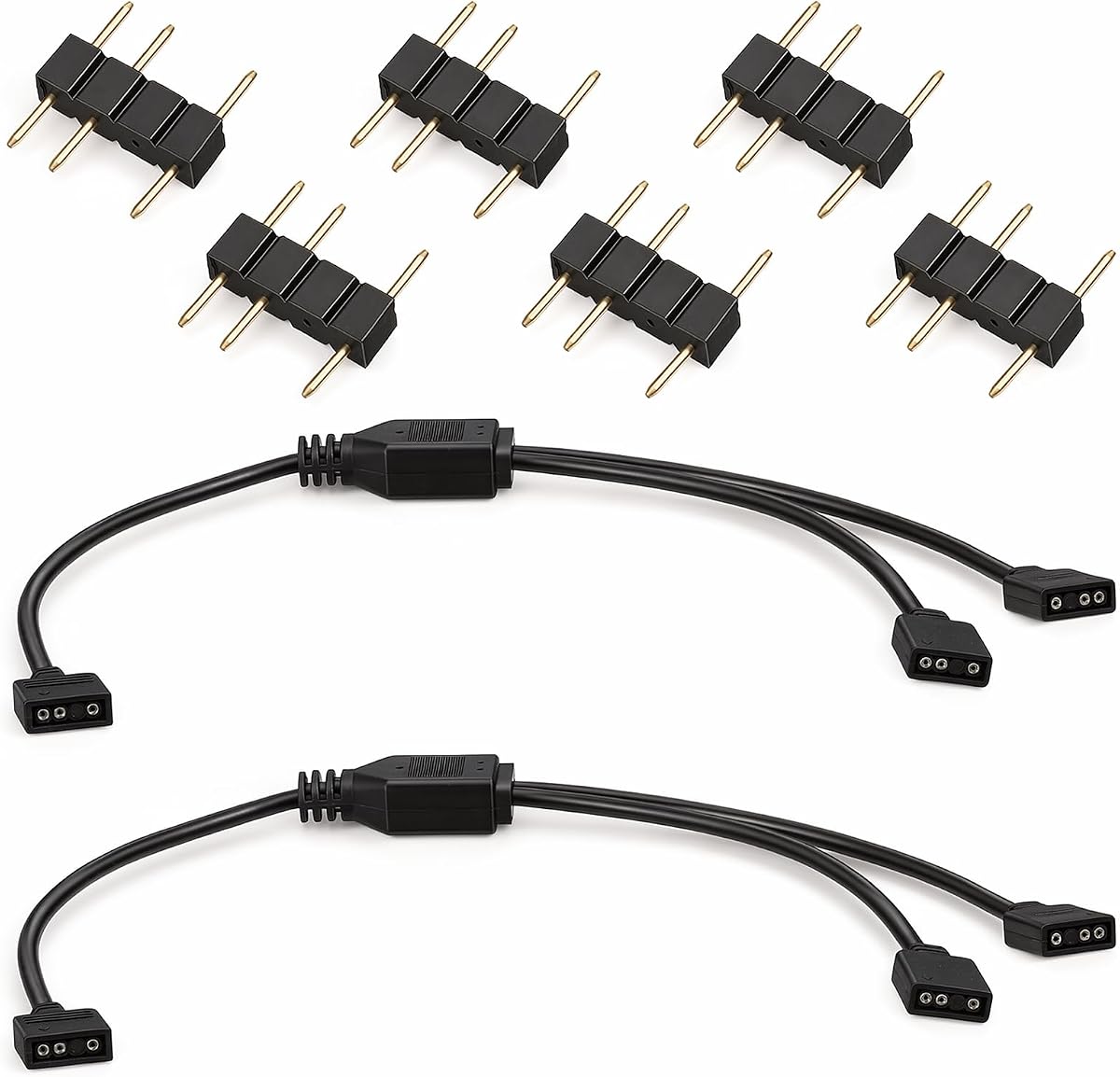
2 Pcs 5V 3 Pin ARGB Splitter Cable
5.0Editor score
Affordable two pack
Two port output
Pure copper cores
This guide compares the top ten ARGB splitter cables for PC builds, evaluating connectivity, durability, and signal quality for optimal lighting performance.
Choosing the right ARGB splitter cable ensures your lighting system works smoothly without signal loss. A good splitter matches your motherboard header type and supports addressable devices safely.
We evaluated ten popular models based on connector quality, cable length, and ease of installation. Our list covers various splitter ratios to fit different fan and strip configurations.
Each pick highlights key features and potential limitations to help you decide. Note that availability and stock levels change frequently across online retailers.
5.0Editor score

5.0Editor score

4.9Editor score
The following table provides a side by side overview of all ten models including their key specifications and direct links for more details.


This splitter cable offers a perfect rating score for reliability and ease of use in PC builds. It features three output ports for distributing signals to multiple fans or LED strips from one header. Users appreciate the clear directional arrows that ensure correct polarity during installation.
We may earn a commission when you buy through this link, at no additional cost to you.
The package includes two cables and enough male connectors for most needs without buying extras. Each unit is 11.8 inches long which fits many cases without excess slack. The design focuses on a direct connection with no complex routing or soldering needed.
While the length is standard it may not reach distant headers in large chassis without extra extensions. The simple PVC jacket lacks braided armor against tangling or abrasion in tight spaces. However for most standard builds these trade offs are acceptable given the low cost.
Buyers seeking a dependable two pack to expand their lighting zones will find this top choice. It suits anyone prioritizing high customer satisfaction and straightforward setup over premium shielding features. We recommend checking header orientation before ordering to avoid compatibility issues.
Align the arrow on the connector with the arrow on the port for correct signal flow.
The bundle provides eight male connectors to handle multiple devices without extra purchases.
We may earn a commission when you buy through this link, at no additional cost to you.
This white splitter provides a budget friendly way to expand RGB lighting across two devices from one header. The soft PVC jacket offers flexibility for routing in tight spaces without kinking. Buyers like the bright color which stands out against black internal components.
We may earn a commission when you buy through this link, at no additional cost to you.
Each pack contains two cables with six male connectors so you can start immediately. The 11.8 inch length is ideal for most mid tower chassis without excess slack. The copper core ensures stable data transmission for consistent color and lighting effects.
It supports only two outputs which limits scaling compared to larger splitters. The standard insulation lacks extra protection against abrasion from sharp edges inside cases. However the low cost makes it easy to add a few extra units if more ports are needed.
Those needing a simple white two pack to keep costs down should consider this option. It works well for small builds or secondary zones where premium features are not critical. Verify your header type matches the 5V 3 pin requirement before purchasing.
The soft jacket bends easily to route cables neatly around tight corners in your case.
Six included connectors allow you to plug in multiple fans without buying extras.
We may earn a commission when you buy through this link, at no additional cost to you.
This cable offers insulating protective caps to prevent short circuits when needles are unused. It measures 13.19 inches which gives a bit more reach than shorter options for routing. The design focuses on safety for exposed connectors in open frame or spacious builds.
We may earn a commission when you buy through this link, at no additional cost to you.
The cable supports two outputs for connecting fans or strips from one motherboard header. It includes one unit only so plan connector needs carefully. The simple plug and play approach works well with standard 5V 3 pin addresses on modern boards.
It does not come with extra male pins so you may need separate connectors for daisy chaining. The lack of braided shielding leaves it open to potential tangling in crowded cases. These limitations are minor given the focus on safety and basic functionality.
Users worried about exposed pins touching metal plates will appreciate the protective caps. It suits small builds where a single extension solves the port shortage. Check your case layout to ensure the length matches your specific routing needs.
Protective caps cover unused needles to avoid contact with metal parts inside the chassis.
At 13.19 inches this cable offers slightly more slack than standard 11.8 inch models.
We may earn a commission when you buy through this link, at no additional cost to you.
This splitter supports up to five devices from a single header which is rare for standard ARGB cables. It comes in a two pack totaling 50cm in length for longer routing. The durable plastic housing protects internal wires from wear during regular use.
We may earn a commission when you buy through this link, at no additional cost to you.
The bundle includes twelve male connectors for connecting fans and LED strips directly. Its longer length helps reach distant zones without extra extensions. Copper cores maintain stable signal transmission even with multiple devices attached.
Connecting five devices might draw too much power from a single header. The lack of braided shielding means the cable could tangle more easily in tight spaces. Ensure your motherboard supports the load before using this high port count model.
Builders with many LEDs or fans on one zone will benefit from the five port design. It is ideal for large cases where routing distance matters. Verify power limits on your motherboard header before installing multiple devices.
The five port output allows you to connect many fans without needing multiple splitters.
A total length of 50cm offers extra slack for routing across larger cases.
We may earn a commission when you buy through this link, at no additional cost to you.
This two pack cable receives a perfect user rating for simplicity and reliability in PC builds. It features three output ports for splitting signals across multiple fans or LED strips. The clear arrow indicators help ensure correct polarity during installation.
We may earn a commission when you buy through this link, at no additional cost to you.
Each cable measures 11.8 inches which fits standard cases without excess slack. The package includes eight male connectors to cover most common needs without extra purchases. Its design focuses on a direct connection with no soldering or tools required.
The short length may require extra extensions for distant headers in larger chassis. The PVC jacket lacks braided armor against tangling or abrasion. However for most standard builds these limitations are acceptable given the low cost.
Anyone seeking a dependable way to expand their lighting zones will find this top choice. It suits those prioritizing high customer satisfaction and straightforward setup. We recommend checking header orientation before ordering to avoid compatibility issues.
Perfect user ratings reflect consistent performance and ease of use across many builds.
Eight included male connectors let you plug in multiple devices without extra purchases.
We may earn a commission when you buy through this link, at no additional cost to you.
This cable synchronizes PC ARGB fans and LED series using a one to one extension design. It comes in a two pack with four male connectors for basic setup needs. The female to female ends allow direct connection between devices without adapters.
We may earn a commission when you buy through this link, at no additional cost to you.
Each unit is 11.8 inches long for reaching nearby headers or extending existing cables. It supports standard 5V 3 pin headers on modern motherboards. The focus is on maintaining consistent color and lighting effects across devices.
It does not split signals to multiple ports which limits expansion options. The limited connector count might require buying extras for larger setups. However for simple extensions it provides a direct link without signal degradation.
Users needing a basic extension to sync fans will find this a practical choice. It works well for single port expansions in compact builds. Verify your motherboard header matches the 5V 3 pin requirement before purchasing.
The female to female ends allow you to extend existing cables without adapters.
Designed to keep color and animation effects consistent across connected ARGB devices.
We may earn a commission when you buy through this link, at no additional cost to you.
This splitter uses pure copper cores for efficient power and data transmission. It earns a perfect user rating for reliability and consistent color across devices. Each pack includes two cables and enough connectors for basic expansion needs.
We may earn a commission when you buy through this link, at no additional cost to you.
The 11.8 inch length fits standard cases without excess slack. Clear arrow markings on connectors ensure correct polarity alignment. It supports 5V 3 pin headers common on modern motherboards.
It provides only two outputs which may limit scaling. The standard PVC jacket lacks extra protection against abrasion. However the pure copper build ensures stable performance for most builds.
Buyers needing a reliable two pack with quality internal wiring will find this ideal. It suits small setups prioritizing signal stability over port count. Check your motherboard specifications to confirm 5V 3 pin compatibility.
Pure copper cores deliver efficient power and data transmission for consistent color.
Includes two cables and additional male connectors for immediate use.
We may earn a commission when you buy through this link, at no additional cost to you.
This three pack lets you expand lighting across multiple zones without buying extras. Each cable supports three outputs for splitting signals to multiple fans or strips. It includes twelve male connectors to cover complex setups.
We may earn a commission when you buy through this link, at no additional cost to you.
The 11.8 inch length fits standard cases without excess slack. Clear labels guide proper alignment during installation. It supports 5V 3 pin headers on modern motherboards.
The cable is only 11.8 inches which may require extensions for distant headers. The standard PVC jacket lacks braided shielding. However the bulk connector count supports large lighting networks.
Users planning multi zone RGB control will appreciate the three pack value. It suits those needing flexibility to group components. Verify your motherboard limits before connecting many devices to one header.
The bundle provides three cables to expand multiple zones at once.
Twelve included male connectors cover most multi device expansion needs.
We may earn a commission when you buy through this link, at no additional cost to you.
This two pack earns a perfect user rating for reliable performance and ease of use. It features pure copper cores and a soft PVC sheath for durability. The design focuses on stable signal transmission without interference.
We may earn a commission when you buy through this link, at no additional cost to you.
Each cable is 30cm long which fits most cases. Clear arrow markers help with correct alignment. The package includes connectors for immediate setup without extra purchases.
The cable is only 30cm which may require extensions for distant headers. The PVC jacket lacks braided armor. However the anti interference build ensures consistent color.
Users needing a reliable two pack for stable performance will find this ideal. It suits those prioritizing quality over advanced features. Check your motherboard specifications for compatibility.
Pure copper cores with anti interference design ensure consistent color and lighting.
Soft PVC protects internal wires from wear during regular cable management.
We may earn a commission when you buy through this link, at no additional cost to you.
This splitter uses gold plated contacts and oxygen free copper for stable transmission. It features braided sleeves that prevent tangling and reduce electromagnetic interference. The design supports multi zone lighting control effectively.
We may earn a commission when you buy through this link, at no additional cost to you.
It includes sixteen male connectors for complex setups. Each cable supports three outputs for splitting signals to multiple fans or LED strips. The premium build maintains color accuracy even with long runs.
The cost is higher than standard cables and it offers only three outputs. Verify motherboard limits before connecting many devices. However the signal integrity justifies the expense for premium builds.
Buyers wanting high end materials will find this ideal. It suits those prioritizing durability and signal quality. Check compatibility with your 5V 3 pin header before purchasing.
Gold plated contacts ensure stable data transmission across all connected devices.
Premium braided sleeves prevent tangling and reduce electromagnetic interference.
We may earn a commission when you buy through this link, at no additional cost to you.
Selecting the right splitter depends on your motherboard headers and desired lighting zones. This guide outlines key factors to consider before purchasing.
Ensure the splitter matches your motherboard header type. Most addressable RGB systems use 5V 3 pin headers while standard RGB uses 12V 4 pin. Mismatched headers can damage devices or prevent operation. Check your motherboard manual before buying.
Always verify that your header supports 5V 3 pin ARGB before purchasing any splitter.
Choose a splitter with enough outputs for your setup. Some models support two ports while others support three or five. Consider future expansion needs when selecting a model.
Plan for enough ports to avoid needing additional splitters in the future.
Cable length affects routing flexibility. Standard lengths range from 11 inches to 50 cm. Measure the distance between your header and fans to ensure a good fit.
Measure your case to confirm the cable reaches your intended ports without excess slack.
Look for splitters with robust connectors and good insulation. Copper cores maintain signal quality. Braided sleeves protect against tangling.
Prioritize models with quality insulation to ensure long term durability.
Some packages include male pins for immediate setup. Others require separate purchases. Check the package contents before ordering.
Ensure the bundle includes enough male connectors for your devices.
High port splitters can overload motherboard headers. Check your manual for power limits to avoid damage. Splitting across headers is safer.
Verify power limits on your motherboard before connecting many devices to one header.
Look for clear arrow indicators and plug and play connectors. Tools are not required for installation. Some models include protective caps for unused pins.
Choose models with clear directional markers for safe installation.
Prices vary by features and quality. Budget models offer basic functionality while premium versions include braided sleeves or gold contacts. Balance features against your needs.
Choose a model that fits your budget while meeting your core requirements.
Always align the arrow on the splitter connector with the arrow on the header to ensure correct polarity. Misalignment can cause LEDs to malfunction or not light up.
Use the included male connectors to plug your fans or LED strips into the splitter ports. Ensure each connection is secure to maintain stable signal transmission.
Avoid bending the cables sharply at the connector pins. Store extra cables in a cool dry place away from sharp objects to protect the insulation.
5V ARGB headers support addressable RGB which lets you control individual LEDs. 12V RGB headers control all LEDs together in one color. Never plug a 5V splitter into a 12V header as it can damage the LEDs. Always check your motherboard manual to confirm the header type.
Most splitters support between two to five devices. However connecting too many may exceed your motherboard header power limit. Check your motherboard specs to see the maximum wattage supported. It is safer to use multiple headers if you have many fans.
Many packages include male connectors to let you connect devices immediately. Some do not include extra pins so check the contents before ordering. Always verify how many connectors are included to avoid buying extras.
Mismatched polarity or loose connections can cause color issues. Ensure the arrow on the connector matches the arrow on the port. Check that all pins are seated fully. If the problem persists try a different splitter.
You can chain splitters to expand further but this increases power draw. It is safer to use different motherboard headers for different chains. Always check your header power limits before connecting many devices.
If all connected lights show synchronized colors and animations the splitter is working. If some lights differ check connections and polarity. Ensure your motherboard software is properly configured for addressable RGB.
We reviewed ten top ARGB splitter cables covering various port counts and price points. Our top picks include the Editor's Choice 1-to-3 splitter and the Budget pick with pure copper cores.
Prioritize compatibility with your motherboard header and enough connectors for your setup. Consider cable length and signal integrity to ensure reliable performance.
Prices and availability change often so check current listings before buying. Always verify your motherboard manual for power limits before expanding your lighting zones.