
Corded Landline Phone for Seniors
4.2Editor score
9 big picture buttons
110dB loud ringer
Hands-free calling mode
This guide compares the top captioned telephone models for seniors and hearing impaired users, featuring real-time captions, amplified sound, and easy dialing
Finding the right captioned telephone can transform how you communicate with family and friends. These devices offer real-time text captions alongside audio, ensuring you never miss a word during important calls. Whether you struggle with hearing loss or simply prefer reading along, a captioned phone provides clarity and confidence.
We have carefully evaluated the leading models available on the market to bring you this comprehensive list. Our comparison focuses on essential features like caption accuracy, sound amplification, ease of use, and reliability. Each product has been selected based on user feedback, technical specifications, and overall value for seniors and those with hearing impairments.
Each review below highlights specific strengths and potential limitations to help you make an informed decision. You will find detailed breakdowns of features, pros, cons, and expert insights for every pick. Please note that product availability and pricing can change frequently, so check the current listings before purchasing to ensure you get the best deal available today.
4.2Editor score

4.3Editor score
4.5Editor score
The following table provides a side-by-side comparison of all ten top-rated captioned telephones and specialized senior phones. We highlight key specifications to help you quickly identify which model best fits your specific needs and environment.


The Hamilton CapTel 2400iSPNBT stands out as a top choice for users needing reliable captioning. It features real-time text captions displayed on a large touchscreen, ensuring you catch every word of the conversation. With a solid rating from users, it offers a balance of clarity and ease of use.
We may earn a commission when you buy through this link, at no additional cost to you.
Key strengths include its amplified sound capabilities, which go up to 40dB, making it suitable for those with hearing loss. The built-in answering machine also displays voicemail captions directly, so you can review messages at your own pace. This combination of audio and visual aids ensures no important information is missed during calls.
While the device is powerful, it does require a high-speed internet connection and FCC registration for the captioning service. These steps are necessary to ensure the service remains free and compliant with regulations. For most users, the setup process is straightforward and worth the benefit of clear communication.
This phone is ideal for seniors or individuals with hearing impairments who want to stay connected with confidence. Whether you are calling family or receiving important updates, the captioned telephone provides the clarity needed to enjoy every conversation without stress.
The real-time captioning feature ensures that what you hear matches what you read on the screen instantly.
Captions for voicemail mean you never have to guess what a message said, providing complete clarity.
We may earn a commission when you buy through this link, at no additional cost to you.
For those seeking an affordable solution without complex features, this corded landline phone offers exceptional value. It is designed specifically for seniors with memory or visual impairments, focusing on simplicity. The large picture buttons make dialing effortless, removing the stress of remembering numbers.
We may earn a commission when you buy through this link, at no additional cost to you.
The phone features a 110dB loud ringer and adjustable volume, ensuring calls are never missed even in noisy environments. Hands-free calling allows users to converse without holding the handset, which is beneficial for those with arthritis or grip issues. The visual indicator light adds an extra layer of safety for users with hearing loss.
While it lacks the advanced captioning technology of other models, its reliability and simplicity make it a strong contender for basic communication needs. It operates on a standard phone line without needing batteries or Wi-Fi, ensuring connectivity even during power outages. This reliability is crucial for seniors living alone.
Choose this model if you need a straightforward, budget-friendly way to stay in touch with loved ones. It prioritizes ease of use and accessibility, making it an excellent choice for daily communication without technical complications.
Customizable photo speed dial buttons allow users to connect with family simply by pressing a familiar image.
The adjustable loud ringer and visual light ensure no incoming call goes unnoticed.
We may earn a commission when you buy through this link, at no additional cost to you.
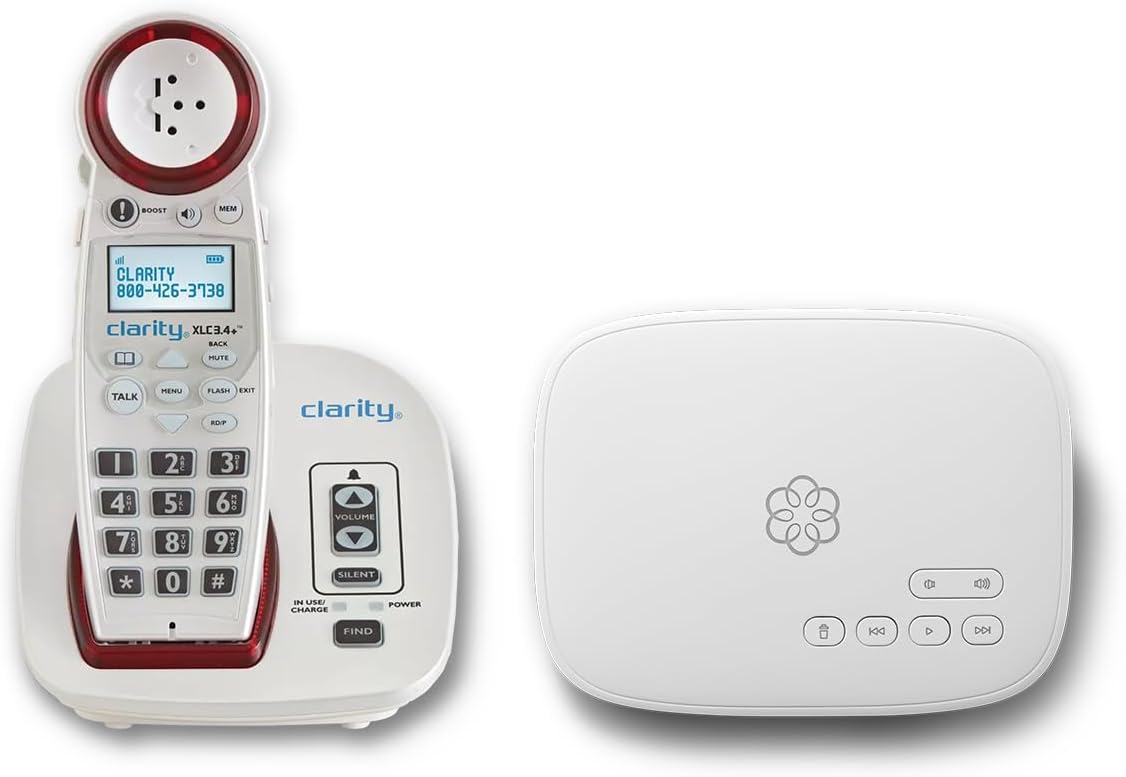
This bundle combines a reliable phone service with an amplified cordless phone tailored for hearing impaired users. The Ooma Telo service provides unlimited nationwide calling and robust safety features like address-based 911 alerts. It is designed to offer peace of mind and clear communication for senior households.
We may earn a commission when you buy through this link, at no additional cost to you.
The Clarity XLC3.4+ handset is hearing aid compatible and features adjustable volumes to suit different hearing needs. You benefit from visual ringer alerts and talking keypad options, ensuring you never miss an important call. The service includes advanced robocall blocking, protecting you from unwanted interruptions and scams.
The premium nature of this bundle means a subscription fee is required for the service. However, the included concierge assistance helps with setup, reducing technical barriers. For those willing to invest in a complete solution, the reliability and safety features provide significant value over standard landlines.
This option is perfect for users who want a seamless, high-quality communication experience with added safety features. If you value premium support and robust calling capabilities, this bundle offers a comprehensive solution for staying connected safely.
The bundled service ensures high-quality audio and consistent connectivity across the country.
Address-based 911 alerts and text messages ensure emergency dispatchers know your location instantly.
We may earn a commission when you buy through this link, at no additional cost to you.
The VTech SN5147 offers a unique hybrid system combining a reliable corded base with a cordless handset. This setup ensures you stay connected even during power outages while enjoying mobility around the house. It is designed specifically for seniors, featuring high-contrast buttons and large displays.
We may earn a commission when you buy through this link, at no additional cost to you.
With a 90dB extra-loud ringer and visual indicators, this phone ensures you never miss a call. The included photo dial slots simplify contact access, making it easy to reach loved ones quickly. The smart call blocker helps manage unwanted robocalls, adding a layer of protection to your daily routine.
While slightly more expensive than basic corded phones, the flexibility and safety features justify the cost. The answering machine with slow playback is another thoughtful addition for users who need time to process information. It balances practicality with user-friendly design effectively.
Consider this model if you need both mobility and reliability in your home phone setup. It is a robust choice for seniors who value clear communication and easy access to contacts without technical complexity.
Combine the security of a corded base with the convenience of a cordless handset.
The smart call blocker protects against unwanted spam calls automatically.
We may earn a commission when you buy through this link, at no additional cost to you.
This home telephone allows you to answer, dial, and hang up using only your voice. It is designed for individuals with significant vision or mobility difficulties who may struggle with physical buttons. The device stays active and ready to listen for commands, offering true hands-free convenience.
We may earn a commission when you buy through this link, at no additional cost to you.
Key benefits include the ability to make calls without lifting a handset or pressing keys. The quality of listening ensures commands are recognized accurately, making it accessible for those with limited dexterity. It operates on a standard home phone line, simplifying setup and use.
While voice control is a major plus, reliance on voice recognition means accuracy can vary based on environment or speech clarity. However, for users with severe mobility issues, the trade-off is worth the accessibility gain. It represents a step forward in making telephony inclusive for everyone.
Choose this if physical interaction with traditional phones is difficult or impossible. It offers a unique solution for staying connected through voice commands alone, removing physical barriers to communication.
No buttons to press makes this phone accessible for those with limited hand mobility.
The device remains active and ready to listen for commands at all times.
We may earn a commission when you buy through this link, at no additional cost to you.
This big button phone is designed with seniors and those with hearing impairments in mind. It offers adjustable amplified volume to ensure clear conversations even in noisy settings. The large buttons are easy to see and press, accommodating users with arthritis or poor eyesight.
We may earn a commission when you buy through this link, at no additional cost to you.
A key feature is the stored phone number protection, ensuring your contacts remain safe even if the line is unplugged. The wall mountable design provides flexibility in placement, keeping the phone accessible without cluttering tables. The replaceable picture buttons add a personal touch for quick dialing.
While it is a basic corded model, its focus on amplification and ease of use makes it a practical choice. The memory protection feature adds reliability, giving peace of mind that important contacts are preserved. It is a solid option for daily home use.
Opt for this if you need a dependable, amplified landline with large, accessible buttons. It simplifies communication for seniors by focusing on essential features that enhance clarity and convenience.
Adjustable volume settings allow users to customize sound levels to their hearing needs.
Wall mounting keeps the phone within easy reach and saves surface space.
We may earn a commission when you buy through this link, at no additional cost to you.
This VoIP phone is tailored for seniors with dementia or Alzheimer's, featuring customizable image keys that open to reveal family photos. It simplifies dialing by using visual cues rather than numbers, making it incredibly intuitive. The phone requires an active VoIP service to function, so check your setup first.
We may earn a commission when you buy through this link, at no additional cost to you.
Safety is a priority with a dedicated help key for instant emergency access. The amplified sound exceeds 110dB, ensuring clarity even in challenging environments. A visual red light alert provides a clear cue for incoming calls or missed messages, supporting those with hearing difficulties.
The main limitation is the requirement for a specific VoIP setup rather than a traditional landline. However, for those with internet phone service, the benefits of memory support and safety features are significant. It is a thoughtful tool for maintaining connection and safety.
Choose this if you use VoIP and need strong visual and memory aids for a senior. The combination of safety keys and customizable images makes it a standout choice for specialized needs.
Insert family photos into image keys to make dialing intuitive for those with memory loss.
The dedicated help key provides immediate access to pre-programmed emergency contacts.
We may earn a commission when you buy through this link, at no additional cost to you.
Serene Innovations focuses on performance with a high definition amplified phone designed for clear sound. It aims to provide the best possible audio quality for seniors who struggle with background noise or distortion. The interface is designed to be senior-friendly, prioritizing ease of use.
We may earn a commission when you buy through this link, at no additional cost to you.
The primary advantage is the emphasis on high-definition audio, which can make a big difference for hearing aid users. Amplification is integrated to boost volume without sacrificing clarity. It is a straightforward device that does not clutter your desk with unnecessary buttons.
While the available information is limited, the focus on sound quality suggests a reliable core experience. Users may find it meets their needs well if audio clarity is their main concern. It is worth considering for those who prioritize sound performance over extra features.
This model suits users who value pure audio performance. If your main goal is clear, amplified sound without technical complexity, this phone delivers on that promise.
High definition audio ensures voices sound natural and clear during every call.
Designed for performance, this phone prioritizes clarity and reliability.
We may earn a commission when you buy through this link, at no additional cost to you.
This phone combines voice dialing with traditional features like visual ringers and amplified sound. It includes 17 programmable voice memories, allowing you to dial by name rather than number. This can be helpful for those who find typing numbers challenging but may struggle with voice recognition.
We may earn a commission when you buy through this link, at no additional cost to you.
Talking caller ID announces the caller's name before you answer, which is great for accessibility. Visual LED indicators ensure you see a call even if the ringer is quiet. The device supports up to 40dB volume, making it suitable for moderate hearing loss.
However, the low user rating suggests that the voice recognition or setup might not work as expected for everyone. Programming 17 memories can be time-consuming, and some users may find it less intuitive than physical buttons. It is a niche tool for specific needs.
Consider this if voice memory access is a priority for you. While it offers unique features, ensure you are comfortable with the setup process before purchasing.
Store up to 17 voice-activated names for quick dialing access.
LED ring indicators provide a visual signal for incoming calls.
We may earn a commission when you buy through this link, at no additional cost to you.
This corded landline phone focuses on simplicity with 9 photo memory keys for one-touch dialing. It is designed for seniors with dementia or memory loss, allowing them to call by pressing a familiar image. The hands-free calling feature supports users with limited mobility, making conversations more comfortable.
We may earn a commission when you buy through this link, at no additional cost to you.
With a ringer reaching over 110dB and earpiece volume above 90dB, this phone ensures you hear every call. The design does not require batteries or a separate power supply, plugging directly into a standard phone line for reliability. It is a straightforward tool for daily communication.
The main trade-off is the lack of advanced features like voicemail or caller ID. However, for those who need basic, reliable contact with family, it is highly effective. The simplicity ensures you do not get overwhelmed by menus or settings.
Choose this if you need a reliable, photo-based dialing system without complexity. It is a warm bridge to family bonds that works without technical fuss.
Press a photo to dial instantly without needing to remember numbers.
No batteries needed means it works as long as the phone line is active.
We may earn a commission when you buy through this link, at no additional cost to you.
Selecting the right telephone involves considering several factors to ensure it meets your unique needs. This guide breaks down the most important features to evaluate before making a purchase.
Captioned telephones rely on internet services to provide real-time text. Ensure your internet connection is stable to avoid interruptions during calls. Some models require registration to access free government-funded services, so check the setup requirements carefully.
Check if the phone supports the specific captioning service you need. Not all devices work with all providers, so compatibility is key for consistent performance.
Look for phones with adjustable amplification to match your hearing loss level. Devices offering 40dB or higher amplification are ideal for those with significant hearing difficulties. Volume control should be accessible directly on the device for quick adjustments.
Higher amplification helps you hear clearly without distortion. Always test or review specs to ensure the output matches your requirements.
Large buttons, high-contrast displays, and voice controls make phones easier to operate. For seniors with dementia, picture buttons or memory slots simplify the dialing process. Avoid complex menus that might cause confusion.
Simplicity ensures you can use the phone confidently every day. Prioritize models designed specifically for elderly or impaired users.
Some phones require Wi-Fi or VoIP, while others use standard phone lines. If you want reliability during outages, a corded landline without battery dependence is better. Verify if the device works with your existing wiring or internet setup.
Decide between landline and VoIP based on your home infrastructure. Corded phones often offer more stability for basic needs.
Visual ringer lights and talking caller ID are essential for hearing impaired users. These features ensure you are notified of incoming calls even if you miss the sound. Some models also include vibrating alerts or extra loud ringers.
Multiple alert types provide a safety net. Look for phones that offer both visual and audio cues to avoid missed calls.
Safety features like SOS buttons or one-touch emergency access can be vital for seniors living alone. Some models include text alerts to family members during emergencies. Always check if emergency numbers can be programmed quickly.
Ease of emergency access provides peace of mind. Ensure the phone allows immediate connection to help when needed.
A sturdy build ensures the phone lasts longer in a household. Look for warranties that cover defects or service issues. Some manufacturers offer long-term support for captioning software updates.
Investing in a durable model reduces long-term costs. Warranty coverage is a good indicator of manufacturer confidence in quality.
While some captioning services are free, others require subscriptions for full features. Calculate the total cost including any monthly fees. Basic landline phones may be cheaper upfront but lack advanced accessibility features.
Understand the total cost of ownership before buying. Sometimes paying more for a better service bundle saves money in the long run.
To set up your captioned telephone, first connect it to a stable internet source or phone line as required. Register your account if the service needs FCC compliance, and ensure the microphone is unblocked for optimal performance. Test the connection with a friend to verify captions appear correctly.
Keep your phone in a well-lit area so you can read the screen easily. Regularly update firmware if the device supports it to maintain feature compatibility. Clean the screen and buttons gently with a soft cloth to prevent buildup that could affect touch response.
For best results, adjust volume and caption size daily according to your needs. Place the phone in a central location where it is easily accessible for emergencies. Regularly check the speaker and mic for blockages to ensure clear sound quality.
Not all models work with every line type. Some require internet for captioning services while others use standard landlines. Always check the connectivity requirements before purchasing to ensure compatibility with your home setup.
Most government-funded captioning services are free for eligible US residents with hearing loss. However, you may need to register and maintain an internet connection. Some premium bundles might include additional fees for enhanced features.
Corded landline phones often continue working during power outages since they draw power from the line. However, internet-dependent captioned phones will not work unless you have a backup power source. Consider this if reliability is a priority.
Many captioned telephones are designed to be hearing aid compatible. Check for specific compatibility mentions in product specs. This ensures you can pair your device without interference for clear audio.
Most photo dial buttons allow you to insert a card with a family photo into a dedicated slot. Follow the manual to assign a contact number to each slot. This process usually takes only a few minutes.
If internet is required for captioning, the text feature will stop working until it is restored. Some models still allow voice calls via the phone line. Ensure you understand the limitations before relying solely on captions.
Choosing a captioned telephone can dramatically improve your quality of life by ensuring you never miss a word. Our top picks like the Hamilton CapTel 2400iSPNBT offer the best balance of technology and accessibility for most users.
Focus on features that match your specific needs such as amplification levels, visual alerts, and ease of dialing. Consider whether you need a landline or internet-based solution based on your home infrastructure.
Remember to check current prices and availability as these models may change over time. With the right device, staying connected with loved ones becomes easier and more enjoyable for everyone.