
SANSUI 24 Inch Curved 160Hz Gaming Monitor
4.4Editor score
160Hz refresh rate
1500R curvature
FHD VA panel
Finding the right curved 160Hz gaming monitor can transform your setup into a competitive edge. These screens offer fast refresh rates and immersive curves that wrap around your vision for deeper engagement.
We evaluated ten real products based on panel quality, response times, connectivity options, and overall build reliability. Each model brings unique strengths for different budgets and gaming preferences.
Every pick includes detailed specs and pros to help you decide quickly. Prices change frequently so verify current deals before purchasing your next display for serious gaming sessions.
4.4Editor score
4.5Editor score

4.6Editor score
As an Amazon Associate we earn from qualifying purchases.
This table presents a side-by-side overview of all ten monitors including key specs like resolution, refresh rate, and response time so you can compare features at a glance.






This SANSUI monitor offers an impressive entry point for gamers seeking a curved 160Hz experience without breaking the bank. Its 4.4 rating reflects solid performance and reliability for daily gaming tasks.
We may earn a commission when you buy through this link, at no additional cost to you.
The 24-inch FHD VA panel delivers deep contrast and vivid colors with 110% sRGB coverage. Features like black level adjustment and crosshair overlays enhance competitive play while the 1ms MPRT response time keeps motion clear.
While it lacks speakers and premium ergonomics the tilt adjustment and VESA compatibility allow flexible mounting. The absence of audio output means you will need external speakers or headphones for full immersion.
Ideal for budget-conscious gamers or students this monitor balances speed and visual quality effectively. Its warranty and support options add peace of mind for new users starting their curved monitor journey.
The 1500R curve wraps visuals naturally around your field of view reducing eye strain during long sessions.
Preset modes for FPS and RTS games plus crosshair tools help optimize performance across different genres.
We may earn a commission when you buy through this link, at no additional cost to you.
This 27-inch variant expands your workspace while maintaining the fast 160Hz refresh rate and curved immersion. It shares similar core tech with the smaller model but offers more screen real estate for multitasking.
We may earn a commission when you buy through this link, at no additional cost to you.
The 4000:1 contrast ratio ensures deep blacks and vibrant colors. HDR support enhances visual depth in compatible games although it requires HDMI connection. Low blue light and anti-flicker features protect your eyes during extended use.
Connectivity includes HDMI 2.0 and DP1.4 for flexible setups but the absence of speakers means external audio is necessary. The stand supports tilt adjustments and VESA mounting offers wall or arm mounting options.
Gamers wanting a bigger display without premium costs will appreciate this model. While 1080P may appear less sharp on 27 inches the curvature helps maintain immersion and performance remains smooth for most titles.
At 27 inches the wider view aids multitasking and gaming immersion without needing dual monitors.
Anti-glare coating and low blue light modes reduce strain making long play sessions more comfortable.
We may earn a commission when you buy through this link, at no additional cost to you.
With a slightly higher rating this model emphasizes color accuracy and viewing angles. The 97% DCI-P3 coverage ensures rich tones appealing to content creators and gamers alike who value vivid visuals.
We may earn a commission when you buy through this link, at no additional cost to you.
Fast response times and FreeSync support minimize stutter and tearing in competitive games. The VA panel delivers strong contrast while the 178-degree viewing angle keeps colors consistent from different seating positions.
It includes a HDMI cable and adapter reducing initial setup hassle. Kensington lock allows secure mounting in shared spaces. Like other SANSUI models it lacks built-in audio requiring external speakers for sound.
This is a versatile pick for users needing color fidelity and smooth motion. Whether gaming or editing its performance and features make it a reliable addition to any desk setup.
Wide color gamut support ensures accurate and vibrant visuals for both gaming and creative tasks.
Kensington lock support allows secure attachment in shared or public workspaces for added safety.
We may earn a commission when you buy through this link, at no additional cost to you.
This CRUA model stands out with 4K resolution and high refresh rates offering crisp visuals for immersive gaming and media. The 32-inch screen provides ample space for multitasking and detailed graphics.
We may earn a commission when you buy through this link, at no additional cost to you.
With 120% sRGB coverage and HDR capabilities colors appear rich and accurate. Integrated speakers reduce clutter while HDMI 2.1 ensures compatibility with next-gen consoles and PCs for smooth performance.
The curve enhances immersion especially in open-world games. However driving 4K at 160Hz demands a powerful graphics card. Its price reflects these premium features but may stretch budget constraints for some.
Ideal for enthusiasts wanting high resolution without sacrificing speed this monitor delivers a compelling mix of clarity and motion. Its versatile connectivity makes it suitable for both gaming and creative workflows.
High resolution delivers sharp details that bring game worlds and media content to life with clarity.
HDMI 2.1 support ensures future-proofing and optimal performance with latest gaming consoles and PCs.
We may earn a commission when you buy through this link, at no additional cost to you.
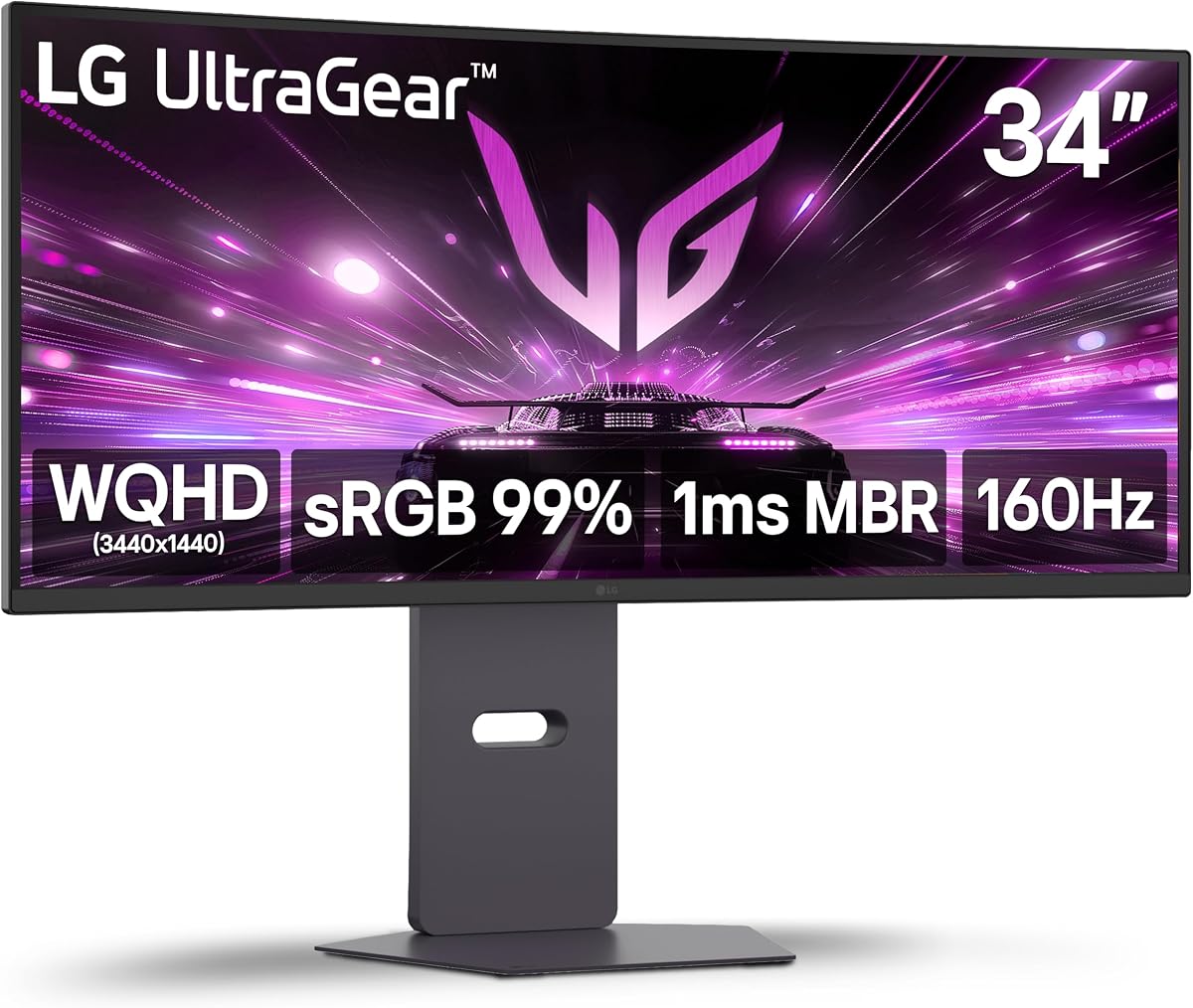
This LG UltraGear delivers a premium ultrawide experience with 160Hz refresh rate and advanced AMD FreeSync Premium for smooth tear-free gameplay. Its high rating confirms consistent performance across gaming and productivity tasks.
We may earn a commission when you buy through this link, at no additional cost to you.
The WQHD resolution offers sharp clarity while HDR10 support enriches colors and contrast. Built-in Waves MaxxAudio speakers provide rich sound without extra hardware. Features like Black Stabilizer help spot enemies in dark areas.
The stand supports tilt height and swivel adjustments for perfect viewing ergonomics. While the price is higher than entry-level options the feature set and build quality justify the investment for serious gamers.
Best for users wanting immersive screen space and reliability this monitor balances speed comfort and visual fidelity. It stands out as a versatile tool for competitive play and creative work.
The 21:9 aspect ratio expands workspace allowing multiple windows or side-by-side media consumption.
Black Stabilizer and Crosshair features give tactical advantages in competitive gaming scenarios.
We may earn a commission when you buy through this link, at no additional cost to you.
This renewed version offers the same high-performance specs as the new model at a reduced cost. Its perfect 5.0 rating suggests consistent customer satisfaction and reliable function after refurbishment.
We may earn a commission when you buy through this link, at no additional cost to you.
Enjoy 34-inch ultrawide views with fast refresh rates and vivid colors. The stand and connectivity remain full-featured providing flexibility and comfort. Audio via built-in speakers adds convenience without extra peripherals.
While renewed products carry some risk most arrive in excellent condition. Check warranty details to ensure protection against potential issues. It is a smart choice for those wanting premium features affordably.
Ideal for budget-savvy enthusiasts this option delivers the benefits of an ultrawide without the new-unit price tag. It maintains the quality and functionality that make LG a trusted brand in gaming displays.
Renewed models provide significant savings while keeping core performance and build quality intact.
High ratings indicate thorough inspection and testing before sale ensuring dependable performance.
We may earn a commission when you buy through this link, at no additional cost to you.
Samsungs 1000R curve wraps tightly around your vision offering unmatched immersion especially for open-world games. QHD resolution ensures sharp details across the 32-inch screen with vibrant colors.
We may earn a commission when you buy through this link, at no additional cost to you.
Fast refresh rates and FreeSync support deliver smooth gameplay while HDR10 enhances contrast and shadows. Eye Saver Mode minimizes blue light to reduce strain during long sessions. The design prioritizes visual engagement and comfort.
The deep curve may limit wall mounting or desk depth but enhances peripheral vision. It lacks USB hubs but covers essential video and audio needs. Build quality reflects Samsungs reputation for reliability.
Best for users wanting maximum immersion this monitor stands out with its aggressive curvature and high resolution. It balances performance with comfort features making it suitable for extended gaming marathons.
The 1000R curve fills peripheral vision reducing distractions and heightening situational awareness.
Blue light filters and flicker-free technology reduce eye strain for longer uninterrupted play.
We may earn a commission when you buy through this link, at no additional cost to you.
This Sceptre monitor combines ultrawide immersion with high refresh rates and distinctive LED back cover lighting. It offers robust connectivity and audio options appealing to gamers who want extra flair.
We may earn a commission when you buy through this link, at no additional cost to you.
The 180Hz refresh rate ensures fluid motion while 99% sRGB covers most color needs. Dual DisplayPort connections support multi-device setups and built-in speakers add convenience. The design feels modern with custom backlighting.
While LED lights enhance aesthetics they might distract in dark rooms. Stand adjustment is limited to tilt. Overall the feature set at this price point is competitive for budget-friendly ultrawide seekers.
Ideal for users seeking style and speed this model delivers strong performance and connectivity. It suits gamers wanting visual customization without compromising on refresh rate or screen size.
Back cover LED lights allow personalization to match room lighting or gaming themes.
Two DisplayPort inputs enable easy switching between multiple gaming PCs or consoles.
We may earn a commission when you buy through this link, at no additional cost to you.
Alienware delivers a flagship ultrawide with premium build and performance. The 180Hz refresh rate and 1ms response ensure top-tier responsiveness while its design turns heads with iconic styling.
We may earn a commission when you buy through this link, at no additional cost to you.
Color accuracy and HDR400 certification provide rich visuals for both gaming and media. Hardware-based low blue light preserves color quality while reducing strain. Console mode adapts settings for optimal gameplay on connected systems.
The stand offers limited adjustability but maintains stable footing. Its price is higher than most but reflects quality and warranty support. For enthusiasts seeking reliability and aesthetics this monitor stands out.
Best for dedicated gamers and pros this model offers unmatched performance and durability. It is a long-term investment combining speed color accuracy and brand trust for serious setups.
Alienwares signature design elevates desk style with premium materials and futuristic looks.
Dedicated console mode optimizes settings for seamless integration with gaming consoles.
We may earn a commission when you buy through this link, at no additional cost to you.
This AOC monitor leads in raw speed with a 200Hz refresh rate and near-instant 0.3ms response time. It delivers exceptionally smooth motion for competitive gaming while maintaining ultrawide immersion and solid build quality.
We may earn a commission when you buy through this link, at no additional cost to you.
The WQHD resolution provides sharp visuals while Adaptive-Sync ensures tear-free gameplay. The stand offers full height tilt and swivel adjustments for ergonomic comfort. HDR support adds contrast although real-world results vary.
To fully utilize 200Hz you need a powerful graphics card. At lower resolutions it still offers high fluidity. Its pricing makes it an accessible option for those seeking elite refresh rates.
Ideal for competitive gamers this model emphasizes performance without compromising on ergonomics. It provides the speed needed for fast-paced titles while keeping setup flexibility and visual clarity intact.
200Hz refresh delivers ultra-smooth motion crucial for competitive and action-heavy gaming.
Full stand adjustments let you tailor the setup to your seating posture for comfort.
We may earn a commission when you buy through this link, at no additional cost to you.
Choosing the right curved 160Hz gaming monitor involves balancing resolution refresh rate curve radius and build quality to match your gaming style and budget.
Refresh rate determines how many frames per second the screen displays impacting motion smoothness. A 160Hz refresh rate provides fluid visuals ideal for fast-paced games reducing motion blur and screen tearing.
Look for high refresh rates paired with fast response times like 1ms to ensure sharp images during rapid movement and competitive gameplay.
Curved monitors wrap visuals around your peripheral vision increasing immersion and reducing eye strain. Curvature values like 1000R to 1800R define how tightly the screen bends.
Deeper curves like 1000R are more immersive but limit desk space while moderate curves like 1500R balance comfort and flexibility.
Resolution affects image sharpness and detail. 1080P offers speed while QHD or WQHD provides clearer visuals. Panel types like VA deliver better contrast and color.
VA panels are common in curved gaming monitors due to their high contrast ratios and vibrant colors suitable for immersive gaming.
Adaptive Sync technologies like AMD FreeSync match the monitor refresh rate with your graphics card to prevent screen tearing and stuttering.
Ensure your monitor supports FreeSync or G-Sync Compatible features for smooth gameplay when paired with compatible GPU hardware.
Modern gaming monitors offer HDMI and DisplayPort connections. HDMI 2.1 supports next-gen consoles while DisplayPort 1.4 ensures high refresh rates.
Check available ports to match your PC or console setup and confirm cable compatibility for optimal performance.
Adjustable stands with tilt swivel and height help you position the monitor for comfort. VESA mounting allows flexible setups on arms or walls.
Choose monitors with ergonomic adjustments to reduce neck and eye strain during long gaming sessions.
Color coverage like sRGB and DCI-P3 ensures vivid and accurate visuals. HDR support enhances contrast and dynamic range.
High color gamut coverage and HDR certification contribute to richer scenes and better visual fidelity across games and media.
Durable construction and reliable customer support protect your investment. Look for brands with clear warranty terms and accessible service.
Strong build quality and comprehensive warranties add peace of mind and longevity to your gaming monitor.
Connect the monitor to your PC or console using HDMI or DisplayPort and select the highest refresh rate in your graphics settings for optimal performance.
Adjust the stand tilt and height to eye level to minimize neck strain and reduce glare from ambient light sources.
Clean the screen with a soft microfiber cloth and avoid harsh chemicals to preserve the panel and coating integrity over time.
A refresh rate of 160Hz or higher is ideal for competitive gaming as it provides smoother motion and reduced input lag. Higher rates help track fast-moving targets accurately and improve reaction times.
Yes curved monitors wrap visuals naturally around your field of view reducing the need to move your head excessively. This lowers eye and neck strain during extended gaming sessions.
On a 32-inch monitor 1080P may look pixelated compared to QHD or 4K. Higher resolutions offer sharper images and better clarity especially on larger screens.
FreeSync synchronizes the monitors refresh rate with your graphics card to reduce screen tearing and stuttering. It is essential for smooth gameplay especially in fast-paced titles.
Yes many models offer high color accuracy and wide gamut coverage suitable for video editing. Check for good sRGB and DCI-P3 coverage for precise color work.
Enable the highest refresh rate in your operating system display settings and use a compatible cable like DisplayPort 1.4 for best performance.
Many curved 160Hz monitors support consoles via HDMI. Confirm that your chosen model supports the required resolution and refresh rates for your console.
Curved monitors improve immersion in small rooms by drawing your focus inward. Just ensure adequate desk depth to accommodate the curve comfortably.
These ten curved 160Hz monitors offer diverse options from budget-friendly entry-level displays to premium ultrawide screens tailored for immersive and fast-paced gaming.
Prioritize refresh rate and curvature based on your play style while considering resolution and ergonomics for comfort. Balanced choices ensure smooth performance and long-term satisfaction.
Prices and availability change often so verify current deals before purchase to secure the best value for your gaming setup.