
ewnol Dockable Case
4.4Editor score
Affordable all-in-one bundle
Slim dockable design
Includes screen protectors
Compare the top 10 dockable Switch 2 cases for October 2026 to find the perfect protective shell that supports full docking, gameplay comfort, and durable
Protecting your Nintendo Switch 2 is essential for gamers who travel or play daily. A dockable case ensures you can enjoy TV mode without removing the shell. Look for designs that support the kickstand and allow easy Joy-Con access for maximum versatility.
We evaluated ten top-rated cases based on protection, dock compatibility, and ergonomic design. Each option was analyzed for material quality, ease of use, and additional features like screen protectors or stands. This list helps you choose the best fit for your needs.
Every pick includes detailed specs, pros, cons, and real user insights. We highlight budget-friendly options and premium picks with unique features like power banks or metal stands. Prices and availability change frequently, so check current listings before buying.
4.4Editor score

4.6Editor score

5.0Editor score
This side-by-side comparison highlights the key features of all ten dockable Switch 2 cases. From budget-friendly shells to premium all-in-one solutions, each product offers unique benefits for protection, portability, and gameplay comfort.



The SUPCASE for Nintendo Switch 2 Case stands out as the top overall pick with a strong 4.6 rating. It provides military-grade protection while maintaining seamless dock compatibility for TV mode. Users appreciate the foldable Joy-Con covers that protect controllers during transport.
We may earn a commission when you buy through this link, at no additional cost to you.
Its seamless dock design lets you connect to the TV without removing the case. The hinge mechanism allows quick Joy-Con assembly and disassembly. Anti-slip rubberized texture improves grip during intense gameplay, while raised bezels guard the screen from scratches.
The case is not compatible with the Switch 2's kickstand function, which is a trade-off for dock protection. The weight is slightly higher than minimal cases, but this adds to the durable, balanced construction. It is ideal for frequent travelers and dock users.
Buy this if you want reliable protection without sacrificing dock access. It suits gamers who prioritize TV mode and controller safety. The premium design and eco-friendly materials make it a stylish, functional choice for Switch 2 owners.
The case is specifically designed for uninterrupted docking, allowing you to switch from handheld to TV mode effortlessly.
Engineered to U.S. military standards, this case defends against drops and impacts while using eco-friendly polycarbonate.
We may earn a commission when you buy through this link, at no additional cost to you.
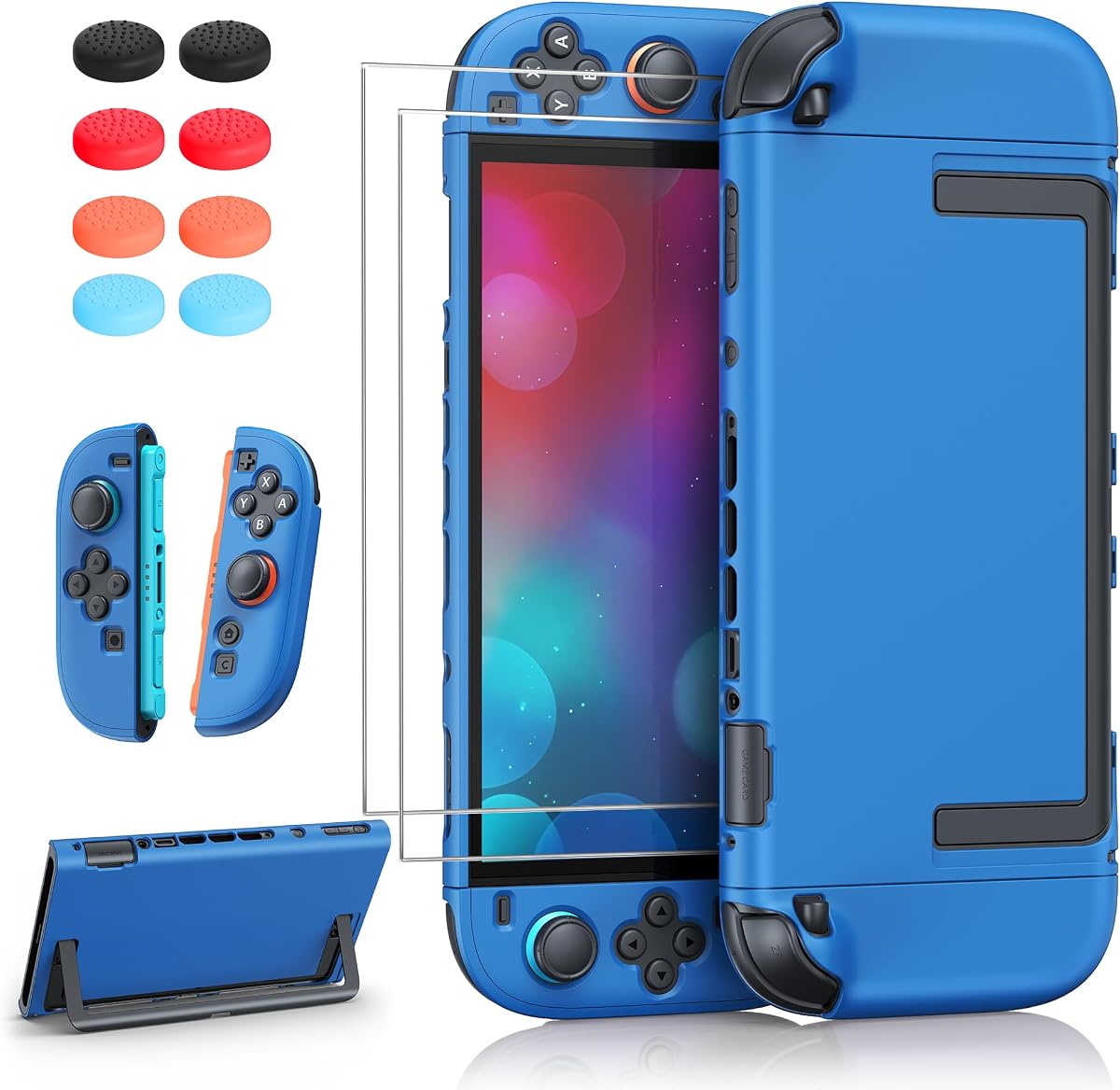
The ewnol Dockable Case offers excellent value as the best budget option. It is a complete set with screen protectors and thumb caps, all for a low price. The grip design is ergonomic, and it supports full functionality including the kickstand.
We may earn a commission when you buy through this link, at no additional cost to you.
Its dockable design fits the Switch 2 dock directly, though users note it feels tight by design to prevent wobbling. The U-shaped back opening allows the stand to open fully. Precise cutouts provide access to all buttons and ports without case removal.
The tight docking fit may concern some users, but it ensures a secure hold during TV play. The materials are standard TPU and PC, which are reliable but not as premium as military-grade options. This is great for beginners or casual gamers.
Choose this if you want an affordable, complete protection bundle. It is ideal for those who need screen protection and a grip without spending much. The all-in-one nature makes it a convenient starter kit.
This case includes two tempered glass screen protectors and four joystick caps, offering full coverage protection in one package.
The comfortable grip shape improves hand support during long sessions and allows easy Joy-Con removal.
We may earn a commission when you buy through this link, at no additional cost to you.
The Mumba Fortress Case is the top premium pick with a perfect 5.0 rating. It offers true 360-degree protection with a front cover and a metal stand. The detachable front cover allows docking without removing the rear shell, keeping the console safe.
We may earn a commission when you buy through this link, at no additional cost to you.
It includes six locking game card slots, making it a travel-ready organizer. The aluminum kickstand adjusts from 0 to 120 degrees for any viewing angle. The one-piece Joy-Con design prevents wobble, and the military-grade build ensures durability.
The higher price reflects the premium features like the metal stand and front cover. You must detach the front cover to dock, which is an extra step but maintains rear protection. This is best for users who want maximum protection and style.
Buy this if you need full screen protection and a sturdy stand. It suits travelers who want game card storage and premium build quality. The innovative design sets it apart as a top-tier choice for Switch 2 owners.
Unlike cases that only protect the back, this includes a durable front cover to fully shield the screen and buttons.
Simply detach the front cover to dock your Switch 2 while the rear shell stays on for continued protection.
We may earn a commission when you buy through this link, at no additional cost to you.
The Dockable Blue Case features a unique pop-up Joy-Con quick release mechanism. This hidden button design lets you detach controllers in one second without prying. It is stand compatible and has a carbon fiber grip for a premium look.
We may earn a commission when you buy through this link, at no additional cost to you.
Its military-grade protection absorbs shocks from drops and has a scratch-resistant surface. The kickstand cutout allows the built-in stand to open freely. The PC material is anti-yellowing and lightweight, solving daily pain points like fingerprints and slip.
The one-press latch requires a bit of practice, and the case does not include screen protection. Some users may find the mechanism less intuitive than standard cases. However, it is perfect for multiplayer gamers who swap Joy-Cons frequently.
Choose this for its innovative Joy-Con release and stylish carbon fiber grip. It is ideal for those who play motion games or share controllers. The affordable price and durable protection make it a solid value choice.
The hidden spring-latch button lets you detach Joy-Cons in one second for uninterrupted multiplayer gaming.
Premium PC material paired with carbon fiber texture offers anti-slip, anti-yellowing, and a mechanical look.
We may earn a commission when you buy through this link, at no additional cost to you.
This SUPCASE model is the best option for tabletop play due to its foldable aluminum stand. The stand allows angles from 30 to 90 degrees and folds flush when not in use. It is dock compatible for seamless TV mode without case removal.
We may earn a commission when you buy through this link, at no additional cost to you.
The case features larger ergonomic grips and flip-out hinge covers for Joy-Con security. The 2.5mm raised bezel protects the screen from dock contact. The multi-layer hard shell is balanced at 145g for a natural feel.
It lacks Joy-Con covers, which some users may prefer for extra safety. The price is higher than minimal cases, but the aluminum stand adds significant value. This is ideal for users who play on desks or trays frequently.
Buy this if you need a reliable stand and dock compatibility. It is best for tabletop gamers who want hands-free viewing. The durable design and protective bezel make it a well-rounded choice.
The built-in hollow aluminum-alloy stand sets angles from 30 to 90 degrees and folds flush into the back.
Precision dock-compatible fit is designed for smooth docking with a raised screen edge to reduce contact.
We may earn a commission when you buy through this link, at no additional cost to you.
The Belkin Grip Case is the best ergonomic option, designed for long play sessions without fatigue. Its textured non-slip grip ensures secure handling. The case is dock compatible and allows quick Joy-Con release for tabletop mode.
We may earn a commission when you buy through this link, at no additional cost to you.
Made with a minimum of 75% recycled plastic, it is a sustainable choice. It works with other Belkin accessories like travel bags. The two-year coverage adds peace of mind for any gaming setup.
It has a basic design without extra features like stands or screen protectors. This makes it less versatile than other cases but ideal for pure comfort. The price reflects a premium brand and sustainable materials.
Choose this for all-day comfort and reliable build quality. It suits users who prioritize ergonomics and brand trust. The eco-friendly aspect is a strong plus for environmentally conscious gamers.
This comfortable grip supports long sessions without fatigue whether handheld or docked.
The gaming grip is made with a minimum of 75% recycled plastic materials.
We may earn a commission when you buy through this link, at no additional cost to you.
The FASTSNAIL Grip Charging Case is the best choice for extended gaming thanks to its 10,000mAh power bank. It has a front cover with twelve game card slots. The power bank attaches magnetically, allowing play anywhere without charging.
We may earn a commission when you buy through this link, at no additional cost to you.
The case is designed for dock compatibility, but you must remove the front cover and power bank first. It includes a detachable protective frame for quick Joy-Con removal. The contoured non-slip grip reduces hand fatigue.
The extra weight of the power bank makes it heavier than standard cases. Docking requires extra steps, which may be inconvenient for frequent TV users. This is ideal for travel and outdoor gaming sessions.
Buy this if you need extended battery life and game card storage. It is best for travelers or marathon players. The dual-layer protection and front cover make it a multifunctional accessory.
Specifically designed for travel, the power bank allows you to enjoy extended gaming sessions with ease.
Detachable design ensures a perfect fit with the official dock, though front cover removal is required.
We may earn a commission when you buy through this link, at no additional cost to you.
This PlayVital case features a split design with separate covers for the console and Joy-Cons. It is slim, lightweight, and fully dockable. A stand is included to replace the built-in kickstand. The series comes in solid colors like Antique Yellow.
We may earn a commission when you buy through this link, at no additional cost to you.
Raised support on the Joy-Con grips improves handheld comfort and reduces fatigue. Precision cutouts ensure smooth access to ports and buttons. The hard shell resists scratches and drops, keeping your console safe in travel.
Managing multiple parts may be less convenient than a one-piece design. It is not compatible with the Joy-Con 2 Charging Grip. This is best for users who want a customizable, complete protection kit.
Choose this for its split design and added stand. It is ideal for daily gaming and travel. The aesthetic bundle and ergonomic support make it a practical choice for Switch 2 players.
Separate covers for console and Joy-Cons allow fast installation and removal for easy handheld comfort.
The bundle includes a dockable case, Joy-Con grips, thumbstick caps, a foldable stand, and a card slot cover.
We may earn a commission when you buy through this link, at no additional cost to you.
The FYOUNG Upgrade Case is the best all-in-one kit for beginners. It includes a dockable hard case, controller covers, tempered glass screen protectors, and silicone thumb grips. The slim design is easy to travel with.
We may earn a commission when you buy through this link, at no additional cost to you.
The shell is made from durable PC material with a matte finish. All ports and buttons are accessible. It protects against bumps and scratches while adding minimal bulk to the console.
Color variations may occur depending on screen settings. The protection is reliable but standard. This is a great starter kit that combines essential protection with everyday convenience for new Switch 2 owners.
Buy this for a complete bundle without extra purchases. It is ideal for users who want screen and console protection at once. The travel-ready design makes it a handy choice.
Upgraded dockable hard case, controller case, screen protectors, and thumb grips guard against drops and daily wear.
Tempered glass screen protectors deliver crystal-clear clarity while soft silicone grips improve control and comfort.
We may earn a commission when you buy through this link, at no additional cost to you.
This PlayVital case is the best cute option with solid color themes like Matcha Green. It includes a console shell, thumb grip, button toppers, and a kickstand sticker. It supports full access for charging and swapping game cards.
We may earn a commission when you buy through this link, at no additional cost to you.
The PC hard shell resists bumps and scratches. Color-matched silicone pads make button presses smoother. The three-piece split structure makes handheld and tabletop play seamless. It is designed to be easy to clean and reassemble.
The protection is light compared to military-grade options. There are multiple pieces to assemble, which may be tedious. This is ideal for users who prioritize style and customization over heavy-duty defense.
Choose this for a playful, practical design. It is best for those who want to match accessories. The included items make it a complete kit for daily protection.
Multiple solid colors with matching silicone button toppers offer a clean, mix-and-match look.
The 3-piece split structure makes handheld, docked, and tabletop play seamless with raised arc grips.
We may earn a commission when you buy through this link, at no additional cost to you.
Choosing the right dockable Switch 2 case involves balancing protection, compatibility, and convenience. Here are key factors to consider before buying.
Dock compatibility is the most important feature for TV mode users. Look for cases that fit the official dock without removing the shell. Some require removing front covers, so check if this is acceptable for your routine.
Protection varies from slim hard shells to military-grade armor. Military-grade standards like MIL-STD-810G offer drop and impact resistance. Hard cases are better for daily wear, while slim cases are lighter for casual use.
Ergonomic grips reduce hand fatigue during long sessions. Look for textured surfaces, raised arc grips, or contoured shapes. These features improve comfort and control for handheld play.
Some cases include integrated stands, while others block the built-in kickstand. If you play tabletop, ensure the stand is adjustable or compatible. Foldable metal stands are more durable than plastic ones.
Quick access to Joy-Cons is essential for multiplayer and motion gaming. Look for hinges, pop-up buttons, or split designs that allow easy removal without taking off the whole case.
Many bundles include screen protectors, thumb grips, or card slots. Assess if these extras add value or cost more separately. All-in-one kits offer convenience for new users.
Materials like PC, TPU, and recycled plastic affect durability and weight. Anti-yellowing coatings and scratch-resistant finishes keep the case looking new. Eco-friendly materials are a plus for sustainability.
Some brands offer warranties or customer support. A two-year coverage or 24/7 support provides peace of mind. Check for return policies in case the case does not fit your needs.
Install the case carefully by aligning the ports and buttons. Press gently to snap the shell into place without forcing parts. Ensure all cutouts are open and functional before use.
A dockable case is highly recommended for TV mode to protect the console without removing the shell. It allows seamless docking, saving time and avoiding wear from repeated handling. Some cases need front cover removal but still offer protection.
Not all dockable cases block the kickstand. Some have cutouts or integrated stands. Check if the case design supports the built-in stand or if you need an accessory stand for tabletop play.
Clean a hard case with a soft cloth and mild soap. Avoid harsh chemicals that damage the material. Let it dry completely before reattaching any parts like grips or covers.
Dockable cases are designed not to affect gameplay. They add grip and protection while keeping buttons accessible. Slim designs ensure the console feels natural and easy to hold.
Dockable cases are worth the price for frequent users who want protection and convenience. They prevent scratches, reduce wear, and support TV mode. The cost is lower than repair expenses.
Most dockable cases are compatible with screen protectors. Look for cases with raised bezels to avoid contact. Some bundles include protectors for ease of use.
Most cases support official docks, but some may not fit third-party docks due to port alignment. Check the product description for dock compatibility. Official docks ensure reliable fit.
Use hinges, buttons, or split designs to release Joy-Cons. Press the mechanism gently without pulling. Follow manufacturer steps to avoid damage to controllers or case.
The SUPCASE, ewnol, and Mumba cases offer the best overall value and features for most users. They cover needs from budget-friendly protection to premium durability.