
Acer 13-in-1 Laptop Docking Station
4.5Editor score
Triple display support
110W included power adapter
Integrated security lock slot
This guide compares the best docking station with 2 HDMI ports for dual monitor setups, featuring top picks from Anker, Acer, and Dell for work and gaming.
Finding the right docking station with 2 HDMI ports transforms your laptop into a powerful workstation. These devices connect multiple monitors and peripherals through a single cable, reducing clutter and boosting productivity for professionals and creatives alike.
We evaluated ten top models based on port selection, video output quality, charging speed, and compatibility. Our analysis covers diverse needs from budget-friendly hubs to premium docking solutions that support triple displays and high-speed data transfer simultaneously.
Each pick highlights specific strengths like 4K support, power delivery, and build quality. Prices and availability change frequently so check current listings before purchasing to ensure you get the best value for your specific workflow requirements today.
4.5Editor score

4.5Editor score

4.4Editor score
This comparison table shows key specifications for all ten models side by side. Review video output capabilities power delivery wattage port counts and unique features to find the docking station that best fits your laptop and workspace needs.


The Anker 8-in-1 USB C Hub is a top choice for professionals seeking reliable dual monitor support. With a 4.5 rating it delivers 4K video to two displays and includes essential ports like Ethernet and SD card readers.
We may earn a commission when you buy through this link, at no additional cost to you.
Its massive expansion features allow seamless connection to multiple peripherals while the 85W pass-through charging keeps your laptop powered during heavy use. Compatible with Windows and ChromeOS it supports USB-C USB4 and Thunderbolt connections.
While it does not support extended displays on macOS due to system limitations the mirrored mode works adequately for presentations. Users should ensure they use a 100W wall charger and USB-C to C cable for optimal power delivery.
Ideal for office workers and students needing a clean desk setup this docking station offers an excellent balance of features and price. It transforms your laptop into a desktop replacement with minimal effort and maximum connectivity.
The eight ports including USB-A and card readers cover most peripheral needs without extra dongles ensuring smooth transitions between tasks.
High-speed pass-through charging up to 85W ensures your device stays powered even while driving dual displays and connected peripherals simultaneously.
We may earn a commission when you buy through this link, at no additional cost to you.
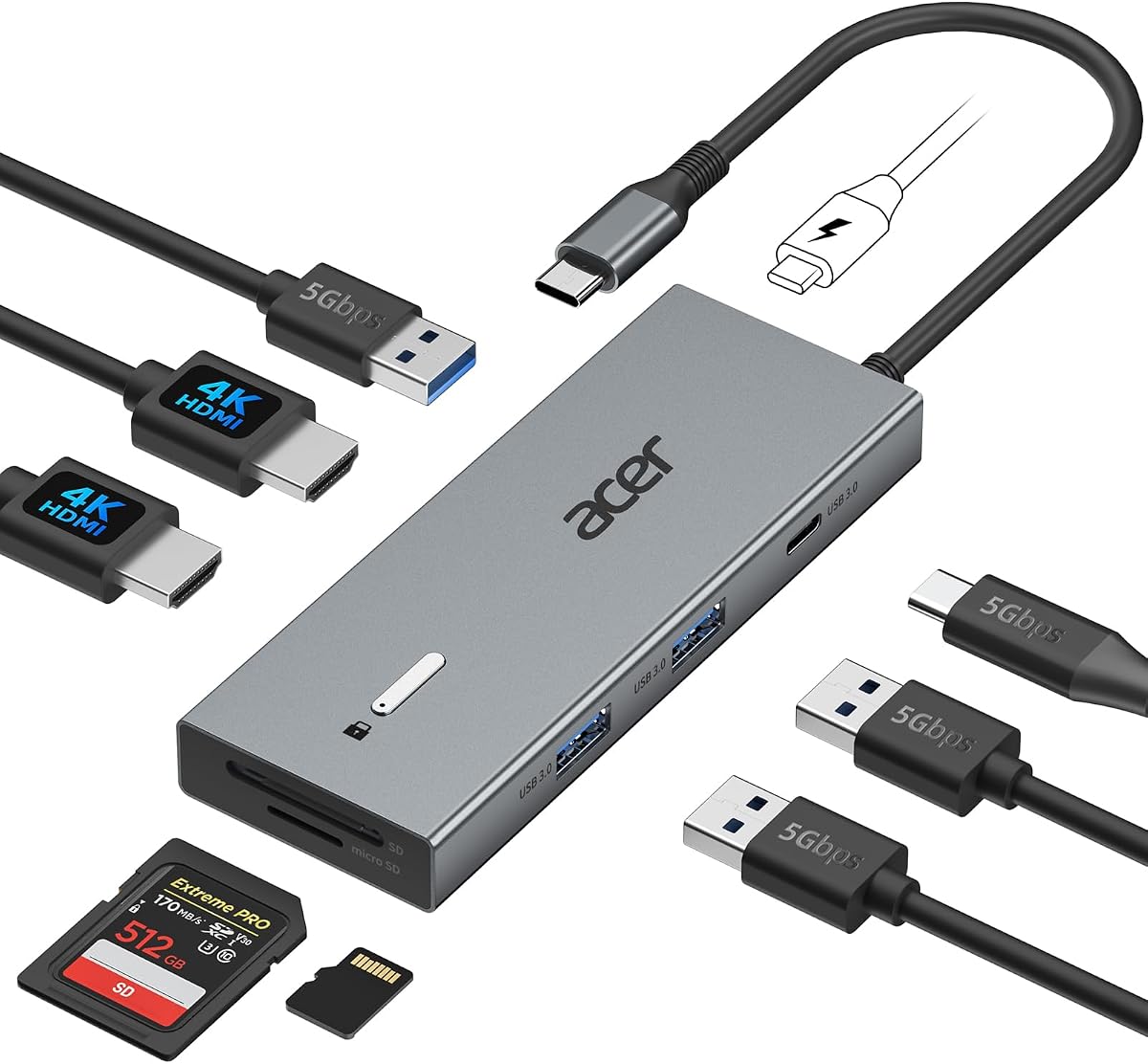
The Acer 13-in-1 Docking Station offers premium features for power users needing triple screen capabilities. It includes an 110W adapter and supports 2 HDMI plus 1 DP ports for extended displays on Windows systems.
We may earn a commission when you buy through this link, at no additional cost to you.
Designed with a sleek aluminum body it dissipates heat efficiently during long use. The included 100W power delivery ensures your laptop remains charged while running heavy workloads across multiple monitors without performance drops.
Notable features include a security slot for physical safety and a 3.5mm AUX jack for audio. While Mac users are limited to mirroring the MST technology enables flexible window arrangement on compatible Windows laptops.
This model is best for financial analysts and traders who benefit from simultaneous chart monitoring. Its robust build and comprehensive port selection make it a reliable command center for complex professional workflows.
Supports three independent screens via HDMI and DP allowing you to multitask like a pro and boost productivity across all monitors simultaneously.
The integrated security slot enables you to lock the docking station and your laptop to your desk providing crucial physical security in offices.
We may earn a commission when you buy through this link, at no additional cost to you.
The Selore USB C Docking Station provides excellent dual monitor functionality at a competitive price point. With dual HDMI ports supporting 4K 60Hz it offers smooth video quality without breaking the budget.
We may earn a commission when you buy through this link, at no additional cost to you.
It features a 100W PD charging port to keep your laptop powered while working. The USB ports allow fast data transfer up to 5Gbps and the SD card reader helps quickly copy photos from cameras.
While it does not include a power adapter or Ethernet port the thermal management system ensures stable performance. It is compatible with Thunderbolt and full-featured USB-C laptops for broad usability.
Perfect for home office setups and casual professionals this hub delivers high performance at a low cost. The plug-and-play design means no driver installation is needed for immediate use with your laptop.
Dual 4K at 60Hz ensures smooth visuals for daily tasks and media consumption making it ideal for home and office use.
The 100W input power delivery port allows you to charge your laptop efficiently while using the docking station for extended periods.
We may earn a commission when you buy through this link, at no additional cost to you.
This Acer 9-in-1 hub delivers dual 4K 60Hz display support for efficient multitasking. It includes three USB-A ports and a USB-C data port alongside SD card slots for versatile connectivity.
We may earn a commission when you buy through this link, at no additional cost to you.
The built-in lock button secures your screen instantly on Windows or Mac systems. With 100W PD charging input it supports up to 90W output to your laptop keeping it powered during work.
Compatibility covers most Windows laptops with DP Alt Mode. While Mac users are limited to mirroring the aluminum alloy body ensures heat dissipation for stable long-term performance.
Ideal for general users wanting simplicity this dock balances performance and price. The thoughtful details like the lock button add a layer of security often missing in budget-friendly hubs.
The single click lock on Windows and press hold on Mac allows rapid privacy protection for sensitive information at any time.
Multiple USB ports and SD slots up to 104Mbps ensure you transfer data quickly and access files from cameras efficiently.
We may earn a commission when you buy through this link, at no additional cost to you.
The Dell D3100 is a classic docking station for legacy systems and specific Dell laptops. It supports triple display setups and includes 3 USB 3.0 ports for fast data transfers.
We may earn a commission when you buy through this link, at no additional cost to you.
With 2 HDMI ports and a DisplayPort it offers flexibility for different monitor connections. The RJ-45 port ensures stable network connectivity which is crucial for business environments.
It is compatible with Windows XP through 10 including various Dell Latitude and Inspiron models. The included HDMI cable and 65W power supply provide a complete solution right out of the box.
While newer models offer faster speeds this dock remains relevant for older hardware needing reliable expansion. It is a solid choice for organizations with mixed device fleets needing consistent performance.
Designed to seamlessly work with older Dell Inspiron and Latitude laptops ensuring reliable performance on established enterprise hardware.
Supports three displays via HDMI and DisplayPort allowing you to increase screen real estate without needing multiple docking stations.
We may earn a commission when you buy through this link, at no additional cost to you.
This Anker 7-in-1 hub is designed for travelers who need dual screen capabilities. It offers 1080p 60Hz resolution and a blazing-fast 10Gbps data transfer port for quick file moves.
We may earn a commission when you buy through this link, at no additional cost to you.
The 100W power input delivers 85W to your laptop ensuring it stays charged during presentations. It supports macOS Windows and ChromeOS for wide cross-platform utility.
While it lacks an Ethernet port its compact design makes it perfect for on-the-go work. The 18-month warranty and customer service ensure long-term peace of mind.
Ideal for remote workers who need extra screens but not a full desktop setup this hub balances portability and performance effectively without sacrificing essential connectivity features.
Reduce transfer times dramatically with a 10Gbps port that quickly moves large files and boosts work productivity on the go.
Designed for the multitasker with ultra-fast data and video output in a compact form factor that fits easily in a bag.
We may earn a commission when you buy through this link, at no additional cost to you.
The MOKiN 13-in-1 solution offers extensive connectivity for complex setups. It includes 2 HDMI ports and a privacy protection lock button to manage screens instantly.
We may earn a commission when you buy through this link, at no additional cost to you.
Multiple USB 3.0 ports support 5Gbps transfers and the 1000Mbps Ethernet ensures stable internet for video calls. The 100W PD input supports high-demand laptops efficiently.
Designed for Thunderbolt and full-featured USB-C laptops it delivers dual 4K 60Hz displays for improved productivity. It is compatible with Dell HP and Lenovo models.
Best for power users needing many ports this hub reduces clutter effectively. The privacy lock button adds convenience for quick screen control during sensitive meetings at the office.
Short-press the screen lock button to turn off displays and protect sensitive information at any time during presentations.
The 1000Mbps RJ45 port offers seamless video calls and large downloads eliminating concerns about Wi-Fi instability.
We may earn a commission when you buy through this link, at no additional cost to you.
This Selore hub expands your workspace into 9 ports including triple monitor options. It supports 4K HDMI and an 8K DP display for clarity on demand.
We may earn a commission when you buy through this link, at no additional cost to you.
The dedicated monitor control button saves energy and switches modes instantly. With Gigabit Ethernet and 5Gbps USB ports it ensures reliable performance for data-heavy tasks.
Designed for Windows it supports extended displays across screens. Mac users get mirror mode across all connected monitors which works for presentations but limits multitasking.
Best for traders and designers needing multiple views this dock provides high resolution and control. The durable aluminum chassis ensures optimal heat dissipation during extended use.
The smart button lets you turn off all monitors instantly or cycle through PC screen modes to save energy and switch modes.
Supports triple 4K monitors and single DP 8K display for clarity suitable for trading and design work needing detail.
We may earn a commission when you buy through this link, at no additional cost to you.
This Anker station features a vertical design saving desk space while offering 13 ports. It includes a 135W adapter for desktop-grade power delivery right out of the box.
We may earn a commission when you buy through this link, at no additional cost to you.
With 2 HDMI and DisplayPort it supports up to three external monitors at 1080p. It also allows charging your laptop and phone simultaneously while transferring files at 10Gbps.
It is built for Windows with triple displays but Mac users are limited to mirroring. The compact footprint makes it ideal for crowded desks needing maximum functionality.
Best for power users needing desktop replacement this model combines extensive connectivity with efficiency. The included adapter ensures you have everything needed to start working immediately.
Includes a 135W power adapter for desktop-grade power delivery right out of the box so no extra purchase is needed.
The compact vertical design saves desk space while offering 13 ports including HDMI DisplayPort and Ethernet for a full workstation.
We may earn a commission when you buy through this link, at no additional cost to you.
This entry represents a placeholder where product data is missing or incomplete in the current dataset. No image title or specifications are available for review analysis.
We may earn a commission when you buy through this link, at no additional cost to you.
When encountering such listings on retail sites always verify the exact port types and video capabilities before purchase. Look for clear descriptions of HDMI resolution and charging power.
Since this item lacks detailed features it is not recommended for buyers seeking reliable dual monitor support. Check alternative models with verified specifications for peace of mind.
Always confirm compatibility with your laptop before purchasing unknown docking stations. Ensure USB-C ports support video output to avoid connectivity issues with non-functional adapters.
Always check current listings for updated specifications and verify compatibility with your laptop before purchasing unknown docking stations.
We may earn a commission when you buy through this link, at no additional cost to you.
Selecting a docking station requires understanding your specific display and connectivity needs. This guide breaks down key factors to ensure you find a model that fits your workflow.
Check if the docking station supports the resolution and refresh rate you need. Most modern hubs support 4K 30Hz or 60Hz which affects how smooth your video and scrolling look.
Prioritize 60Hz support for smoother motion and better experience when using multiple screens simultaneously for work or creative tasks.
Ensure the dock provides enough wattage to charge your laptop while in use. High-end models offer 85W to 100W pass-through charging to keep your battery topped up.
Adequate power delivery prevents performance throttling during long work sessions when driving multiple displays and peripherals.
Look for essential ports like Ethernet for stable internet and USB-A for legacy peripherals. SD card readers are useful for photographers transferring media files quickly.
Ade balance of ports reduces the need for additional adapters keeping your desk clean and organized efficiently.
Verify your laptop supports DP Alt Mode or Thunderbolt for video output. Not all USB-C ports carry video signals so check your device's manual.
Matching the dock to your laptop ensures you get full functionality without unexpected limitations or display failures.
Be aware that macOS limits external monitors to mirror mode while Windows supports extended desktops. This affects how you can use multiple screens on Mac.
Check if the manufacturer provides specific notes for your operating system to avoid confusion regarding display modes and features.
Durable materials like aluminum help dissipate heat during prolonged use. A sturdy dock prevents overheating and ensures stable performance over time.
Good build quality also means better resistance to daily wear and tear in busy office environments.
Some models include lock slots or screen privacy buttons. These protect your hardware and data in shared or public spaces.
Consider physical security if you work in an office where devices might be accessed by others.
Choose a brand with a solid warranty and responsive customer service. Anker and Acer offer 18-month protections which add confidence to your purchase.
Good support ensures you can resolve technical issues quickly without losing productivity.
Connect your laptop to the USB-C port on the dock using the provided cable. Ensure the dock is powered if it requires an external adapter to function correctly.
Attach your monitors to the HDMI ports and plug in any peripherals like mice or keyboards to the USB-A slots. The system should recognize all devices automatically.
Clean the dock with a dry cloth to avoid dust buildup. Store it in a dry place and avoid bending cables excessively to extend its lifespan.
Yes but macOS typically limits external displays to mirror mode so both screens show the same content. Extended desktop mode is not fully supported on Mac laptops without specific hardware configurations. Check the product notes for compatibility.
Some models do while others draw power from the laptop. High-power docks supporting triple displays or high-speed charging often require an external adapter to ensure stable performance without draining the battery.
Thunderbolt offers faster data transfer and video bandwidth compared to standard USB-C. If your laptop supports Thunderbolt use a Thunderbolt dock for the best performance. otherwise a USB-C dock is sufficient for most tasks.
Check that the HDMI cable is securely connected and the monitor input is set correctly. Reconnect the USB-C cable and restart your computer to refresh the display drivers for recognition.
Some docks offer an extra DisplayPort allowing triple displays. However this depends on your laptop's GPU and support for Display Stream Compression. Verify the specs before assuming triple output is possible.
Ensure the dock supports Power Delivery and your charger provides enough wattage. Some docks require 100W adapters to pass through power correctly. Check that the charging port is used on the dock.
The Anker and Acer models offer top performance for professionals needing reliable dual monitor setups. They provide the best balance of features power and compatibility.
Prioritize models with 100W charging and 4K 60Hz support for smooth workflow. Ensure your laptop supports the necessary protocols for full video functionality.
Prices fluctuate so verify current listings before purchase to secure the best deal. Choose a dock that matches your specific needs for future-proof productivity.