
MINISFORUM MS-S1 MAX Mini AI Workstation PC
4.5Editor score
128GB LPDDR5x Unified Memory
AMD Ryzen AI Max+ 395
Dual Unit Cluster Support
This guide compares the top dual GPU AI setups for local LLM inference, deep learning, and rendering to help you build a powerful workstation.
Finding the right dual GPU AI setup is essential for developers running local language models. These systems deliver massive VRAM and compute power for training and inference tasks without relying on the cloud.
We evaluated ten distinct systems ranging from consumer workstations to enterprise servers. Each option was assessed on GPU architecture, memory capacity, cooling efficiency, and software compatibility.
Every pick highlights specific strengths like cost efficiency or raw performance. Prices and availability fluctuate frequently so check current listings before purchasing any hardware for your project.
4.5Editor score

5.0Editor score

5.0Editor score
The following table provides a side by side comparison of key specifications for all ten systems included in this comprehensive guide to help you make an informed decision.


This unique dual GPU card offers massive memory at a consumer price point. It delivers 48GB of VRAM allowing users to run large language models locally without multi card complexities.
We may earn a commission when you buy through this link, at no additional cost to you.
The innovative design combines two Arc Pro B60 GPUs to deliver 394 TOPS of performance. This setup is purpose built for high concurrency inference and complex AI workloads efficiently.
While the PCIe configuration requires specific motherboard support for full bandwidth it significantly lowers total system cost. This trade off is acceptable for budget conscious researchers deploying local LLMs.
Researchers and hobbyists needing high memory capacity should strongly consider this card. It provides an accessible path to running open source models like DeepSeek or Qwen locally.
The innovative dual GPU design combines two Arc Pro B60 GPUs delivering 48GB of GDDR6 memory on a 192 bit bus.
Uses a PCIe 5.0 x8 plus PCIe 5.0 x8 interface that achieves full bandwidth on standard consumer platforms with bifurcation support.
We may earn a commission when you buy through this link, at no additional cost to you.
This workstation delivers professional grade computing power for enterprise environments. It features dual RTX PRO 6000 Blackwell GPUs with 96GB of VRAM each for extensive model training and inference.
We may earn a commission when you buy through this link, at no additional cost to you.
Powered by AMD Ryzen 9 9950X it offers 16 cores for multi threaded processing. The 256GB DDR5 RAM ensures smooth operation with massive datasets without bottlenecks or latency.
Liquid cooling maintains stable temperatures during sustained workloads. While expensive this system removes the need for custom assembly and provides immediate usability out of the box.
Enterprise teams needing reliable turnkey AI infrastructure should consider this option. It combines cutting edge hardware with professional support for critical production workloads.
The Ryzen 9 9950X delivers robust processing power with 16 cores and 4.3GHz base clock for demanding AI workflows.
A 360mm liquid cooler ensures efficient heat dissipation allowing sustained performance during long training sessions.
We may earn a commission when you buy through this link, at no additional cost to you.
This premium workstation is engineered for maximum performance in AI research and development. It features two RTX 5090 GPUs providing 64GB of GDDR7 memory each for unparalleled processing power.
We may earn a commission when you buy through this link, at no additional cost to you.
The AMD Ryzen 9 9950X processor offers 16 cores and up to 5.7GHz boost clock for lightning fast data processing. Combined with 256GB DDR5 it handles complex workloads with ease.
Liquid cooling keeps the system stable under heavy loads. The full tower chassis offers expandability and excellent airflow ensuring longevity even during intensive training sessions.
Professionals requiring the highest consumer level GPU performance will find this system ideal. It balances raw speed with reliability making it perfect for cutting edge AI tasks.
The 16 core processor delivers up to 5.7GHz boost clock speed for maximum single thread performance in AI tasks.
Includes 5Gb Ethernet and 15 USB ports plus Wi Fi 7 ensuring flexible connectivity options for any lab setup.
We may earn a commission when you buy through this link, at no additional cost to you.
The NVIDIA DGX Spark brings enterprise scale AI power directly to your desk. It features the Grace Blackwell chip delivering up to 1 PetaFLOP of AI performance for local tasks.
We may earn a commission when you buy through this link, at no additional cost to you.
Designed from the ground up for AI it integrates with the full NVIDIA AI software stack. This allows developers to prototype and deploy models seamlessly across environments.
With 128GB of unified memory it supports large models up to 200 billion parameters locally. This eliminates cloud dependency and ensures data privacy for sensitive research projects.
Teams wanting powerful local AI resources without data center costs should choose this option. It offers exceptional ROI for increased productivity and rapid innovation cycles.
Delivers enterprise scale AI and high performance computing right where you need it in a compact energy efficient design.
Run models up to 200 billion parameters with FP4 precision using 128GB unified memory per unit for rapid iteration.
We may earn a commission when you buy through this link, at no additional cost to you.
This server is designed for high density GPU clusters requiring massive throughput. It houses up to eight RTX PRO 6000 Blackwell GPUs with 96GB VRAM each for intense training.
We may earn a commission when you buy through this link, at no additional cost to you.
Equipped with dual EPYC 9005 processors it provides up to 192 cores for parallel processing. The 24 channel DDR5 memory ensures high bandwidth for data hungry applications.
Networking and storage are robust with up to 10 total NICs and 8 hot swap drives. This ensures minimal downtime and efficient data ingestion for large scale AI tasks.
Organizations building private AI clouds will find this system indispensable. It balances performance with security making it ideal for mission critical deployment scenarios.
Equipped with 2 AMD EPYC 9005 processors featuring up to 192 Zen 5c cores and 24 channel DDR5 RDIMM memory.
Designed for HPC clusters as a high density 4U GPU server capable of housing eight 600W GPUs.
We may earn a commission when you buy through this link, at no additional cost to you.
Built for specialized workflows like geospatial analysis this workstation offers high reliability. It features a Ryzen Threadripper 9970X with 32 cores for complex multi threaded computations.
We may earn a commission when you buy through this link, at no additional cost to you.
The RTX 5090 provides 32GB of GDDR7 memory which handles large datasets smoothly. Paired with 128GB of ECC RAM it ensures data integrity during critical processing tasks.
Cooling is managed by a 360mm AIO liquid cooler keeping temperatures low under load. This allows sustained performance without throttling even during long rendering sessions.
Professionals using PIX4Dsurvey or similar tools will appreciate this configuration. It delivers professional stability and speed for heavy data processing requirements.
Features a 32 core processor with up to 5.4GHz turbo speed for maximum processing throughput.
Includes 10GbE LAN and 2.5G networking plus Wi Fi 7 for high speed data transfer.
We may earn a commission when you buy through this link, at no additional cost to you.
This system delivers unprecedented machine learning capabilities for local AI training. Driven by the AMD EPYC 9965 it offers unmatched multi threaded processing for deep learning models.
We may earn a commission when you buy through this link, at no additional cost to you.
Equipped with 768GB DDR5 ECC RAM it handles massive datasets in real time without bottlenecks. The three RTX PRO 6000 GPUs provide 288GB VRAM for complex CAD and rendering tasks.
It includes a 2800W Titanium PSU and comes turnkey with Windows 11 Pro. The toolless design streamlines maintenance ensuring uptime for mission critical engineering projects.
Engineering firms needing a definitive tool for generative design should select this setup. It combines massive capacity with reliability for professional workflows.
Equipped with 8x96GB DDR5 RDIMM memory offering a massive 768GB RAM pool with error correcting security.
Features Triple NVIDIA RTX PRO 6000 Blackwell GPUs delivering 288GB of VRAM for multi million polygon assemblies.
We may earn a commission when you buy through this link, at no additional cost to you.
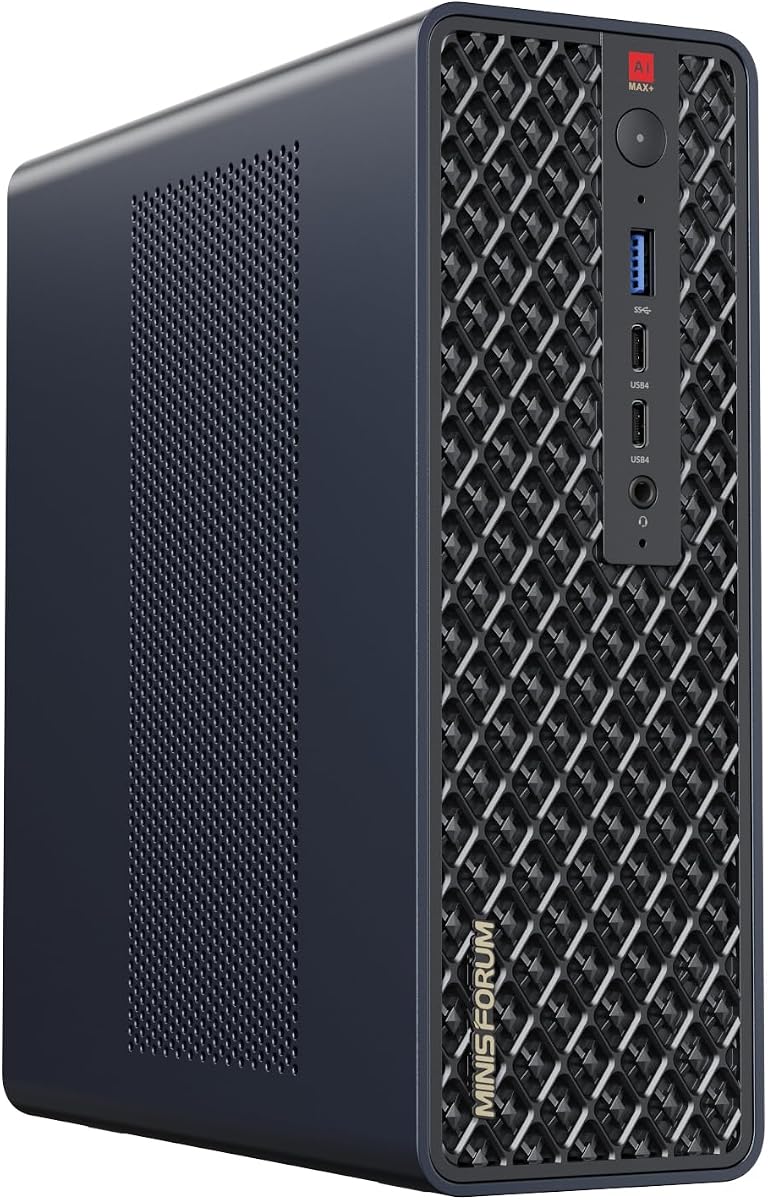
This mini workstation offers impressive AI capabilities in a tiny form factor. The MS-S1 MAX integrates AMD Ryzen AI Max+ 395 with unified memory for powerful parallel computing.
We may earn a commission when you buy through this link, at no additional cost to you.
It features up to 128GB LPDDR5x RAM eliminating traditional VRAM bottlenecks. This makes it ideal for large scale AI inference and video editing workflows on a desk.
Two units can be configured as a cluster to run larger models locally. This cluster design allows for scaling AI power without needing a massive data center.
Users needing a space efficient solution for local LLMs will love this device. It maximizes performance stability while fitting easily into personal or rack environments.
The MS-S1 MAX features an AMD Ryzen AI Max+ 395 APU integrating Zen 5 CPU and RDNA 3.5 GPU.
Two MS-S1 MAX units can be configured as a dual-unit cluster to run a large 235B Q4 model locally.
We may earn a commission when you buy through this link, at no additional cost to you.
The RTX PRO 6000 Max-Q supercharges local generative AI pipelines. Engineered for agentic workflows it packs massive 96GB of next gen GDDR7 ECC memory into a dual slot card.
We may earn a commission when you buy through this link, at no additional cost to you.
Delivering up to 3,511 TOPS of AI performance it handles complex simulations effortlessly. The max power consumption cap of 300 Watts ensures thermal management stays efficient.
It bridges the gap between intense calculation and breathtaking visual output. This card allows teams to scale intelligence rapidly without cloud latency or subscription overhead.
Research labs needing reliable GPU power with low thermal impact should consider this. It fits into standard desktops while delivering enterprise grade performance and stability.
Accelerate your high-performance computing tasks using the cutting-edge NVD Blackwell architecture.
We stand firmly behind the quality of our hardware ensuring that your setup remains fast, stable, and secure.
We may earn a commission when you buy through this link, at no additional cost to you.
This mini PC brings leading AI performance to small desk spaces. The MS-S1 Max Workstation uses AMD Ryzen AI Max+ 395 delivering 126 TOPS overall processor performance.
We may earn a commission when you buy through this link, at no additional cost to you.
Equipped with Radeon 8060S graphics it handles multimedia tasks efficiently. Five video outputs including HDMI and USB4 allow for complex multi-monitor setups and digital signage.
Advanced cooling technology ensures stable operation even at 130W power. The dual centrifugal fans provide superior heat management while maintaining a quiet operational environment.
Professionals needing high performance computing in a small form factor will appreciate this device. It delivers staggering performance for creative and engineering workloads alike.
MINISFORUM AI MS-S1 Max Workstation comes with AMD Ryzen AI Max+ 395 processor using latest Zen 5 architecture.
Integrates phase change cooling technology with an intelligent 3D fan shroud glacier cooling system.
We may earn a commission when you buy through this link, at no additional cost to you.
Selecting the right dual GPU setup requires balancing VRAM capacity, processor power, and budget constraints for your specific AI workload.
VRAM determines the size of models you can run locally. Dual setups often provide massive combined memory like 96GB or more essential for fine tuning large language models.
Prioritize models with HBM3e or GDDR7 memory for highest bandwidth.
A powerful CPU with many cores ensures data preprocessing doesn't bottleneck GPU inference. Look for 16+ cores in consumer workstations or 64+ in server builds.
Ryzen Threadripper or EPYC processors are top choices for dual GPU setups.
Dual GPUs often require x8 x8 bifurcation on consumer boards to utilize full bandwidth. Ensure your motherboard supports this feature before purchasing.
Server systems usually handle this configuration natively.
Two GPUs generate significant heat requiring efficient cooling solutions. Liquid cooled workstations ensure sustained performance without thermal throttling.
A minimum 1600W PSU is often recommended for dual high-end configurations.
Verify support for PyTorch, TensorRT, or vLLM to ensure smooth deployment. Enterprise GPUs like RTX PRO offer better driver stability for production tasks.
Open-source models like DeepSeek or Qwen have broader support.
Large datasets require fast NVMe storage to feed GPUs quickly. Look for PCIe 5.0 SSDs and at least 4TB total capacity.
RAID configurations can improve data redundancy and throughput.
Properly configure PCIe settings in BIOS to ensure both GPUs are recognized by the system. Enable bifurcation if using consumer motherboards to maximize bandwidth.
Keep airflow paths clear by avoiding cluttered desk setups. Regular dusting of vents ensures cooling fans operate efficiently without strain.
Install the latest drivers and tools like CUDA or IPEX-LLM for optimized performance. Monitoring tools can help track VRAM usage to prevent crashes during training.
Yes, consumer GPUs like RTX 5090 or 4090 can be used for AI training. However, they lack ECC memory and enterprise support. Ensure your motherboard supports SLI or NVLink alternatives for multi GPU use.
A quantized 70B model typically requires around 40-48GB VRAM. Dual setups are ideal for this as they can combine memory capacity. Unquantized models would need significantly more memory.
Dual GPUs significantly improve inference speed by splitting the workload across both devices. This allows for faster generation of text and better handling of multiple concurrent users.
Linux is generally preferred for AI workloads due to better driver support and resource management. However, Windows 11 Pro for Workstations offers robust tools for enterprise setups.
Bifurcation allows a single PCIe x16 slot to be split into two x8 lanes. This is essential for using dual GPUs on consumer motherboards without bandwidth loss.
Dual GPU setups often draw over 1000W total power. Ensure you have a PSU rated at least 1600W and the correct 240V outlet availability for high-end systems.
We reviewed ten distinct setups ranging from compact mini PCs to massive enterprise servers. Each option offers unique benefits depending on your budget and performance needs.
Prioritize VRAM capacity and cooling efficiency for long term reliability. A system with 48GB or more memory allows you to run complex models without cloud costs.
Prices fluctuate frequently so always check current listings before purchasing any hardware. Visit the links provided to view real time stock and pricing details.