
JLab Work Buds
3.9Editor score
Detachable boom mic
55+ hours playtime
Bluetooth multipoint
Discover the top earbuds for laptop conference calls in October 2026. This guide compares ten models for microphone clarity and comfort during long meetings.
Finding the right earbuds for laptop conference calls is essential for clear communication. Poor audio quality can disrupt important meetings and lead to misunderstandings with colleagues or clients.
We compared ten top models based on microphone performance, battery life, and comfort. Our analysis focuses on how well each pair handles voice calls in various environments.
Each pick highlights key strengths and weaknesses to help you choose. Keep in mind that product availability and specifications may change over time.
3.9Editor score

4.9Editor score
4.0Editor score
Here is a side-by-side comparison of all ten products evaluated for this guide. Each entry includes key specifications to help you identify the best fit for your needs.




The XIAOWTEK Wireless Earbuds offer impressive performance for their price point. With a 4.9 rating, they stand out for their long battery life and clear microphone quality during calls.
We may earn a commission when you buy through this link, at no additional cost to you.
Their Bluetooth 5.4 chip ensures a stable connection up to 15 meters. The four ENC microphones effectively filter background noise, making your voice sound clear even in busy environments.
While they lack active noise cancelling for music, the passive isolation is decent. The LED display on the case provides a convenient way to check battery levels at a glance.
These earbuds are ideal for professionals seeking reliable connectivity without breaking the bank. Their comfort and battery life make them a top contender for long conference calls.
The four ENC microphones work together to isolate your voice from surrounding chatter, ensuring clear communication on every call.
With up to 50 hours of total playtime, you can go through an entire work week without needing to recharge the case.
We may earn a commission when you buy through this link, at no additional cost to you.
These wireless earbuds are designed with clear calls in mind. The Bluetooth 5.4 chip offers low latency and a stable connection for uninterrupted meetings.
We may earn a commission when you buy through this link, at no additional cost to you.
Advanced ENC call noise cancellation ensures your voice comes through clearly even in noisy settings. The earbuds are comfortable for extended wear with ergonomic tips.
Battery life is solid with 36 hours total, allowing for multiple days of calls on one charge. The LED display helps track power usage effectively.
For users needing reliable voice quality without extra cost, these are a strong option. They deliver consistent performance for daily conference needs.
The Bluetooth 5.4 chipset provides a faster and more stable signal transmission, preventing dropouts during critical calls.
Tap the earbuds to manage calls and play music without needing to touch your laptop, keeping your workflow uninterrupted.
We may earn a commission when you buy through this link, at no additional cost to you.
The Soundcore P30i brings advanced noise cancelling to budget earbuds. It reduces ambient noise by up to 42dB, helping you focus on your meetings.
We may earn a commission when you buy through this link, at no additional cost to you.
Four microphones with AI enhancement ensure your voice is picked up accurately during calls. The adaptive technology adjusts to different environments seamlessly.
A unique feature is the charging case that doubles as a phone stand for hands-free viewing. This is great for multitasking during long video conferences.
If you need active noise cancellation without paying premium prices, this is an excellent choice. It balances features and performance effectively.
The ANC system detects external sound and automatically selects the optimal level for your ears, blocking distractions during calls.
Four microphones use AI algorithms to isolate your voice, ensuring clarity even when others are speaking nearby.
We may earn a commission when you buy through this link, at no additional cost to you.
For those who prefer a wired connection, these Panasonic earbuds are a reliable choice. They eliminate the worry of charging and ensure consistent audio quality.
We may earn a commission when you buy through this link, at no additional cost to you.
The ergonomic design with multiple ear tip sizes ensures a secure fit that isolates noise naturally. The integrated microphone allows for hands-free calling.
The balanced audio provides clear highs and lows, making voice calls sound natural. The call controller on the wire is easy to use for managing meetings.
Ideal for laptops with a 3.5mm jack, they offer a simple plug-and-play solution. This model is perfect if you want to avoid wireless complications.
As wired earbuds, they never need charging, ensuring you are always ready for a call without worrying about battery levels.
Comes with S, M, and L ear tips to match different ear shapes, ensuring comfort during long hours of wear.
We may earn a commission when you buy through this link, at no additional cost to you.
Buying these in a two-pack is a smart move for families or small offices. They provide a reliable wired solution for conference calls without wireless issues.
We may earn a commission when you buy through this link, at no additional cost to you.
The microphone filters out noise effectively, delivering clear conversations even in noisy rooms. The remote control allows you to manage calls easily.
The durable TPE cable is tangle-free and resistant to wear. They are waterproof, making them suitable for various environments.
For straightforward meeting needs where reliability matters more than features, these are a great value. They are simple and functional for daily use.
Includes two pairs of earbuds, ensuring you always have a backup ready when one is lost or needs cleaning.
The built-in microphone filters out ambient noise to ensure your voice is heard clearly during online meetings and calls.
We may earn a commission when you buy through this link, at no additional cost to you.
The JLab Work Buds are specifically designed for professionals who need reliable voice performance. The detachable boom mic ensures high-quality audio on calls.
We may earn a commission when you buy through this link, at no additional cost to you.
With Bluetooth multipoint, you can switch between your phone and laptop effortlessly. The 55+ hours of total playtime means you rarely need to charge.
The charging dock organizes your buds and mic while providing power. The boom mic reduces background noise to keep your voice clear.
For budget-conscious buyers needing a professional headset replacement, this is a solid pick. It offers features usually found in more expensive models.
The noise-canceling boom mic can be attached or detached depending on whether you are on a call or listening to music.
Seamlessly switch between devices with Bluetooth multipoint connectivity, allowing you to answer calls from your laptop instantly.
We may earn a commission when you buy through this link, at no additional cost to you.
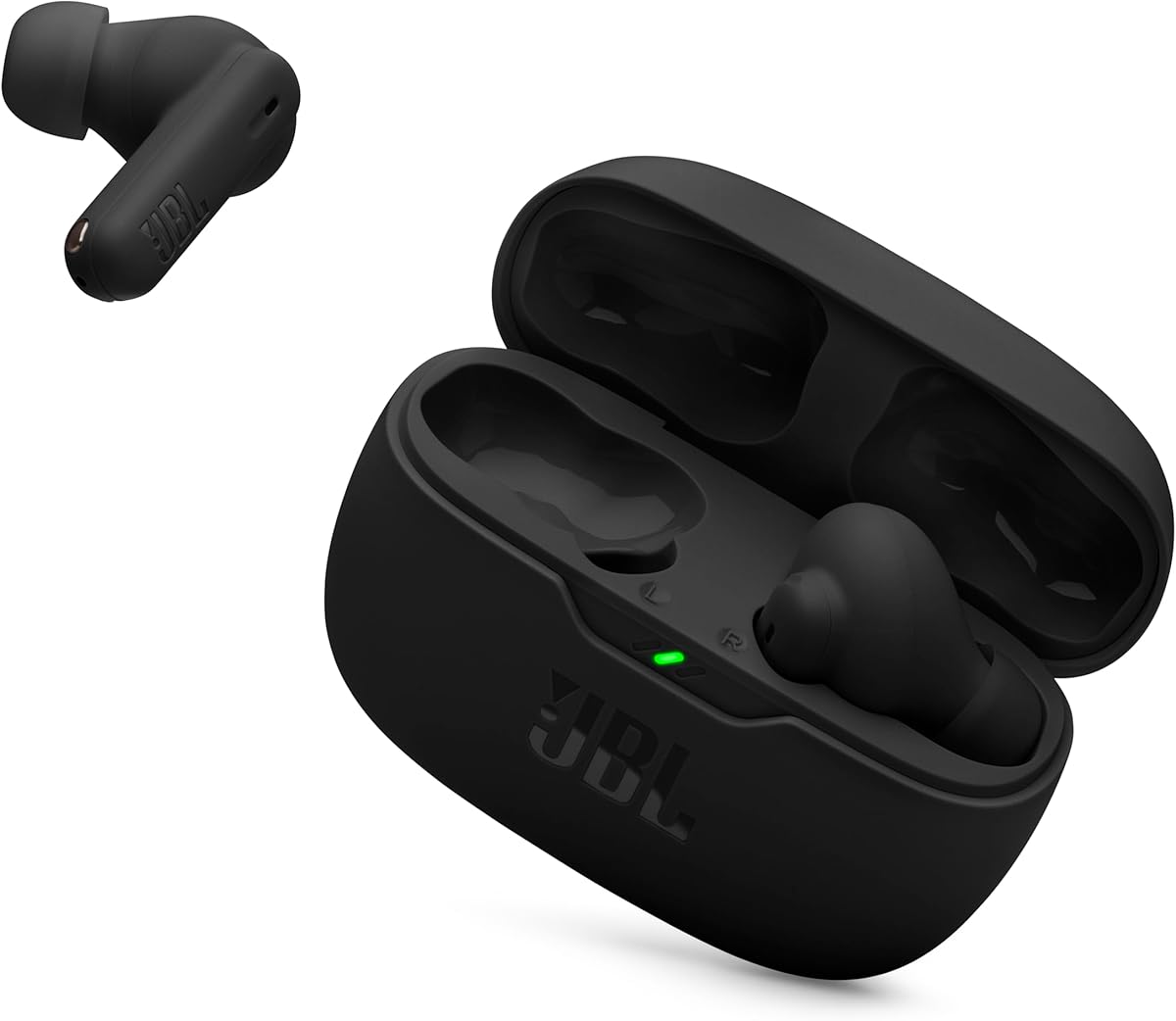
JBL Vibe Beam 2 delivers the signature JBL Pure Bass sound alongside clear call performance. It balances music enjoyment with professional communication needs.
We may earn a commission when you buy through this link, at no additional cost to you.
Active Noise Cancelling filters out distractions so you can focus on meetings. Four microphones ensure your voice comes through clearly even in noisy places.
The fast charging gives you three hours of playtime in just ten minutes. The JBL Headphones app allows you to customize your sound settings.
These are great if you want to enjoy music and meetings with consistent audio quality. The ANC helps you stay focused during calls.
8mm dynamic drivers deliver deep, powerful bass that makes calls and music sound vibrant and rich during use.
Control how much outside sound you hear, allowing you to talk with others or stay aware of your surroundings.
We may earn a commission when you buy through this link, at no additional cost to you.
Dell Pro Plus Earbuds are built for business professionals seeking distraction-free communication. The AI-based mic intelligently filters background noise.
We may earn a commission when you buy through this link, at no additional cost to you.
Adaptive ANC switches between deep focus and awareness modes with a simple pinch. The touch controls make managing calls and audio straightforward.
They offer a comfortable fit that is ideal for long workdays. The sound quality ensures your voice is heard loud and clear.
If you prioritize call quality over music features, these are a smart choice. They are optimized for laptop integration and productivity.
The AI-based noise-cancelling mic recognizes your voice and filters out background noise for superior call quality.
Switch between Adaptive ANC and enhanced transparency mode easily to suit your environment during a call.
We may earn a commission when you buy through this link, at no additional cost to you.
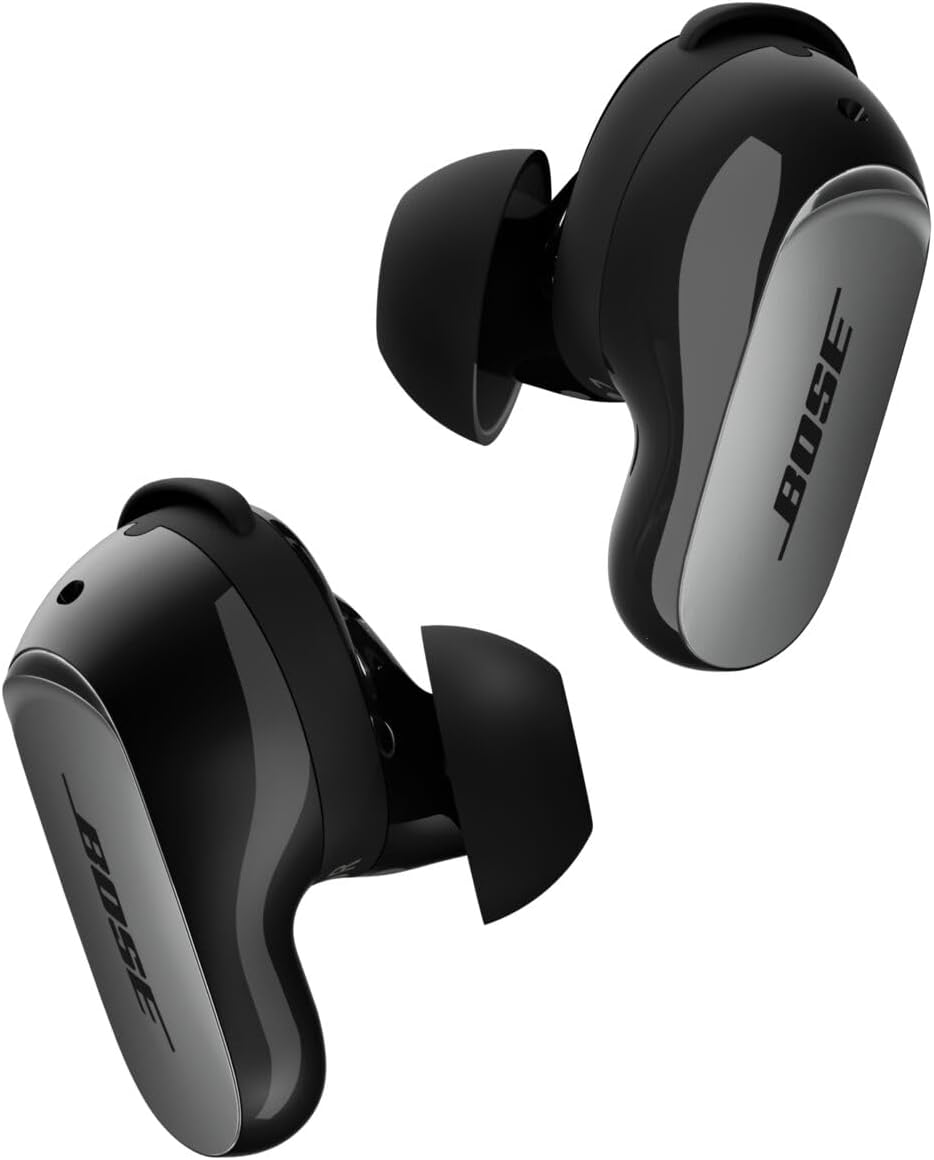
Bose QuietComfort Ultra Earbuds offer world-class noise cancellation and clear calls. CustomTune technology adapts audio to your ear shape for a personalized experience.
We may earn a commission when you buy through this link, at no additional cost to you.
SpeechClarity technology uses noise-rejecting mics to focus on your voice. This ensures you are heard clearly even in very noisy environments.
Bluetooth multipoint lets you switch between devices seamlessly. The immersive audio feature enhances multimedia content for a theater-like experience.
For those willing to invest in top-tier audio quality, these earbuds are unmatched. They provide a premium experience for every aspect of your day.
CustomTune analyzes your ears and adapts the sound for you, delivering personalized noise cancellation and audio quality.
Spatializes your audio for a theater-like experience, making meetings and entertainment more engaging and lifelike.
We may earn a commission when you buy through this link, at no additional cost to you.
The Soundcore Liberty 5 Pro Max features an AI Note-Taker for meeting transcription. It earned a Guinness World Record for high speech quality scores.
We may earn a commission when you buy through this link, at no additional cost to you.
Whisper-Clear calls allow you to speak at any volume while maintaining clarity. The AMOLED display case lets you control settings directly from the case.
Business-grade privacy protects your data with local encryption and secure protocols. Battery life supports 28 hours of total use with ANC on.
Ideal for professionals needing note-taking assistance, this model is a strong innovator. It brings AI efficiency to your daily workflow.
The case records and transcribes meetings, generating summaries and action items to help you stay organized and efficient.
10 sensors and AI ensure your voice is heard clearly even if you whisper, protecting your energy during long calls.
We may earn a commission when you buy through this link, at no additional cost to you.
Selecting the right earbuds for laptop conference calls involves considering several key factors to ensure your communication remains clear and uninterrupted.
The most critical feature for conference calls is the microphone. Look for models with multiple microphones or noise-canceling technology to ensure your voice is picked up clearly while background noise is filtered out.
Prioritize earbuds with specific call-enhancement features like ENC or beamforming to avoid misunderstandings during meetings.
A stable Bluetooth connection is essential to prevent dropouts during important calls. Bluetooth 5.3 or newer versions offer better range and stability for connecting to laptops reliably.
Consider models with multipoint connectivity if you need to switch between your phone and laptop frequently without manual reconnection.
Long battery life ensures you won't run out of power in the middle of a long meeting. Look for earbuds offering at least 6 hours of talk time per charge and a case that provides additional charges.
Check total playtime numbers to ensure the earbuds can last through your workday without needing frequent recharging.
Since you may wear earbuds for hours during meetings, comfort is key. Ergonomic designs with multiple ear tip sizes help you find a secure fit that doesn't cause fatigue.
Ensure the earbuds stay snug in your ears to maintain consistent audio quality and microphone performance throughout the call.
Active noise cancellation (ANC) helps block out distracting background noise so you can focus on the call. This is especially useful in busy environments like open offices or coffee shops.
While ANC is beneficial for listening, make sure it doesn't degrade microphone performance when transmitting your voice.
Ensure the earbuds are compatible with your laptop's operating system. Most modern Bluetooth earbuds work with Windows and macOS, but checking specific features like call controls can prevent issues.
Wired options are also viable if your laptop has a headphone jack or you prefer avoiding wireless setup steps.
Touch controls or physical buttons allow you to manage calls without touching your laptop. Features like quick pairing and easy call muting improve the overall meeting experience.
Look for intuitive interfaces that let you accept calls, mute the microphone, or adjust volume effortlessly.
Start by pairing your earbuds with your laptop through the Bluetooth settings. Ensure the earbuds are in pairing mode by holding the designated button on the case until the LED flashes.
During calls, make sure you are seated in a quiet environment. Speak clearly into the microphone and avoid covering it with your hand to maintain audio clarity.
Clean the earbuds regularly with a soft, dry cloth to prevent dust buildup. Store them in the case when not in use to protect them from damage and ensure they are charged for the next meeting.
Most Bluetooth earbuds work with any laptop that has Bluetooth capability. If your laptop does not have built-in Bluetooth, you can use a USB Bluetooth adapter to connect wireless earbuds easily.
A good microphone for calls should have noise-canceling capabilities to filter out background sounds. Multiple microphones or beamforming technology also help isolate your voice for clearer communication.
Aim for earbuds that offer at least 5 to 6 hours of talk time on a single charge. This ensures they can handle long meetings without needing to be recharged mid-call.
Active noise cancellation helps you hear the other participants clearly by blocking background noise. However, ensure the model also has a good microphone to prevent your voice from being distorted.
Wired earbuds eliminate latency and battery concerns, providing consistent audio quality. Wireless earbuds offer more freedom of movement and convenience, which many users prefer for office settings.
Check that the earbuds are fully charged and properly paired. Clean the microphone holes to remove dust and ensure you are speaking clearly near the mic for better performance.
Yes, most earbuds support both call and audio modes. Some advanced models allow seamless switching between devices or apps for a unified multimedia and communication experience.
Choosing the right earbuds depends on your specific needs and budget. The XIAOWTEK Wireless Earbuds lead our list for their excellent battery life and clear call performance.
If you need specialized features like a boom mic or AI transcription, options like the JLab Work Buds or Soundcore Liberty 5 Pro Max might be more suitable for your workflow.
Remember that availability and pricing can change, so check the current product details before making your decision. Invest in a pair that ensures your voice is heard clearly every time.