Flipper Big Button TV Remote for Seniors
4.2Editor score
Color-coded button layout
Customizable favorite channels
Hidden buttons for setup
This guide compares the top easy to use TV remote for seniors models to help you choose the best option for elderly users with vision or dexterity needs.
Finding a simple remote can be hard for elderly users. This guide reviews ten top models designed for clear buttons and easy setup.
We compared features like button size, lighting, and compatibility. Each pick suits different needs like dementia care or low vision.
Read our detailed reviews to find the right fit. Prices and stock change often, so check current listings before buying.
4.2Editor score

4.2Editor score

4.3Editor score
This side-by-side table highlights key differences in button layout, lighting, and compatibility across all ten reviewed models for informed selection.


The EZclicker Big Button Universal TV Remote is a top choice for elderly users needing clear, simple control. It holds a strong 4.2 rating for its accessible design focused on those with limited dexterity. The extra-large enter button and tactile feedback make pressing keys easy even in low light.
We may earn a commission when you buy through this link, at no additional cost to you.
Its universal compatibility covers major TV brands without complicated menus. The programming process uses just two buttons to sync, making setup fast. The 7 by 2 inch size fits small hands well and stores easily on a nightstand or couch.
While it does not control cable boxes or streaming sticks, this simplifies the layout for pure TV viewing. The lack of streaming app navigation may be a limitation for some smart TV users. However, for traditional broadcast or HDMI sources, it works seamlessly.
We recommend this remote for seniors or caregivers prioritizing simplicity and clear labeling. It reduces frustration during daily use and serves as a great gift for grandparents or those with vision challenges. Check compatibility lists before purchase to ensure your TV model is supported.
The tactile feedback and oversized enter button provide clear sensory cues for users with vision or motor limitations.
Holding Mute and Volume together for sixty seconds auto-programs the remote, eliminating complex code entry steps.
We may earn a commission when you buy through this link, at no additional cost to you.
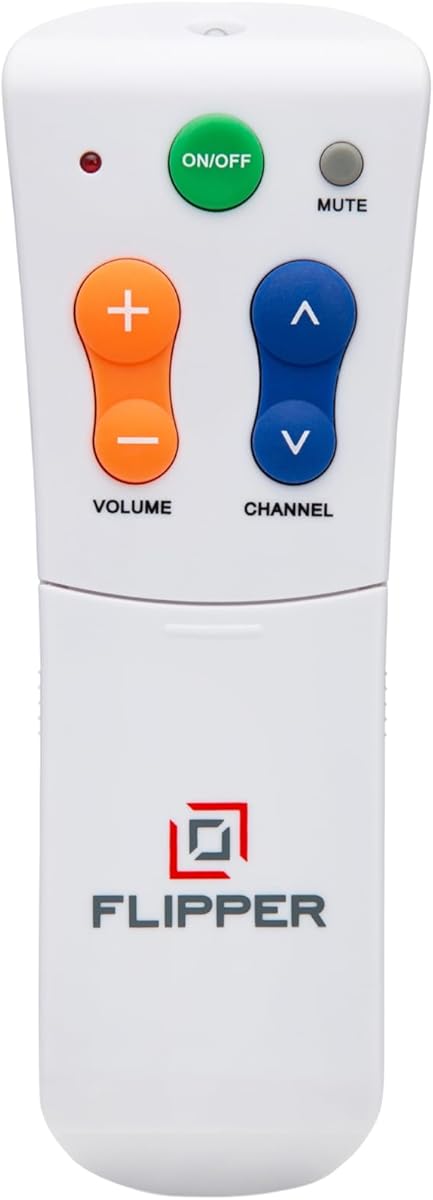
The Flipper remote is built specifically for seniors with dementia or Alzheimer's who need maximum simplicity. It has a 4.2 rating and focuses on reducing confusion with a clean four-button face. The color-coded buttons for volume and channels make operations intuitive for users with impaired vision.
We may earn a commission when you buy through this link, at no additional cost to you.
Caregivers can pre-program up to 25 favorite channels for quick access. The hidden buttons slide out for setup, keeping the main interface clutter-free. This design helps users regain independence without needing to remember complex sequences or codes.
The main trade-off is that it cannot navigate streaming apps like Netflix or Roku menus. It works best for cable, satellite, or broadcast setups. The price is higher than basic models, but the dedicated dementia-focused features justify the cost for many families.
We suggest this remote for households where mental clarity is a concern. It removes the stress of overwhelming options and provides peace of mind for caregivers. Ensure your primary viewing is via traditional broadcast or cable to get the most out of this device.
The limited four-button face and color cues help users with memory issues operate TV without confusion or frustration.
Pre-setting favorite channels lets users cycle through content easily without scrolling through hundreds of unwanted options.
We may earn a commission when you buy through this link, at no additional cost to you.
The GE BigEZ OneTouch remote offers exceptional value with its 4.3 rating and clear, bright design. It features fully backlit buttons that are easy to see in dark rooms. The white body stands out visually, helping users find it quickly when it is misplaced on a couch.
We may earn a commission when you buy through this link, at no additional cost to you.
Setup is streamlined with preset buttons for five major TV brands. The blue volume and orange channel keys provide color cues that assist those with color vision challenges. It also supports control of one extra device like a soundbar or DVD player.
One limitation is the limited brand support compared to broader universal remotes. If your TV is not Samsung, LG, Vizio, Sony, or Roku, this model may not work. However, for those brands, it provides a reliable, affordable solution with strong technical support.
We recommend this remote for budget-conscious buyers seeking clarity and lighting features. The backlit buttons are a major plus for evening viewing. Check your TV brand against the preset list before buying to ensure compatibility.
Fully backlit buttons and a white body ensure the remote remains visible and usable even in dimly lit living rooms.
Pre-set buttons for five common brands allow instant pairing without needing to search for complex remote codes.
We may earn a commission when you buy through this link, at no additional cost to you.
The EZclicker TV Remote for Seniors is a compact option with a 4.2 rating. Its 6-inch length makes it very easy to handle for users with limited grip strength. The design focuses on tactile feedback and big buttons to prevent accidental presses during operation.
We may earn a commission when you buy through this link, at no additional cost to you.
Programming is done by holding Mute and Volume buttons together, a simple process that does not require complex codes. It works with major TV brands but excludes cable boxes and streaming devices like Fire Stick or Roku to keep the interface clean.
While it is lightweight and easy to store, the smaller size might be tricky for those who prefer larger controls. The exclusion of streaming apps means it is best for traditional TV sources only. However, for basic power, volume, and channel control, it is highly effective.
We suggest this remote for users needing a portable and lightweight solution. It fits well in small living spaces or for travelers. Verify your TV brand compatibility before purchase to ensure the remote will work as expected.
The 6-inch length and lightweight build make it ideal for users who struggle with bulky remote controls.
Limiting features to essential power, volume, and channel buttons reduces confusion for elderly users.
We may earn a commission when you buy through this link, at no additional cost to you.
This Big Button Universal Remote stands out with a 4.4 rating and zero programming needed. It works with many major brands like Samsung and LG right out of the box. The extra-large enter button and tactile feedback help users confirm actions without visual confirmation.
We may earn a commission when you buy through this link, at no additional cost to you.
The broad compatibility covers many TV types, making it a strong choice if you change TVs often. It does not support cable boxes or streaming devices, keeping the layout simple for TV control only. The 90-day warranty provides added peace of mind for buyers.
While it lacks advanced features, its reliability and ease of use are significant advantages. The absence of setup steps saves time and frustration. However, the generic build might not feel as premium as other models in this guide.
We recommend this remote for users who want immediate usability without technical steps. It is a solid choice for households needing a spare or primary remote for standard TVs. Check your brand against the supported list before buying.
The remote works right out of the box without pairing or code entry, saving time and effort.
A 90-day free replacement warranty ensures buyer confidence and quick support if issues arise.
We may earn a commission when you buy through this link, at no additional cost to you.
The Large Button TV Remote Control for Seniors offers a 4.4 rating with a focus on ergonomic design. Its lightweight body and clear layout make it comfortable to hold for long periods. Extra-large buttons reduce misclicks and improve accuracy during channel and volume adjustments.
We may earn a commission when you buy through this link, at no additional cost to you.
It is designed for traditional TV brands and excludes niche models or streaming-specific remotes. The sturdy build ensures long-lasting use in daily home environments. This simplicity promotes independence for elderly users who do not need complex smart TV features.
The lack of voice control or niche brand support limits its use in advanced smart setups. However, for core TV functions, it performs reliably. The clear markings help users avoid frustration during regular use.
We suggest this remote for households prioritizing comfort and ease of use. Its durable build makes it suitable for busy living spaces. Verify your TV model is supported before purchase to ensure proper function.
The lightweight and comfortable grip reduces hand fatigue, making it easier for users with arthritis to hold.
Marked buttons with simple functions help users locate controls quickly without needing to read fine print.
We may earn a commission when you buy through this link, at no additional cost to you.
The Philips BigEZ OneTouch remote provides accessibility with a 3.8 rating and a fully backlit keypad. It features colorblind-friendly blue and orange keys that help users distinguish controls easily. The OneTouch setup streamlines pairing for five major TV brands.
We may earn a commission when you buy through this link, at no additional cost to you.
Its directional pad supports navigation on smart TVs and streaming devices. This adds more functionality than basic models. However, the lower rating suggests users may face occasional issues with compatibility or build quality.
The limited brand support means it may not work with all TVs. Also, the might be complex for those needing minimal buttons. Yet, for users needing backlit keys and some navigation, it offers a solid balance.
We recommend this remote for those needing specific backlighting and navigation features. Check brand compatibility carefully before purchase. The backlit buttons remain a standout feature for evening use.
The fully backlit buttons enhance visibility in dark rooms, making the remote easier to use at night.
Including a directional pad allows basic navigation on smart TVs beyond just power and volume controls.
We may earn a commission when you buy through this link, at no additional cost to you.
This Big Button Universal TV Remote focuses on simplicity with a 3.0 rating. It includes extra-large buttons and a clear layout suitable for elderly users. The design prioritizes traditional TV compatibility over streaming or cable box controls to reduce confusion.
We may earn a commission when you buy through this link, at no additional cost to you.
While it works with most major brands, the lower rating suggests mixed experiences with reliability. The layout remains user-friendly, but users might encounter setup issues or signal limitations. The lack of streaming support keeps the interface minimal.
For users who need a basic remote for standard TVs, it offers a straightforward solution. The extra-large buttons help prevent accidental presses. However, the lower performance ratings warrant careful consideration before purchase.
We suggest this remote for users seeking basic functionality at a low cost. Ensure your TV brand is supported to avoid compatibility issues. It is best for traditional TV setups where streaming is handled separately.
Limiting functions to power, volume, and channel avoids the complexity of smart TV navigation systems.
Extra-large buttons reduce the need for precise finger movements, helping users with limited dexterity.
We may earn a commission when you buy through this link, at no additional cost to you.
This remote is a specialized choice for Samsung TV owners, earning a 4.4 rating. The backlit buttons stay lit for 30 seconds, helping users find controls quickly in the dark. It includes a soft silicone cover and mount hook for added protection and accessibility.
We may earn a commission when you buy through this link, at no additional cost to you.
The remote works right out of the box without pairing, saving time and frustration. It is designed solely for Samsung TVs, so compatibility is guaranteed for that brand. The ergonomic design fits comfortably in the hand, reducing strain.
Since it is limited to Samsung TVs, it is not versatile for other brands. Also, streaming devices are not supported directly. However, for Samsung users seeking convenience and durability, the included accessories add significant value.
We recommend this remote for Samsung TV households needing extra convenience features. The protective cover and hook make it practical for daily use. Ensure your TV is a Samsung model before purchase to avoid mismatches.
The protective cover and mount hook help prevent drops and loss, making it easier to keep track of the remote.
Buttons that stay lit for thirty seconds ensure visibility during low-light conditions without extra effort.
We may earn a commission when you buy through this link, at no additional cost to you.
The Anderic RR1004 offers a unique approach with glow-in-the-dark keys for low-light use. It has a 4.0 rating and focuses on essential controls like power, volume, and channel. The minimalist design reduces clutter and confusion for elderly users.
We may earn a commission when you buy through this link, at no additional cost to you.
Its learning function allows copying commands from existing remotes, such as adding inputs. However, this requires line-of-sight and does not work with RF or Bluetooth systems. It is pre-programmed for LG TVs, simplifying setup for that brand.
The initial setup may need some assistance, but daily use is straightforward. The lack of RF support limits use with some smart TVs. For IR-based systems, it provides a simple and reliable solution.
We suggest this remote for users needing basic controls with glow features. Check your TV type and existing remote compatibility before purchase. The glow-in-the-dark keys make it practical for night viewing.
The learning feature lets you copy common commands like inputs from your old remote without complex codes.
Limiting to core functions keeps the remote easy to understand and use without extra buttons to confuse users.
We may earn a commission when you buy through this link, at no additional cost to you.
Selecting the right remote involves considering layout, lighting, and compatibility. This section outlines key factors to evaluate before purchase.
Look for remotes with oversized buttons that are easy to press. The layout should include clear spacing to prevent accidental presses. Avoid remotes with too many functions that can overwhelm users with cognitive limitations.
Choose a model with distinct power, volume, and channel buttons that stand out visually.
Remotes with backlit buttons help users find controls in dark rooms. This feature is essential for evening viewing. Some models include glow-in-the-dark keys for visibility without needing extra light sources.
Prioritize remotes with illumination if the user often watches TV in low-light conditions.
Ensure the remote supports your specific TV brand. Many universal models have preset buttons for Samsung, LG, or Sony. Check the compatibility list to avoid issues with niche or streaming-specific brands.
Verify that the remote works with your TV model before purchasing to ensure proper function.
Simpler setup methods reduce frustration during initial use. Look for OneTouch or automatic pairing features that do not require entering codes. Some remotes work out of the box, while others need a quick sync process.
Select a remote with clear instructions and minimal steps for a smoother installation experience.
Check whether the remote uses AAA or AA batteries. AA batteries often last longer but are larger. Some models have battery compartments that are easy to open for users with dexterity issues.
Choose a battery type that balances longevity with ease of replacement.
Remotes used daily should be sturdy enough to survive accidental drops. Look for soft rubberized coatings or protective cases. A lightweight build helps reduce hand strain during extended use.
Opt for models with reinforced corners or included protective covers to extend the device's life.
Determine if the user needs control over streaming apps like Netflix or YouTube. Most simple remotes focus on basic power and volume functions. Ensure the remote supports the primary source of content.
Select a remote that aligns with your primary viewing habits to avoid unnecessary complexity.
Color-coded buttons help users distinguish between volume and channel controls quickly. This feature is especially helpful for those with low vision. Bright colors like blue for channel or orange for volume improve usability.
Prioritize remotes with distinct color coding to enhance visual recognition of controls.
Start by inserting the correct batteries as indicated in the manual. Ensure the battery compartment is closed securely to prevent leaks. Place the batteries so they match the polarity markings inside the compartment.
Program the remote by following the specific setup steps for your TV brand. For models with auto-setup, point the remote at the TV and press the required buttons until the TV responds. For preset models, select the correct brand button.
Keep the remote clean by wiping it with a dry cloth. Avoid using liquids that may damage the electronics. Store it in a consistent location, such as a side table, to reduce searching time.
Most remotes in this guide focus on traditional TV functions like power, volume, and channel control. They do not support navigation of streaming apps like Netflix or YouTube. Check compatibility lists to confirm support for your specific devices.
Remotes typically use either AAA or AA batteries. Check the product specifications to confirm the correct type. Some models use AAA for compact designs, while others use AA for longer life.
Most universal remotes support major brands like Samsung, LG, Sony, and Vizio. However, some models have limited brand support. Always verify your TV model against the manufacturer's compatibility list before purchasing.
Programming methods vary by model. Some require holding specific button combinations, while others use OneTouch auto-setup. Follow the included instructions to sync the remote with your TV. Most setups take less than a minute.
Many simple remotes are designed solely for TV control. Some models can control a cable box or soundbar as a secondary device. Check the product details to confirm multi-device capabilities before buying.
First, check the battery installation and replace them if needed. Ensure there is no obstruction between the remote and TV sensor. Contact customer support if issues persist for troubleshooting assistance.
Some remotes feature simplified layouts with fewer buttons to reduce confusion. Look for models with clear labeling and minimal steps. These designs help users maintain independence without feeling overwhelmed by complex controls.
Most simple remotes in this guide do not include voice control features. They focus on physical button presses for reliability. If voice control is needed, check specific product listings for support.
This guide reviewed ten top models tailored for elderly users with varying needs. Our top picks include the EZclicker Big Button Universal TV Remote for overall performance, Flipper for premium simplicity, and GE BigEZ for budget-friendly lighting features.
Prioritize remotes with large buttons, clear labeling, and easy setup. Consider whether you need compatibility with specific TV brands or streaming devices. Choose a model that matches the user's daily viewing habits for the best experience.
Prices and stock change often, so check current listings before buying. Ensure the model you select aligns with your compatibility needs to avoid returns. With the right remote, seniors can enjoy a stress-free TV experience.