
UGREEN Ethernet Coupler 10Gbps
4.7Editor score
10Gbps high speed
PoE power support
328ft extension range
This guide compares the top 10 Ethernet Line Extender options for home and business networking, analyzing speed, range, and reliability to help you choose the
Finding a reliable Ethernet Line Extender is crucial for modern networks that demand stable connectivity across large spaces. These devices allow you to push data signals beyond standard cable limits without sacrificing performance or requiring costly rewiring projects throughout your property.
We evaluated ten top-rated models based on speed capacity, maximum range, ease of setup, and overall build quality. Our analysis focuses on real-world performance metrics and technical specifications to ensure you select a solution that meets your specific networking needs effectively.
Each product listing below highlights key features, pros, and cons to help you make an informed decision quickly. Please note that pricing and availability change frequently, so verify current details before purchasing to ensure you get the best value for your investment.
4.7Editor score

4.8Editor score
4.4Editor score
This side-by-side comparison evaluates the ten leading Ethernet Line Extender models available today. We analyze key specifications like maximum distance, supported speeds, and connectivity options to help you identify the best fit for your network infrastructure.


The StarTech 10/100 Ethernet Extender earns our Editor's Choice award for its exceptional range capabilities and professional-grade reliability. With a 4.8-star rating, it stands out as a robust solution for extending network signals up to 0.5 miles without signal degradation.
We may earn a commission when you buy through this link, at no additional cost to you.
This device supports unmanaged dual-speed connectivity and includes essential features like VLAN tag pass-through and Wake on LAN. Its transparent network operation ensures seamless integration with existing infrastructure without requiring complex configuration or software installation steps.
While it caps speeds at 100Mbps and carries a premium price, these trade-offs are acceptable for industrial or remote deployments where distance is the primary constraint. The TAA compliance and solid construction justify the investment for businesses needing dependable long-range networking.
We recommend this extender for IT administrators managing remote sites, surveillance systems, or industrial equipment where standard cables fail. Its ability to reach 800 meters makes it a top choice for demanding professional environments requiring stable connectivity over vast distances.
Reach distances of up to 0.5 miles using standard copper cabling to overcome typical 100-meter limits effectively.
Support VLAN tagging and jumbo frames for seamless integration into complex managed network environments.
We may earn a commission when you buy through this link, at no additional cost to you.
The UGREEN Ethernet Coupler offers exceptional value with a 4.7-star rating and supports speeds up to 10Gbps. This budget-friendly kit allows you to join two Ethernet cables seamlessly to extend your network reach without active electronic components.
We may earn a commission when you buy through this link, at no additional cost to you.
Its built-in PoE support means you can power connected devices like IP cameras through the same cable, simplifying installations significantly. The coupler works with Cat5 through Cat8 cables, ensuring compatibility with virtually any existing network infrastructure you might have.
While passive extenders can't regenerate signals like active units, this model maintains stability over 328 feet when paired with quality cabling. Users appreciate the durable Z-shaped design that prevents pin damage and ensures reliable data transmission in high-traffic areas.
Home users and small offices looking for a cost-effective way to extend cable runs will find this coupler ideal. Just ensure your existing cables are in good condition to maximize performance and avoid signal loss over the extended distance.
Avoid expensive active extenders by using this passive coupler to simply join existing cables together easily.
Deliver power to devices like cameras without needing separate power adapters for simpler installation setup.
We may earn a commission when you buy through this link, at no additional cost to you.
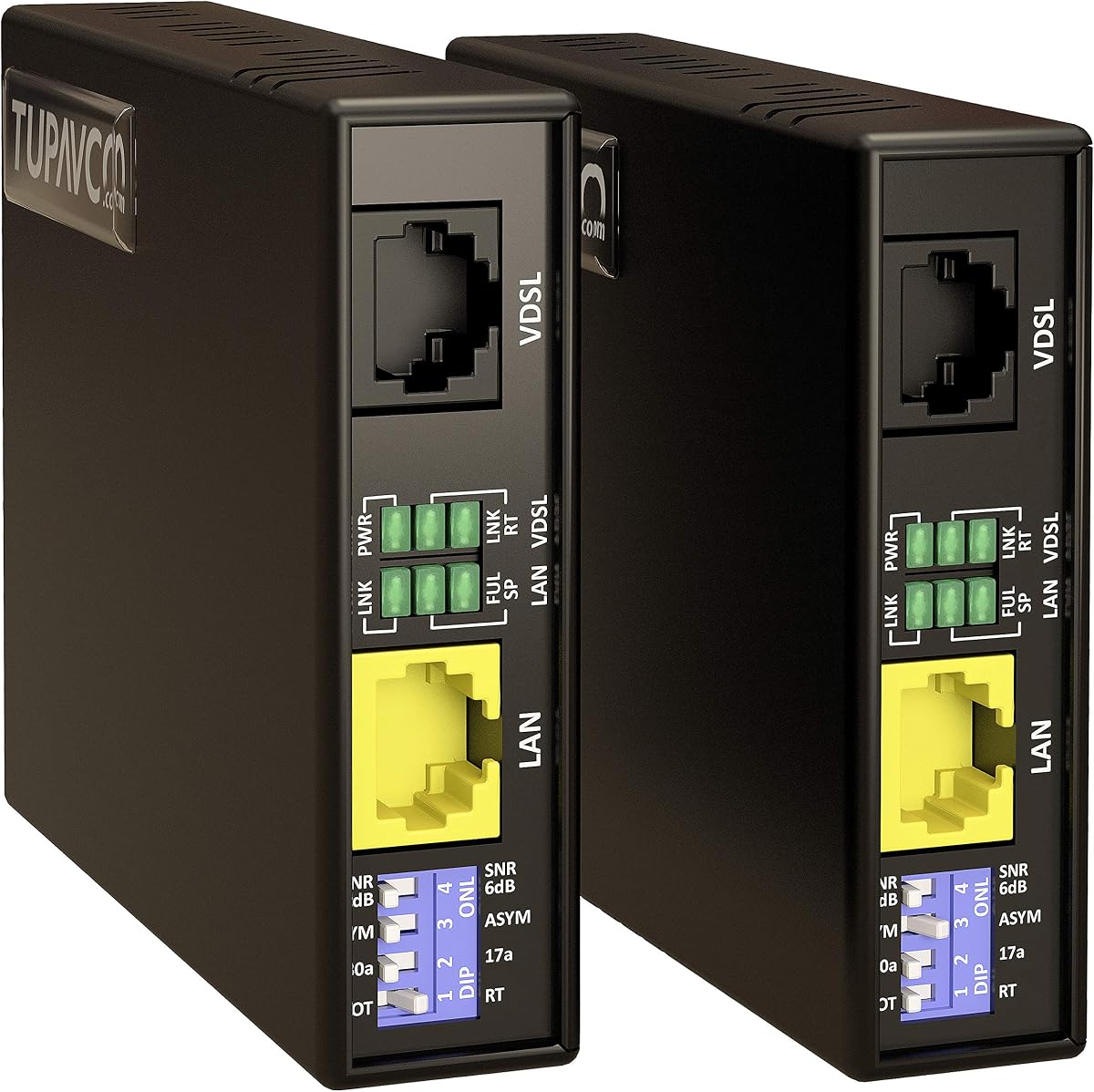
For those needing extreme reach, this VDSL-based Ethernet Extender Kit delivers a massive 7000-foot range with a 4.4-star rating. It transforms existing twisted copper wire into a reliable high-speed network link without requiring new cable infrastructure investments.
We may earn a commission when you buy through this link, at no additional cost to you.
The kit includes preset units for central and remote locations that work out of the box. You can use standard phone cables or CAT5 through CAT8 network cables to pass signals to remote devices like cameras or modems securely and efficiently.
While the premium price tag is a consideration, the ability to extend networks across acres of property justifies the cost for large estates or industrial sites. Active signal regeneration ensures stability even over these extraordinary distances where passive extenders would fail completely.
Businesses with distributed assets or rural properties will benefit most from this long-range solution. It eliminates dead zones and provides wired connectivity to remote equipment where running new Ethernet cabling would be impractical or prohibitively expensive to install.
Break the 328ft standard limit and extend network access up to 7000 feet over existing wiring.
Utilize existing phone or network cables to avoid the expense of installing new dedicated wiring.
We may earn a commission when you buy through this link, at no additional cost to you.
The NETGEAR Powerline Kit brings Gigabit speeds into rooms where Wi-Fi struggles using your home's electrical wiring. With a 4.2-star rating, it supports high-bandwidth activities like 4K streaming and gaming by extending connectivity without visible cables.
We may earn a commission when you buy through this link, at no additional cost to you.
MIMO and Beamforming technologies direct signals efficiently through circuits for improved coverage compared to older models. The included noise-filtered power outlet lets you plug in other devices without sacrificing network performance or losing available electrical sockets.
Performance heavily depends on the quality and age of your home's electrical wiring. However, for users on the same circuit, this kit delivers reliable fast connections that eliminate the need for long Ethernet cable runs or weak wireless signals.
It is ideal for media rooms or home offices needing stable wired connections where running cables is impossible. While it lacks Wi-Fi, the dedicated Ethernet ports ensure consistent speeds for stationary devices like consoles and desktop computers.
Achieve fast network speeds over electrical outlets for smooth 4K streaming and online gaming sessions.
Keep your outlets accessible with a pass-through socket that doesn't block wall power availability.
We may earn a commission when you buy through this link, at no additional cost to you.
TP-Link AV1000 Powerline Ethernet Adapter KIT offers a compact solution for extending wired networks through electrical outlets. This device supports AV1000 speeds and features a Gigabit port to ensure high-speed data transfer for connected devices like TVs and consoles.
We may earn a commission when you buy through this link, at no additional cost to you.
Its nano design prevents blocking adjacent outlets, maintaining convenience while extending your network reach effectively. The setup is simple with no configuration required, and it includes Ethernet cables for immediate use without needing to purchase extra accessories separately.
Performance relies on being plugged into wall outlets on the same electrical circuit for optimal results. While not suitable for homes with AFCI breakers in all cases, it remains a reliable choice for extending coverage to basements and garages effectively.
Home users seeking a balance of speed and convenience will appreciate this compact adapter kit. It provides secure wired connections for devices that need stability without running cables through walls or relying on potentially slow Wi-Fi signals.
Plug in without blocking the second outlet to maintain full usage of available power sockets.
Automatically reduces power consumption when idle to lower energy costs without affecting performance.
We may earn a commission when you buy through this link, at no additional cost to you.
This TP-Link kit combines powerline Ethernet with Wi-Fi 6 extenders to deliver versatile connectivity across multi-story homes. It extends your network to areas blocked by thick walls while providing wireless access with speeds up to AX1500 standards for faster browsing.
We may earn a commission when you buy through this link, at no additional cost to you.
The dual-band system ensures seamless streaming and gaming by reducing congestion on the network. You can clone your router's SSID and password instantly, creating a unified network without requiring complex reconfiguration of connected devices manually.
While it requires wall outlets to function effectively, it offers a complete solution for whole-home coverage where traditional Wi-Fi extenders fail. The included Gigabit Ethernet port also supports wired devices that need maximum speed and stability for optimal performance.
Families with multiple connected devices will benefit from the capacity to support up to 64 devices at once. This hybrid approach bridges gaps in coverage effectively without sacrificing speed or reliability in hard-to-reach areas of your home.
Use OneMesh compatibility to easily expand coverage with existing TP-Link routers seamlessly.
Connect both wireless devices and Ethernet cables for flexibility with different device types.
We may earn a commission when you buy through this link, at no additional cost to you.
The TP-Link AV1000 Powerline WiFi Kit extends your network reliably through electrical wiring with a straightforward setup. Featuring AC1200 Wi-Fi speeds, it covers up to 750 feet and provides a wired port for devices needing stable connections like game consoles.
We may earn a commission when you buy through this link, at no additional cost to you.
Its passthrough design allows you to plug other appliances into the adapter without blocking wall sockets. This feature maintains convenience while extending connectivity to hard-to-reach rooms without requiring complex configuration or additional wiring steps for installation.
OneMesh compatibility lets you expand your network easily by connecting to compatible routers for seamless whole-home coverage. However, performance is subject to wiring quality and distance, so results may vary in older homes with complex electrical circuits.
Users looking for a simple, reliable solution to eliminate dead zones will find this kit effective. It balances performance with ease of use, making it a solid choice for families wanting to extend Wi-Fi without technical expertise.
Plug other devices into the adapter itself to keep your electrical outlets fully available.
Sync settings with OneMesh routers for a unified network across your entire property easily.
We may earn a commission when you buy through this link, at no additional cost to you.
This active Ethernet Range Extender Kit regenerates signals to bridge distances up to 600 meters reliably. Using just two wires or existing coax, it delivers transparent Layer 1 connectivity suitable for cameras and remote management systems without configuration.
We may earn a commission when you buy through this link, at no additional cost to you.
Both units are mains powered and include adapters for immediate deployment. The kit works with spare pairs in existing cables, making it a cost-effective solution for extending networks where installing new dedicated wiring is impossible or too costly.
It maintains full transparency for VLANs and DHCP, ensuring existing network configurations work without modifications. However, since the case is IP-unrated, you must mount units inside a sealed enclosure for any exterior runs to ensure safety and durability.
IT managers with distributed setups will appreciate its ability to cross 600 meters while maintaining reliable speeds. It provides a stable link for surveillance or control systems where Wi-Fi is impractical and standard Ethernet cables are too short.
Regenerate signals at both ends to maintain connection quality over long two-wire runs.
Utilize spare pairs in existing cables or coax to avoid expensive infrastructure upgrades.
We may earn a commission when you buy through this link, at no additional cost to you.
This VDSL Ethernet Extender Kit extends network range up to 5000 feet with speeds up to 300Mbps. It leverages existing phone lines to provide cost-effective high-speed connections for remote devices without needing expensive new cable installation projects.
We may earn a commission when you buy through this link, at no additional cost to you.
Support for G.INP minimizes interference from noise, maximizing speed stability over long distances. The adjustable DIP switch allows you to select different profiles to optimize performance based on your specific line conditions and distance needs effectively.
While it is a premium option, the speed and reach justify the cost for large properties or industrial sites. Setup is plug-and-play with no software installation, and LED indicators simplify monitoring status and troubleshooting connectivity issues quickly.
Organizations needing high-speed access over miles of existing wiring will find this kit superior to standard extenders. It bridges large gaps reliably, ensuring remote sites stay connected with bandwidth sufficient for video conferencing and data transfers.
Maintain up to 300Mbps even at long distances unlike standard extenders that slow down.
Tune settings via DIP switches to match your specific wiring and environmental conditions.
We may earn a commission when you buy through this link, at no additional cost to you.
The TP-Link AV600 Powerline Adapter offers a budget-friendly way to extend wired connections through walls easily. With a 4.2-star rating, it delivers AV600 speeds up to 750 feet, making it a practical choice for small homes or specific room needs.
We may earn a commission when you buy through this link, at no additional cost to you.
It features a 100Mbps Ethernet port suitable for most standard tasks like browsing and streaming. The kit includes Ethernet cables and sets up instantly without configuration, allowing you to connect devices like smart TVs or game consoles quickly.
While the speed is limited compared to Gigabit models, the cost efficiency makes it ideal for secondary devices. Power saving mode reduces energy use when idle, aligning with eco-friendly household goals while maintaining reliable wired connectivity for essential tasks.
Users needing basic wired access in hard-to-reach areas will find this adapter sufficient. It eliminates the need for Wi-Fi extenders for devices that perform better on wired networks without breaking the budget with expensive hardware.
Extend your network to additional rooms without investing in expensive Gigabit powerline kits.
Automatically switch to power-saving mode to reduce energy consumption when not actively in use.
We may earn a commission when you buy through this link, at no additional cost to you.
Selecting the right Ethernet Line Extender requires understanding your specific range, speed, and environment needs to ensure optimal network performance.
Determine the distance between your router and the target device to choose an extender that covers it. Most active extenders go up to 5000 feet or more, while passive couplers or powerline adapters usually cover shorter distances within a home.
Check the maximum range of the product and ensure it exceeds your required distance by a margin for stability.
Ensure the extender supports speeds that match your internet plan and device capabilities. Some models offer up to 10Gbps while others cap at 100Mbps, so avoid bottlenecks by choosing a model rated higher than your expected usage.
Match the extender speed to your fastest device to prevent slowing down your entire network performance.
Verify that the extender supports your existing cable type such as Cat5e, Cat6, or phone lines. VDSL extenders work with telephone wiring while standard Ethernet couplers require RJ45 connections, so compatibility is key for easy installation.
Select an extender that matches your existing infrastructure to avoid replacing all your cables manually.
Active extenders regenerate signals to maintain quality over long distances while passive couplers simply join cables. Choose active units for runs over 328 feet to ensure reliable speeds, and use passive for short joins or splices.
Use active extenders for long runs to maintain signal quality and passive for simple short connections.
If you plan to connect devices like cameras that require power, check for PoE (Power over Ethernet) support. This allows the extender to deliver power through the cable itself eliminating the need for extra power adapters or outlets.
Choose PoE-supported extenders for IP cameras to simplify installation without extra power wiring requirements.
Enterprise setups may require VLAN support and jumbo frames for segmentation and efficiency. Review technical specs to ensure the device passes tags and supports necessary protocols if you use a managed network environment.
Confirm VLAN support and enterprise features if you use managed networks for better control and segmentation.
Some extenders need power at both ends while others are passive or USB powered. Ensure you have access to power outlets where the remote unit will sit before purchasing an active model that requires local power.
Verify power outlet availability at both ends to ensure active extenders can operate without issues.
Look for durable materials and warranty terms especially if deploying in industrial or outdoor environments. Quality casing and support protect your investment and ensure longevity in harsh or fluctuating environmental conditions.
Check warranty and build quality to ensure long-term reliability and support for your network investment.
Start by plugging the local unit near your router and the remote unit at your destination into wall outlets or power sources if active. Connect your router to the local unit via an Ethernet cable and then connect your devices to the remote unit ports.
Allow a few minutes for the link to establish and LEDs to stabilize indicating a successful connection. For active extenders, ensure both ends are powered simultaneously and verify network status indicators to confirm connectivity and signal strength.
Keep units away from heat sources and moisture to maintain durability over time. Check cables periodically for wear and avoid bending them sharply to ensure signal integrity and prolong the lifespan of your network extension setup.
Yes, VDSL-based extenders can transmit data over standard phone lines effectively. They convert Ethernet signals to work over twisted pair phone wiring allowing you to extend networks without running new cables through walls.
Most extenders are plug-and-play and require no software installation. Active units may have optional management tools but basic connectivity works immediately upon powering both ends of the device pair.
Passive couplers typically cover up to 328 feet while active extenders can reach up to 7000 feet or more depending on the model and wiring quality.
Yes, if the extender has a lower speed rating than your connection or uses poor quality wiring. Choose a model with a speed rating higher than your internet plan to prevent bottlenecks on your network.
Only if both units are housed in weatherproof enclosures. Most standard extenders are for indoor use so use proper casing and waterproof outlets to protect equipment from rain or extreme temperatures safely.
No, powerline-based extenders must be plugged directly into wall outlets for best performance. Power strips can interfere with signal transmission and reduce speeds significantly for home network setups.
Whether you need a simple coupler for joining cables or a long-range VDSL extender for large properties, the right choice depends on your distance and speed needs. We highlighted top picks ranging from budget passive units to enterprise-grade active extenders.
Prioritize active extenders if you need to bridge gaps over 328 feet and passive couplers for quick short fixes. Ensure compatibility with your wiring type and power availability to avoid unexpected installation challenges later on.
Remember to verify current prices and stock before buying as deals change frequently. This guide provides a solid foundation to help you connect your devices reliably and efficiently wherever you need a stable network.