
SSK Portable SSD 1TB External Solid State Hard Drive
4.5Editor score
1050MB/s read and 1000MB/s write
SLC caching for steady performance
USB-C and USB-A cable included
Find the best external SSD for Linux with our expert guide comparing top models for speed, durability, and compatibility.
Selecting the right external SSD for Linux requires careful consideration of compatibility, speed, and durability to ensure smooth workflow integration.
We evaluated leading models based on transfer rates, build quality, and Linux file system support to identify the most reliable options for users.
Each pick highlights key strengths and trade-offs, helping you choose the perfect drive for your needs while noting that prices may vary over time.
4.5Editor score

4.7Editor score

4.6Editor score
This side-by-side comparison highlights key specifications and features across all ten drives to help you quickly identify the best fit for your Linux setup.





This drive stands out with its high capacity and robust durability, making it ideal for Linux users needing reliable storage on the go.
We may earn a commission when you buy through this link, at no additional cost to you.
Its NVMe performance ensures rapid file transfers, while the IP65 rating protects against water and dust in various environments.
The included password protection adds a layer of security, though the price is higher than some competing models.
Anyone prioritizing durability and capacity for Linux workflows will find this SSD a solid long-term investment.
IP65 water and dust resistance ensures this drive survives harsh conditions where other drives might fail.
256-bit AES hardware encryption keeps sensitive data safe with password protection features.
We may earn a commission when you buy through this link, at no additional cost to you.
The Samsung T7 is widely recognized for its speed and compatibility across platforms, including Linux systems.
We may earn a commission when you buy through this link, at no additional cost to you.
Its compact aluminum body offers excellent heat dissipation and durability, making it perfect for daily carry.
While it lacks an IP rating, the drop resistance provides adequate protection for most indoor and office environments.
For users seeking a balance of performance and portability, this drive delivers excellent value.
NVMe technology enables read speeds up to 1050MB/s for quick file access and backups.
Shock-resistant design withstands drops up to 6 feet, ensuring longevity during travel.
We may earn a commission when you buy through this link, at no additional cost to you.
As the fastest drive on this list, the T9 offers next-gen speeds for Linux users handling large datasets or media files.
We may earn a commission when you buy through this link, at no additional cost to you.
Its Dynamic Thermal Guard prevents overheating during sustained transfers, maintaining performance under heavy loads.
The premium price reflects its cutting-edge technology, requiring a compatible host to fully utilize 2000MB/s speeds.
For professionals needing top-tier performance, this drive is worth the investment.
Up to 2000MB/s read speeds significantly reduce wait times for large file transfers.
Dynamic Thermal Guard manages heat to ensure consistent speeds during extended use.
We may earn a commission when you buy through this link, at no additional cost to you.
SSK offers a compelling budget option with performance that matches higher-priced rivals on Linux systems.
We may earn a commission when you buy through this link, at no additional cost to you.
Its SLC caching ensures steady speeds during transfers, avoiding slowdowns when handling large files.
Though it lacks advanced software features, the drive delivers reliable performance for everyday tasks.
For cost-conscious users needing solid speed, this drive is a smart choice.
SLC caching maintains steady write speeds even when transferring large files.
Weighing just 36.6g, this drive is incredibly easy to carry anywhere.
We may earn a commission when you buy through this link, at no additional cost to you.
The Lexar ES3 combines speed with a slim profile, fitting easily in pockets while supporting Linux systems.
We may earn a commission when you buy through this link, at no additional cost to you.
It includes software for file encryption, adding security without requiring hardware changes.
Its card-like design is convenient, though some users may prefer a more rugged build.
Ideal for travelers needing portable storage with basic security features.
Lexar DataShield provides AES encryption to protect personal data across devices.
Only 10.5mm thick, this drive fits effortlessly in wallets or card holders.
We may earn a commission when you buy through this link, at no additional cost to you.
The T7 Shield is built for outdoor and field work, offering IP65 protection against water and dust.
We may earn a commission when you buy through this link, at no additional cost to you.
Its larger size accommodates 2TB capacity, making it suitable for Linux users storing extensive datasets.
Drop resistance up to 9.8 feet ensures durability even in rough environments.
Best for professionals who need weather-resistant storage for fieldwork.
IP65 rating ensures reliable operation in rain or dusty conditions.
2TB storage allows for extensive backups without needing multiple drives.
We may earn a commission when you buy through this link, at no additional cost to you.
Western Digital delivers a secure option with hardware encryption, protecting data even if the drive is lost.
We may earn a commission when you buy through this link, at no additional cost to you.
Its NVMe performance ensures quick access to files on Linux systems without bottlenecking.
The sturdy design offers drop resistance, though software tools are primarily optimized for Windows.
A solid choice for users prioritizing data security on portable drives.
Password-enabled 256-bit AES hardware encryption keeps personal files secure.
Drop resistant up to 6.5 feet provides peace of mind during travel.
We may earn a commission when you buy through this link, at no additional cost to you.
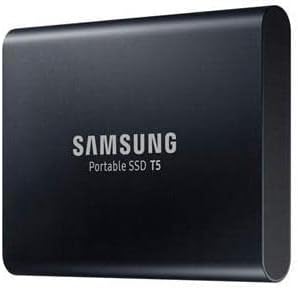
The T5 is a trusted model known for reliability, though its USB 3.1 limits speeds compared to newer drives.
We may earn a commission when you buy through this link, at no additional cost to you.
Its metal construction provides excellent durability and heat dissipation for sustained use on Linux.
While slower than modern NVMe options, it still outperforms traditional HDDs significantly.
Good for users needing high capacity with a proven track record of stability.
High user rating indicates consistent performance over years of usage.
Solid aluminum design ensures durability and efficient heat management.
We may earn a commission when you buy through this link, at no additional cost to you.
This 500GB version offers the same speed as the 1TB model in a smaller package for Linux users.
We may earn a commission when you buy through this link, at no additional cost to you.
It features Dynamic Thermal Guard to prevent overheating during extended sessions.
With 500GB, it is suitable for moderate storage needs like system backups or portable apps.
Ideal for students or professionals needing a compact, fast portable drive.
Small enough to fit in a pocket, perfect for travel or commuting.
Automatic heat management ensures consistent speeds during use.
We may earn a commission when you buy through this link, at no additional cost to you.
This affordable T5 model offers solid performance at a lower cost, working well on Linux systems.
We may earn a commission when you buy through this link, at no additional cost to you.
While limited to USB 3.1 speeds, it provides a significant upgrade over mechanical hard drives.
Its durable design and high reliability rating make it a safe choice for general storage.
Recommended for users seeking budget-friendly external storage without sacrificing quality.
Lower price point makes it accessible for casual users and students.
High user rating reflects consistent performance over extended usage.
We may earn a commission when you buy through this link, at no additional cost to you.
Choosing the best external SSD for Linux involves evaluating speed, compatibility, and durability to match your workflow needs.
USB 3.2 Gen 2 offers up to 1050MB/s speeds, while Gen 2×2 drives like the T9 reach 2000MB/s. Ensure your Linux system supports the required interface to fully benefit.
Prioritize Gen 2 or higher for smooth transfers of large files on Linux.
Most drives come formatted as exFAT or NTFS, which Linux can read natively or with minor drivers. However, reformatting to ext4 may optimize performance on Linux.
Check if the drive supports reformatting without losing warranty coverage.
Look for IP ratings like IP65 for water and dust resistance, or shock resistance ratings for drop protection. These features ensure reliability in variable environments.
Rugged designs are essential for fieldwork or travel-heavy usage.
Capacities range from 500GB to 4TB. Consider how much data you store locally versus on the cloud to determine the best fit.
Higher capacity drives offer better value per gigabyte for extensive storage needs.
Hardware encryption via AES 256-bit protects sensitive data. Ensure the encryption software is compatible with Linux or supports open-source alternatives.
Hardware encryption is safer and more compatible than software-only solutions on Linux.
Fast drives can generate heat. Features like Dynamic Thermal Guard help maintain performance by preventing overheating during sustained transfers.
Proper thermal management ensures consistent speeds without throttling.
Some drives include both USB-C and USB-A cables, simplifying connections across various devices. Verify what is included to avoid extra costs.
Included cables save time and money for immediate setup.
Higher speed and capacity models cost more. Balance your budget against performance needs, as budget options often offer sufficient speeds for most tasks.
Value-driven choices balance cost with essential features.
Connect the drive via a USB 3.2 port for optimal speed, ensuring cables are undamaged to avoid bottlenecks.
Format the drive to ext4 for Linux-native performance, though backups should be made before reformatting.
Safely eject the drive before unplugging to prevent data corruption and extend hardware lifespan.
Most modern external SSDs work with Linux via USB, but file systems like NTFS may require additional drivers. Reformatting to ext4 ensures native compatibility.
ext4 is the recommended native file system for Linux, offering better performance and reliability. However, exFAT is useful for cross-platform compatibility.
Generally, Linux has built-in USB mass storage drivers, so no installation is needed. Some encryption software may require specific packages.
Yes, Windows-formatted drives like NTFS can be read on Linux, though write access might need extra tools. Reformatting to ext4 removes these limitations.
Tools like smartmontools or hdparm can check drive health. Always back up important data before running diagnostics.
Many models feature IP ratings and shock resistance. Look for drives with at least IP55 or drop resistance above 6 feet for better protection.
Top choices include the Samsung T7 for balanced performance, the T9 for speed, and the SSK for budget-friendly options.
Prioritize interface speed and durability to match your Linux workflow and environment for long-term reliability.
Always check current prices and compatibility notes before purchase to ensure the best deal.