
NexiGo N60 1080P Webcam
4.3Editor score
Full HD 1080p video quality
Built-in noise-cancelling microphone
Plug and play USB connectivity
Choosing the right external webcam for your Mac can transform your video calls and content creation. High quality cameras deliver clear images and crisp audio, ensuring you look professional on every call. Whether you need 4K resolution or reliable 1080p performance, the market offers many tailored options.
To create this guide, we analyzed ten top-rated webcams specifically compatible with macOS. We evaluated image quality, microphone performance, build materials, and ease of setup. Each product was selected based on user reviews and technical specifications to ensure reliable performance for remote work and streaming.
Each pick below highlights key features, pros, and cons to help you decide quickly. We include detailed buying advice to guide your selection process. Please note that prices and availability change frequently, so verify current listings before purchasing to secure the best deal available today.
4.3Editor score

4.6Editor score

4.6Editor score
As an Amazon Associate we earn from qualifying purchases.
This side-by-side comparison details the specifications and features of all ten selected webcams. Review the image resolution, audio capabilities, and compatibility notes to find the device that best fits your Mac setup and workflow needs.




The Acer 4K Webcam stands out as the top choice for Mac users seeking high fidelity video. It delivers crisp 4K visuals and clear audio, making it perfect for professional calls and streaming. With a rating of 4.6 stars, it is highly trusted by users who value quality.
We may earn a commission when you buy through this link, at no additional cost to you.
This webcam features a genuine Sony 1/2 CMOS sensor that ensures balanced and true-to-life visuals. The aerospace-grade aluminum body provides durability and fast heat dissipation. Additionally, the Phase Detection Autofocus keeps your image sharp, while the dual microphones capture your voice clearly from up to 2.5 meters away.
While the price is higher than budget options, the premium build and image quality justify the cost. The included privacy cover adds security, and the plug-and-play setup eliminates driver hassles. This makes it a reliable long-term investment for any serious video workflow.
If you need a camera that makes you look professional on every call, this is the pick. It works seamlessly with Zoom, Teams, and FaceTime. We recommend it for creators, remote workers, and anyone who wants the best possible video quality on their Mac setup.
The Sony sensor and 4K resolution ensure your details are visible even in low light.
The all-metal unibody design feels premium and helps keep the camera cool during long sessions.
We may earn a commission when you buy through this link, at no additional cost to you.
The Anker PowerConf C200 is a strong contender for those who want sharp video without going full 4K. Its 2K resolution provides excellent clarity for meetings, and the low-light correction ensures you look good even in dim rooms. Users praise its audio quality and ease of use.
We may earn a commission when you buy through this link, at no additional cost to you.
This webcam features AI noise cancellation to filter out background sounds like typing or air conditioning. The customizable viewing angles let you frame your shot perfectly using software controls. It is widely compatible with macOS, making it a versatile choice for hybrid workers.
The need for software to adjust angles might be a minor inconvenience for some. However, the overall video quality and audio performance make up for it. It is a great balance between high resolution and practical features for daily use.
We recommend this webcam for professionals who prioritize clear audio and good lighting performance. It is ideal for home offices where lighting might vary. The privacy cover adds peace of mind, making it a solid daily driver for video conferencing.
AI noise cancellation ensures your voice comes through clearly even in busy environments.
Software-adjustable angles help you find the perfect framing for your workspace setup.
We may earn a commission when you buy through this link, at no additional cost to you.
The EMEET C960 offers genuine 4K resolution at a price point that rivals 1080p models. It is perfect for users who want high-quality video without spending a premium. The autofocus keeps your image steady, and the dual mics ensure clear voice transmission during calls.
We may earn a commission when you buy through this link, at no additional cost to you.
Users appreciate the plug-and-play setup and the included privacy cover. The 73-degree field of view focuses on you rather than your background, reducing the need for blurring. It supports a 1/4-inch tripod thread for versatile mounting options on any monitor or desk.
The default resolution starts at 1080p, so you need to switch to 4K via software. This step adds minor complexity but is worth the detail. Overall, the build and performance deliver impressive value for the money spent on this unit.
For budget-conscious buyers who still demand high resolution, this webcam is an excellent choice. It works well with popular apps like Zoom and Teams. We suggest it for educators and streamers who need reliability and clarity without breaking the bank.
Getting true 4K quality at a budget price makes this model a standout in its category.
The included tripod thread allows for flexible placement on monitors or camera tripods easily.
We may earn a commission when you buy through this link, at no additional cost to you.
The NexiGo N60 is the perfect entry point for anyone needing a reliable webcam for daily calls. It delivers sharp 1080p video and clear audio at a fraction of the cost of premium models. Users love its simplicity and the included privacy cover for security.
We may earn a commission when you buy through this link, at no additional cost to you.
Its built-in noise-cancelling microphone reduces background noise effectively for small offices. The camera works with a wide range of systems including macOS, ensuring compatibility. It connects via USB and requires no drivers, making it ready to use instantly after plugging in.
While the build is plastic and the focus is fixed, it handles most indoor lighting well. It is not designed for professional streaming but is more than enough for Zoom meetings. This practicality makes it a top pick for casual users.
If you want a functional camera without overspending, the NexiGo N60 is the best value. It fits every Mac setup easily. We recommend it for students and home office workers who need clear video for routine communication tasks.
This webcam provides full HD performance at a budget-friendly price that suits many.
Plug-and-play connectivity means you spend less time setup and more time meeting.
We may earn a commission when you buy through this link, at no additional cost to you.
The Logitech Brio 100 is a straightforward webcam that delivers consistent Full HD performance. It is ideal for users who want a brand they trust without complex settings. The Auto-Light Balance feature boosts brightness so you look good even in shadowed areas.
We may earn a commission when you buy through this link, at no additional cost to you.
Its integrated privacy cover ensures security when you are not on a call. The camera is made with recycled plastic, appealing to eco-conscious buyers. It works well with major platforms like Zoom and Google Meet without needing extra software.
The mono microphone is clear but lacks stereo depth. If you want a camera that just works without fuss, this fits the bill. It is a solid choice for basic business needs where reliability matters more than high-end features.
For general users seeking a no-fuss webcam, this is a safe choice. It pairs easily with Mac systems and delivers clean video. We recommend it for office workers who need dependable daily video calls without complex setup or configuration.
Auto-Light Balance automatically adjusts brightness to ensure you look natural in all settings.
Made with recycled plastic, it supports sustainable manufacturing practices without sacrificing performance.
We may earn a commission when you buy through this link, at no additional cost to you.
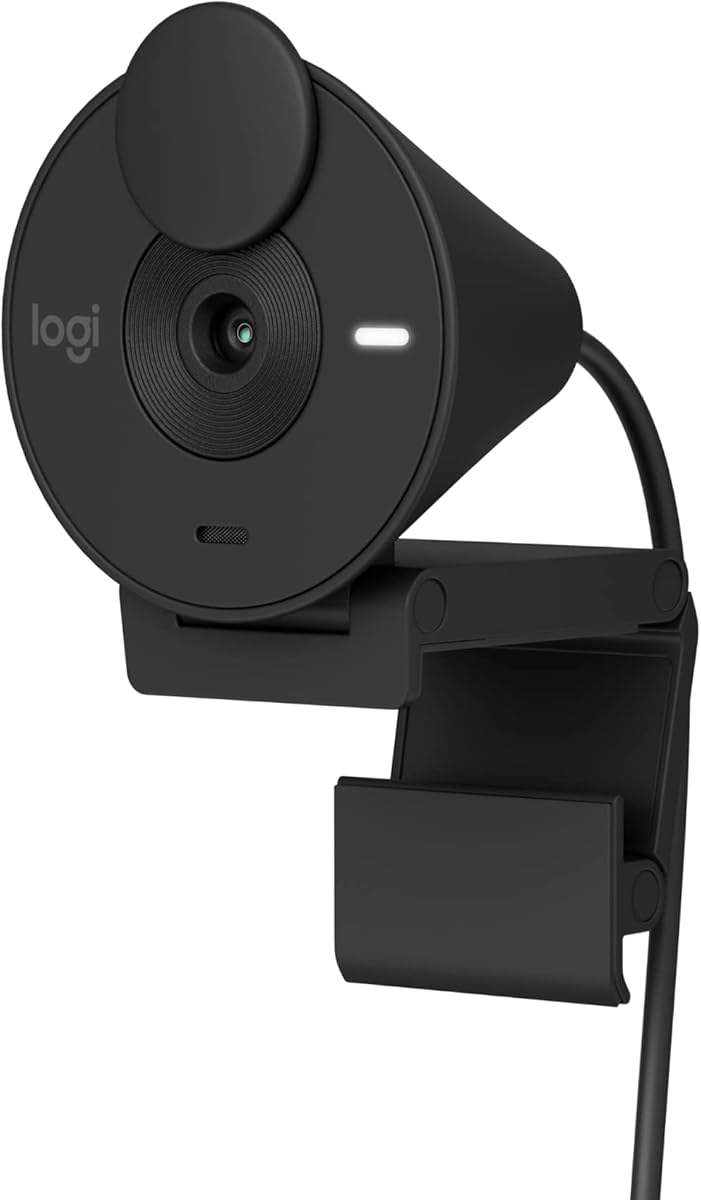
The Logitech Brio 301 offers Full HD video with the added benefit of app customization. Using Logi Tune, you can adjust color and image quality to match your environment. The spin privacy shutter is a sleek way to protect your privacy between calls.
We may earn a commission when you buy through this link, at no additional cost to you.
Its Auto Light Correction ensures you are seen clearly regardless of room lighting. The mono mic suppresses background sound well enough for clear calls. It is certified for Zoom and Teams, making integration seamless for business environments.
The reliance on the app for advanced settings might be a hurdle for some. However, the flexibility it provides is useful for tweaking your look. It is a good step up from basic models for those who want control over their video feed.
We recommend this webcam for users who appreciate app integration and customization. It suits professionals who want to fine-tune their appearance. For Mac users needing reliable performance with extra features, this model is a strong contender for daily use.
The Logi Tune app lets you adjust color and quality for a personalized video experience.
The spin privacy shutter is easy to use and provides reliable protection for your lens.
We may earn a commission when you buy through this link, at no additional cost to you.
The Logitech C920e is designed for professional environments requiring certified performance. It offers a balanced 78-degree view ideal for individual or small group calls. With dual omnidirectional microphones, your voice is captured clearly without needing a headset.
We may earn a commission when you buy through this link, at no additional cost to you.
Built-in autofocus and light correction ensure you look sharp in any setting. The attachable privacy screen gives you control over when you are visible. It is TAA compliant and works seamlessly with popular apps like Microsoft Teams and Zoom.
While the price is higher than consumer models, the enterprise features justify it for work. The clip is sturdy and mounts securely on monitors. It is a reliable choice for companies needing standard devices for employees across different locations.
For business users seeking certified quality, this is the ideal choice. It simplifies deployment and management. We recommend it for office setups where reliability and compliance are top priorities for video conferencing needs.
Certified for Zoom and Teams ensures seamless integration into corporate video systems.
Dual omnidirectional mics capture clear audio from multiple directions for natural sound.
We may earn a commission when you buy through this link, at no additional cost to you.
The Logitech C922x HD Pro is a premium option for streamers and content creators. It delivers crisp video at 30fps and includes a license for background removal software. The stereo microphones ensure your audio sounds professional without extra gear.
We may earn a commission when you buy through this link, at no additional cost to you.
Users praise its autofocus and HD lighting adjustment which keeps details sharp in varied lighting. The glass lens produces vibrant colors and clarity. While it lacks a shutter, the software control provides flexibility for background effects.
The price is higher, but the included software and stereo audio add value. It is a robust tool for those broadcasting or recording content regularly. The performance justifies the investment for serious users looking to elevate their output.
If you stream or record content, this webcam is a top choice. It delivers quality that matches professional standards. We recommend it for creators who want to focus on content without worrying about technical quality limits on their feed.
Dual microphones capture natural stereo sound that enhances the quality of your recordings.
The included XSplit VCam lets you replace your background easily with a virtual one.
We may earn a commission when you buy through this link, at no additional cost to you.
The Logitech C920S is a classic model that continues to deliver reliable high-performance video. It offers Full HD quality and includes a privacy shutter for security. The HD autofocus ensures you stay sharp even when moving around during calls.
We may earn a commission when you buy through this link, at no additional cost to you.
Stereo audio with dual mics captures natural sound, reducing the need for headsets. The light correction handles dim environments well. It is widely compatible with macOS and works seamlessly with all major video calling applications.
While it lacks some new software features, its core video and audio quality remain strong. It is a trusted choice for general use. The included privacy cover adds peace of mind for users concerned about security on their setup.
For those who want a reliable workhorse webcam, this model fits perfectly. It is a solid upgrade from basic cameras. We recommend it for professionals who prioritize consistent quality and privacy features without needing complex settings.
The privacy shutter puts you in control and protects the lens with a snug fit.
Stereo audio captures natural sound on calls and recorded videos clearly.
We may earn a commission when you buy through this link, at no additional cost to you.
This Acer 4K Webcam delivers premium video quality with a durable metal build. It features Phase Detection Autofocus for fast and accurate focusing. The lightweight design makes it easy to transport, while the fast cooling ensures stable performance during long streaming sessions.
We may earn a commission when you buy through this link, at no additional cost to you.
The dual high-sensitivity microphones capture clear audio from up to 2.5 meters away. The magnetic privacy cover provides secure protection for your lens. It works seamlessly with major platforms like Teams and Zoom, offering a seamless experience.
The metal construction ensures it feels solid and looks professional. While it shares features with other models, its unique cooling and portable design set it apart. It is a great choice for mobile workers who value quality on the go.
If you want 4K video in a portable package, this model is ideal. It suits gamers and streamers who move between locations. We recommend it for users who need high performance and durability in a sleek, lightweight form factor.
The aluminum body dissipates heat quickly for reliable 24/7 video performance.
The magnetic privacy cover snaps securely over the lens to block unwanted peeks.
We may earn a commission when you buy through this link, at no additional cost to you.
Selecting the right external webcam involves balancing resolution, audio quality, and build durability. This guide outlines key factors to ensure you find a device that works seamlessly with macOS and meets your specific needs.
Resolution determines how clear your video looks. Options range from 1080p Full HD to 4K Ultra HD. Higher resolution like 4K is ideal for streaming and professional calls, but 1080p is sufficient for standard meetings. Ensure the camera supports 30fps or higher for smooth motion.
Look for cameras with quality sensors like Sony CMOS to ensure crisp detail.
Many users operate in home offices with limited natural light. Cameras with low-light correction or light adjustment features help you look good in dim settings. This prevents your image from appearing grainy or dark during evening calls.
Always check for auto-light correction features before buying a webcam.
Clear audio is just as important as video. Built-in noise-cancelling microphones filter out background noise like keyboard clicks or fans. Some models offer stereo sound, which enhances clarity. If you often meet in noisy places, prioritize models with advanced audio features.
Consider a separate mic if you want professional studio-quality audio instead.
The field of view (FOV) determines how much of your room the camera captures. A narrower view focuses on you, while a wider view shows more background. Choose a range between 70 to 90 degrees for standard calls. Adjustable FOV helps in flexible setups.
Adjust the camera angle to frame yourself correctly for the best results.
Security is a growing concern for remote workers. Look for webcams with integrated privacy shutters or covers. These allow you to physically block the lens when not in use. This prevents accidental recording and adds peace of mind.
A sliding or magnetic privacy cover is a valuable feature for any office setup.
Durable materials like metal ensure the webcam lasts longer and looks premium. Check if the device has a universal clip or tripod thread. A sturdy clip holds the camera securely on your monitor, while a tripod thread allows for flexible mounting options.
Prioritize models with tripod threads for versatile placement on desks.
Ensure the webcam is plug-and-play with macOS. Most modern USB cameras work with no drivers, but checking specs is key. Look for compatibility with apps like Zoom, Teams, and Google Meet. Avoid models requiring complex software setups for basic use.
Plug-and-play connectivity saves you time and reduces setup frustration daily.
Webcams range from budget-friendly to premium. Determine your budget based on your needs. A 1080p budget model suits casual users, while 4K models are better for pros. Balance the cost with features you actually need to avoid overspending.
Focus on value features like audio quality rather than just resolution alone.
Connect your webcam via USB to your Mac. macOS typically recognizes it automatically. Open your preferred app like Zoom or FaceTime to select the new camera. Adjust the camera angle for a flattering view and secure it on your monitor or desk.
Clean the lens gently with a soft cloth to remove dust. Check for updates in your settings regularly. Keep the firmware updated to fix bugs and improve performance. Store your camera safely when not in use to protect the lens.
Test your audio and video settings before important calls. Adjust lighting to avoid shadows. Ensure your privacy cover is open during use. Position your camera at eye level for better engagement with your audience during meetings.
Most modern external webcams are compatible with Mac OS X 10.7 and higher. Ensure your device supports USB 2.0 or 3.0 for the best performance. Some models may require specific drivers, but plug-and-play is common.
4K offers sharper detail but requires more bandwidth. For standard Zoom or Teams calls, 1080p is usually sufficient. Choose 4K if you stream content or want the highest possible image quality.
A privacy shutter is a cover that blocks the lens when not in use. It prevents accidental recording and ensures your privacy. It is an essential feature for security-focused users.
Yes, webcams with high frame rates like 60fps are great for streaming. Look for models compatible with gaming consoles or capture cards. This enhances your streaming setup significantly.
Check if the webcam is set as the default microphone in macOS settings. Ensure no other apps are using the mic. Sometimes restarting the app or unplugging the device resolves these issues easily.
Most webcams work without extra software. However, some models offer apps to adjust brightness or frames. These apps enhance your control over the image quality if needed.
We reviewed ten top webcams ranging from budget-friendly 1080p models to premium 4K options. The Acer 4K Webcam stands out as the top choice for quality, while the NexiGo N60 offers the best budget value.
Prioritize resolution and audio clarity based on your needs. Ensure compatibility with your apps and check for privacy features like shutters. A good webcam elevates your presence and ensures professional quality on every call.
Remember that prices change frequently, so verify current listings before purchasing. This guide aims to help you find the perfect webcam for your Mac setup. Choose wisely to ensure smooth and clear video experiences in 2026.