
22MP Film & Slide Scanner with 5 LCD LCD
4.3Editor score
Affordable All In One Kit
Instant Preview Playback Options
HDMI USB Output Connectivity
This guide compares the top film scanner to digital converter models for preserving 35mm slides and negatives with high resolution and standalone editing
Preserving your family history requires converting old film into reliable digital files. A good film scanner to digital converter makes this process simple without needing a computer. You want high resolution and easy editing to keep memories safe and accessible for years.
We evaluated ten top models based on sensor quality, display size, and format compatibility. Each unit was compared for speed, ease of use, and ability to handle mixed film collections. Our focus remains on standalone operation to ensure anyone can start digitizing immediately.
Every pick below highlights key strengths and ideal use cases for different collectors. You will see how each device handles slides negatives and printed photos efficiently. Please note that stock and availability can change frequently so check current listings before buying.
4.3Editor score

4.3Editor score

4.3Editor score
This side by side comparison reviews ten leading models to help you find the right tool for your archive. We look at resolution display size and supported film types to ensure you choose a device that meets your specific needs.


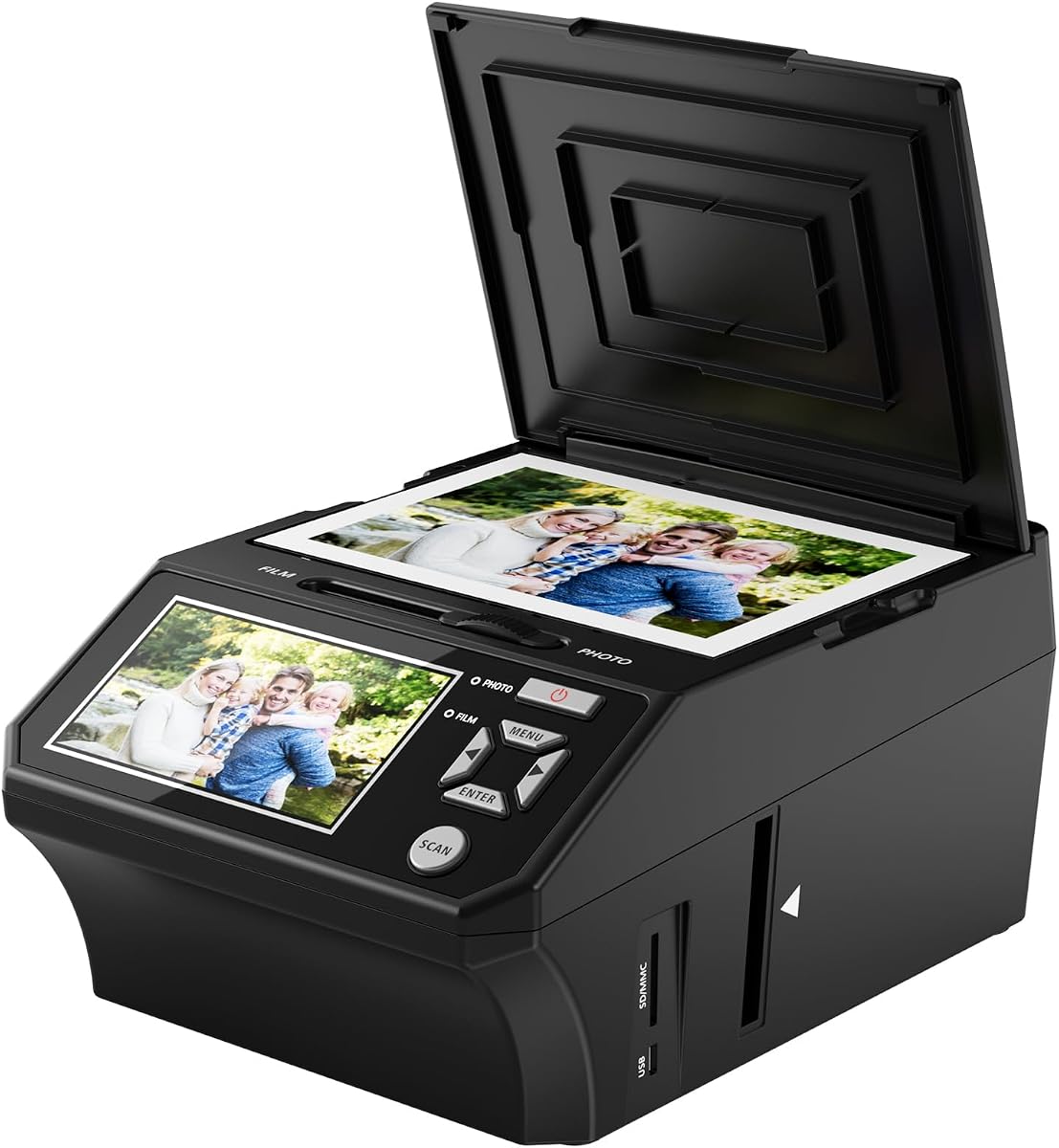


This KODAK Slide N Scan model delivers a robust 22MP resolution that captures fine details from your old negatives. It earns our top pick for its balanced feature set and reliable performance in converting slides and negatives without a computer.
We may earn a commission when you buy through this link, at no additional cost to you.
The large 5 inch LCD screen provides a crystal clear preview of your images before saving them to an SD card. You can adjust brightness and color with simple touch buttons on the device itself making the workflow smooth and accessible.
While the color correction tools are functional they lack the depth of desktop software for professional restoration. However for most family archives the onboard adjustments are sufficient to enhance faded images and prepare them for sharing.
If you need a dependable converter that works straight out of the box this model is the ideal choice for any collector.
The continuous feeding tray technology allows you to load multiple frames quickly without stopping to reposition each slide individually.
Connect to your TV via HDMI for instant viewing or save to an SD card for easy transfer to any computer later.
We may earn a commission when you buy through this link, at no additional cost to you.
The Magnasonic All-in-One scanner offers a sharp 24MP resolution that stands out for capturing intricate details in your vintage photos. It supports a wide range of formats including Super 8 film making it a versatile tool for mixed media collections.
We may earn a commission when you buy through this link, at no additional cost to you.
You can view your scans directly on the large display or connect to a TV using an optional HDMI cable for larger viewing sessions. The interface allows for quick adjustments to brightness and color ensuring your files look their best before saving.
The main drawback is that the included HDMI cable is not always bundled which means you may need to purchase it separately. Additionally the scanning process can take slightly longer compared to more streamlined models on the market today.
For users prioritizing maximum resolution and movie reel conversion this scanner provides excellent value and reliable performance.
Unlike standard photo scanners this unit can handle Super 8 film strips allowing you to convert moving images into digital files.
The SD card slot supports up to 128GB of memory giving you ample space to store thousands of digitized frames.
We may earn a commission when you buy through this link, at no additional cost to you.
This HP FilmScan model brings a premium feel to the category with its sleek design and responsive touchscreen interface. It is designed for users who want a seamless standalone experience without the need for external software or drivers.
We may earn a commission when you buy through this link, at no additional cost to you.
The quick load tray helps you process batches of slides efficiently reducing the downtime between each scan. You can adjust your images directly on the screen which ensures that your digital copies retain the original clarity and color balance.
While the touch controls are smooth they offer fewer manual adjustments than dedicated desktop software tools. This trade-off simplifies the process significantly which is ideal for those who prefer speed and convenience over granular control.
If you are willing to pay a bit more for a refined user experience this scanner is a strong investment for your home archive.
The all angle LCD touch screen allows users to preview and edit images directly on the scanner with intuitive gestures.
Digitize mixed archives with support for 135 126 and 110 negatives and positive slides in a single device.
We may earn a commission when you buy through this link, at no additional cost to you.
The KODAK SCANZA is a compact unit that fits easily on any desk while still offering a wide range of film format support. It stands out for including an HDMI cable right in the box which is a rare convenience in this price segment.
We may earn a commission when you buy through this link, at no additional cost to you.
Its 3.5 inch TFT LCD screen is bright and adjustable which helps when previewing your scans in various lighting conditions. You can scan and save images with a single button press making it very accessible for users who want quick results.
The smaller display size means you might need to zoom in to check fine details before saving your files to the SD card. While this does not affect the output quality it does require a bit more patience during the verification step.
For those with limited space or who need a portable solution this scanner delivers solid performance and essential features.
Mac and PC compatible converter comes with all necessary cables including USB power and HDMI for immediate setup.
Handles 35mm 126 110 Super 8 and 8mm negatives and slides ensuring you can digitize almost any vintage format.
We may earn a commission when you buy through this link, at no additional cost to you.
This KODAK REELS digitizer is specialized for converting 8mm and Super 8 film reels into digital video files. It captures frames at 1080p resolution allowing you to preserve family movies without needing an old projector to view them.
We may earn a commission when you buy through this link, at no additional cost to you.
The device includes a full accessory kit with empty take up reels and adapters for various reel sizes. You can use the on screen interface to align frames and adjust exposure ensuring that each frame is captured clearly and accurately.
The main limitation is that it does not extract audio from the film so you will need a separate tool if you want sound. For users focused solely on visual preservation however this workflow is streamlined and effective for long reels.
If you have a collection of home movies this is the dedicated tool you need to bring them to life digitally.
Converts motion picture film reels frame by frame to 1080p HD MP4 video files using an 8MP sensor for clarity.
Comes with a 7 inch empty take up film reel gray and red reel adapters and a dusting cloth for handling.
We may earn a commission when you buy through this link, at no additional cost to you.
This scanner stands out because it can handle printed photos alongside traditional film negatives and slides. It is an all in one solution for households that want to digitize mixed types of media without needing multiple devices.
We may earn a commission when you buy through this link, at no additional cost to you.
The 5 inch HD viewing screen provides a vivid display for previewing images which makes checking for dust or damage easy. The device includes an SD card right out of the box so you can start scanning immediately without extra purchases.
While it may not offer the highest resolution on the market the speed and convenience it offers are significant benefits for bulk scanning. The inclusion of a three year warranty also provides peace of mind for long term usage.
If you need a flexible tool for both photos and film this scanner offers great value and ease of use.
Effortlessly converts 35mm slides 135 and 110 film negatives printed photos and business cards into high quality JPEGs.
Captures images in seconds and saves them directly to the provided SD card for instant storage and backup.
We may earn a commission when you buy through this link, at no additional cost to you.
The KODAK Slide N Scan Max features a generous 7 inch LCD screen that makes reviewing your scanned images very comfortable. It is designed for users who want a digital picture frame experience after scanning their collection.
We may earn a commission when you buy through this link, at no additional cost to you.
The quick feeding tray ensures continuous scanning without the need to reposition each frame manually saving you time during large sessions. You can resize and adjust images with one touch features which simplifies the workflow significantly.
While the device is larger than some compact models the increased screen real estate is a worthwhile trade for for visibility. Just remember that an SD card is not included so you will need to purchase one separately.
If you value a large viewing area and a straightforward workflow this model is an excellent choice for your home.
The quick-feeding tray ensures continuous scanning without the need to reposition each frame ideal for large collections.
The 7 inch tiltable LCD screen doubles as a digital picture frame offering an enhanced viewing and editing experience.
We may earn a commission when you buy through this link, at no additional cost to you.
This scanner offers a very affordable entry point into digital conversion while still providing a solid set of features. It includes a full accessory kit with HDMI and USB cables so you can start converting memories right away.
We may earn a commission when you buy through this link, at no additional cost to you.
The 5 inch LCD display allows you to view your photos in real time with a wide viewing angle that is great for sharing. You can save images to the built in memory or an external card ensuring you have options for storage.
While the internal memory is limited to 128MB it serves as a useful backup when you forget your SD card. The build quality may vary slightly compared to top tier brands but it performs well for home archival tasks.
If you are looking for a budget friendly option that has everything you need to start this is a strong candidate.
Includes everything you need to get started: scanner cables power adapter and film holders for various formats.
Connect via Type C USB to transfer photos to your computer or use HDMI to display images on your TV.
We may earn a commission when you buy through this link, at no additional cost to you.
This unit comes with an impressive 36 month warranty which shows the manufacturer has confidence in its longevity. It is designed to be simple to use with one touch scanning and instant previews on the 5 inch LCD screen.
We may earn a commission when you buy through this link, at no additional cost to you.
You can easily back up your files to a computer using the Type C USB cable or connect to a TV for family viewing. The gallery mode allows you to use the device as a digital photo frame when not actively scanning.
The main limitation is that the device must be plugged into a power source during use which restricts portability to a fixed spot. For a desktop setup however the stable power connection ensures consistent scanning performance throughout your session.
If you want a reliable scanner with strong warranty support this model is a solid choice for your home office.
Connect the scanner to your PC or Mac using the included Type C to USB cable to easily transfer data.
Includes scanner cables power adapter cleaning brush user manual and 5 dedicated film adapters for all major formats.
We may earn a commission when you buy through this link, at no additional cost to you.
This HP model features a large 7 inch color LCD touch display that offers seamless preview and editing directly on the device. It is suitable for both professionals and beginners who want a powerful standalone scanning solution.
We may earn a commission when you buy through this link, at no additional cost to you.
The rapid batch scanning tray paired with the 50mm adapter simplifies the scanning of mixed slide collections like 135 and 126 formats. You can crop and adjust scans without needing additional software which keeps your workflow clean and efficient.
While the user interface is powerful it may take a bit of time to learn all the touch features compared to simpler models. Additionally customer ratings have varied which suggests that user experience might depend on specific expectations.
If you need a large display and touch controls for detailed adjustments this scanner offers a robust solution for your needs.
The touch screen film scanner allows seamless preview editing and showcasing of photos directly on the device.
Includes built-in editing tools letting you crop and adjust scans directly on its 7-inch display without needing additional software.
We may earn a commission when you buy through this link, at no additional cost to you.
Choosing the right converter depends on your specific film collection and technical needs.
Look for scanners with at least 14MP resolution to ensure your prints remain clear when viewed on screens or printed. Higher resolution like 22MP or 24MP is better if you plan to crop or print large photos later.
Focus on optical resolution rather than interpolated numbers to get the best possible detail from your old film.
Check which film types the device supports such as 35mm 126 110 or Super 8. Some models are limited to 35mm only so verify compatibility before buying if you have mixed media.
Ensure the package includes adapters for every format you own to avoid purchasing extra accessories later.
A larger LCD screen makes it easier to review images for dust or alignment issues without needing to connect to a computer. Models with 5 inch or larger displays are generally more user friendly than those with smaller screens.
Consider if the display can function as a digital frame so you can view your memories without opening a laptop.
If you want to avoid installing software or drivers look for a standalone model that saves directly to an SD card. This allows you to scan photos without connecting to a PC or Mac which is ideal for quick sessions.
Ensure the device has physical buttons for basic editing tasks so you can adjust color and brightness on the spot.
Check if the scanner offers HDMI output for TV viewing or USB Type C for fast data transfers to your computer. Versatile connectivity options allow you to share your photos easily across different devices and platforms.
Having multiple transfer methods ensures that you can access your files even if one connection type fails or is incompatible.
Look for features like automatic feeding trays or one touch buttons that simplify the scanning process. A user friendly interface will save you time when converting large batches of slides or negatives.
Avoid models with complex menus that require a computer manual to understand basic functions.
A longer warranty period like three years provides peace of mind that the device will function correctly over time. Check if the manufacturer offers customer support to help resolve any technical issues you might encounter.
Prioritize brands with a track record of reliability to ensure your archival project is not interrupted by hardware failure.
Verify what comes in the box such as cleaning brushes HDMI cables or SD cards to avoid extra costs. A complete kit ensures you can start scanning immediately without searching for additional accessories online.
Ensure the included film holders are sturdy enough to keep your negatives flat for clear and distortion free scans.
Always clean your film strips or slides with a soft brush before loading them into the scanner to prevent dust marks. Place the film into the correct adapter tray ensuring it sits flat and secure for the best image quality.
Use the LCD screen to preview your images and adjust brightness or color settings before saving them to the SD card. This step helps you ensure that your photos are clear and ready for digital viewing or sharing.
Keep the scanner in a cool dry place when not in use and cover it to protect against dust and moisture. Regularly update the firmware if your model supports it to ensure compatibility with modern systems and optimal performance.
Most modern standalone models do not require a computer to scan and save files. You can connect an SD card directly to the device and transfer images to a computer later for backup and viewing.
Many units support 35mm 126 and 110 formats but some also handle 8mm and Super 8 film. Always check the product specifications to confirm compatibility with your specific collection before purchasing.
Scanning a single photo usually takes between one to five seconds depending on the model and resolution settings. Larger collections may take longer so consider the batch scanning capabilities of the device.
Yes most standalone converters include built-in editing tools that allow you to adjust brightness and color correction. However for advanced restoration desktop software may offer more detailed control over image adjustments.
Most models do not include an SD card so you will need to purchase one separately. Some units have limited internal memory that serves as a backup option but an external card is required for large batches.
You can use the HDMI output port on the scanner to connect directly to your TV. This allows you to view your scanned photos on a larger screen for family viewing sessions without needing a laptop.
We have reviewed ten reliable models that help you preserve your memories without the need for a computer. The KODAK Slide N Scan leads as our top pick for its balance of resolution and ease of use.
Prioritize a scanner that supports your specific film formats and offers a large viewing screen for accurate editing. A device with simple controls and a durable build will serve your archival needs for many years.
Please check current availability and specifications before making your final decision as features may vary by region. With the right tool you can easily transform your vintage photos into digital files ready for sharing.