
Cooler Master Q300L V1
4.5Editor score
Modular I/O panel placement
Transparent side panel view
High airflow perforated design
This guide compares the top ten horizontal PC cases for home theater and desktop use, evaluating cooling, size, and build quality for your next build.
Horizontal PC cases offer a unique form factor ideal for home theater setups and space-conscious desktops. They lay flat to fit under monitors or inside cabinets while supporting standard components for versatile performance and style.
We evaluated ten leading models based on airflow design, component compatibility, and aesthetic appeal. Each selection balances horizontal orientation flexibility with robust cooling solutions to ensure your system runs quietly and efficiently under load.
Every pick highlights key strengths and potential trade-offs to help you choose wisely. Note that pricing fluctuates frequently so verify current deals before purchasing to secure the best value for your specific build requirements.
4.5Editor score

4.8Editor score

4.5Editor score
The following table provides a side-by-side overview of all ten selected models highlighting their primary specifications and unique selling points for quick comparison during your decision-making process.


The Lian Li A3-mATX stands out as the top choice for enthusiasts seeking a blend of style and performance in a horizontal form factor. With an impressive 4.8 rating it delivers superior cooling and component support while maintaining a compact 26.3L footprint ideal for modern desks.
We may earn a commission when you buy through this link, at no additional cost to you.
Its standout feature is the ability to accommodate GPUs up to 415mm and 360mm radiators without sacrificing the low profile appeal. The steel mesh side and top panels ensure optimal airflow for high-TDP components while the walnut wood front panel adds a touch of elegance to any setup.
While the modular design offers great flexibility for fan and radiator placement some users might find cable management slightly constrained compared to larger full towers. However the trade-off is minimal given the exceptional thermal performance and aesthetic appeal it provides for horizontal builds.
This case is perfect for builders who want a minimalist yet powerful system that fits horizontally under a monitor or on a desk. It balances form and function better than most competitors making it the definitive choice for premium horizontal PC configurations in 2026.
The full mesh design allows air to flow freely through the case keeping components cool even under heavy gaming loads.
The walnut wood front panel provides a unique look that differentiates it from standard metal plastic cases on the market.
We may earn a commission when you buy through this link, at no additional cost to you.
For budget conscious builders the Cooler Master Q300L V1 offers incredible value with a high airflow design that punches well above its price class. It supports Micro-ATX and Mini-ITX boards comfortably making it a versatile choice for smaller horizontal desktop setups.
We may earn a commission when you buy through this link, at no additional cost to you.
Key strengths include the modular I/O panel which can be moved to the front top or bottom for better cable routing and user preference. The transparent side panel showcases your build while the perforated design on all sides promotes excellent heat dissipation and airflow efficiency.
Trade-offs include the limitation to smaller motherboards and a build that relies heavily on plastic rather than premium metal. Despite these minor compromises the case delivers reliable performance and a clean look that fits well in home office environments.
This is the ideal pick for those entering the horizontal case market who want quality without breaking the bank. Its flexibility and airflow capabilities ensure your system stays cool and accessible for years to come.
Move the I/O panel to suit your desk layout ensuring cables run neatly without cluttering your workspace visually.
Perforated panels on all sides allow air to enter and exit freely reducing internal heat buildup during intensive tasks.
We may earn a commission when you buy through this link, at no additional cost to you.
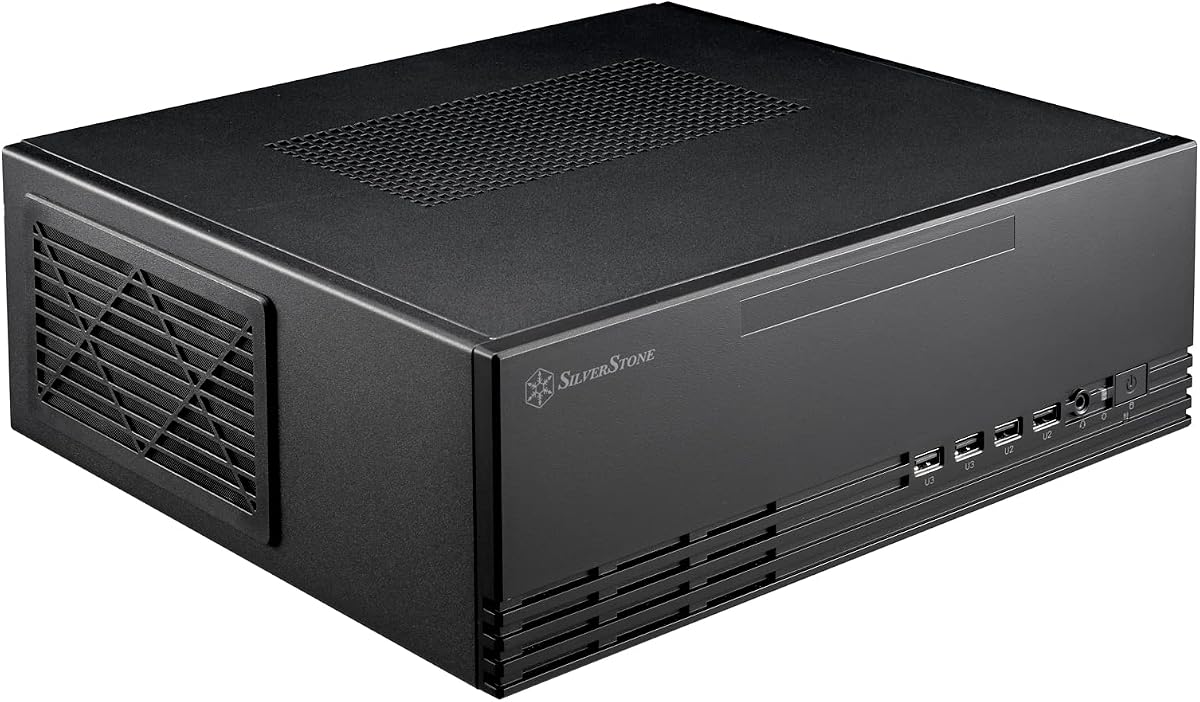
The Silverstone GD09 is specifically engineered for home theater environments delivering a premium look and feel with its faux aluminum finish. It is a top contender for those who want their PC to blend seamlessly into a living room entertainment center while maintaining strong hardware support.
We may earn a commission when you buy through this link, at no additional cost to you.
Its positive air pressure design ensures excellent cooling and quietness while preventing dust accumulation which is crucial for long term reliability in media centers. The 358mm depth allows it to fit comfortably inside standard home theater cabinets without compromising component placement or access.
While it is optimized for horizontal placement and lacks the flexibility of some convertible cases this dedication to the HTPC form factor is exactly what users in this niche need. The build quality and thoughtful design justify the price for dedicated media server or gaming setups.
Choose this case if you need a reliable and aesthetically pleasing solution for a living room build. It combines form function and thermal efficiency perfectly for high end home theater PC applications.
The sleek faux aluminum finish mimics high end audio equipment making it visually cohesive with your media console.
Quick access filters simplify maintenance keeping internal components clean without disassembling the entire case regularly.
We may earn a commission when you buy through this link, at no additional cost to you.
The Cooler Master QUBE 540 introduces a fresh take on horizontal cases with its flexible orientation design that adapts to your needs seamlessly. It is engineered to work in both horizontal and vertical positions allowing you to change layouts without compromising on component support or aesthetics.
We may earn a commission when you buy through this link, at no additional cost to you.
This model offers up to 415mm GPU clearance making it compatible with the latest high performance graphics cards including upcoming models. The full front mesh panel maximizes ventilation ensuring that even under heavy load your system remains cool and responsive during demanding tasks.
While the glass panels enhance visual appeal they add some weight and may require careful handling during setup or moves. The inclusion of handles and a reversible I/O panel mitigates these issues by improving accessibility and overall usability in various configurations.
This case is best for users who want future proofing and adaptability in their desktop build. Whether horizontal on a desk or vertical on a floor it delivers robust performance and modern connectivity options.
Switch between horizontal and vertical placements using the reversible I/O panel and movable handles for ultimate layout freedom.
Accommodate oversized graphics cards without modification ensuring compatibility with future hardware releases for years ahead.
We may earn a commission when you buy through this link, at no additional cost to you.
The Grandia 11 merges the sleek look of stereo equipment with the power of a standard ATX motherboard supporting a compact and capable horizontal build. It supports SSI-CEB ATX and Micro-ATX motherboards offering broader compatibility than many specialized HTPC enclosures.
We may earn a commission when you buy through this link, at no additional cost to you.
A fully meshed front panel provides large surface area for air intake while a 240mm radiator support enables water cooling for high performance components. The positive air pressure design ensures that dust is kept out and internal components stay cool and quiet during operation.
Although it supports water cooling the radiator size is limited to 240mm which may restrict users seeking extreme cooling setups. However for most media center builds this is sufficient to handle modern CPUs and GPUs without excessive noise or heat buildup.
Select this case if you want a stylish yet powerful horizontal PC that fits under entertainment units. Its balance of cooling performance and compact design makes it ideal for home theater enthusiasts needing reliable hardware support.
Support for 240mm radiators allows you to integrate liquid cooling for quieter thermal management in tight spaces.
The compact shortened chassis is designed to fit seamlessly inside standard home theater furniture for a clean setup.
We may earn a commission when you buy through this link, at no additional cost to you.
The Lian Li B4-mATX brings a touch of luxury to the horizontal PC market with its premium real wood finish available in black walnut or white beech. This case is perfect for users who want their PC to look like a piece of fine furniture rather than standard hardware.
We may earn a commission when you buy through this link, at no additional cost to you.
Despite its compact 21.3L volume it supports GPUs up to 358mm and 360mm AIO coolers providing significant performance headroom. Two slim 120mm fans come pre-installed ensuring immediate cooling out of the box without requiring extra purchases for basic thermal management.
One trade-off is the limited size which may require careful selection of power supply units and accessories to avoid interference. However the dual positioning capability allows you to run it vertically if horizontal space is at a premium in your room.
This is the ideal choice for discerning builders who value aesthetics alongside functionality. The wood finish and compact design make it a stunning centerpiece for any desk or entertainment area.
Available wood finishes elevate the look of any room blending high performance hardware with sophisticated interior design.
Slim fans and flexible radiator placement ensure airflow remains effective despite the small physical dimensions of the case.
We may earn a commission when you buy through this link, at no additional cost to you.
The Shiny Snake G300 is designed for enthusiasts who need a portable powerhouse fitting flagship GPUs into a small 16.8L chassis without sacrificing performance. It features a military grade handle and vibration dampened base making it perfect for LAN parties or transporting your rig safely.
We may earn a commission when you buy through this link, at no additional cost to you.
Its dual thermal architecture allows flexibility with cooling choices supporting ATX PSUs for air cooling or SFX units for water cooling. The front I/O is fully featured with USB Type-C and standard ports ensuring all peripherals connect without needing adapters or dongles.
Horizontal PSU placement reduces cable clutter near the graphics card improving airflow and aesthetics. While the compact size requires careful component selection the intelligent interior layout and removable PCI bracket make upgrades and maintenance manageable.
Choose this case if you need to move your PC frequently without compromising on power. Its portability and thermal efficiency make it a top choice for travel and event ready builds.
The integrated handle and rugged base ensure your PC can survive transport to gaming tournaments or dorm rooms.
Switch between air and liquid cooling configurations easily to suit your performance needs and budget constraints.
We may earn a commission when you buy through this link, at no additional cost to you.
The GD09B-C updates the classic Silverstone HTPC design with the crucial addition of a USB Type-C front port for modern connectivity. This allows for faster data transfers and connection to modern peripherals without requiring adapters which simplifies the user experience significantly.
We may earn a commission when you buy through this link, at no additional cost to you.
It retains the positive air pressure design known for excellent cooling and quietness ensuring your system remains silent even during intensive media playback or gaming sessions. The faux aluminum finish keeps the look professional and fits well in living room setups.
While the design is somewhat traditional the functional upgrades like the USB-C port and quick access filters make it a practical choice for current builds. It supports ATX and Micro-ATX motherboards providing flexibility for component selection within the HTPC form factor.
This is a solid choice for users upgrading a legacy HTPC who need modern connectivity without changing the chassis style. It balances familiarity with necessary tech updates for 2026 readiness.
Front USB Type-C provides fast charging and data speeds for modern devices without cable clutter on your entertainment center.
Positive air pressure design reduces noise by minimizing turbulence and keeping fans at lower speeds for efficiency.
We may earn a commission when you buy through this link, at no additional cost to you.
The Grandia GD09B brings an aluminum construction to the HTPC market offering durability and a premium feel in a classic black finish. Its 358mm depth ensures it fits comfortably inside standard home theater cabinets making it ideal for hidden or semi-hidden installations.
We may earn a commission when you buy through this link, at no additional cost to you.
It supports ATX motherboards and expansion cards up to 12.2 inches providing ample room for a powerful system within a compact profile. The positive air pressure design ensures that your components stay cool and dust free over years of continuous operation.
While it lacks some modern features like USB-C ports the solid build quality and reliable cooling make it a dependable option for legacy or budget-friendly HTPC projects. Quick access filters simplify maintenance so you don't need to disassemble the case often.
Select this model if you prioritize build quality and cabinet fit over cutting edge front panel features. It remains a reliable standard for dedicated home theater computing setups.
The deep chassis design ensures the PC sits flush inside home theater cabinets without protruding awkwardly.
Aluminum construction offers better heat dissipation and structural integrity compared to standard plastic alternatives.
We may earn a commission when you buy through this link, at no additional cost to you.
The Milo 11 is the ultimate slim solution for users who need a Micro-ATX enclosure that takes up minimal space. With a volume of only 10.35L it is perfect for office environments or tight entertainment setups where every inch counts.
We may earn a commission when you buy through this link, at no additional cost to you.
It supports both horizontal and vertical orientation giving you flexibility to place it on a desk or shelf. The inclusion of a slot for a 9.5mm slim optical drive is a rare feature that accommodates older media needs without bulk.
One trade-off is the requirement for a TFX power supply which may need to be sourced separately and limits standard PSU options. However for those needing a highly compact system this constraint is often worth the space savings and clean look.
This case is best for simple office or media builds where size is the top priority. Its sleek design ensures your PC remains unobtrusive while still providing solid protection for your hardware components.
At just 10.35L this case fits in the tightest spots ensuring your desk or shelf stays clutter free.
Built in support for slim optical drives adds versatility for users who still need CD or DVD functionality.
We may earn a commission when you buy through this link, at no additional cost to you.
Selecting a horizontal PC case involves balancing form factor constraints with performance needs. This section outlines key factors to evaluate to ensure you pick a case that fits your environment and build requirements.
Ensure the case supports your motherboard size whether Micro-ATX Mini-ITX or standard ATX. Some HTPC cases limit you to smaller boards while others accommodate full ATX layouts for broader component selection and upgrades.
Check the manual or spec sheet carefully to confirm dimensions and mounting points before purchasing to avoid incompatibility issues.
Horizontal cases often limit graphics card length due to chassis depth. Verify that the case can fit your current or future GPU especially if you plan on using high-end models that exceed standard sizes.
Look for cases specifying clearance in millimeters to ensure your graphics card fits without blocking other components or airflow paths.
Proper airflow is critical in horizontal layouts where hot air can get trapped. Prefer cases with mesh panels or perforated designs that allow air to enter and exit freely to maintain optimal thermal performance.
Positive air pressure designs help keep dust out while ensuring cool air reaches sensitive components like CPU and GPU coolers efficiently.
Some slim horizontal cases require specific power supply types such as TFX or SFX instead of standard ATX units. Always check which PSU form factor the case supports to avoid needing adapters or extra cabling.
Consider the PSU placement location as it can impact cable routing and clearance for other components like graphics cards.
Since horizontal cases are often exposed on desks or in entertainment centers their look matters. Choose materials like aluminum wood or mesh that match your existing decor style for a cohesive visual appearance.
Premium finishes may require more care but enhance the overall look of your build significantly in visible environments.
If you plan to move your PC frequently choose a case with built-in handles or sturdy construction that can withstand travel vibrations. Some specialized portable models are designed specifically for LAN parties or on-the-go use.
Look for features like vibration dampening and secure latches to protect components during transport without compromising build quality.
Front I/O ports are essential for connecting peripherals conveniently. Ensure the case includes modern ports like USB Type-C if you need high-speed data transfer or fast charging capabilities for devices.
Modular I/O panels offer added flexibility to reposition ports based on your desk setup and cable management preferences.
Horizontal cases may accumulate dust differently than vertical towers so effective filtration is key. Quick access filters make cleaning easier and help maintain long term system performance without disassembly.
Positive pressure designs often work best with filters to push dust out rather than letting it settle on critical components inside.
Position your horizontal PC on a flat stable surface to prevent accidental tipping or vibration damage. Ensure there is ample clearance around the vents to maintain good airflow and avoid overheating components during prolonged use.
Clean dust filters regularly using a soft brush or compressed air to keep internal components free from debris. This simple maintenance step helps maintain quiet operation and extends the lifespan of fans and other critical hardware inside.
When connecting cables organize them neatly to avoid obstructing airflow or causing interference with moving parts. Using cable ties or routing through designated channels ensures a clean build and reduces the risk of accidental disconnection.
Not all horizontal cases support standard ATX power supplies. Some slim or compact HTPC cases require TFX or SFX power supplies to save space. Always check the specific power supply compatibility listed in the product specifications before purchasing to avoid incompatibility.
Horizontal cases often rely on positive air pressure and mesh panels to move air efficiently across components. Vertical towers use natural convection more effectively but horizontal cases can perform just as well with optimized fan layouts and filter designs.
Yes many horizontal cases support high performance GPUs and processors making them fully capable for gaming. Look for models with sufficient GPU clearance and cooling options to handle modern titles without overheating.
A mesh front panel allows maximum airflow into the case which helps keep components cool during intensive tasks. It reduces thermal throttling and improves overall system performance compared to solid front panels that restrict air intake.
Most dedicated HTPC horizontal cases are designed with specific depths to fit under home theater cabinets. Measure your cabinet depth and compare it with the case dimensions to ensure a proper fit without protrusion.
Absolutely horizontal cases can be placed directly on a desk surface or used under a monitor. Many models include rubber feet to prevent slipping and protect your desk from scratches during regular use.
We have reviewed ten top horizontal PC cases ranging from budget-friendly options to premium HTPC solutions. Each model offers unique strengths whether you prioritize airflow compatibility or aesthetic integration into your living space.
When choosing a horizontal case consider your specific needs like GPU size and cooling requirements to ensure a smooth build experience. Prioritizing ventilation and compatibility will help you avoid common pitfalls with smaller form factor enclosures.
Always check current prices and availability before finalizing your purchase as deals change frequently. Select the case that best fits your budget and setup to enjoy a reliable and stylish horizontal PC for years to come.