
ASRock Intel Arc A580 Challenger 8GB OC
4.6Editor score
8GB GDDR6 memory on 256-bit bus
Factory overclocked to 2000MHz
Dual-fan cooling with 0dB silent mode
This guide compares the top Intel Arc GPU models for gaming and AI workloads in October 2026, evaluating performance and features.
Finding the right Intel Arc GPU can transform your computing experience whether you game or create content. These cards offer strong performance and modern features like AI acceleration.
We compared ten real Intel Arc GPU options based on specs, ratings, and user feedback. Each entry highlights key strengths and trade-offs to help you decide.
Each pick shows detailed features and real-world use cases for clarity. Prices change often so check current listings before buying to ensure the best deal.
4.6Editor score

3.9Editor score

This table offers a side-by-side view of all ten Intel Arc GPU models we reviewed. Use it to quickly compare memory, architecture, and key features.



The ASRock Intel Arc Pro B60 Creator stands out as a powerhouse for AI and workstation tasks. It holds a 3.9 rating and brings 24GB of GDDR6 memory to the table which is rare at this price tier.
We may earn a commission when you buy through this link, at no additional cost to you.
Its Xe2-HPG architecture with XMX engines delivers strong AI acceleration. This makes it ideal for running large language models and generative design workflows locally without cloud dependency.
Trade-offs include a single blower fan which can be louder under load. But the 0dB silent mode helps during lighter tasks. The PCIe 5.0 support ensures future bandwidth needs are met.
Buy this if you need local AI inference power for 70B class models. It simplifies setups that usually require multiple cards. The ISV certification adds reliability for professional software stacks.
The 24GB VRAM allows running quantized models like DeepSeek-R1:70B directly on one card without multi-GPU setups.
Validated drivers for engineering and design software ensure stability during critical rendering or simulation tasks.
We may earn a commission when you buy through this link, at no additional cost to you.
The ASRock Arc B570 Challenger earns a 4.7 rating and fits budget builds perfectly. It delivers smooth 1440p gaming thanks to Xe2-HPG architecture and 10GB of GDDR6 memory.
We may earn a commission when you buy through this link, at no additional cost to you.
XeSS 2 technology enhances frame rates via AI upscaling. The dual fan setup keeps temps manageable while metal backplate adds rigidity. DisplayPort 2.1 and HDMI 2.1a cover modern monitors.
Cons include fan noise under heavy gaming and driver maturity compared to rivals. Still these are acceptable for the price. The energy efficient design keeps power usage low.
This is a top pick for gamers on a budget. It balances performance and features well. Use it for streaming and creative tasks too thanks to AV1 encode support.
With 2600MHz clock and 10GB memory this card handles high settings in modern titles without stuttering.
DisplayPort 2.1 and HDMI 2.1a ensure compatibility with next gen high refresh and high resolution displays.
We may earn a commission when you buy through this link, at no additional cost to you.
The WEELIAO MAXSUN Arc Pro B60 48G Turbo offers 48GB of GDDR6 via dual GPUs. While unrated it targets pros needing local LLM inference without cloud costs.
We may earn a commission when you buy through this link, at no additional cost to you.
Each GPU runs at 2400MHz with 20 Xe cores for 394 TOPS total compute. This supports multi-turn dialogues and heavy AI workloads. The PCIe 5.0 x8 split works on consumer boards with bifurcation.
Cooling uses a triple thermal design to maintain stability. But it needs proper airflow. The cost is high compared to single cards though it saves on multiple GPU setups.
Buy this if you deploy 70B models on site. It handles concurrency well and supports PyTorch. Check your motherboard for lane splitting before purchasing.
Eliminates cloud reliance by running DeepSeek-R1:70B or QwQ-32B entirely on one card.
Each chip is recognized separately allowing parallel processing of different inference tasks.
We may earn a commission when you buy through this link, at no additional cost to you.
The ASRock Arc A580 Challenger holds a 4.6 rating and suits creative users well. It features 8GB GDDR6 on a 256-bit bus for solid 1440p gaming and rendering.
We may earn a commission when you buy through this link, at no additional cost to you.
Factory overclocking pushes clocks to 2000MHz for smoother playback. Dual fans with 0dB tech ensure silence at idle. Metal backplate adds durability and looks premium.
Trade-offs include needing two 8-pin power connectors and lacking XMX focus. But for mixed gaming and editing it balances well. AV1 encode helps video workflows too.
This fits mid-range builds needing reliability. Verify PSU capacity before install. Use for streaming and 3D rendering where memory bandwidth matters more than raw AI.
0dB Silent Cooling stops fans completely at low loads for noise-free browsing or work.
DisplayPort 2.0 supports high resolutions and refresh rates up to 7680×4320.
We may earn a commission when you buy through this link, at no additional cost to you.
The Sparkle Arc B580 Titan OC offers 12GB GDDR6 with 2760MHz boost. It scores 4.5 stars and brings TORN Cooling 2.0 for reliable thermals during long sessions.
We may earn a commission when you buy through this link, at no additional cost to you.
Blue breathing light and metal backplate make it visually distinct. Axial fans move air efficiently. It fits well in gaming rigs that need style alongside performance.
Fewer ports than rivals may limit multi-monitor setups. Support is less widespread. But the build quality stands out. Performance suits 1440p gaming well.
Choose this for custom builds with RGB themes. Check case clearance before install. Use for games needing high clock speeds and consistent cooling.
Blue Breathing Light adds a unique touch to open case builds.
TORN Cooling 2.0 ensures stable boosts under load without thermal throttling.
We may earn a commission when you buy through this link, at no additional cost to you.
The MAXSUN Arc Pro B60 Dual brings two Arc Pro B60 GPUs together for 48GB VRAM. It targets rendering and AI workloads needing massive memory bandwidth.
We may earn a commission when you buy through this link, at no additional cost to you.
Turbo cooling exhausts heat efficiently during sustained tasks. The dual slot design saves space compared to multi-card setups. Ideal for workstation builds.
Cons include needing robust power and complex config. But it removes cloud costs. Great for teams doing heavy visual computing. Check chassis airflow first.
Buy for professional rendering or AI inference. Use if you need parallel compute in one slot. Ensure PSU meets wattage needs for stability.
48GB VRAM allows loading massive datasets without paging to system RAM.
Dual slot design keeps system compact while doubling compute power.
We may earn a commission when you buy through this link, at no additional cost to you.
The ASRock Arc B570 Bundle scores 5.0 stars and pairs a GPU with a PRO-650G PSU. It covers key parts for a clean 1440p gaming system quickly.
We may earn a commission when you buy through this link, at no additional cost to you.
XeSS 2 tech boosts frames via AI. The 650W Gold PSU offers stable power for this tier. Silent cooling keeps noise low during daily tasks.
Limitation is PSU wattage for higher end parts later. But for a first build it works well. Save on separate PSU research time.
Choose for new PC builds wanting simplicity. Verify system needs match. Use for smooth gaming and streaming without extra compatibility checks.
80 PLUS Gold PSU delivers clean power with high efficiency to save on electricity.
Bundle cuts build time by ensuring compatible components match out of the box.
We may earn a commission when you buy through this link, at no additional cost to you.
The GUNNIR Arc Pro B50 LP fits tight spaces with 16GB GDDR6. Unrated it suits SFF workstations needing AI acceleration in a low profile card.
We may earn a commission when you buy through this link, at no additional cost to you.
70W draw needs no external power. Turbo fan cools well inside cases. XMX engines deliver 170 TOPS for inference tasks. Ideal for edge work.
Limitation is GPU power compared to full size cards. But for specific SFF needs it is rare. Great for compact AI nodes.
Buy for mini PCs or HTPC builds. Check clearance before install. Use for light AI and media tasks where space matters most.
167x69x18.4mm size fits narrow cases without sacrificing core GPU features.
170 TOPS compute accelerates local inference without needing large power budgets.
We may earn a commission when you buy through this link, at no additional cost to you.
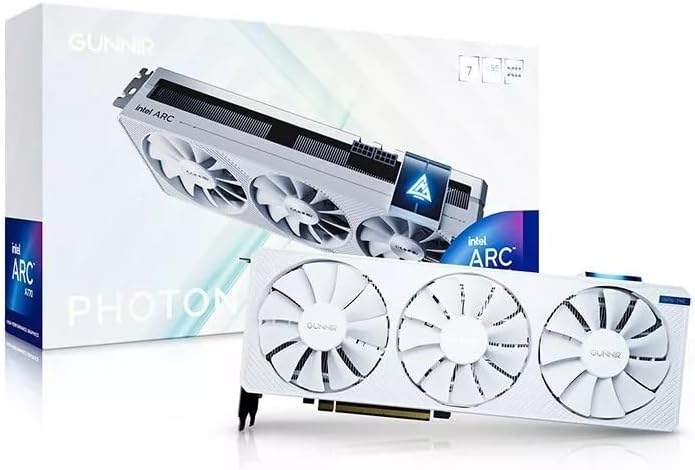
The WEELIAO GUNNIR Arc A770 Photon holds a 4.5 rating and offers 8GB GDDR6 at 2400MHz. Its white triple fan design suits themed builds well.
We may earn a commission when you buy through this link, at no additional cost to you.
Handles 4K workloads smoothly with HDMI and DP support. Triple fans keep temps low during rendering. Good for media centers or streaming.
White finishes limit compatibility with some cases. VRAM is mid-range for heavy 4K gaming. But for content creation it fits well.
Choose for white rigs needing stable 4K output. Verify case aesthetics before install. Use for editing and playback workloads efficiently.
White triple fan design adds style to custom builds with matching themes.
Supports 4K resolution for high fidelity video playback and streaming.
We may earn a commission when you buy through this link, at no additional cost to you.
The Sparkle Arc A310 Omni View scores 4.6 stars and offers four HDMI outputs. It is perfect for multi-monitor office or trading setups needing simplicity.
We may earn a commission when you buy through this link, at no additional cost to you.
50W TBP keeps power use low and cooling needs minimal. Single fan and slot design saves space. Ideal for lightweight tasks without gaming needs.
VRAM is limited for heavy workloads. But for display connectivity it excels. Great for kiosks or digital signage.
Buy for office workstations needing four screens. Check monitor cables. Use for static or low load tasks requiring multiple displays.
Four HDMI ports allow connecting up to four screens without extra adapters.
50W TBP reduces heat and power costs for 24/7 office use.
We may earn a commission when you buy through this link, at no additional cost to you.
Selecting the right Intel Arc GPU depends on your tasks whether gaming AI or workstation work. This guide covers key factors to match specs to needs.
VRAM is critical for AI models and high-res textures. Look for 10GB or more for gaming and 24GB+ for LLM inference.
Prioritize cards with at least 10GB for smooth 1440p gaming and larger for AI workloads.
Xe2-HPG offers better AI and efficiency over Xe HPG. Check for XMX engines which boost AI acceleration in new models.
Choose Xe2-HPG if you plan to run local AI tasks or want future-proof features.
Blower coolers fit multi-GPU setups but run louder. Dual fans offer quiet cooling for single GPU builds.
Pick dual fans for home PCs and blower for servers or tight cases.
Check if your PSU meets wattage needs. Some cards need 650W minimum others more for dual GPU configs.
Ensure your PSU has enough connectors and wattage before buying high-end models.
Intel updates drivers regularly for stability. Review support for your software stack like PyTorch or creative apps.
Verify software compatibility with ISV certifications before purchasing for professional work.
Low profile cards fit mini towers while full size fit standard cases. Check chassis clearance before ordering.
Match the card size to your case to avoid fit issues after purchase.
Look for DisplayPort 2.1 or HDMI 2.1a for high refresh displays. Multi-monitor needs may need 4 outputs.
Ensure the card has enough ports for your display setup before buying.
Gaming needs clock speed and VRAM while AI needs compute and memory. Choose based on your main workload.
Pick AI-focused cards for inference and gaming-focused for 1440p or 4K gaming.
Install the card fully into the PCIe slot before powering on. Verify it is seated tight to avoid connection issues.
Update drivers using Intel official tools for stability. Reboot after install to ensure proper hardware detection.
Monitor temps during load to ensure cooling works. Clean dust from fans regularly to maintain airflow efficiency.
Yes models the Xe2-HPG and Pro B60 cards feature XMX engines for AI acceleration. They can run 70B-class quantized models locally.
Some models handle 4K video and light gaming but 1440p is ideal for mid-range. High-end cards suit 4K better.
Yes they work with Linux especially for LLM deployments. Check driver versions for optimal stability.
Most need at least 650W. Dual GPU cards require more. Verify connectors before install.
It allows running large AI models locally without cloud costs. It helps in heavy rendering too.
Use low-profile cards like the GUNNIR B50 LP. Check clearance and power before install.
Yes they support AV1 encode for fast video exports. This helps streaming and editing workflows.
The ASRock Pro B60 Creator leads for AI and gaming builds the B570 fits budgets well.
Pick based on VRAM needs and form factor to match your workspace.
Check prices often before buying as they fluctuate frequently.