
Logitech K120
4.6Editor score
Full Size Wired USB
Spill Resistant Design
Compatible with Windows 10
Finding the right keyboard for a pos system is essential for smooth daily operations in retail and service environments. A good unit must balance speed, durability, and comfort to handle high-volume transactions without frustrating staff or slowing down customers during busy periods.
We evaluated ten leading models based on build quality, key layout, connectivity options, and resistance to spills or wear. Our analysis focuses on real-world performance metrics that matter most to merchants who need reliable input devices that integrate seamlessly with their existing pos infrastructure.
Each pick highlights specific strengths and weaknesses to help you match a device to your unique workspace needs. Keep in mind that product availability and pricing can fluctuate frequently, so verifying current details before purchasing is always recommended for your business planning.
4.6Editor score
4.8Editor score

4.5Editor score
As an Amazon Associate we earn from qualifying purchases.
The following table provides a side-by-side overview of the ten top keyboards we reviewed. Compare key specifications and features at a glance to determine which model best fits your specific point of sale requirements and budget constraints.


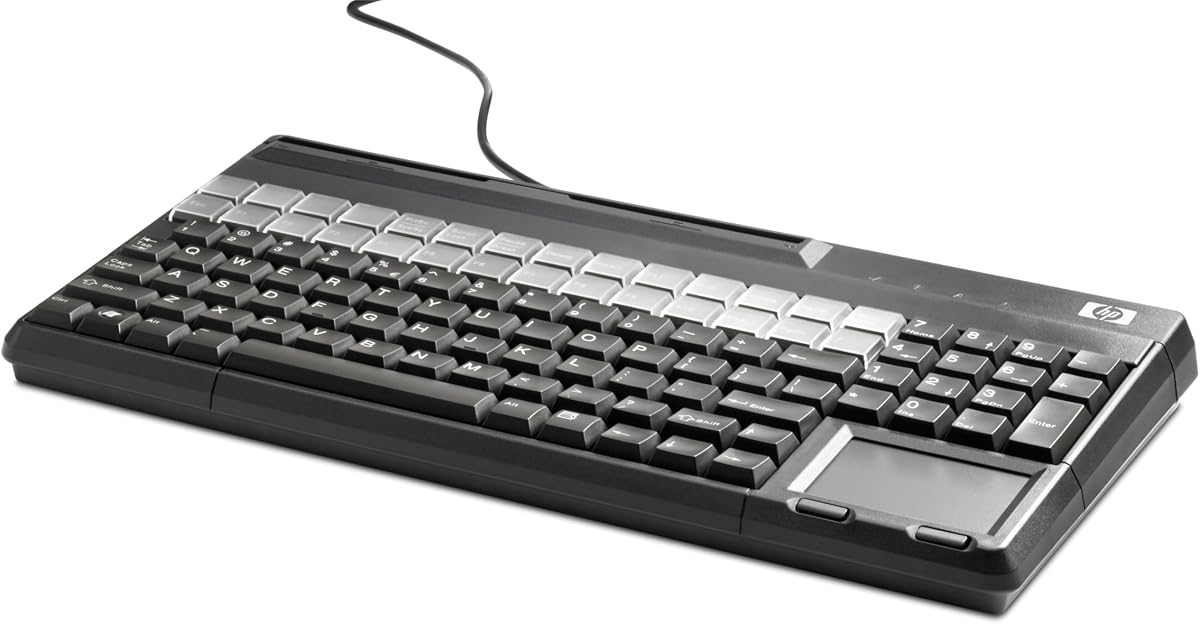
This HP model stands out as a top contender for businesses needing a specialized keyboard for pos system operations. With a rating reflecting strong user satisfaction, it offers a comprehensive 106 key layout and a magnetic stripe reader built directly into the chassis. Its combination of speed, durability, and customizability makes it ideal for retail environments where speed and accuracy are non-negotiable.
We may earn a commission when you buy through this link, at no additional cost to you.
The inclusion of 28 relegendable keys allows operators to tailor shortcuts to their specific software, which significantly reduces keystrokes during busy shifts. The magnetic stripe reader eliminates the need for external peripherals, saving counter space and reducing clutter in tight workstations. USB connectivity ensures stable data transmission without the latency issues sometimes seen with wireless devices in crowded wireless environments.
While the device is highly functional, its price point is higher than generic alternatives, which might be a consideration for smaller shops. Additionally, the design follows a legacy form factor that may feel less modern to users accustomed to slim profiles, but this robust construction ensures longevity in demanding settings where frequent spills or impacts occur.
Ultimately, this keyboard is recommended for established retail or hospitality businesses that need a dedicated, reliable input device. It balances professional functionality with durability, making it a smart long-term investment for any pos setup that handles high transaction volumes daily.
The 28 relegendable keys let staff create shortcuts for common actions like voids or discounts without navigating menus.
The built-in magnetic stripe reader streamlines checkout by reducing peripheral count and keeping the counter workspace clean.
We may earn a commission when you buy through this link, at no additional cost to you.
The Logitech K120 offers an accessible entry point for small businesses or temporary setups needing a reliable keyboard for pos system entry. Its high rating reflects widespread trust in its durability and ease of use. While it lacks specialized pos functions, its standard full-size layout and spill-resistant design make it a practical choice for budget-conscious environments.
We may earn a commission when you buy through this link, at no additional cost to you.
Users appreciate the quiet membrane switches and deep-profile keys that provide a comfortable typing experience over long shifts. The spill-resistant design protects the internal electronics from common accidents like spilled drinks, which is critical in food service settings. Setup is instant via USB, requiring no drivers, so staff can start working immediately without IT intervention.
Because it is a standard office keyboard, you will not find programmable keys or card readers included. This limits its utility for complex inventory systems but keeps costs low and simplicity high. The build quality is sturdy enough for daily use, and the inclusion of recycled plastic aligns with modern sustainability goals without compromising performance.
This model is perfect for startups, pop-up shops, or secondary terminals where cost efficiency is the primary goal. It delivers the essentials of reliability and comfort without the added expense of specialized enterprise hardware, making it a logical choice for basic data entry tasks.
Drainage holes beneath the keys allow liquids to pass through without damaging the circuitry, extending device life significantly.
Using post-consumer recycled plastic reduces the product carbon footprint while maintaining standard office durability.
We may earn a commission when you buy through this link, at no additional cost to you.
The Cherry Lpos G86 represents a high-end solution for complex point of sale systems that demand extensive customization and functionality. With 169 keys and 42 relegendable keys, it offers more surface area for shortcuts than most competitors. Its magnetic stripe reader integration further enhances workflow efficiency, making it a top-tier option for high-volume retail or logistics.
We may earn a commission when you buy through this link, at no additional cost to you.
The extensive key layout allows businesses to map out entire operational workflows without relying on software menus. This reduces mouse dependency and speeds up transactions, which directly impacts customer satisfaction during peak hours. The USB interface ensures consistent performance, while the robust construction handles the physical demands of a busy retail counter environment without degradation over time.
However, the premium price and larger size mean it is not suitable for compact workstations with limited space. Businesses with tight desk constraints might find the footprint too expansive compared to more streamlined options. Despite this, the value provided by its customizability and durability often justifies the cost for professional environments.
If your operation relies on rapid data entry and specialized commands, this keyboard delivers the precision and endurance needed. It is best suited for established businesses that can afford the investment and have the physical space to accommodate its full-featured design.
The large number of relegendable keys lets you map complex functions directly to physical keys for instant access.
The integrated magnetic stripe reader removes the need for external hardware, reducing points of failure in your system.
We may earn a commission when you buy through this link, at no additional cost to you.
The Cherry G86 Compact blends a standard keyboard layout with an integrated touchpad, making it a space-saving solution for smaller counters. Its spill-resistant design ensures resilience against common workplace accidents, while the 106 key layout provides all necessary keys for standard input. This model appeals to businesses needing a single device to handle typing and navigation without a separate mouse.
We may earn a commission when you buy through this link, at no additional cost to you.
The integrated touchpad allows for quick scrolling and clicking directly on the device, which can streamline workflows where space is at a premium. The black finish offers a professional look that fits well in most retail environments, and the USB connection ensures plug-and-play compatibility with most modern terminals. The durability is backed by Cherry's reputation for quality key mechanisms.
While the touchpad saves space, it may not offer the precision of a standalone mouse, which could be a limitation for detailed graphic design tasks. Some users report mixed experiences with the trackpad sensitivity, but for standard menu navigation, it performs adequately. The compact size is its greatest asset, fitting easily into kiosks or limited counter spaces.
This keyboard is recommended for retail outlets or kiosks where desk real estate is limited. It provides a balanced mix of functionality and compact design, ensuring you do not sacrifice too much usability for space savings in constrained workstations.
By combining a keyboard and touchpad into one unit, you free up counter space for other essential POS equipment.
The spill-resistant design protects internal components from liquids, extending the lifespan of the device in messy environments.
We may earn a commission when you buy through this link, at no additional cost to you.
The Perixx PERIBOARD-513III offers a full-size keyboard experience with a built-in touchpad, targeting users who need both typing and navigation in one device. The quiet scissor keys provide a laptop-like feel, reducing noise in quiet environments. Multimedia hotkeys add convenience for controlling audio or launching browsers, enhancing its utility beyond basic data entry tasks.
We may earn a commission when you buy through this link, at no additional cost to you.
Users value the dedicated numeric keypad for faster data entry, which is essential for inventory and sales transactions. The touchpad includes physical buttons for clicking, providing tactile feedback that some find more reliable than surface clicking alone. USB connectivity ensures straightforward setup, and the 6 ft cable offers flexibility in positioning the device relative to the computer.
However, the touchpad and keyboard are distinct parts of the same chassis, which can feel less seamless than truly integrated designs. While the build is solid, the average rating suggests some users may encounter durability concerns over time. It remains a viable option for home offices or smaller retail setups where noise reduction is a priority.
This model is ideal for environments where quiet operation and space-saving are key priorities. The combination of multimedia controls and a numeric keypad makes it versatile for general business use, though heavy industrial settings may require more rugged alternatives.
Scissor-switch mechanisms reduce typing noise, making it suitable for quiet retail spaces or shared office areas.
Dedicated function keys allow quick access to volume and media controls without needing separate applications.
We may earn a commission when you buy through this link, at no additional cost to you.
The Adesso Easy Touch is designed for harsh environments where water and spills are frequent risks. Its IP67 rating means it can withstand submersion in water for 30 minutes, making it perfect for food processing or outdoor kiosks. Large keys with high contrast ensure readability even in dirty or oily conditions, and the durable membrane switch offers long-lasting performance.
We may earn a commission when you buy through this link, at no additional cost to you.
Its waterproof design simplifies cleaning significantly. You can hose it down or wipe it aggressively without fear of damage, which is a necessity in hygiene-critical industries. The USB plug-and-play connectivity works across most Windows systems, ensuring compatibility with standard industrial computers without extra driver installations.
While excellent for tough conditions, it may be overkill for a standard dry office. The large key size can take some getting used to for fast typists, and the aesthetic is purely functional rather than stylish. However, for environments where equipment often gets wet or dirty, this resilience is invaluable.
This keyboard is the definitive choice for manufacturing, food service, or outdoor POS setups. Its ability to survive wet and dirty conditions makes it a reliable partner in industries where standard keyboards would fail prematurely.
Waterproof construction allows thorough disinfection, meeting strict hygiene standards in food and medical industries.
Large, high-contrast characters ensure readability even when grease or grime covers the surface.
We may earn a commission when you buy through this link, at no additional cost to you.
The Cherry LPOS Touch focuses on programmability, offering 127 programmable keys and a touchpad for complex workflows. While the rating is lower than others, it suggests a niche appeal for specific enterprise needs. The touchpad saves mouse space, and the relegendable keys allow for deep customization in specialized industries like warehousing or logistics.
We may earn a commission when you buy through this link, at no additional cost to you.
The programmable keys can be mapped to macros or specific functions, which can streamline complex entry tasks significantly. The USB interface ensures standard connectivity, and the compact design fits well in controlled environments where physical layout matters. It is a tool designed for power users who need more control than a standard keyboard offers.
However, the lower rating indicates potential usability or quality concerns that prospective buyers should investigate thoroughly. Some users may find the programming interface complex or the touchpad less precise. It remains a powerful option for those who need specific programmable capabilities, but may not suit general retail.
This keyboard is best suited for specialized business applications requiring heavy customization. If your workflow relies on macros or unique key mappings, the advanced features may justify the investment despite the mixed user feedback.
Programmable keys allow you to record and execute complex sequences of commands with a single press.
An integrated touchpad provides navigation without needing a separate mouse, ideal for kiosks and compact counters.
We may earn a commission when you buy through this link, at no additional cost to you.
The Cherry KC 1000 is a specialized tool designed for secure transactions involving smartcards and PIN entry. With a high rating reflecting its reliability in security-focused environments, it integrates a chip card terminal directly into the keyboard. This makes it ideal for government, healthcare, or financial settings where compliance and data protection are paramount.
We may earn a commission when you buy through this link, at no additional cost to you.
The secure PIN entry ensures that credentials are protected during input, reducing the risk of keylogging or shoulder surfing. It supports multiple protocols including T=0 and T=1, ensuring compatibility with various smartcard systems. The thin design keeps the footprint small while maintaining a sturdy build, and it works across Windows and Mac systems.
Because it is optimized for security, it lacks some general-purpose features found in standard retail keyboards. The focus is entirely on secure access and card reading rather than typing comfort or programmable macros. However, for its intended purpose, it offers robust security features and compliance approvals that standard devices cannot match.
This keyboard is essential for industries requiring smartcard authentication. If your business handles sensitive transactions or requires secure access control, the built-in security features provide peace of mind and regulatory compliance.
FIPS 201 and EMV approvals ensure the device meets strict government and financial industry security standards.
Dedicated PIN entry functionality protects sensitive credentials from common cyber threats and unauthorized access.
We may earn a commission when you buy through this link, at no additional cost to you.
The Cherry G80 Compact is a robust mechanical keyboard built for industrial applications requiring reliability. With Cherry MX Black switches, it offers a tactile and durable typing experience rated for over 100 million actuations per key. The compact dimensions save space, making it suitable for tight workstations or kiosks where larger keyboards would be impractical.
We may earn a commission when you buy through this link, at no additional cost to you.
The inclusion of a PS/2 adapter adds flexibility, allowing the device to work with legacy industrial computers that do not support modern USB standards. The gold crosspoint contacts ensure stable switching performance, reducing the risk of missed keystrokes during critical operations. This design prioritizes function and longevity over modern aesthetics.
Mechanical switches can be louder than membrane options, which might be distracting in quiet retail settings. Additionally, the reliance on PS/2 may limit compatibility unless you rely on the USB option. However, for environments where a device must survive constant use and potential rough handling, its industrial build is a significant advantage.
This model is perfect for factories, warehouses, or legacy systems where durability is the primary concern. Its ability to handle heavy-duty use without failure makes it a reliable choice for critical industrial data entry tasks.
MX Black switches offer over 100 million actuations, ensuring the device lasts years even in high-volume use.
The included PS/2 adapter allows use on older systems, extending the device's versatility across generations of hardware.
We may earn a commission when you buy through this link, at no additional cost to you.
The Logitech K270 offers wireless flexibility for POS setups where cable management is a concern. Its strong rating highlights a long battery life and reliable connection, allowing users to work up to 33 feet away. The full-size layout includes a number pad and multimedia keys, ensuring full functionality without the clutter of wires.
We may earn a commission when you buy through this link, at no additional cost to you.
Wireless convenience can be a game changer in mobile retail environments, like pop-up shops or inventory counters. The spill-proof design adds necessary protection against accidental liquid damage, and the deep-profile keys maintain typing comfort. The Unifying receiver supports multiple devices, making it scalable for offices with several peripherals.
However, wireless setups depend on batteries, which adds maintenance overhead for busy businesses. While the 24-month battery life is impressive, forgetting to change batteries can disrupt work. Additionally, wireless signals can theoretically be interfered with in crowded radio environments, though this is rare in standard business settings.
This keyboard is ideal for businesses needing flexibility and clean desk aesthetics. If you want to minimize cables and maintain mobility, the K270 delivers a reliable wireless experience with enough durability for daily tasks.
An estimated 24-month battery life reduces maintenance and ensures consistent operation without frequent interruptions.
Wireless connectivity up to 33 feet allows you to position the keyboard anywhere within range of the computer.
We may earn a commission when you buy through this link, at no additional cost to you.
Selecting the right keyboard for a pos system involves balancing physical durability, functional features, and connectivity options. This guide breaks down the essential factors you must evaluate to ensure your input device meets operational demands and withstands daily wear and tear.
In retail and service environments, keyboards are exposed to spills, dust, and frequent impacts. Look for models with spill-resistant designs or waterproof ratings like IP67 to protect internal components from liquids. Durable key mechanisms, such as mechanical switches or reinforced membrane layers, ensure the device functions reliably despite heavy daily use and physical stress.
Prioritize keyboards built for industrial or commercial use rather than standard office models if your environment is harsh or high-traffic.
Standard QWERTY layouts are familiar, but POS systems often benefit from programmable or relegendable keys. These allow staff to map shortcuts for common actions like discounts, voids, or menu items directly to specific keys. A larger key count with programmable surface area reduces navigation time through software menus and speeds up transaction completion significantly.
Evaluate how many relegendable keys a model offers to determine if it fits your software's requirements for quick access to specific functions.
USB connectivity remains the standard for stability, but PS/2 adapters offer compatibility with legacy industrial systems. Wireless options provide flexibility for mobile counters but introduce battery dependency and potential signal interference. Ensure the chosen interface matches your computer's ports and your environment's needs for mobility versus reliability.
For high-security or high-volume areas, a wired USB connection is usually preferable to avoid latency or power issues.
Some POS scenarios require integrated hardware like magnetic stripe readers or smartcard terminals built into the keyboard. These integrated devices reduce cable clutter and ensure secure input for card transactions. For industries like healthcare or government, compliance features like FIPS approvals may be mandatory for secure data entry.
Identify if you need built-in card readers or secure PIN entry to avoid needing separate peripheral hardware that takes up counter space.
Counter space is often limited in retail and restaurant settings, making the physical size of the keyboard critical. Compact designs with integrated touchpads can save space by eliminating the need for a separate mouse. However, ensure that shrinking the size does not sacrifice key comfort or durability required for long shifts.
Measure your available workspace and compare it to the keyboard dimensions to ensure it fits comfortably without obstructing other POS equipment.
Staff typing for hours daily need keyboards that support comfort to prevent repetitive strain injuries. Look for models with deep-profile keys, ergonomic curves, or quiet scissor switches that reduce noise. Comfortable typing reduces fatigue, improves accuracy, and maintains morale during busy peak hours when speed is essential.
Prioritize ergonomic designs that offer tactile feedback without requiring excessive force to actuate the keys.
Price varies significantly between basic models and specialized enterprise keyboards. While budget options save upfront costs, investing in a durable, feature-rich device may lower long-term costs by reducing replacements. Consider maintenance needs like battery changes for wireless models versus the upfront cost of wired alternatives.
Calculate the total cost over several years including maintenance and replacement to make a cost-effective decision for your business.
Ensure the keyboard is compatible with your operating system and POS software. Most keyboards support Windows, but specialized features like smartcard readers may require specific drivers. Confirm that plug-and-play functionality is available to avoid complex setup processes during deployment.
Check product descriptions for software compatibility to ensure seamless integration without requiring extensive technical support.
Connect your keyboard to your system using the provided USB or wireless receiver. Ensure the interface matches your computer ports and check that the device is recognized immediately. For legacy systems requiring PS/2, use the included adapter if necessary to maintain compatibility with older hardware configurations.
Clean the keyboard regularly using compressed air to remove dust and debris from between keys. For spill-resistant models, gently wipe the surface with a dry cloth or use the manufacturer's recommended cleaning solution. Avoid using liquid cleaners directly on the keys to prevent moisture from seeping into internal components.
Store wireless keyboards in a dry, cool place when not in use to preserve battery life. If you notice keys becoming sticky or unresponsive, inspect them immediately for debris. Proper maintenance extends the lifespan of the device and ensures consistent performance in high-volume work environments.
The HP POS Keyboard and Cherry Lpos G86 are widely regarded as durable options for high traffic retail. They feature robust construction and spill resistance designed to withstand daily wear and tear. These models are built specifically for enterprise environments where reliability and longevity are critical.
Yes, standard keyboards like the Logitech K120 or K270 work fine for basic entry tasks. However, they lack specialized features like programmable keys or integrated card readers. For complex retail operations, a dedicated POS keyboard improves workflow efficiency.
Relegendable keys allow you to customize labels and assign shortcuts for specific POS actions. This customization reduces navigation time and speeds up transactions significantly. It is especially useful for businesses with complex menu structures or frequent discount entries.
Wireless keyboards like the Logitech K270 are reliable for most POS use cases with strong connectivity. However, they require battery changes and may face signal interference in crowded areas. Wired models remain safer for high-security or uninterrupted transaction needs.
To clean a spill-resistant keyboard, unplug it and invert it to drain any liquid. Use a damp cloth to wipe the keys and let it dry completely before reconnecting. Always follow the manufacturer's guidelines to maintain the waterproof or spill-resistant rating.
Most modern USB keyboards including those from Cherry and Logitech are cross-platform compatible. Check product details to confirm Mac support, especially for specialized features like smartcard readers. Generally, plug-and-play models work well across different operating systems.
Choosing the right keyboard for your POS system depends on balancing durability, features, and budget. The HP POS Keyboard stands out for its robust functionality and magnetic stripe integration. The Logitech K120 offers a budget-friendly option for smaller operations needing basic reliability.
Consider specialized needs like waterproofing or secure card readers before making a final decision. Matching the device to your environment ensures staff efficiency and minimizes downtime caused by hardware failures. Prioritize models with proven durability for high-volume settings.
Prices and availability change frequently, so verify current details before purchasing. Investing in a quality input device pays off in improved transaction speeds and long-term satisfaction. Select the option that best fits your specific business requirements and workspace constraints.