Redragon K686 HE Wired Hall-Effect Rapid Trigger Magnetic Gaming Keyboard
4.4Editor score
8000Hz polling rate
Rapid trigger technology
One-knob simplicity
This guide compares the best keyboard for Valorant including Hall Effect switches, rapid trigger tech, and low latency models for competitive FPS performance.
Finding the right keyboard for Valorant requires precision, speed, and reliability. Competitive players need devices that register inputs instantly to support rapid counter-strafing and quick peeking mechanics essential for success in the game.
We evaluated ten top-rated gaming keyboards based on switch technology, polling rates, and build quality. Each model offers unique features like Hall Effect sensors, optical switches, and customizable actuation points designed to enhance your aiming and movement skills.
Each pick highlights specific strengths and potential trade-offs for different playstyles. While rankings reflect overall performance, individual needs vary. Please check current availability and pricing directly on the retailer site before making your final purchase decision.
4.4Editor score
5.0Editor score

4.6Editor score
The following comparison table outlines the core specifications of each keyboard to help you decide which model fits your setup and gameplay style best.





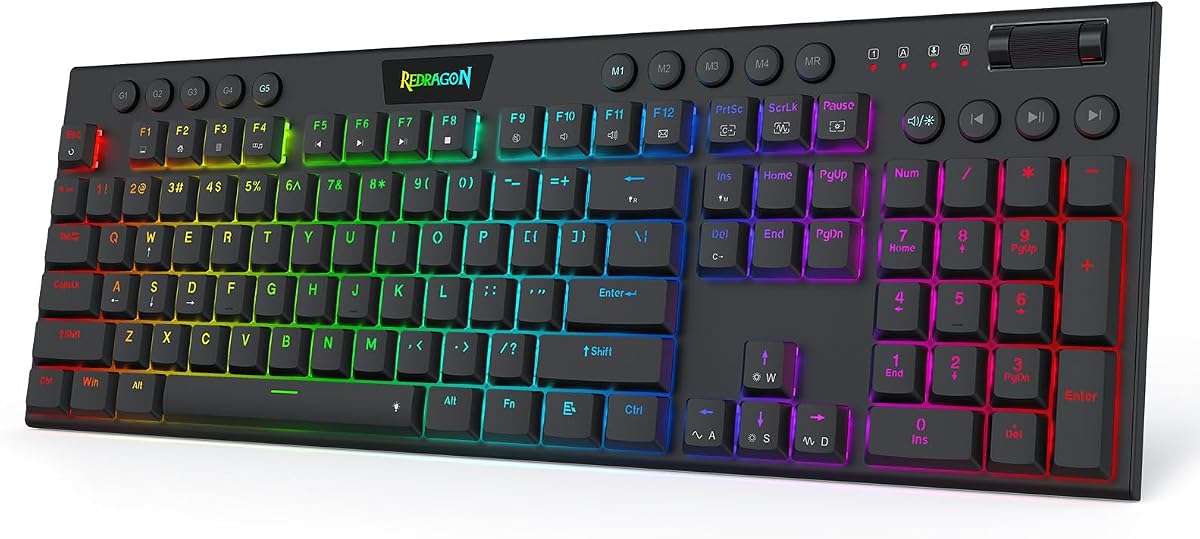
The Redragon K618 HE stands out as a top contender for Valorant players seeking speed and comfort. With a perfect rating, this keyboard utilizes low-profile magnetic switches to minimize travel distance and maximize responsiveness.
We may earn a commission when you buy through this link, at no additional cost to you.
Its standout feature is the rapid trigger technology which allows for instant reset of keys. This is critical for counter-strafing in Valorant where split-second movements determine the outcome of a duel. The dedicated macro zone adds utility for recording complex ability sequences.
While highly performant, the low-profile design might feel different if you are used to tall mechanical switches. However, the ergonomic benefit and reduced fatigue over long sessions make this trade-off acceptable for competitive play.
This keyboard is ideal for gamers who want rapid input registration without breaking the bank. Its balance of speed, comfort, and features makes it our top recommendation for most Valorant competitors in 2026.
Low-profile magnetic switches reduce travel distance by 30 percent allowing faster actuation during intense firefights.
A dedicated 4×5 macro zone lets you record combos without installing additional software or drivers on your PC.
We may earn a commission when you buy through this link, at no additional cost to you.
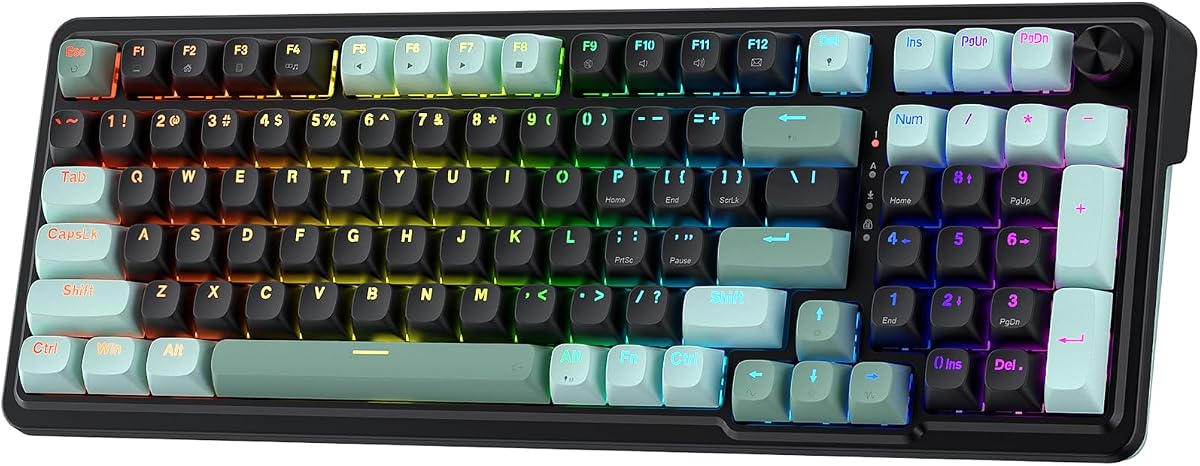
The Redragon K686 HE delivers high-end features at a budget-friendly price point. It uses Hall Effect sensors to detect keypresses without physical contact ensuring consistent performance over time.
We may earn a commission when you buy through this link, at no additional cost to you.
Its 8000Hz polling rate means inputs are registered eight times faster than standard keyboards. This reduces latency significantly which is crucial for fast-paced tactical shooters. The rapid trigger feature cuts redundant keystrokes during quick direction changes.
Build quality is functional but lacks the premium feel of more expensive models. The noise dampening layers help reduce clack which is nice for shared spaces. However, you sacrifice wireless flexibility and heavy-duty materials.
Gamers on a tight budget will find this keyboard offers exceptional value. It provides the core technologies needed for competitive play without requiring a large investment making it a smart entry-level choice.
The wired connection transmits inputs up to eight times faster than standard keyboards for near instant registration.
A single control knob adjusts backlight brightness and media playback simplifying your setup without extra key combos.
We may earn a commission when you buy through this link, at no additional cost to you.
The Razer Huntsman Mini is a premium choice featuring optical switch technology that uses light beams for actuation. This design allows for faster response times and greater durability compared to traditional mechanical switches.
We may earn a commission when you buy through this link, at no additional cost to you.
Its Snap Tap feature prioritizes the latest input between a pair of keys allowing for smooth counter-strafing without complex key combinations. The aluminum frame provides structural integrity ensuring stability during intense gaming sessions.
The compact 60 percent layout saves desk space for mouse movement which is beneficial for low sensitivity gamers. However, you may miss dedicated arrow keys or function keys depending on your workflow preferences.
This keyboard is best suited for players seeking top-tier performance and build quality. If you value brand reliability and advanced software customization the Huntsman Mini justifies its higher price point.
Razer Linear Optical switches register key presses at the speed of light with shorter actuation distances than other linear switches.
Razer Snap Tap allows for responsive in-game movement by prioritizing the latest input between a pair of assigned keys.
We may earn a commission when you buy through this link, at no additional cost to you.
The Redragon K673 HE combines magnetic switch technology with a practical single-knob design. This allows you to manage lighting and volume without memorizing extra key combos during gameplay.
We may earn a commission when you buy through this link, at no additional cost to you.
Its dual-module floating structure paired with dampening layers provides a soft Hi-Fi bounce feel. The 8000Hz polling rate ensures your peek-and-fire timing lands exactly when you mean it in competitive matches.
The software allows for precise tuning of actuation profiles between 0.1mm and 3.4mm. This flexibility helps match your keystroke habits to the specific demands of Valorant mechanics.
If you prioritize tactile feedback and media control this keyboard is a strong contender. Its focus on sound quality and input precision makes it a reliable choice for long-term usage.
A single control knob adjusts backlight brightness and media playback so you manage lighting and volume effortlessly.
An anti-wobble independent switch-plate design paired with dampening layers gives a soft and silky bounce feel.
We may earn a commission when you buy through this link, at no additional cost to you.
The Corsair Clipper PRO MINI is built for durability with an IP57 rating for water and dust resistance. Its Rapid Trigger enables instant 0.1mm reset for rapid taps and faster reactions.
We may earn a commission when you buy through this link, at no additional cost to you.
Precise SOCD movement ensures cleaner directional inputs which is essential for accurate positioning in tactical shooters. The ultra-fast 8000Hz input registration guarantees every shot lands exactly when you need it.
While highly durable, the premium price point may be a barrier for some buyers. The white colorway also requires more maintenance to keep looking clean over time compared to darker models.
This keyboard is ideal for players who value ruggedness and precise input control. If you want a compact reliable keyboard that can withstand spills and heavy use this model is a top choice.
Built to handle intense gameplay with water and dust resistance plus durable PBT keycaps that resist wear.
FlashTap SOCD enables cleaner directional inputs and sharper counter-strafing for consistent execution.
We may earn a commission when you buy through this link, at no additional cost to you.
The Aula WIN60 HE leverages advanced magnetic switches to ensure precise actuation without physical contact. A major selling point is its web-based driver which allows customization without downloading bulky software.
We may earn a commission when you buy through this link, at no additional cost to you.
With up to 8000Hz polling rates this keyboard delivers ultra-fast response times perfect for high-stakes matches. The rapid trigger function ensures lightning-fast response times for complex combos and rapid shooting.
While the web driver is convenient it requires an internet connection to access settings. The design is functional rather than flashy focusing on performance over aesthetic embellishments.
This keyboard is great for users who want a no-fuss setup process. The hot-swappable feature adds long-term value by allowing switch changes without replacing the whole device.
The powerful yet easy-to-use web-based driver is accessible from any device with an internet connection for hassle-free setup.
As a hall effect keyboard it eliminates wear and tear associated with traditional mechanical switches for better longevity.
We may earn a commission when you buy through this link, at no additional cost to you.
The AULA WIN68 HE offers a balanced combination of performance and portability. Its lightweight and compact design makes it ideal for travel or limited desk spaces.
We may earn a commission when you buy through this link, at no additional cost to you.
An industry-leading 8000Hz polling rate ensures commands take effect instantly. The web driver allows for one-stop management of customization settings without worrying about system compatibility.
While highly portable, the keyboard lacks advanced switch customization found in pricier models. The RGB lighting is vibrant but the overall build feels simpler than premium alternatives.
This is a smart choice for gamers who move setups frequently. The detachable cable adds convenience making it easier to pack and transport during LAN events or trips.
The streamlined web-based driver makes it simple to personalize your keyboard for gaming or work in just a few clicks.
The small size and lightweight design make it easier to carry and perfect for business trips or on-the-go sessions.
We may earn a commission when you buy through this link, at no additional cost to you.
The AULA F75 Pro stands out with tri-mode connectivity allowing wireless or wired play. Its 4000mAh battery supports long sessions without frequent recharging interruptions.
We may earn a commission when you buy through this link, at no additional cost to you.
Side-printed PBT keycaps are durable and soft to the touch providing a distinct aesthetic and tactile experience. The multi-function knob allows easy adjustments for brightness or volume during gameplay.
While wireless introduces slight latency compared to wired it is negligible for most players. The heavier weight improves stability but reduces portability slightly compared to lighter models.
This keyboard is perfect for users wanting wireless freedom without sacrificing build quality. The unique side-print keycaps add a fresh look to any setup.
Tri-mode Connection Keyboard works with Bluetooth 5.0, 2.4GHz wireless and USB wired connection to meet all needs.
The rechargeable keyboard is equipped with a 4000mAh large-capacity battery which has long-lasting battery life.
We may earn a commission when you buy through this link, at no additional cost to you.
The ATTACK SHARK X68 HE features a compact layout that retains separate arrow keys. This balances space saving with usability for players who need navigation keys frequently.
We may earn a commission when you buy through this link, at no additional cost to you.
Its top mount structure provides a quiet stable typing operation. The RGB lighting and PBT keycaps enhance both aesthetics and durability for long gaming sessions.
While the brand is less established than others, performance specs like 8000Hz polling compete well with major manufacturers. The web driver is accessible but may require initial setup learning.
This model offers excellent value for those wanting a balanced size. It keeps essential keys while maintaining a small footprint ideal for competitive setups.
This type-c wired gaming keyboard is crafted with scientific structure and retains separate arrow keys for efficiency.
This wired mechanical keyboard adopts top-mounted structure for a quiet, stable and smooth typing operation.
We may earn a commission when you buy through this link, at no additional cost to you.
The ASUS ROG Strix Scope II 96 combines full-size functionality with wireless connectivity. It retains the number pad and function keys while staying compact enough for most desks.
We may earn a commission when you buy through this link, at no additional cost to you.
Enhanced acoustics with integrated sound-dampening foam reduce pinging noises. The ROG SpeedNova technology ensures low latency for wireless gaming sessions.
Its larger size may not suit users with limited desk space. The high-end pricing reflects its features but might be prohibitive for casual gamers.
This keyboard is perfect for those needing a number pad without sacrificing wireless freedom. The long battery life supports extended play without interruption.
Experience a compact space-saving design that's only 1 cm wider than a standard 80 percent keyboard.
Seamlessly connect via Bluetooth low-latency 2.4GHz wireless with ROG SpeedNova technology or a reliable USB wired connection.
We may earn a commission when you buy through this link, at no additional cost to you.
Choosing the right keyboard for Valorant involves understanding key technical factors that impact gameplay performance and comfort.
Hall Effect magnetic switches detect keypresses without physical contact allowing for adjustable actuation points and rapid reset. Optical switches use light beams for instant registration without mechanical wear.
Prioritize Hall Effect or optical switches for the fastest response times and highest durability in competitive play.
Polling rate measures how often the keyboard sends signals to the computer. Higher rates like 8000Hz mean inputs are processed more frequently reducing input lag significantly.
Look for keyboards with at least 1000Hz but aim for 8000Hz for the lowest latency possible in fast-paced matches.
Actuation point is the distance a key must travel to register a press. Adjustable points allow you to set lighter presses for speed or deeper presses for stability.
Choose a model with adjustable actuation to fine-tune your settings based on your specific typing and gaming style.
Keyboard sizes range from 60 percent compact to full-size 96 percent. Smaller layouts save desk space for mouse movement while larger ones include number pads and dedicated arrow keys.
Select a layout that fits your desk space and whether you need a number pad for non-gaming tasks.
Materials like aluminum frames and PBT keycaps increase durability and resistance to wear. Sound dampening features improve the acoustic experience and reduce distractions.
Invest in keyboards with sturdy construction and quality keycaps to ensure longevity during long gaming sessions.
Wired connections offer the most reliable latency-free performance. Wireless options provide flexibility but may introduce slight lag depending on the technology used.
Competitive players should prioritize wired connections for zero latency while casual gamers may prefer wireless convenience.
Software allows you to map keys create macros and adjust lighting. Web-based drivers offer convenience without requiring heavy software installation on your PC.
Ensure the keyboard software supports the specific features you need like rapid trigger adjustments and macro creation.
IP ratings indicate resistance to water and dust which protects the device from spills and debris. Switch durability ratings show how many keystrokes the keys can withstand.
Opt for models with high durability ratings and protective features if you tend to use your keyboard in varied environments.
To maximize performance calibrate your actuation points in the software to match your preferred keystroke style. Adjusting the reset distance can significantly improve rapid counter-strafing mechanics.
Regularly clean the keyboard using compressed air to remove dust from switches and under keycaps. For spills use a damp cloth to wipe the surface and ensure it is dry before reconnecting.
Update firmware periodically through the manufacturer's website or software to access performance improvements and bug fixes. This keeps your keyboard running at peak efficiency over time.
Hall Effect switches use magnetic sensors to detect keypresses without physical contact. This allows for adjustable actuation points and rapid reset which is crucial for quick directional changes and precise aiming in Valorant.
A 60 percent layout saves desk space allowing larger mouse movements which benefits low-sensitivity players. However it lacks dedicated arrow keys so consider your comfort with function layer combinations before switching.
Rapid trigger technology allows keys to reset immediately upon release without needing to fully return to the top position. This enables faster repeated keystrokes and smoother counter-strafing in tactical shooters.
Modern wireless keyboards with 2.4GHz technology like ROG SpeedNova have minimal latency comparable to wired models. However for absolute zero lag a wired connection remains the safest choice for esports.
Optical switches rely on light beams instead of physical metal contacts so they are less prone to wear and tear. This generally results in a longer lifespan and more consistent actuation over time.
Most mechanical keyboards support Mac via standard USB connectivity. Some software may only support Windows so check compatibility requirements for specific drivers or macros before purchasing.
TKL or 60 percent sizes are best for limited desks where mouse space is priority. Full-size or 96 percent keyboards suit users needing number pads for non-gaming tasks like work or data entry.
PBT keycaps are more durable and resistant to shine and wear compared to ABS. They provide a textured feel that improves grip and reduces slipping during intense gaming sessions.
The Redragon K618 HE leads our list with exceptional speed and comfort for low-profile enthusiasts. The Redragon K686 HE offers unmatched value for budget-conscious players seeking rapid trigger tech.
For premium experiences the Razer Huntsman Mini provides optical precision and durable construction. Select based on your specific needs regarding layout and connectivity preferences.
Always verify current stock and warranty details before buying to ensure you get the most up-to-date features and support from the manufacturer.