
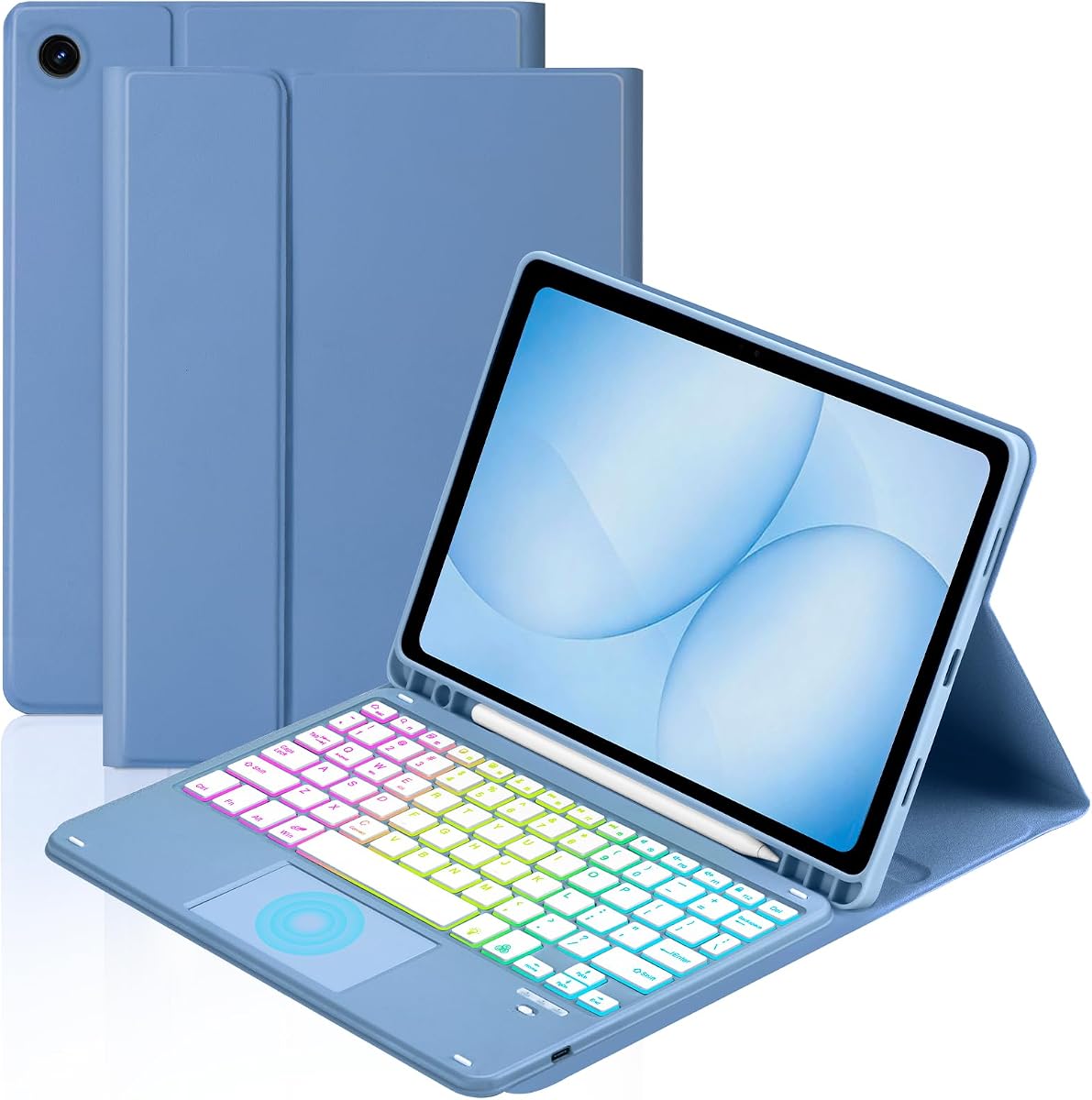
YBING Keyboard Case for Samsung Galaxy Tab A11 Plus & Galaxy Tab A9 Plus
4.5Editor score
360-degree rotation cover
7-color rainbow backlight
Detachable wireless keyboard
Discover the top 10 keyboards for Samsung A11 Tablet. We compare magnetic cases, trackpads, and battery life to help you choose the perfect laptop-like setup.
Transform your Samsung Galaxy Tab A11 into a productivity powerhouse with a dedicated keyboard case. These accessories blend protection with typing comfort for work and study needs.
We evaluated ten top-rated options based on build quality, battery life, and compatibility. Our guide highlights magnetic detachment, trackpad support, and viewing angles.
Each pick shows unique strengths for different workflows and budgets. Note that prices and availability change frequently on Amazon, so check current listings before buying.
4.5Editor score

4.3Editor score

4.3Editor score
This side-by-side comparison highlights key specifications across all ten keyboard cases to help you quickly identify the best fit for your Samsung Galaxy Tab A11.




The Dexnor case stands out with its integrated multi-touch trackpad, turning your Tab A11 into a true laptop replacement. Its 4.3-star rating reflects reliable performance and sturdy magnetic build quality.
We may earn a commission when you buy through this link, at no additional cost to you.
With a rechargeable 650mAh battery offering up to 720 hours of standby, you can work for weeks without charging. The scissor-switch keys ensure comfortable typing for long sessions.
The screen sits directly on the base rather than floating, which may feel less elevated than some rivals. This trade-off keeps the unit ultra-light and stable on your lap.
Ideal for students and mobile workers who need a trackpad for precise control without extra peripherals. Its balance of portability and function makes it the top pick overall.
The multi-touch trackpad supports gestures like swipe and pinch, allowing precise cursor control similar to a laptop for efficient browsing and editing.
Weighing just 1.36lbs, the case remains light enough for daily commutes while providing rock-solid magnetic support to keep the tablet secure.
We may earn a commission when you buy through this link, at no additional cost to you.
TUNKARMOR offers a detachable magnetic keyboard that lets you separate typing from viewing modes easily. Its 4.3-star rating highlights strong protection and convenient pen storage.
We may earn a commission when you buy through this link, at no additional cost to you.
The auto sleep/wake function helps preserve battery life by waking the tablet when opened and putting it to sleep when closed. Anti-slip slots ensure stable viewing angles.
Removing the keyboard might leave the tablet without a typing surface if needed quickly. Users should secure the magnetic attachment to prevent accidental displacement during use.
Perfect for users who value flexibility between tablet and laptop modes. Its protective honeycomb inner layer adds durability for daily transport in bags or backpacks.
The magnetic keyboard can be firmly attached or detached within seconds, allowing you to adapt the setup for typing or media viewing as needed.
Automatic sleep/wake sensors detect the lid status to wake or sleep the tablet, reducing power drain and extending usage time between charges.
We may earn a commission when you buy through this link, at no additional cost to you.
This case pairs a magnetic detachable keyboard with a separate Bluetooth mouse for versatile navigation. Its 4.4-star rating reflects strong multitasking features and vibrant backlighting.
We may earn a commission when you buy through this link, at no additional cost to you.
The built-in trackpad supports multi-finger gestures for smooth browsing, while the mouse offers precision for detailed tasks. A Type-C cable recharges the keyboard in 2 to 3 hours.
Adding a mouse increases overall weight and adds another device to manage. Ensure the mouse battery remains charged to avoid interruptions during work sessions.
Ideal for productivity seekers who prefer a dual navigation setup. The 7-color backlight adds personal flair while maintaining clear visibility in dim environments.
Both a trackpad and Bluetooth mouse are included, giving you the option to switch between precise cursor control and quick gesture navigation easily.
The keyboard features 7-color rainbow lighting with breathing and constant modes, allowing you to personalize your typing environment and visibility at night.
We may earn a commission when you buy through this link, at no additional cost to you.
Soke supports Windows, Android, and iOS systems seamlessly, making it versatile for cross-device users. Its 4.6-star rating indicates reliable performance and strong magnetic connection.
We may earn a commission when you buy through this link, at no additional cost to you.
The detachable keyboard connects via Bluetooth with a 10-meter range. A 7-color backlight ensures comfortable typing in dark settings, while the auto sleep/wake function protects battery life.
Power indication relies on blinking lights that might be missed without checking closely. Users may need to charge the keyboard promptly when the indicator blinks.
Great for families or travelers using different operating systems. Its simple magnetic design provides stability without complexity, keeping setup straightforward for daily use.
Switch between Windows, Android, and iOS with a simple key combination, allowing the same keyboard to work across different devices seamlessly.
The 7-color backlit keys offer vibrant lighting in dark conditions, enhancing visibility and comfort for evening productivity or travel tasks.
We may earn a commission when you buy through this link, at no additional cost to you.
YBING offers exceptional value with a rotating cover and strong magnetic adsorption. Its 4.5-star rating reflects solid construction and convenient stylus storage at a low cost.
We may earn a commission when you buy through this link, at no additional cost to you.
The 360-degree rotation allows landscape or portrait use flexibly. With 16 built-in magnets, the keyboard stays firmly in place, ensuring stability during typing and viewing.
The lack of a trackpad means you rely on touch screens or optional mice. This is acceptable given the budget-friendly pricing and other protective features.
Best for budget-conscious buyers needing reliable protection and portability. Its rainbow backlight and shortcut keys enhance productivity without breaking the bank for daily tasks.
The 360-degree rotating design lets you position the tablet horizontally or vertically, ideal for watching videos or reading at comfortable angles.
Sixteen powerful magnets securely attach the keyboard to the case, preventing movement or accidental detachment during travel or heavy use.
We may earn a commission when you buy through this link, at no additional cost to you.
Harvopu provides a 3-Level DPI mouse for precision editing alongside a detachable keyboard. Its 4.3-star rating highlights exceptional battery life and durable stain-resistant protection.
We may earn a commission when you buy through this link, at no additional cost to you.
The Type-C rechargeable keyboard offers up to 180 hours of use on one charge. The mouse sensitivity adjustment aids detailed graphic work and precise navigation across screens.
The added mouse makes the setup slightly heavier than keyboard-only options. Users must ensure both devices are charged to maintain full workstation functionality.
Perfect for power users needing desktop-grade control. The stain-resistant case ensures clean aesthetics, while the detachable design offers flexibility for various tasks.
The wireless mouse features 3-Level DPI settings to switch instantly between detailed editing and fast browsing, providing desktop-grade accuracy for your tablet.
A 2-hour charge delivers up to 180 hours of use, ensuring the keyboard stays powered through extended work sessions or travel without interruption.
We may earn a commission when you buy through this link, at no additional cost to you.
TiMOVO focuses on energy efficiency with a battery that lasts 90 hours and hibernation mode. Its 4.4-star rating reflects solid build quality and reliable auto-connect features.
We may earn a commission when you buy through this link, at no additional cost to you.
The detachable keyboard can be stored away when not needed. A 420mA rechargeable battery recharges in 2 to 3 hours for consistent daily performance and longevity.
The keyboard disconnects after 10 minutes of inactivity to save power, which means you may need to press a key to wake it. This minor delay is acceptable for battery savings.
Ideal for users prioritizing battery longevity and clean design. Its anti-slide grooves and full protection keep the tablet safe during frequent travel and daily use.
The 420mAh battery supports over 90 hours of work and 90 days of standby, ensuring the keyboard stays ready whenever inspiration strikes.
Removing the keyboard when not in use makes carrying the tablet lighter and easier, allowing flexibility between typing and reading modes.
We may earn a commission when you buy through this link, at no additional cost to you.
MePadKey features a smart touchpad supporting up to four-finger gestures for advanced multitasking. Its 4.2-star rating highlights useful gesture controls and vibrant backlighting.
We may earn a commission when you buy through this link, at no additional cost to you.
The trackpad handles swipe, scroll, and screenshot functions with multi-touch capabilities. A rechargeable battery provides 80 hours of use without backlight for extended sessions.
Gesture sensitivity may require adjustment depending on user preference. This minor learning curve is offset by the convenience of having navigation integrated directly into the keyboard.
Great for users who prefer touchpad navigation over a mouse. Its rainbow lighting adds visual appeal, while the detachable design ensures easy transport in travel bags.
The smart touchpad supports up to four-finger gestures, enabling actions like screenshots, app switching, and zooming without touching the screen.
Switch between rainbow and breathing light modes to match your environment, enhancing visibility and adding style to your daily workflow.
We may earn a commission when you buy through this link, at no additional cost to you.
This MePadKey variant emphasizes protection with thickened edges and 360-degree rotation. Its 4.3-star rating reflects strong durability and convenient built-in pencil holder.
We may earn a commission when you buy through this link, at no additional cost to you.
The keyboard features a touchpad with multi-finger gestures for efficient navigation. Use the FN key combination to switch systems, accommodating different devices without changing hardware.
Rotating the case may shift the keyboard position, requiring adjustment. Users should practice system switching to avoid disruption during multi-device workflows.
Best for users needing robust protection and flexible viewing. The included holder keeps stylus pens secure, while the detachable keyboard maintains versatility across tasks.
Thickened convex edges protect corners and allow 360-degree rotation, offering flexible viewing angles while shielding the tablet from drops and scratches.
Switch between different operating systems using the FN key, allowing this single keyboard to adapt to various devices without extra setup.
We may earn a commission when you buy through this link, at no additional cost to you.
Supveco uses a honeycomb grid to increase tablet lifespan by reducing overheating. Its 4.6-star rating confirms strong protection and reliable battery performance.
We may earn a commission when you buy through this link, at no additional cost to you.
The flexible silicone back with TPU cover cushions against shocks. Auto color-changing backlight adds visual variety, while auto sleep/wake helps save power during idle time.
The longer 3.5-hour charge might inconvenience users needing quick top-ups. Users can monitor the blinking light to avoid unexpected shutdowns during work.
Ideal for users prioritizing tablet health and protection. Its detachable keyboard and cooling design make it a smart long-term investment for daily heavy usage.
The inner honeycomb grid pattern increases lifespan by over 30% by protecting your tablet from overheating and reducing heat buildup during use.
Auto sleep/wake detects when you open or close the lid, automatically waking or sleeping the tablet to conserve power and extend battery life.
We may earn a commission when you buy through this link, at no additional cost to you.
Selecting the right keyboard involves evaluating compatibility, features, and build quality for your specific workflow.
Check that the keyboard case supports your exact model number, such as SM-X230 or SM-X210, as fit and magnet alignment vary between releases.
Always verify model compatibility before purchase to ensure the keyboard aligns correctly with the tablet's connectors and sensors.
Decide between detachable magnetic keyboards for versatility or attached cases for stability. Detachable designs allow flexible viewing angles and easier portability.
Detachables offer more flexibility, while attached cases provide consistent stability during typing and media consumption.
Built-in trackpads save space and enable precise cursor control without extra devices. External mouse options offer better ergonomics and customizable DPI settings.
Choose trackpads for space-saving convenience or mice for precision work requiring adjustable sensitivity and ergonomic comfort.
7-color backlit keyboards allow customization and visibility in low-light environments. Ensure you can adjust brightness or switch modes easily.
Backlights enhance typing visibility and personalization, so check that modes are easy to switch and bright enough for dark settings.
Look for models offering 50 hours or more of use to minimize charging frequency. Standby time can also extend the overall battery efficiency.
Long battery life reduces interruptions, so prioritize keyboards with high-capacity batteries and efficient auto sleep modes.
Cases with reinforced corners or honeycomb grids shield against drops and overheating. Ensure the design covers all edges to prevent scratches.
Strong protection ensures device longevity, so choose cases with full coverage and impact-resistant materials for daily transport.
Multiple viewing angles reduce neck strain during long sessions. Non-slip grooves and rotating stands offer better ergonomics.
Adjustable angles improve comfort for typing and watching videos, so select cases with stable multi-angle support.
Keyboards supporting Windows, Android, and iOS via shortcut keys work across devices. Verify switch methods for smooth transitions between systems.
Multi-system support ensures you can use the same keyboard on multiple devices without needing additional hardware or complex setups.
Connect the keyboard via Bluetooth by turning it on and pairing through your tablet's settings. Allow a few seconds for stable synchronization before typing.
Use the auto sleep/wake feature by opening or closing the case lid. This helps conserve battery life when the device is not in use.
Keep the case clean by wiping with a dry cloth. Avoid liquid cleaners that might damage the internal components or keyboard keys.
Most are designed for specific model numbers like SM-X230 or SM-X210. Always verify your model in settings before buying. Some support A9 Plus variants too.
Yes, all featured keyboards are detachable magnetically. You can detach them for light tablet use or attach them when typing is required.
Some models come with a separate wireless mouse. Others have built-in trackpads. Check product descriptions carefully to confirm the navigation method provided.
Battery life ranges from about 5 hours with backlight to over 180 hours without. Standby times can reach 720 hours depending on usage frequency.
They are not waterproof, but many have stain-resistant exteriors. Avoid spills and clean gently with a dry cloth to maintain functionality.
Most include auto sleep/wake functions that detect lid position. This helps conserve battery when the tablet is closed or not in active use.
The Dexnor and YBING cases lead our list with excellent trackpad and budget features. Harvopu stands out for users needing premium mouse precision and long battery life.
Prioritize compatibility and battery needs over extra features. A model that matches your workflow ensures daily productivity without unnecessary complications.
Prices vary and change regularly, so compare current listings before purchasing. Check reviews and availability to confirm the best deal for your specific needs.