
Lenovo Smartcard Wired Keyboard II-US English
4.4Editor score
Simple Design
Reliable Connectivity
Compact Footprint
This guide compares the top keyboards with smart card readers for secure authentication, featuring detailed reviews and specs for government, enterprise, and
Secure authentication is critical for modern workspaces. A keyboard with smart card reader combines typing comfort with robust access control, ensuring only authorized users enter sensitive systems or data centers efficiently.
We evaluated ten leading models based on security compliance, build quality, and ergonomic design. Our analysis covers government-grade certifications, switch types, and connectivity options to help you find the perfect secure typing solution.
Each pick highlights unique strengths like TAA compliance or mechanical switches. Prices and availability change frequently, so verify current details before purchasing. These selections represent the best balance of security and usability available today.
4.4Editor score
4.6Editor score

4.1Editor score
The following table provides a side-by-side comparison of all ten models. Review key specifications like compliance standards, connectivity, and design features to determine which device fits your specific security requirements.


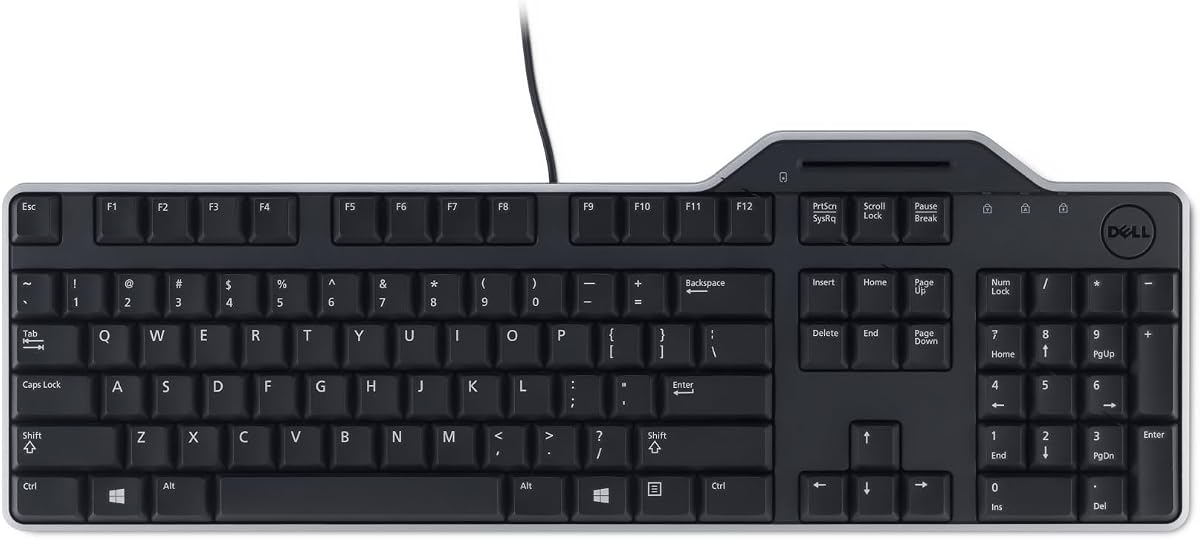
The Dell KB813 stands out as a robust solution for secure environments. Rated 4.6 stars, it combines a full-size layout with an integrated smartcard reader for seamless authentication without extra dongles.
We may earn a commission when you buy through this link, at no additional cost to you.
Its spill-resistant design ensures longevity in busy workspaces, while the ergonomic palm rest supports long typing sessions. The quiet keys make it ideal for shared offices where noise control is necessary.
While it uses standard membrane switches rather than mechanical ones, the comfort features offset this trade-off. The wired USB connection ensures stable data transfers without battery concerns.
Buy this if you need a reliable, secure keyboard for enterprise or government use. It balances security, durability, and comfort effectively for daily professional tasks.
The built-in smartcard reader simplifies login processes and enhances authentication security for protected systems.
Spill resistance and a detachable palm rest ensure the keyboard lasts longer and keeps hands comfortable.
We may earn a commission when you buy through this link, at no additional cost to you.
The Adesso TruForm AKB-150SB-TAA is designed for high-security sectors like banking and government. With a 4.1 rating, it offers TAA compliance and advanced smart card standards for reliable identification systems.
We may earn a commission when you buy through this link, at no additional cost to you.
Its split ergonomic layout encourages natural hand positioning, reducing wrist strain during long hours. The integrated palm rest and quiet membrane keys further enhance user comfort and productivity.
While the split design might take time to get used to, the ergonomic benefits are significant. The support for ISO7816 and PC/SC standards ensures wide compatibility across secure applications.
Choose this model for organizations requiring strict compliance and user-friendly design. It delivers premium security features without compromising on typing comfort.
TAA compliance and support for ISO/SC standards make it ideal for government and regulated industries.
The split design and palm rest help maintain natural posture, reducing discomfort during extended use.
We may earn a commission when you buy through this link, at no additional cost to you.
The Cherry KC 1000 is a robust security keyboard built for environments requiring strict compliance. Its 4.6 rating reflects trust in its FIPS 201 and EMV 2000 approvals for secure PIN entry.
We may earn a commission when you buy through this link, at no additional cost to you.
It supports multiple protocols including T=0 and T=1, ensuring broad compatibility with smartcards. The thin design keeps the workspace tidy, while cross-platform support adds versatility.
The one-handed operation feature is a practical touch for security workflows. However, the focus on function over form means it lacks stylistic variety.
Ideal for IT and security teams needing certified hardware. It prioritizes robust security protocols and reliable performance above all else.
FIPS and EMV certifications ensure the keyboard meets high standards for secure authentication.
Driver support for major operating systems ensures flexibility across diverse IT environments.
We may earn a commission when you buy through this link, at no additional cost to you.
The Adesso EasyTouch 130SB brings mechanical durability to secure workstations. With a 4.6 rating, it features red switches rated for 50 million keystrokes, ensuring longevity in intensive environments.
We may earn a commission when you buy through this link, at no additional cost to you.
Security is robust with EMV 4.0 and PBOC2.0 compliance, plus a built-in reader. The large print keycaps improve visibility, which is helpful for accessibility or low-light conditions.
A dedicated Copilot AI key adds modern productivity features, though it may not suit everyone. The wired connection ensures stable performance without interruptions.
Consider this for office or secure workstations needing tactile feedback and modern tools. It combines mechanical reliability with essential security standards effectively.
Red mechanical switches provide tactile feedback and long life for frequent typing tasks.
Large print keycaps make letters and symbols easier to read for all users.
We may earn a commission when you buy through this link, at no additional cost to you.
The Dell Keyboard Smartcard USB is praised for its reliability and simplicity. With a 4.7 rating, it delivers secure smartcard entry without complicating the workspace with wireless dependencies.
We may earn a commission when you buy through this link, at no additional cost to you.
Its spill-resistant build and quiet keys make it suitable for busy offices. The low-profile keys ensure a smooth typing experience, while the full-size layout supports efficient data entry.
This model lacks advanced ergonomic or mechanical features, focusing instead on core functionality. The wired USB connection ensures consistent performance without battery worries.
It fits users who prioritize dependability and basic security. An excellent choice for standard enterprise deployment requiring minimal fuss.
Wired USB connectivity eliminates battery concerns and ensures steady data transfer.
Low-profile keys and full-size layout provide comfortable typing for extended periods.
We may earn a commission when you buy through this link, at no additional cost to you.
The Kensington KB201C targets government agencies needing TAA compliance and secure authentication. Despite a lower 3.8 rating, it supports FIPS-201 and PIV standards critical for federal access.
We may earn a commission when you buy through this link, at no additional cost to you.
Its quiet-click mechanism helps maintain a peaceful workspace, and the full-size layout supports data entry. The three-year warranty adds a layer of protection for institutional buyers.
While the build feels functional rather than premium, the compliance features are its selling point. Wired USB ensures compatibility without software headaches.
Choose this for federal or regulated environments where compliance is mandatory. It meets specific standards required by government sourcing policies.
TAA and FIPS-201 certifications ensure it meets strict federal government requirements.
A three-year limited warranty offers peace of mind for organizational purchases.
We may earn a commission when you buy through this link, at no additional cost to you.
The Lenovo Smartcard Wired Keyboard II offers a straightforward approach to secure typing. Its 4.4 rating reflects satisfaction with its reliable connectivity and smartcard functionality.
We may earn a commission when you buy through this link, at no additional cost to you.
Designed for simplicity, it is lightweight and easy to install without additional drivers. The standard layout ensures familiarity for users transitioning to secure environments.
It lacks advanced ergonomics or multimedia features, focusing on core utility. The wired connection ensures stability without battery management needs.
Perfect for users needing a no-fuss secure keyboard at a competitive price point. It handles essential tasks effectively.
Plug-and-play functionality allows immediate use without complex configuration.
Lightweight construction makes it easy to transport or reposition in workspaces.
We may earn a commission when you buy through this link, at no additional cost to you.
The HP USB Business Slim Smartcard Keyboard delivers professional functionality with a slim footprint. Its 4.5 rating indicates trust in its build quality and reliability for daily use.
We may earn a commission when you buy through this link, at no additional cost to you.
Key features include a built-in spill drain and LED indicators, adding practicality for busy desks. The long cable offers flexibility in positioning relative to the computer.
While the membrane switches are quiet, they lack the tactile feedback of mechanical options. However, the design prioritizes space efficiency and spill protection.
Ideal for corporate offices needing a sleek and functional solution. It balances business aesthetics with essential smartcard capabilities.
Built-in spill drain channels liquids away to protect internal electronics.
A 6ft cable allows comfortable placement without short tethering constraints.
We may earn a commission when you buy through this link, at no additional cost to you.
The Cherry Secure Board 1.0 is designed for high-security needs with RF/NFC interface support. Its 4.2 rating highlights its value for environments requiring robust encryption and authentication.
We may earn a commission when you buy through this link, at no additional cost to you.
It supports thin clients and encryption protocols for secure mode operations. The ability to read both ISO 7816 and ISO 14443 cards adds significant versatility.
While it requires more specific configuration, the security features justify the setup. It targets specialized security applications rather than general office use.
Consider this for secure data centers or government applications. It provides advanced protocols beyond standard smartcard readers.
RF/NFC compatibility allows reading various secure cards and tags beyond standard formats.
Dedicated secure mode with encryption ensures safe authentication on thin clients.
We may earn a commission when you buy through this link, at no additional cost to you.
The NEW OEM Dell KB813t provides an affordable entry point into secure keyboards. With a 4.4 rating, it offers OEM-quality assurance without the premium price of branded retail boxes.
We may earn a commission when you buy through this link, at no additional cost to you.
It includes essential smartcard integration and a full-size layout. The unopened condition suggests brand-new reliability for immediate deployment.
This model focuses on function over flair, lacking advanced ergonomic features. The USB connection ensures compatibility and stability.
Best for IT departments needing replacement units quickly. It delivers core security features at an efficient price point.
OEM packaging often reduces costs while maintaining Dell build standards.
Core smartcard capabilities support basic secure login requirements effectively.
We may earn a commission when you buy through this link, at no additional cost to you.
Selecting the right keyboard requires balancing security needs with ergonomics and connectivity options.
Look for certifications like FIPS 201, EMV, or TAA compliance if you work in government or regulated industries. These ensure the hardware meets strict authentication protocols and interoperability requirements.
Prioritize models with documented standards to guarantee seamless integration with secure systems.
Since you will likely use this device daily, features like wrist rests, split designs, or low-profile keys reduce strain. Ergonomic layouts improve posture during long data entry sessions.
Choose a keyboard that supports natural hand positions to prevent fatigue and injury.
Wired USB connections are generally preferred for security as they eliminate wireless interference and battery dependencies. However, some environments may prefer specific cable lengths or USB-A vs USB-C options.
Ensure the connection type matches your computer's ports and security policies.
Verify that the keyboard supports your specific card standards, such as ISO 7816 or CCID. Compatibility ensures you can use existing access cards without extra adapters.
Confirm protocol compatibility before purchasing to avoid integration issues.
For shared or industrial spaces, spill resistance and high keystroke lifecycles matter. Brands like Dell or Adesso offer robust construction to withstand daily wear and accidental accidents.
Invest in durable hardware to ensure long-term reliability in your workspace.
Consider extra features like multimedia hotkeys, AI assistant access, or large print keycaps. These can improve productivity and accessibility depending on your specific workflow needs.
Balance premium features with budget and practical utility.
Check driver support for your operating system whether Windows, macOS, or Linux. Cross-platform support ensures flexibility if your organization uses multiple device types.
Verify compatibility to ensure plug-and-play setup without complex software installs.
Longer warranties like the three-year offer from Kensington provide peace of mind. Enterprise-grade products often include better support channels for troubleshooting or replacement.
Review warranty terms to protect your investment against defects.
To set up your keyboard, connect the USB cable to your computer and allow drivers to install automatically. Insert your smart card into the integrated reader slot and verify that the LED indicators activate.
Regular cleaning with compressed air helps remove dust from keys and the reader slot. Wipe the surface with a slightly damp cloth, ensuring no liquid enters internal components.
Store the keyboard in a dry, flat surface when not in use. Avoid bending the cable or placing heavy objects on the keys to maintain the mechanism's longevity.
Most modern models are plug-and-play and recognized by operating systems immediately. However, some advanced models may need drivers for specific protocols or operating systems like Linux. Check the product page for driver requirements before purchasing to ensure compatibility.
Not all cards work with all keyboards. Ensure your card complies with standards supported by the keyboard such as ISO 7816. Check the product specifications to confirm compatibility with your existing access credentials.
Wireless options are rare because security standards often require wired connections to prevent signal interception. Most secure models rely on USB to ensure safe authentication. If wireless is necessary, consult your IT policy for approved options.
Use compressed air to blow out dust particles gently. Avoid using water or liquid cleaners directly on the slot. Keep the area dry to prevent electrical shorts or damage to internal components.
Some models like those from Adesso and Kensington explicitly state TAA compliance. This is essential for US government purchases. Verify the certification status on the product page if you need federal compliance.
Many keyboards support macOS with standard drivers. However, advanced features like specific security protocols may require additional software. Always check OS compatibility in the specifications before buying for Apple systems.
High-quality models often have lifespans rated for millions of keystrokes. Regular maintenance and careful handling extend their durability. Warranty terms also indicate expected reliability for professional use.
Yes, these keyboards can be used anywhere secure access is needed. They are designed for enterprise use but offer excellent typing comfort. If you work remotely with sensitive data, they provide robust security.
Our top picks include the Dell KB813 for its balance of comfort and security, the Adesso TruForm for premium ergonomics, and the Lenovo model for budget-friendly simplicity. Each meets unique needs depending on your environment.
When choosing, prioritize security standards like FIPS or TAA if you work in regulated industries. For general users, focus on ergonomics and spill resistance to protect your investment.
Remember to check current availability and compatibility before purchasing. Prices and stock fluctuate often, so verifying details ensures you get the right secure solution for your needs.