
Thermalright Trofeo Vision LCD AIO Display
4.3Editor score
9.16 inch wide display
USB-C plug and play
DIY TRCC software themes
This guide compares the top ten LCD screens for PC cases to help you choose the best model for monitoring stats and enhancing your build aesthetics.
Adding an LCD screen for PC Case transforms your setup into a modern dashboard that displays vital system stats and custom visuals. These displays integrate seamlessly with your hardware to provide real-time insights without cluttering your main monitor workspace.
We evaluated ten top models based on resolution, connectivity options, software features, and build quality. Each product was analyzed for its ability to show CPU and GPU temperatures while maintaining aesthetic appeal within various chassis designs.
Every pick highlights specific strengths like touch support, magnetic mounting, or specific case compatibility. Note that prices fluctuate frequently so verify current offers before purchasing to ensure you get the best value for your investment.
4.3Editor score

4.4Editor score

4.5Editor score
This side-by-side comparison breaks down the key specifications and features of every model to help you decide which screen fits your specific case and monitoring needs.




The Lian Li SM088X stands out as a top contender with its versatile mounting and rich software features. It earns high marks for allowing users to display media and stats without hogging GPU ports.
We may earn a commission when you buy through this link, at no additional cost to you.
Its dynamic control via L-Connect 3 lets you upload custom videos and photos easily. The USB-powered design ensures it functions independently while the diffused ARGB lighting adds a cohesive aesthetic touch to your build.
While the installation guide warns against using longer screws, the flexible bracket system allows for tilt adjustments to suit your viewing angle. The compact size ensures it fits seamlessly into many spaces without overwhelming the case interior.
This screen is ideal for enthusiasts who want a blend of utility and style. Its ability to switch temperature units and show custom layouts makes it a powerful tool for monitoring system health.
Mount it securely to fan frames or case panels using the included bracket for optimal visibility from any angle.
Enjoy plug-and-play connection via USB to function as a secondary monitor without using valuable GPU ports.
We may earn a commission when you buy through this link, at no additional cost to you.
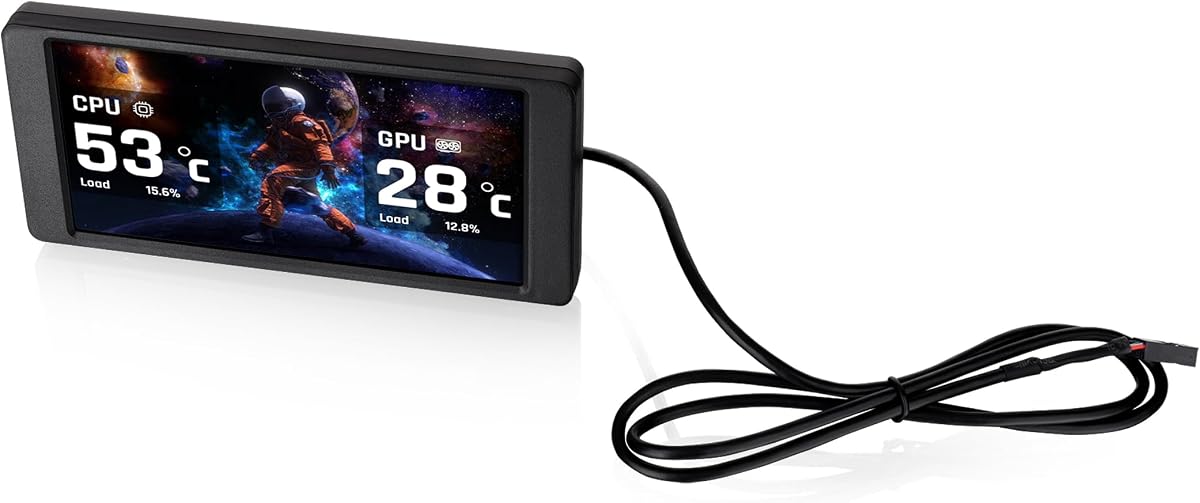
The Thermalright Trofeo Vision offers an impressive 9.16 inch display at an accessible price point. It is perfect for those who want to showcase system stats without breaking the bank.
We may earn a commission when you buy through this link, at no additional cost to you.
You can track CPU and GPU temps easily using the TRCC app which supports preset themes and DIY layouts. The plug and play USB-C connection ensures quick setup with most Windows systems without needing drivers.
At only 17mm thick it fits seamlessly inside or outside your case. The compact build adds function and aesthetic appeal for modders and enthusiasts looking to optimize space.
Buy this if you need a wide screen for monitoring data and custom visuals. Its real-time tracking capabilities provide complete control over your system health at a glance.
The slim build fits seamlessly inside or outside your case adding both function and appeal.
Quick setup and compatibility with most Windows systems is ensured by the simple Type-C interface.
We may earn a commission when you buy through this link, at no additional cost to you.
The WOWNOVA 8 Inch stands out with its desktop mode support allowing it to function as an extended screen. This feature makes it one of the most flexible options for PC enthusiasts.
We may earn a commission when you buy through this link, at no additional cost to you.
You can use the English version software to view temperatures and usage data efficiently. It supports dynamic video themes so you can customize your display with cool and dynamic content easily.
The one cable connection simplifies internal mounting significantly. You do not need GPU ports or extra power cables which makes installation cleaner and more straightforward.
Choose this for its professional look and feature-rich interface. The auto-start and brightness adjustment features add convenience while keeping your eyes protected during long sessions.
Switching to desktop mode as an extended screen gives you more flexibility for monitoring and media.
Customizing your own dynamic video theme makes your build unique and engaging for visitors.
We may earn a commission when you buy through this link, at no additional cost to you.
The darkFlash V92 delivers bright and sharp visuals with its ultra-wide 9.2 inch panel. It is designed specifically for PC case builds to show key system data clearly.
We may earn a commission when you buy through this link, at no additional cost to you.
You can monitor CPU GPU temperatures and custom widgets without needing extra software. The slim aluminum body measures just 12mm thick which helps it blend into your case design nicely.
Flexible mounting options allow installation horizontally or vertically depending on your preference. Check the clearance before purchase to ensure it fits your specific case model properly.
This screen is a great choice for those who want clear data visibility. The free software support means you can use plugins and themes to personalize your experience effectively.
The slim body measures 242.4 by 63.1 by 12 mm fitting cleanly into case builds.
Use free themes and plugins without requiring AIDA64 to monitor system data and widgets.
We may earn a commission when you buy through this link, at no additional cost to you.
The wisecoco 12.6 Inch is a bar style display that can function as an extra display on your desk. It features a 1920×515 resolution with a 1000:1 contrast ratio.
We may earn a commission when you buy through this link, at no additional cost to you.
It includes built-in speakers which make it great for gaming setups where audio matters. The package includes all necessary cables and a screwdriver for simple installation.
You can connect it via Mini HDMI and it supports landscape mode on your PC or laptop. This versatility makes it a great DIY kit for those looking to expand their setup.
Buy this if you want a wide screen for media and monitoring data. The plug and play design means you can mount and connect it quickly to get started.
Landscape mode makes it an extra display on your desk or anywhere you want for flexible use.
The package includes a screen DC cable HDMI cable and screwdriver for simple setup.
We may earn a commission when you buy through this link, at no additional cost to you.
The Hosyond 8.8 Inch brings a responsive capacitive touchscreen to the PC case display market. It features a sharp resolution that delivers crisp visuals for gaming and streaming.
We may earn a commission when you buy through this link, at no additional cost to you.
It is versatile enough to work with Raspberry Pi and other boards making it a great project tool. You can connect it via HDMI which provides a standard video input option.
The low power consumption ensures it runs efficiently without stressing your power supply. Its plug-and-play design means no drivers are needed for most systems.
Consider this if you want touch interaction with your monitoring data. Its wide compatibility makes it a flexible choice for tech enthusiasts and modders.
A responsive capacitive touchscreen allows for smooth control and interaction with your display.
Works with various systems and boards for hassle-free driverless installation and use.
We may earn a commission when you buy through this link, at no additional cost to you.
The Thermaltake 6.0 Inch is designed specifically for View 370 and View 390 series cases. It offers a larger viewing surface than previous models to show off customizable graphics.
We may earn a commission when you buy through this link, at no additional cost to you.
You can upload custom graphics in various formats to personalize your setup. The TT RGB PLUS 3.0 suite provides improved control and system monitoring features.
It functions independently with real-time data on key system components like CPU and GPU. The resolution ensures that images and movies look sharp on the display.
This is a must-buy for owners of compatible Thermaltake chassis. It accentuates your build with stunning visuals and real-time monitoring data effectively.
Upload up to 20 custom graphics in various formats to personalize your display.
Get real-time information on key system components like CPU GPU RAM and others.
We may earn a commission when you buy through this link, at no additional cost to you.
The GeeekPi 12.6 Inch offers high resolution imagery suitable for PC builds. It is specifically designed to fit the Y60 case panel perfectly.
We may earn a commission when you buy through this link, at no additional cost to you.
It features built-in speakers providing audio output without external needs. The touch screen supports up to 10 points of accuracy for a sensitive experience.
Setup is easy with plug and play compatibility. You can adjust screen display settings horizontally or vertically based on your viewing needs.
Buy this for your Y60 case if you want a premium touch experience. The detailed image ensures colors remain bright and consistent from any angle.
This screen is designed to fit the Y60 case panel perfectly for easy installation.
Up to 10 points of multi-touch accuracy provides an excellent touch experience.
We may earn a commission when you buy through this link, at no additional cost to you.
The Thermalright TV 9.16 uses a magnetic design for easy installation and removal. It features a full color IPS panel that accurately reproduces true colors.
We may earn a commission when you buy through this link, at no additional cost to you.
The metal frame technology supports the magnetic suction system making it easy to fix in place. You can freely monitor system parameters using the TRCC software.
Its power and data communication are provided by the motherboard 9-pin interface. The screen is capable of showing static dynamic images and video playback.
Choose this for its convenience and clean look. The software controls monitoring functions allowing it to start automatically with your computer.
The magnetic screen does not require screws making it easy to install and remove.
Supports multiple static and dynamic image switching and DIY personalized theme display.
We may earn a commission when you buy through this link, at no additional cost to you.
The Thermalright Trofeo 6.86 offers a compact display option for small cases. It features a full color IPS panel that restores true delicacy of colors.
We may earn a commission when you buy through this link, at no additional cost to you.
The magnetic attraction performance allows it to move freely within the chassis. This flexibility makes it ideal for custom cooling or case placements.
It supports various static and dynamic image switching for personalized themes. The smaller size ensures it does not overwhelm smaller chassis designs.
Consider this if you need a compact screen for monitoring. Its magnetic design and small footprint make it a practical choice.
The magnetic attraction performance is compatible with chassis installation and can move freely.
Supports a variety of static and dynamic image switching and DIY personalized themes.
We may earn a commission when you buy through this link, at no additional cost to you.
Choosing the right LCD screen depends on your case size connectivity needs and desired features. This guide outlines key factors to consider.
Screen size determines how much data you can display inside your case. Larger screens like 12 inches provide more space for widgets but require significant clearance.
Select a size that fits your case dimensions without blocking airflow or cables.
Higher resolution ensures text and images remain sharp and readable through tempered glass. Look for 1080p or similar for clear system stats.
Opt for higher resolution to avoid pixelation on larger displays.
Connectivity options define how you power and send data to the screen. USB headers or HDMI options determine installation complexity.
Choose USB powered options to free up GPU ports for graphics cards.
Software compatibility affects what kind of custom themes you can use. Ensure the software runs on your operating system like Windows 10 or 11.
Verify software support for Windows and Linux based on your OS.
Mounting features determine how securely the screen stays in place. Magnetic or bracket systems provide different levels of stability.
Look for adjustable mounting to ensure optimal visibility from any angle.
Build material impacts durability and heat dissipation. Aluminum bodies are common and help protect the screen from physical damage.
Prioritize aluminum or sturdy frames for long-term durability.
Power consumption dictates the load on your power supply. Low power designs are efficient and reduce heat generation inside the case.
Check power ratings to ensure your PSU can handle the extra load.
Start by connecting the screen to a USB header or HDMI port depending on your model. Ensure all cables are secure before powering on your system.
Install the manufacturer software and configure your display preferences. Choose from preset themes or upload custom images to personalize your setup.
Clean the screen with a soft dry cloth to avoid scratching. Avoid harsh chemicals that may damage the protective coating on the display.
Most screens draw power from a motherboard USB header or internal USB port. You generally do not need external power bricks for these displays.
Most software is Windows focused but some hardware works on macOS. Always check the official documentation for OS compatibility.
With normal use these screens can last for years. LEDs typically have long lifespans making them durable for gaming setups.
Some support Linux but it requires specific software installation. Verify if drivers exist for your distribution before purchasing.
Many models support external mounting with brackets. Check if the specific model supports external placement and stable mounting.
No many models use USB headers for data and power. HDMI is usually optional unless you plan to use it as a full monitor.
We have reviewed the top ten models to help you find the perfect display. From budget options to premium features there is a screen for every need.
Prioritize connectivity and software support to ensure a smooth experience. Consider your case size before choosing the display dimensions.
Prices change frequently so verify current offers before purchasing. Choosing the right screen elevates your build significantly.