
BENFEI USB 3.0 Switch
4.1Editor score
Affordable price with reliable performance
4 USB 3.0 ports for multiple devices
Includes USB power supply slot
This comprehensive guide compares the top keyboard and mouse switch for 2 computers to help you share peripherals efficiently across multiple machines.
Managing multiple computers often requires switching between keyboards and mice constantly. A dedicated switch allows seamless sharing of peripherals, boosting productivity without extra hardware costs.
We evaluated ten top-rated USB switchers based on port count, data transfer speed, build quality, and ease of use. Each product offers unique advantages for dual PC setups.
Every pick highlights key features, pros, and cons to guide your decision. Prices and availability change frequently, so check current listings before purchasing your ideal switch.
4.1Editor score

4.6Editor score

4.3Editor score
The following table provides a side-by-side comparison of all ten products, highlighting key specifications to help you quickly identify the right switch for your needs.



This 2 in 2 Out USB 3.0 Switch offers the best balance of performance and price for most users. With a 4.6 rating, it stands out for reliability and ease of use in dual PC setups.
We may earn a commission when you buy through this link, at no additional cost to you.
The USB 3.0 technology ensures fast data transfer up to 5Gbps, ideal for sharing keyboards, mice, and printers. The one-button switch with LED indicator makes toggling between computers intuitive.
While limited to two devices, this covers essential needs without clutter. The aluminum shell ensures heat dissipation and longevity, making it sturdy for daily office use.
Perfect for home offices needing simple sharing, this switch delivers great value. Its plug-and-play setup avoids drivers, ensuring immediate use across Windows, macOS, Linux, and Chrome OS systems.
Share keyboards and mice between two computers without unplugging cables, enhancing workflow efficiency seamlessly.
The aluminum alloy shell provides durability and better heat dissipation, extending the switch's lifespan under continuous use.
We may earn a commission when you buy through this link, at no additional cost to you.
The BENFEI USB 3.0 Switch is the top budget pick, offering four USB 3.0 ports at an incredible value. Its 4.1 rating reflects solid performance for basic sharing tasks.
We may earn a commission when you buy through this link, at no additional cost to you.
With 5Gbps speeds, it handles keyboards, mice, printers, and scanners efficiently. The LED indicator and button switching make it user-friendly for quick toggling between computers.
The included 18-month warranty provides peace of mind, and the USB power slot supports high-power devices when needed. This makes it versatile for expanding your peripheral setup.
Ideal for budget-conscious users, this switch delivers reliable sharing without breaking the bank. Its wide OS compatibility ensures it works seamlessly across Windows, Mac, Linux, and Chrome environments.
Get four USB ports to share multiple peripherals affordably, maximizing your investment in dual computer setups.
Exclusive 18-month unconditional warranty ensures long-term satisfaction with friendly customer service available for any issues.
We may earn a commission when you buy through this link, at no additional cost to you.
The UGREEN 2-in 7-Out USB 3.2 Switch is a premium powerhouse, featuring seven ports and blazing 10Gbps speeds for ultimate productivity. Its 4.3 rating underscores its advanced capabilities.
We may earn a commission when you buy through this link, at no additional cost to you.
With both USB-A and USB-C ports, it supports virtually any peripheral, from keyboards to external drives. The included power adapter ensures stable performance for high-demand devices like hard drives.
The external controller keeps your desk tidy, enabling seamless switching between work and personal computers. This level of customization is unmatched for complex dual PC environments.
Best for power users needing maximum ports and speed, this switch justifies its price with future-proof design. It handles large file transfers in seconds, eliminating wait times for efficient workflows.
Transfer 1 GB files in just 1.5 seconds thanks to 10Gbps speeds, drastically improving productivity over older USB models.
Seven ports accommodate all your devices without needing extra hubs, keeping your workspace neat and organized.
We may earn a commission when you buy through this link, at no additional cost to you.
The UGREEN USB 3.0 Switch stands out with its USB-C port support, making it ideal for modern laptops. Its 4.0 rating highlights reliable functionality for sharing keyboards and mice.
We may earn a commission when you buy through this link, at no additional cost to you.
With 5Gbps speeds and four ports, it connects various devices seamlessly. The controller mode allows hidden setups, keeping your desk tidy while maintaining full functionality between computers.
The USB-C power supply enhances stability for high-power devices, reducing disconnection risks. This feature ensures consistent performance for complex setups involving multiple peripherals and external storage.
Perfect for those with USB-C laptops, this switch adapts to modern tech effortlessly. Its plug-and-play nature and included cables make installation simple, ensuring quick setup for immediate productivity gains.
Direct USB-C port support simplifies connecting newer laptops, reducing the need for extra adapters or hubs.
Choose between button or controller switching to suit your workspace preferences and maintain a clean, organized desk.
We may earn a commission when you buy through this link, at no additional cost to you.
The Hearvo HDMI KVM Switch is a hybrid solution, sharing both peripherals and a monitor across two computers. Its 4.0 rating reflects its value for users needing display control.
We may earn a commission when you buy through this link, at no additional cost to you.
With 4K@60Hz support, it delivers crisp visuals for multimedia or professional tasks. The USB 3.0 ports handle keyboards and mice efficiently, ensuring seamless workflow transitions between systems.
The wired remote offers easy access without reaching for the switch, ideal for desk setups. Plug-and-play functionality avoids drivers, making installation straightforward for most operating systems.
Best for those sharing a single monitor, this switch consolidates your setup efficiently. Its adaptive EDID ensures stable images, providing a smooth experience for work or entertainment across both computers.
Control both keyboards, mice, and monitor with one device, simplifying dual-PC desktop management and saving space.
4K@60Hz ensures sharp, flicker-free visuals for detailed work or streaming, enhancing the overall user experience.
We may earn a commission when you buy through this link, at no additional cost to you.
The UGREEN USB 2.0 Switch offers solid performance for basic sharing needs at a budget-friendly price. Its 4.4 rating highlights consistent reliability across various operating systems.
We may earn a commission when you buy through this link, at no additional cost to you.
With four ports, it supports keyboards, mice, and printers effectively. The one-button swap and LED indicator make switching effortless, while the micro USB power ensures stable connections for high-power devices.
Though USB 2.0 is slower, it suffices for peripherals like keyboards and printers. This makes it ideal for users prioritizing cost and simplicity over high-speed data transfers.
Perfect for home offices or light use, this switch delivers straightforward functionality. Its plug-and-play design and included cables ensure easy setup, making it accessible for non-technical users.
Easily toggle between computers with a single click, streamlining workflows without requiring software or drivers.
Four USB 2.0 ports accommodate multiple peripherals, enhancing connectivity for printers and scanners in shared setups.
We may earn a commission when you buy through this link, at no additional cost to you.
The UGREEN USB 3.0 Switch Selector provides excellent mid-range performance with four USB 3.0 ports. Its 4.3 rating indicates reliable sharing for keyboards, mice, and printers.
We may earn a commission when you buy through this link, at no additional cost to you.
With 5Gbps speeds, it handles data transfers efficiently, ideal for flash drives and scanners. The extra USB-C power port ensures stable operation for high-power devices like external hard drives.
Its plug-and-play design simplifies installation across Windows, Mac, and Linux. The included cables and one-button switch make it user-friendly, reducing setup time for immediate use.
Best for those needing multiple USB 3.0 ports, this switch balances cost and functionality well. It ensures smooth workflow transitions, making it a dependable choice for home or office use.
Extra USB-C power port supports high-demand devices, preventing disconnects during intensive usage across multiple peripherals.
USB 3.0 technology ensures fast data transfers, saving time when sharing files between two computers via flash drives.
We may earn a commission when you buy through this link, at no additional cost to you.
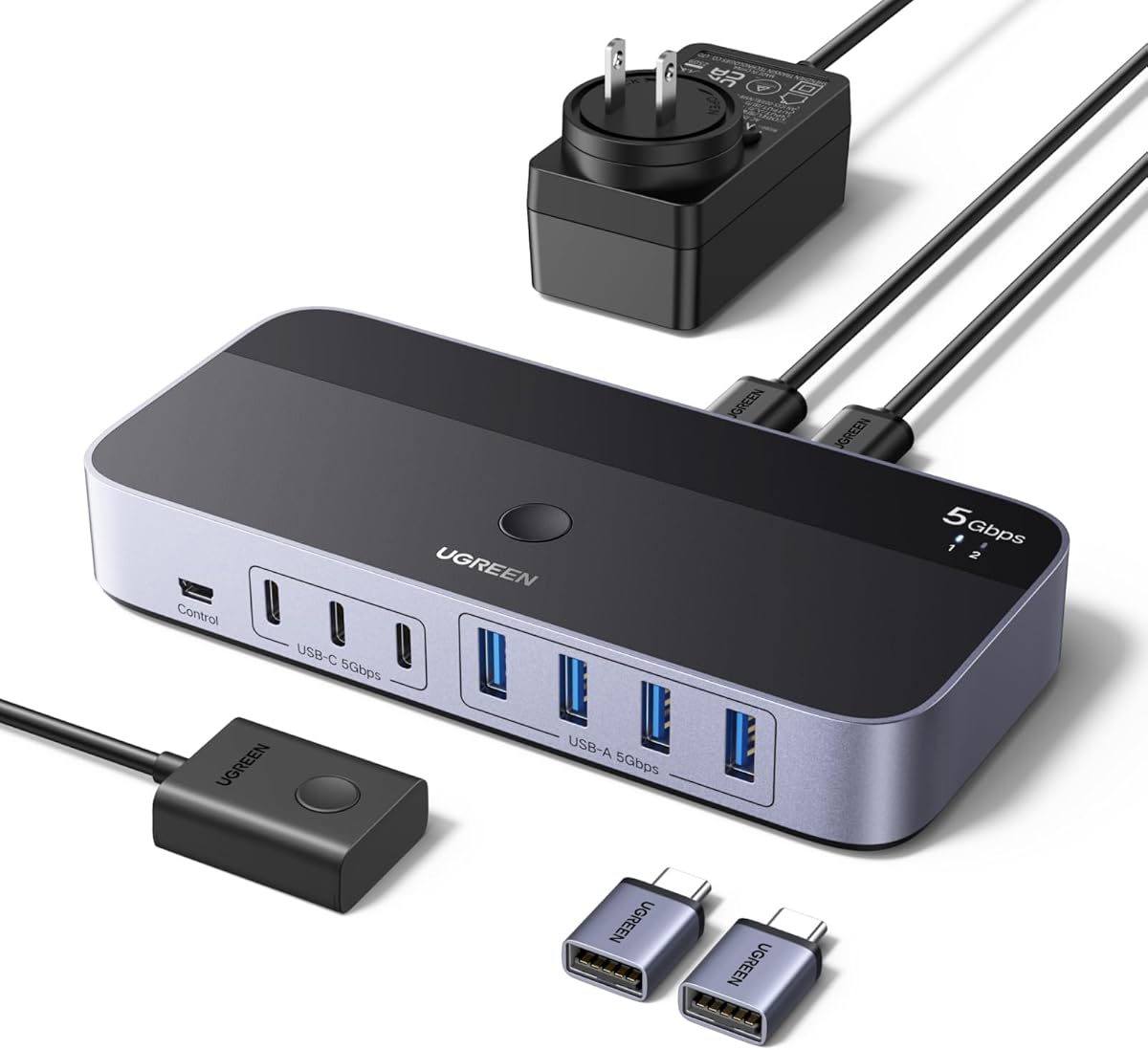
The UGREEN 2-in 7-Out USB 3.0 Switch offers extensive connectivity with seven ports, perfect for users with numerous peripherals. Its 4.3 rating reflects its robust build and functionality.
We may earn a commission when you buy through this link, at no additional cost to you.
With USB-A and USB-C ports, it accommodates legacy and modern devices. The included power adapter ensures stable performance for high-power devices, reducing risks of disconnection or lag.
The external controller keeps your workspace organized, allowing seamless switching between computers. This design prioritizes both functionality and aesthetics, making it suitable for professional environments.
Ideal for users needing maximum connectivity, this switch consolidates multiple hubs into one. Its comprehensive port options and power support make it a versatile, all-in-one solution for dual PC setups.
Support for both USB-A and USB-C devices ensures all your peripherals connect without additional adapters or hubs.
External controller enables easy switching while keeping the main unit hidden, maintaining a clean and professional workspace.
We may earn a commission when you buy through this link, at no additional cost to you.
The USB Switch 2 in 2 Out is a straightforward solution for sharing keyboards and mice between two computers. Its 4.2 rating emphasizes simplicity and reliability for basic users.
We may earn a commission when you buy through this link, at no additional cost to you.
With a push button and LED indicator, switching is intuitive. The external controller keeps your desk tidy, while the included cables ensure you can start using it right out of the box.
This switch is perfect for those needing minimal setup without extra ports. Its plug-and-play nature avoids drivers, making it accessible for non-technical users across various operating systems.
Best for basic dual PC setups, this switch delivers essential functionality at a low cost. Its reliable performance ensures smooth transitions between work and personal computers without complications.
No drivers required, enabling immediate setup and use across Windows, Mac, Linux, and Chrome OS for instant productivity.
External controller allows hidden placement of the main switch, keeping your workspace clutter-free and professional.
We may earn a commission when you buy through this link, at no additional cost to you.
The UGREEN USB 3.0 Switch 2 in 2 Out is a compact, reliable choice for essential dual-PC sharing. Its 4.1 rating highlights consistent performance and ease of use for basic needs.
We may earn a commission when you buy through this link, at no additional cost to you.
With USB 3.0 speeds, it ensures fast data transfers for printers and webcams. The one-button switch and LED indicator simplify toggling between computers, streamlining workflows efficiently.
Its plug-and-play design eliminates the need for drivers, making setup straightforward. The included cables ensure you're ready to use it immediately after unboxing for quick deployment.
Perfect for budget-conscious users needing USB 3.0 speeds, this switch offers great value. It ensures smooth transitions between work and personal systems, enhancing productivity without unnecessary complexity.
Get high-speed data transfers without premium pricing, ideal for sharing printers and webcams efficiently across two computers.
No drivers needed; simply plug in and start sharing peripherals immediately for seamless integration into your workspace.
We may earn a commission when you buy through this link, at no additional cost to you.
Selecting the right USB switch depends on your specific needs, including port count, data transfer speed, and additional features like power support. This guide outlines key factors to consider for an informed decision.
The number of USB ports determines how many peripherals you can connect simultaneously. For keyboards, mice, and printers, a 2-out switch may suffice, but if you use multiple drives or webcams, consider 4-out or 7-out options.
Choose a switch with enough ports to avoid needing additional hubs. Ensure the ports match your device types, such as USB-A or USB-C, to prevent compatibility issues during setup.
USB 3.0 offers up to 5Gbps speeds, which is ideal for transferring large files or using high-performance devices. USB 2.0 is slower but sufficient for basic peripherals like keyboards and mice.
For tasks involving external drives or frequent file sharing, opt for USB 3.0 or higher to maximize efficiency and reduce waiting times during data transfers.
High-power devices like external hard drives or printers may require additional power. Check if the switch includes a power adapter or has a dedicated power port to ensure stable connections.
If your setup involves multiple power-hungry peripherals, a switch with optional or included power supply prevents disconnections and ensures consistent performance across all connected devices.
Switches typically use buttons or external controllers. Button switches are straightforward and cost-effective, while controllers keep your desk tidy by allowing remote access without reaching the main unit.
Consider your workspace layout. If you prefer minimal clutter, an external controller adds convenience, whereas buttons are simpler and more affordable for basic setups.
Ensure the switch supports your operating systems, such as Windows, macOS, Linux, or Chrome OS. Most modern switches are plug-and-play, avoiding the need for drivers, but verifying compatibility is essential.
Driver-free operation simplifies setup and ensures reliability. Confirm support for all OS versions in your dual-PC environment to avoid potential issues during switching or device recognition.
Materials like aluminum alloy enhance durability and heat dissipation, extending the switch's lifespan. Sturdy builds resist wear from daily use and protect internal components from overheating.
Invest in a well-constructed switch to ensure longevity. A durable design is especially important for workstations that experience frequent switching and continuous operation.
Look for features like LED indicators, external controllers, or included cables that enhance usability. A warranty, such as 18 months, provides peace of mind and protection against manufacturing defects.
Extra features streamline workflows and improve user experience. Check for bundled accessories and warranty terms to ensure you get full value and support after purchase.
Prices vary based on port count, speed, and features. Determine your priorities to balance cost with functionality, ensuring you don't overspend on unnecessary features or compromise on essentials.
Affordable options can still deliver reliable performance for basic needs. Focus on value rather than just price to get a switch that meets your requirements without unnecessary extras.
To set up, connect your computers to the switch using provided USB cables, then plug in peripherals like keyboards and mice. Ensure all devices are powered and connected to the correct ports for proper recognition.
Switch between computers by pressing the button or using the external controller. An LED indicator typically shows which computer is active. Avoid unplugging devices while switched to prevent connection issues.
For longevity, keep the switch in a well-ventilated area to avoid overheating. Regularly check cables for wear and ensure the power supply is stable to maintain consistent performance over time.
A keyboard and mouse switch for 2 computers is a device that allows two computers to share USB peripherals like keyboards, mice, and printers. It simplifies workflows by eliminating the need to unplug cables when switching between machines.
Yes. A USB switch shares only USB devices, while a KVM switch shares keyboards, mice, and monitors. If you need to share a display, choose a KVM switch instead of a standard USB switch.
Most modern USB switches are plug-and-play and do not require drivers. They work with Windows, macOS, Linux, and Chrome OS automatically, making setup quick and easy for most users.
Many newer switches include USB-C ports or adapters for compatibility. Check the product specifications to ensure it supports your USB-C devices, as older models may only have USB-A ports.
High-power devices like external hard drives may require additional power. Look for switches with a dedicated power port or included power adapter to ensure stable performance without disconnections.
Most switches feature an LED indicator that lights up to show which computer is currently active. This visual cue helps you confirm the correct device before using peripherals.
Yes, USB switches work well with printers, allowing multiple computers to share a single printer. Ensure the switch supports printer sharing and has sufficient ports for your setup.
With proper care, USB switches can last for years. Their durability depends on build quality and usage frequency. Avoid overloading ports or exposing them to heat to maximize lifespan.
The 2 in 2 Out USB 3.0 Switch leads as the best overall choice for its balance of speed, portability, and affordability. For budget shoppers, the BENFEI USB 3.0 Switch offers excellent value, while the UGREEN 2-in 7-Out USB 3.2 Switch is ideal for power users needing maximum connectivity.
Prioritize your specific needs: port count for device sharing, USB 3.0 speeds for file transfers, and power support for high-demand peripherals. Matching these factors to your workflow ensures a seamless dual-PC experience.
Always check current prices and availability before purchasing, as deals change frequently. With the right switch, you can streamline your workflow, reduce cable clutter, and boost productivity across both computers efficiently.