
RedThunder One Handed Gaming Keyboard RGB Backlit 35 Keys Portable Mini Gaming Keypad Ergonomic Game Controller for PC Gamer
4.4Editor score
35 keys anti ghosting support
Macro recording keys for efficiency
RGB backlit with multiple modes
Discover the top left handed gaming keyboards for 2026. We compare ergonomic layouts, Hall Effect switches, and programmable keypads to help you find the
Finding the right left handed gaming keyboard can transform your gameplay experience significantly. These specialized devices offer unique layouts designed specifically for users who prefer using their left hand for primary inputs while keeping the mouse on the right side.
Our team analyzed ten top rated products based on build quality, switch technology, and ergonomic design. We considered factors like latency, customization options, and comfort to ensure you get a device that matches your specific gaming needs and budget constraints.
Each product in this list highlights key features and real world performance insights. While we strive to provide accurate information, availability and pricing may change over time. Please check the latest details directly on the retailer site before making your final purchase decision.
4.4Editor score

4.6Editor score

4.6Editor score
This side by side comparison highlights the core specifications of each model. From switch types to connectivity options, these details help you understand the differences at a glance.



The RK ROYAL KLUDGE L98 stands out as a top choice for left handed gamers seeking a full mechanical experience. With a 4.6 rating from users, it offers a unique Southpaw layout that places the numpad on the left side for better ergonomics.
We may earn a commission when you buy through this link, at no additional cost to you.
Its gasket structure with PBT keycaps provides a premium typing feel that reduces vibrations during long sessions. The five sound-dampening layers ensure a quiet and smooth experience, while the tri-mode connectivity allows seamless switching between devices.
While the layout might require an adjustment period for those used to standard keyboards, the comfort benefits outweigh this minor hurdle. The massive 8000 mAh battery ensures you can game for days without needing to recharge frequently.
This keyboard is ideal for gamers who want customization and comfort without sacrificing performance. Whether you prefer linear or tactile switches, the hot-swappable design lets you tailor the setup to your exact preferences.
Relocating the numpad to the left frees up space on the right side, allowing for more mouse movement and reducing hand fatigue during extended gaming.
The hot-swappable PCB supports both 3-pin and 5-pin switches, giving you the freedom to experiment with different actuation forces and feedback styles easily.
We may earn a commission when you buy through this link, at no additional cost to you.
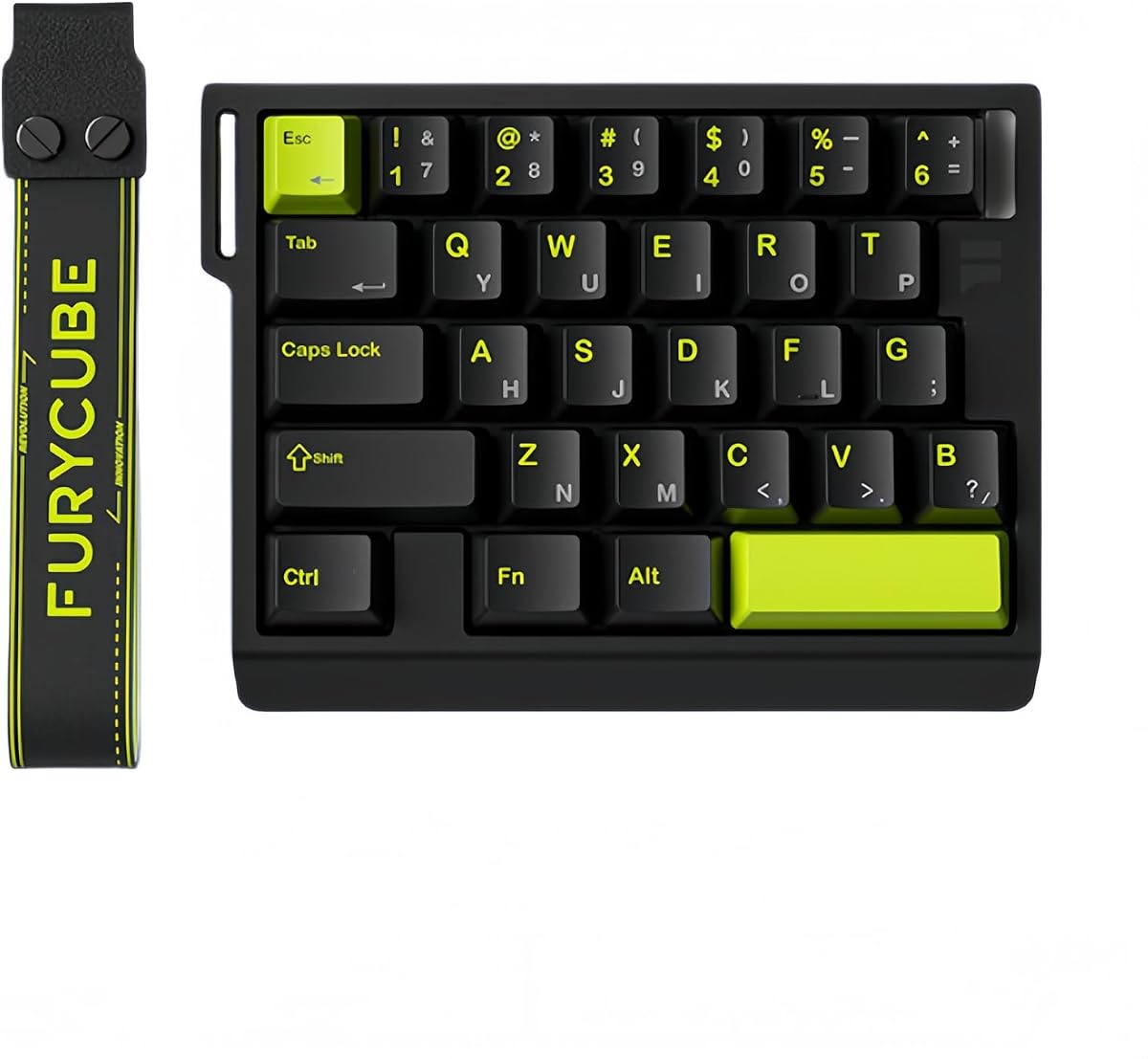
The RedThunder One Handed Gaming Keyboard is an excellent entry-level option for gamers looking to try a one-handed setup without breaking the bank. It features a built-in game chip that ensures fast response times for competitive play.
We may earn a commission when you buy through this link, at no additional cost to you.
With 35 anti-ghosting keys, you can execute complex combos without worry. The macro recording function allows you to automate repetitive actions, which is particularly useful for MMORPGs or strategy games that require quick command inputs.
While it lacks wireless connectivity and has fewer keys than full-size keyboards, its compact size makes it easy to carry and save desk space. The ergonomic design includes a wrist rest that helps maintain comfort during intense gaming sessions.
This keypad is perfect for casual gamers or those on a tight budget who still want quality performance. Its plug-and-play design means you can start using it immediately without installing additional drivers or software.
You can record sequences using FN+F1 or FN+F2 keys, allowing you to execute complex commands with a single press during gameplay for a competitive edge.
The RGB backlit system supports breath and static modes with seven color options, letting you customize the look to match your gaming setup aesthetics.
We may earn a commission when you buy through this link, at no additional cost to you.
The AZERON Keyzen represents the pinnacle of one-handed gaming peripherals with its extensive customization options and premium build quality. It features Cherry MX mechanical switches that deliver reliable tactile feedback for precise inputs during critical moments.
We may earn a commission when you buy through this link, at no additional cost to you.
With 32 fully mappable keys, you can map any keyboard, mouse, or controller input to suit your specific gaming needs. The 360-degree Hall-Effect thumbstick provides drift-free analog control, which is ideal for movement in first-person shooter games.
The adjustable ergonomic design ensures a perfect fit for various hand sizes, reducing strain during long gaming marathons. Although it comes at a higher price, the ability to upgrade components and store multiple layouts makes it a worthwhile investment for serious gamers.
This device is best suited for users who demand the highest level of control and personalization. If you are willing to spend extra for a device that can grow with your skills, the Keyzen offers unmatched versatility.
The magnetic sensor joystick eliminates traditional stick drift, allowing for smooth and consistent movement control in compatible games without mechanical wear over time.
The 3D printed construction allows for modular replacement of parts, ensuring that your keypad remains functional and customizable for years to come.
We may earn a commission when you buy through this link, at no additional cost to you.
The AZERON Gaming Keypad offers advanced adjustability that caters to gamers who need precise control over their inputs. It replaces the traditional keyboard for left-hand use, allowing the mouse to remain on the right side for optimal comfort.
We may earn a commission when you buy through this link, at no additional cost to you.
A standout feature is the Hall Effect thumbstick which eliminates stick drift and supports WASD or 360-degree analog movement. The software allows you to fine-tune sensitivity and map eight directional zones for a highly tailored experience.
While the learning curve might be steep due to the extensive customization options, the rewards are significant for dedicated players. The 3D printed customized keypad ensures a unique fit for your hand size and gaming style.
This device is ideal for competitive players in genres like FPS and MOBA who need quick access to macros and analog controls. It bridges the gap between a traditional keyboard and a game controller effectively.
Exclusive software lets you adjust diagonal keybinds and analog smoothing, giving you granular control over how inputs are registered during gameplay.
You can store up to six control layouts directly on the keypad, ensuring you can switch between different game profiles instantly without reconnecting.
We may earn a commission when you buy through this link, at no additional cost to you.
The AJAZZ AK029 is engineered specifically for competitive gamers who need lightning-fast response times. It features magnetic switches that offer a 0.01mm actuation precision with absolutely no bottom dead zone for near-instantaneous key resets.
We may earn a commission when you buy through this link, at no additional cost to you.
With an 8KHz polling rate, this keypad ensures zero latency, which is crucial for executing precise movements in fast-paced shooters. The integrated SOCD and DKS technologies allow you to bind multiple action combinations to a single keystroke.
Although it has only 29 keys, this compact layout saves valuable desktop space, giving your mouse maximum room for wide and precise flicks. The aluminum build adds a premium feel while maintaining a rugged and reliable structure.
If you play FPS games competitively, this device offers the performance edge you need. Its design prioritizes speed and accuracy over versatility, making it a specialized tool for serious shooters.
Rapid Trigger functionality ensures that keys reset as soon as you release them, allowing for quicker double-taps and smoother strafing during intense combat scenarios.
The 5-layer acoustic structure reduces noise and provides a satisfying tactile feedback that enhances the overall gaming experience without being distracting.
We may earn a commission when you buy through this link, at no additional cost to you.
The Ergonomic Left Handed Keyboard is designed primarily for business and accounting professionals who type extensively. Its patented Natural_A shape keycaps are engineered to reduce back and shoulder strain, improving your overall posture during work.
We may earn a commission when you buy through this link, at no additional cost to you.
With a dedicated left numeric keypad, you can perform calculations efficiently without moving your hand away from the main typing area. The eight multimedia hotkeys add convenience for volume control and media playback without interrupting your workflow.
While this device is not intended for gaming, its focus on health and efficiency makes it valuable for office environments. The compatibility with multiple operating systems ensures it works seamlessly in most corporate setups.
If you suffer from repetitive strain injuries, this keyboard could be a significant investment in your long-term health. It prioritizes comfort and usability over speed or customization.
The ergonomic layout is specifically designed to eliminate RSI and carpal tunnel symptoms by aligning your hands in a more natural position while typing.
Included software optimizes performance and manages the multi-functional hotkeys, allowing you to customize workflows to match your specific job tasks.
We may earn a commission when you buy through this link, at no additional cost to you.
The Keychron C0 HE is built for high-level gameplay and content creation needs. It features an 8K polling rate and Rapid Trigger Hall Effect magnetic switches that ensure instant key resets for precise control in competitive titles.
We may earn a commission when you buy through this link, at no additional cost to you.
Beyond gaming, this keypad is perfect for streamers and video editors who need quick access to OBS scenes or timeline controls. The web-based configurator allows you to customize settings without installing heavy software on your system.
While it is limited to a wired connection, the stability it offers is essential for professional use. The per-key RGB lighting adds a touch of flair to your setup while keeping the footprint small and organized.
This device is ideal for users who switch between gaming and productivity tasks frequently. Its compatibility with both macOS and Windows makes it a versatile choice for mixed environments.
You can customize key mapping and lighting through a browser, saving your settings across devices without needing to install local applications or drivers.
Streamers can manage push-to-talk or execute complex commands with one hand, freeing up the other to navigate chat or monitor gameplay simultaneously.
We may earn a commission when you buy through this link, at no additional cost to you.
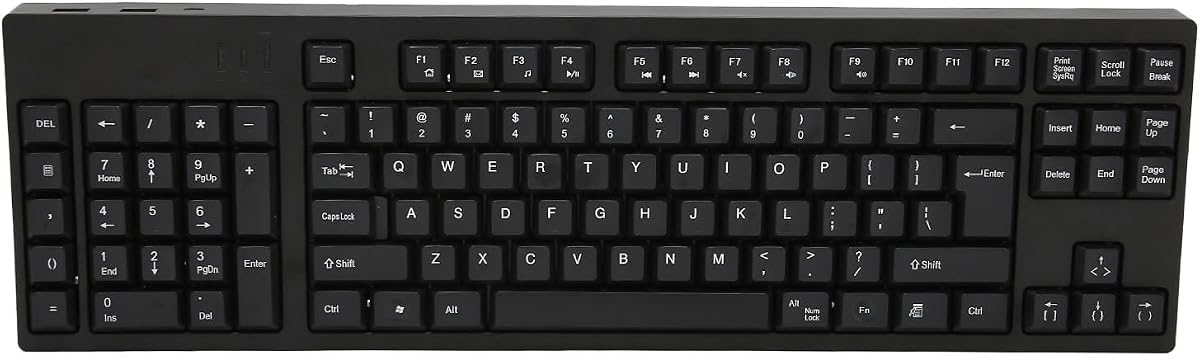
This Left Handed Keyboard offers a full 109-key layout designed to relieve right-hand fatigue and improve efficiency. The left numpad design allows left hand to operate numeric keypad while keeping the right hand free for mouse movement.
We may earn a commission when you buy through this link, at no additional cost to you.
It is constructed from premium ABS material for strength and durability, ensuring accurate typing experiences. The plug-and-play functionality means you can connect it and start using it immediately without any complicated setup steps.
With two additional USB interfaces for peripheral devices, you can connect mice or storage drives directly without needing extra hubs. This feature is particularly useful in office settings where ports might be limited.
If you need a full keyboard experience but want ergonomic benefits, this is a strong candidate. It bridges the gap between gaming peripherals and productivity tools with ease.
The two additional USB ports allow you to connect extra peripherals directly to the keyboard, reducing cable clutter and simplifying your workspace setup.
By repositioning the numpad to the left, the design encourages a healthier posture, reducing strain on the dominant hand during long typing sessions.
We may earn a commission when you buy through this link, at no additional cost to you.
The FKZ M30HE is equipped with full segment adjustable sensitivity key actuation, allowing you to tailor the trigger travel to your preference. This flexibility is rare at this price point and adds significant value for competitive players.
We may earn a commission when you buy through this link, at no additional cost to you.
It features Rapid Trigger technology that activates and deactivates keys with minimal travel, ensuring fast responses during gaming. The dynamic keystrokes feature allows one key to bind four distinct operations, enhancing your in-game capabilities.
With stunning RGB backlighting and north-facing LEDs, you get optimal visibility during gameplay even in low light conditions. The web driver allows users to remap functions and adjust lighting modes easily without installing heavy software.
This keypad is ideal for gamers who want customization without spending a fortune. The hot-swap capability means you can change switches later if your preferences evolve.
Analog keys can bind multiple operations, letting you map complex actions like jumping and shooting into one physical key press for faster reactions.
Each button can be individually illuminated with 24 million colors, helping you identify key zones quickly during intense gaming sessions.
We may earn a commission when you buy through this link, at no additional cost to you.
The A4tech Ergonomic Left Handed Keyboard provides a reliable solution for professionals who spend long hours at a desk. Its patented natural shape reduces back and shoulder strain, helping to improve posture throughout the workday.
We may earn a commission when you buy through this link, at no additional cost to you.
With eight multimedia hotkeys, you can control media playback easily without interrupting your workflow. The design aims to eliminate RSI and carpal tunnel issues by keeping hands in a comfortable natural position.
While it does not offer gaming features, its focus on health makes it a valuable tool for office workers. The wired USB connection ensures stable performance without battery concerns or wireless interference.
If you need a dependable keyboard that prioritizes your health, this is a solid option. It offers practical features that enhance productivity while protecting your body from strain.
The ergonomic layout encourages a more natural hand position, which reduces tension in the shoulders and wrists during extended typing tasks.
Included multimedia hotkeys provide quick access to volume and playback controls, streamlining your interaction with audio files and streaming services.
We may earn a commission when you buy through this link, at no additional cost to you.
Choosing the right device requires understanding specific features that impact your gaming performance and comfort. This guide breaks down the key factors to consider.
Ensure the device is truly designed for left-handed use. Some keypads are ambidextrous, while others feature a dedicated left-side numpad or specific key arrangement that optimizes your dominant hand.
Look for designs that allow your right hand to focus solely on mouse movement for a balanced setup.
Mechanical switches offer tactile feedback and durability, while magnetic Hall Effect switches provide adjustable actuation and rapid trigger for competitive play. Decide based on whether you prefer analog control or traditional clicks.
High-quality switches ensure longevity and consistent performance over years of daily use.
A higher polling rate like 8KHz reduces latency, ensuring your inputs are registered instantly. This is critical for competitive gamers who rely on split-second reactions.
For casual gaming, standard 1000Hz is sufficient, but pros should aim for higher speeds.
Comfort is paramount for long sessions. Look for adjustable palm rests, key angles, and lightweight builds that reduce strain on your wrist and fingers.
A device that fits your hand size naturally will prevent fatigue and potential injury.
Wired keyboards offer zero latency, while wireless models provide freedom of movement. Choose based on whether you prioritize stability or portability for your setup.
Bluetooth and 2.4GHz options allow you to connect multiple devices seamlessly.
Check for software that supports macro recording and key remapping. Advanced users will want to customize actuation points and lighting zones.
Hardware customization like hot-swappable PCBs allow you to change switches without soldering.
Materials like aluminum alloy plates provide stability and durability. Plastic housings should be robust to avoid flexing during intense use.
A sturdy build ensures the device lasts and maintains performance integrity over time.
Intuitive software is essential for managing profiles and macros. Some devices use cloud-based configs while others require local installation.
Ensure the software is compatible with your operating system and offers regular updates.
Start by connecting the device via USB or Bluetooth to your PC. Ensure drivers or software are installed for full functionality if required by the specific model you purchased.
Customize your keymap using the provided software. Assign frequently used commands to the most accessible keys to maximize efficiency during gameplay or work sessions.
Clean the device regularly using a soft brush or compressed air to remove dust from between keys. Avoid harsh liquids that might damage the internal electronics or paint finish.
Yes, most models on this list are designed specifically for left-hand use. They feature layouts where the numpad or keypads are positioned on the left side to optimize comfort and control.
Absolutely. Many gamers pair these devices with a standard keyboard, using the one-handed unit for game commands while keeping a full board for typing and system tasks.
A Hall Effect switch uses magnetic fields instead of physical contacts to detect keypresses. This technology eliminates switch bounce and allows for adjustable actuation points.
Most modern devices support both Windows and macOS. Always check the compatibility list before purchasing, as some features may require specific OS software.
Wireless models with 2.4GHz dongles are generally reliable. However, wired connections still offer the absolute lowest latency for competitive shooters.
Mechanical switches typically last between 50 to 70 million keystrokes. This durability ensures your device will function reliably for years of heavy gaming use.
We have reviewed ten distinct options ranging from budget-friendly mini keypads to premium customizable controllers. The RK ROYAL KLUDGE L98 stands out for its full layout versatility while the RedThunder offers value for beginners.
Prioritize features like switch type and polling rate based on your specific gaming genre. If you play competitive shooters, prioritize latency, but if you enjoy RPGs, macro capabilities might be more important.
Remember that product availability and pricing change regularly. Always verify current stock and specifications on the retailer site before finalizing your purchase to ensure the best deal.