
LG 24U411A-B
4.5Editor score
120Hz refresh rate
Full HD IPS panel
Slim borderless design
Finding a monitor that performs well under bright sunlight can be challenging for professionals and enthusiasts alike. High brightness levels and anti-glare coatings are essential for maintaining visibility without strain during outdoor or bright indoor work sessions.
We evaluated ten top-rated displays based on brightness, color accuracy, resolution, and connectivity options. Each product was assessed for its ability to deliver clear visuals in varying light conditions while supporting diverse workflows from editing to gaming.
Each pick highlights unique strengths like peak nits, color gamut, and portability for specific use cases. Note that availability and stock levels may change over time so verify current options before purchasing your preferred model.
4.5Editor score
4.8Editor score

4.2Editor score
As an Amazon Associate we earn from qualifying purchases.
This side-by-side comparison highlights key specs across all ten models including resolution, refresh rate, panel type, and connectivity features to help you find the optimal display for your setup requirements.




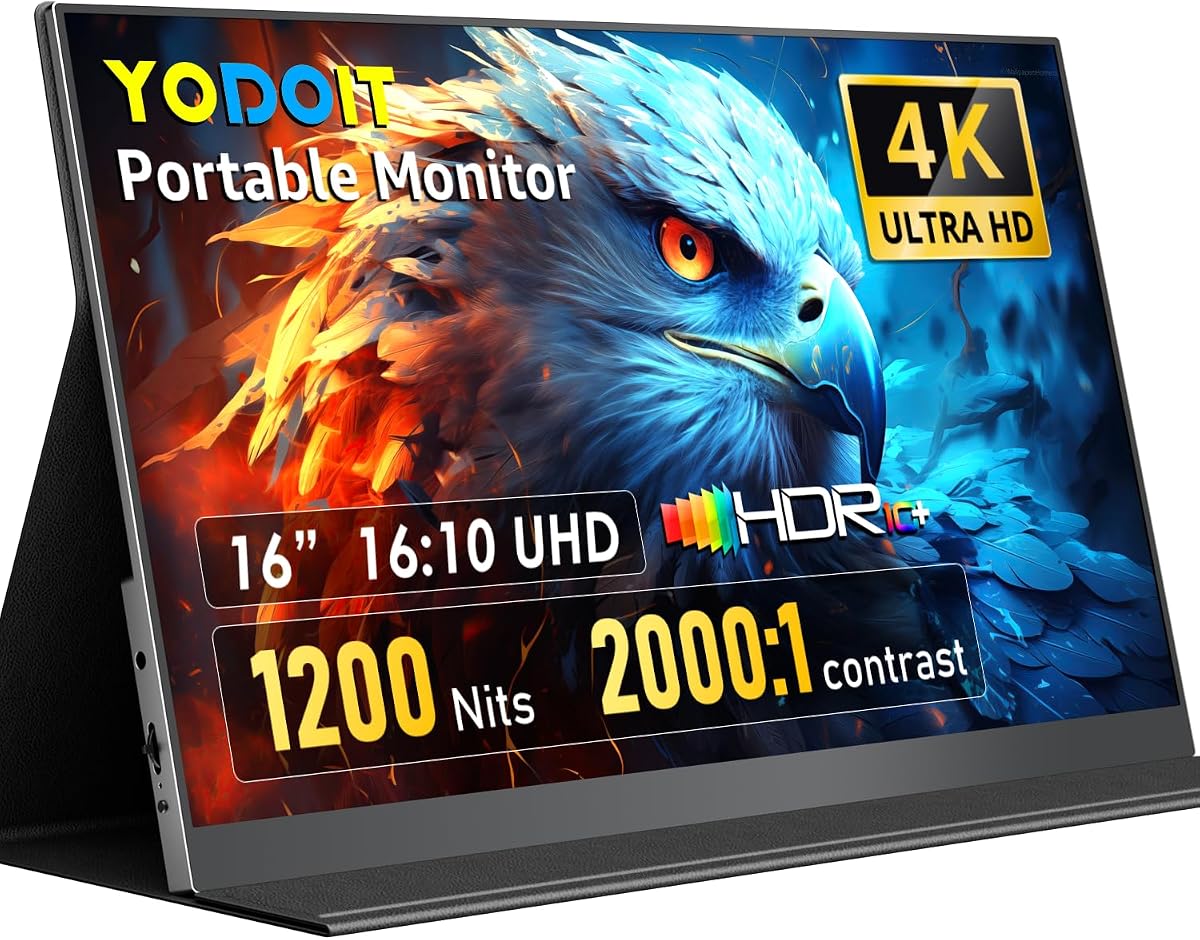
The Yodoit 4K Portable Monitor stands out as the top choice for users needing exceptional brightness in daylight conditions. Its 1200nit peak brightness combined with a matte coating ensures clear visibility without glare or reflection issues.
We may earn a commission when you buy through this link, at no additional cost to you.
With a 16-inch 3840×2400 resolution and 145% sRGB coverage, this display delivers stunning detail and color accuracy ideal for photo editing and design work. The 16:10 aspect ratio provides extra vertical space for productivity.
While it requires a USB-C power adapter to sustain peak brightness on some laptops and the Mini HDMI port carries video only, these trade-offs are minor given its performance in bright environments. Its lightweight build makes it perfect for mobile professionals.
Buyers prioritizing outdoor use or bright indoor spaces will appreciate its unmatched visibility and professional-grade specs. Whether for content creation or gaming, this monitor balances portability with high-end visual fidelity seamlessly.
The 1200nit brightness ensures images remain visible even under direct sunlight making it ideal for fieldwork and outdoor presentations.
With 145% sRGB coverage and 2000:1 contrast this monitor delivers precise colors suitable for print proofing and detailed editing tasks.
We may earn a commission when you buy through this link, at no additional cost to you.
The Dell 24 Monitor SE2426H offers exceptional value with its 144Hz refresh rate and IPS panel delivering smooth visuals and consistent colors. Its TUV eye comfort certification reduces blue light for extended viewing sessions.
We may earn a commission when you buy through this link, at no additional cost to you.
This model features ultra-thin bezels that maximize screen space and a 178-degree viewing angle ensuring clarity from any position. The 1ms MPRT response time keeps motion sharp during gaming or dynamic content.
While its brightness may not compete with specialized sunlight-ready displays it remains a strong choice for well-lit indoor offices. The lack of advanced resolution options limits detail for high-end creative work.
Budget-conscious users seeking reliable performance for work or casual gaming will find this Dell display meets their needs effectively. Its ergonomic tilt adjustment supports comfortable positioning throughout the day.
The 144Hz refresh rate paired with 1ms response time ensures smooth animations and minimal lag during fast-paced tasks.
TUV Rheinland certification reduces harmful blue light allowing long work hours without eye strain or fatigue.
We may earn a commission when you buy through this link, at no additional cost to you.
The Dell 27 Monitor S2725QS delivers impressive 4K visuals with a 120Hz refresh rate suitable for both creative work and immersive entertainment. Its IPS panel ensures accurate colors from any viewing angle.
We may earn a commission when you buy through this link, at no additional cost to you.
ComfortView Plus technology reduces blue light to 35% or less for all-day comfort without sacrificing image quality. The 1500:1 contrast ratio enhances depth and detail especially in HDR content.
While not optimized for direct sunlight the enhanced brightness and contrast handle well-lit rooms effectively. The 5ms response time is adequate but not the fastest for competitive gaming scenarios.
Professionals needing a large high-resolution screen for editing or multitasking will appreciate its visual fidelity. Combined with a modern ash white finish it complements any desk setup beautifully.
ComfortView Plus filters harmful blue light while maintaining vibrant colors for healthier extended viewing sessions.
The 1500:1 contrast ratio and HDR readiness bring out rich details in highlights and shadows across media types.
We may earn a commission when you buy through this link, at no additional cost to you.
The Dell 24 Plus Monitor S2425HSM combines smooth 144Hz performance with comprehensive ergonomic adjustments including height tilt pivot and swivel. Integrated 3W speakers provide convenient audio for calls and media.
We may earn a commission when you buy through this link, at no additional cost to you.
Its TUV 4-star eye comfort certification minimizes blue light emissions without compromising color fidelity. The ultra-thin bezels and ash white finish create a sleek modern aesthetic for any workspace.
Although brightness is standard for indoor use the high refresh rate and low response time ensure fluid visuals during dynamic tasks. The absence of USB-C may limit connectivity for newer laptops.
Users valuing comfort and flexibility will find this display adaptable to various sitting positions and tasks. Its balanced feature set makes it a reliable choice for everyday productivity and entertainment.
Height tilt pivot and swivel adjustments allow personalized viewing angles that reduce strain during long workdays.
Dual 3W speakers deliver wide frequency sound for presentations and media without needing external devices.
We may earn a commission when you buy through this link, at no additional cost to you.
The LG 24U411A-B delivers vivid visuals with a 120Hz refresh rate and 1ms motion blur reduction for sharp gameplay and scrolling. HDR10 support enhances contrast and color richness across compatible content.
We may earn a commission when you buy through this link, at no additional cost to you.
Its ultra-slim bezels and virtually borderless design maximize screen real estate while maintaining a compact footprint. Reader Mode lowers blue light for comfortable long-term reading or document editing.
While designed for indoor use the IPS panel ensures consistent color from different angles. The slim stand base adds minimal desk footprint though stability may vary with aggressive movements.
Budget buyers seeking solid performance and modern styling will appreciate this LG model. It balances gaming features with productivity tools effectively at an accessible price point.
Dynamic Action Sync and 1ms reduction keep fast-moving visuals sharp for responsive gaming and video playback.
Reader Mode and flicker safe technology reduce eye strain during prolonged text or document viewing sessions.
We may earn a commission when you buy through this link, at no additional cost to you.
The Acer SB273 G0bi provides a spacious 27-inch workspace with sharp Full HD resolution and ultra-slim zero frame bezels for immersive viewing. Its 120Hz refresh rate and 1ms response ensure smooth motion for all tasks.
We may earn a commission when you buy through this link, at no additional cost to you.
Adaptive sync compatibility eliminates screen tearing during multitasking or media playback. The IPS panel delivers wide viewing angles ideal for collaborative office environments or dual monitor setups.
Although brightness is standard for indoor office use the design prioritizes clarity and fluidity over sunlight resistance. The frameless design maximizes screen space for better focus on content.
Office workers needing an affordable large display will find this Acer model practical and efficient. Its balanced performance supports productivity and light gaming equally well.
Zero frame bezels on a 27-inch panel maximize visible screen area for expanded workspaces and multi-window layouts.
Adaptive sync and fast response times prevent tearing and ghosting ensuring fluid visuals during fast-moving content.
We may earn a commission when you buy through this link, at no additional cost to you.
The LG 32 inch QHD monitor offers a vast workspace with 2560×1440 resolution and 99% sRGB coverage for accurate colors across creative and professional work. Its 100Hz refresh rate supports smooth animations.
We may earn a commission when you buy through this link, at no additional cost to you.
USB-C connectivity simplifies setup by combining video and power delivery in one cable. The triple-sided micro-bezel design enhances immersion and reduces desk clutter visually.
Though tilt-only adjustment limits ergonomic flexibility the large screen and color fidelity make it ideal for media consumption. HDR10 support improves contrast for richer image depth and shadows.
Users needing a spacious high-resolution display with easy connectivity will appreciate this LG model. Its performance suits multitasking entertainment and design tasks equally.
USB-C port enables single-cable video transmission and power for cleaner desktop organization and device compatibility.
99% sRGB coverage ensures accurate and vivid colors for photo editing and creative production workflows.
We may earn a commission when you buy through this link, at no additional cost to you.
The Dell 27 Plus QHD S2725DSM delivers high-speed performance with a 144Hz refresh rate and 1ms response time for responsive visuals in gaming and workflows. QHD resolution provides sharp detail and spacious layout.
We may earn a commission when you buy through this link, at no additional cost to you.
Full ergonomic adjustments including height tilt pivot and swivel enable custom comfortable positions. Integrated speakers and TUV 4-star eye comfort certification enhance usability without extra accessories.
Its 1500:1 contrast ratio adds depth though brightness remains suitable for indoor environments. The ash white design complements modern desks while minimizing bezel distractions.
Users seeking a balanced mix of resolution speed and ergonomics will find this Dell model excellent for multitasking. Its feature set supports both creative and entertainment needs effectively.
144Hz refresh and 1ms response ensure smooth motion and minimal blur during fast-paced gaming or video work.
Height tilt pivot and swivel adjustments accommodate various sitting positions reducing strain during long sessions.
We may earn a commission when you buy through this link, at no additional cost to you.
The Acer KB242Y G0bi fits small desks with its 23.8-inch FHD panel and zero frame bezels for a clean immersive look. Its 120Hz refresh rate ensures fluid motion across work and casual gaming.
We may earn a commission when you buy through this link, at no additional cost to you.
Adaptive sync eliminates screen tearing during media playback or multitasking. The IPS panel offers consistent colors across viewing angles ideal for collaborative office setups.
Though designed for indoor use the lightweight compact chassis makes relocation easy. The basic stand provides tilt adjustment but lacks height or pivot functions.
Budget users needing a small reliable display will appreciate this Acer model. It delivers solid performance and aesthetics for everyday tasks.
Zero frame bezels on a 23.8-inch panel provide maximal viewing area in a minimal desktop footprint.
120Hz refresh and 1ms response minimize motion blur for responsive visuals during multitasking or gaming.
We may earn a commission when you buy through this link, at no additional cost to you.
The Newsoul 4K Portable Monitor offers ultra-high brightness up to 1200nits ensuring clear visibility in bright indoor spaces or outdoor settings when powered. Its 4K resolution delivers exceptional detail for creative work.
We may earn a commission when you buy through this link, at no additional cost to you.
Matte anti-glare coating reduces reflections significantly enhancing clarity during extended use. VESA mounting allows flexible wall or arm setups for ergonomic positioning in various environments.
While power connectivity is required for peak brightness the aluminum alloy build ensures durability and heat dissipation. The protective magnetic case adds portability and scratch protection for travel.
Professionals requiring high brightness and resolution in a portable form factor will find this Newsoul model valuable. Its premium build supports demanding visual tasks anywhere.
1200nits peak brightness makes content visible even in strong light conditions for versatile work environments.
Aluminum alloy casing and protective magnetic case ensure ruggedness and ease of transport for mobile users.
We may earn a commission when you buy through this link, at no additional cost to you.
Selecting the right monitor for bright conditions requires careful consideration of key technical specifications and practical features that align with your usage scenarios.
Brightness measured in nits determines how well a display remains visible under strong ambient light. For sunlight or brightly lit rooms look for displays rated at 1000 nits or higher to prevent washed out images.
Prioritize brightness ratings above standard indoor levels to ensure clear visibility without squinting or needing to adjust positions.
IPS panels provide wide viewing angles and consistent color reproduction which is critical for design and photo editing tasks. Check sRGB or AdobeRGB coverage to verify color fidelity for creative workflows.
Choose IPS panels with high color gamut percentages to ensure accurate visuals across different viewing angles.
Resolution impacts detail clarity with 4K UHD providing four times the pixel count of Full HD. Match screen size with resolution so higher resolutions on larger panels deliver sharper text and images.
Select resolutions that balance visual detail with system capabilities for optimal performance and clarity.
Higher refresh rates like 120Hz or 144Hz reduce motion blur for smooth animations during gaming or video playback. Response time below 5ms minimizes ghosting ensuring crisp moving images.
Prioritize refresh rates above 60Hz for dynamic content to maintain fluid and lag free visuals.
Modern monitors support USB-C HDMI and DisplayPort connections which determine compatibility with your devices. USB-C enables single cable video power and data which simplifies laptop setups.
Verify available ports match your current hardware to avoid needing additional adapters or docks.
Matte anti-glare coatings reduce reflections from ambient light sources improving visibility in bright environments. Glossy screens may offer deeper blacks but struggle with glare under direct lighting.
Choose matte finishes when working near windows or outdoor setups to maintain image clarity.
Adjustable stands with height tilt pivot and swivel functions help position the screen at eye level reducing strain. Fixed stands may limit comfort during long working sessions.
Select models with full adjustability to maintain proper posture and viewing angles throughout the day.
For on-the-go users lightweight portable monitors with protective cases are essential. Check materials like aluminum alloy for durability and heat dissipation during extended use.
Consider weight and included accessories to ensure ease of transport and setup in different locations.
Position the monitor to face away from direct sunlight or windows to reduce glare even with anti-glare coatings. Use blinds or curtains to control ambient light levels and protect your eyes from strain.
Adjust brightness and contrast settings based on your environment to maintain optimal visibility without causing eye fatigue. Utilize blue light filters or reader modes during evening hours to support healthy viewing habits.
Clean the screen regularly with a soft microfiber cloth and approved screen cleaner to remove dust and fingerprints. Avoid harsh chemicals or abrasive materials that can damage coatings and affect image quality.
For outdoor use choose monitors with at least 1000 nits brightness to ensure visibility under direct sunlight. Higher brightness combined with matte anti-glare coatings prevents washed out images and enhances contrast outdoors.
IPS panels offer wide viewing angles and color consistency which help in sunlight but brightness remains key. Pair IPS technology with high brightness ratings for the best outdoor visibility and color accuracy.
Many portable sunlight monitors draw power from USB-C but peak brightness may need external adapters. Check product details to confirm power requirements for sustained high-brightness operation.
Refresh rate primarily impacts motion smoothness rather than brightness. However higher refresh rates reduce eye fatigue during active use in bright settings contributing to overall comfort.
Standard indoor monitors typically lack sufficient brightness for direct sunlight and may suffer from glare. Use specialized bright displays to ensure readability and prevent visual strain outdoors.
USB-C connectors can transmit video and power over a single cable simplifying setup for portable monitors. HDMI usually carries video only so check for additional power input options.
Use a protective case or screen cover when transporting portable monitors to avoid scratches and dust buildup. Clean gently with microfiber cloths and avoid applying excessive pressure during cleaning.
Yes color accuracy ensures images appear correctly under bright lighting especially for creative work. Look for high sRGB coverage and calibration support to maintain true-to-life colors in sunlight.
The Yodoit 4K Portable Monitor leads our list with unmatched brightness and color accuracy ideal for outdoor and professional use. Alternatives like the Dell and LG models offer strong indoor performance with varied resolutions and features.
Prioritize brightness nits and anti-glare coatings when selecting a monitor for sunlight exposure. Match connectivity and adjustability options to your devices and workspace for a seamless and comfortable experience.
Verify current availability and features before purchase as product specifications may change over time. Select the model that best aligns with your visual needs and usage environment for lasting satisfaction.