
MAYFLASH F300 Arcade Fight Stick Joystick for Switch/Switch 2, PS4, PS3, Xbox Series S/X, Xbox One, Xbox 360, macOS, Windows, Steam Deck and more
4.5Editor score
Compatible with Switch 2
Sanwa button compatible
Turbo function support
Discover the top arcade fight sticks for Switch 2. We compare ten models for build, connectivity, and software to help you choose the perfect controller today.
Finding the right arcade fight stick for Switch 2 can transform your gaming experience. A quality controller offers precision inputs, durable components, and versatile connectivity for competitive play.
We evaluated ten top models based on compatibility, build quality, software features, and user feedback. Each pick meets strict standards for performance and value in the current market.
Each product entry shows key specs, pros, cons, and detailed analysis. Prices fluctuate often, so check current listings before buying to ensure you get the best deal available now.
4.5Editor score
4.7Editor score

4.6Editor score
This table compares all ten selected arcade fight sticks side by side. Review key specifications like connectivity, compatibility, and special features to find the right model for your setup.




The 8BitDo Arcade Stick for Switch 2 is a top tier controller designed for serious gamers. With a 4.7 rating, it stands out for its dynamic button layout and premium materials. This model bridges the gap between casual play and competitive needs.
We may earn a commission when you buy through this link, at no additional cost to you.
Its standout feature is the dynamic button layout that instantly updates when switching modes. The tempered glass faceplate adds durability and a sleek look. Ultimate software allows deep customization of macros and profiles for different games.
While the price is higher than budget models, the build quality justifies the cost. Some users might prefer more color options, but the purple finish is distinctive. The lack of Xbox support limits universal use compared to rivals.
This stick is ideal for Switch and PC players wanting premium features. It is best for those who prioritize customization and durability. Overall, it remains our top recommendation for modern arcade setups.
The layout changes instantly when you toggle between Switch and PC modes. This keeps inputs clear and reduces mistakes during intense gameplay.
Use the software to map buttons and create complex macro combos. Profiles can be saved for different games and switched quickly.
We may earn a commission when you buy through this link, at no additional cost to you.
The MAYFLASH F300 is a reliable budget choice for fighting game fans. It supports Switch 2 and many other platforms like PS4 and Xbox. With a 4.5 rating, it proves you do not need to spend much for good performance.
We may earn a commission when you buy through this link, at no additional cost to you.
Its main strength is broad compatibility and easy customization. The box accepts Sanwa buttons and joysticks for upgrades. Turbo functions offer different speeds for quick inputs. This flexibility helps gamers tailor the stick to their style.
However, the build is more plastic compared to premium models. It lacks wireless connectivity, which limits portability for some users. Still, for wired home play, the value is hard to beat in the current market.
Buy this if you want to start with an affordable stick. It works well for beginners who need reliable controls. The F300 remains a staple for budget conscious gamers seeking versatility.
Works with Switch 2, PS4, Xbox, and PC systems. You can use one stick across most of your gaming devices.
Swapping parts is simple thanks to standard mounting holes. Many users upgrade to Sanwa components for better feel.
We may earn a commission when you buy through this link, at no additional cost to you.
The MAYFLASH F700 Elite offers top tier performance for serious competitors. It features genuine Sanwa parts for precision and durability. With a 4.6 rating, it delivers a smooth experience for games like Street Fighter and Tekken.
We may earn a commission when you buy through this link, at no additional cost to you.
The wireless Bluetooth mode adds freedom for console use. The included anti-slip rubber mat keeps the stick secure during matches. Support for wired headsets enhances communication on supported systems. This model is built for high performance.
The price is significantly higher than standard sticks. It is designed primarily for fighting games, limiting use in other genres. Xbox support is absent, which may frustrate some users. However, the quality justifies the cost for pros.
Choose this if you want the best input quality available. It is perfect for tournament play or dedicated home setups. The Elite version sets a standard for premium arcade sticks today.
Real Sanwa buttons and joystick ensure consistent inputs. This reduces wear over time and improves response speed.
Play without cables on Switch or PS5 using Bluetooth. This keeps your setup clean and reduces trip hazards.
We may earn a commission when you buy through this link, at no additional cost to you.
This 8BitDo model offers solid performance across Switch and Windows platforms. It has a 4.6 rating for its reliable wireless and wired options. The dynamic mapping helps users switch between modes easily without confusion.
We may earn a commission when you buy through this link, at no additional cost to you.
The hidden compartment for the 2.4G receiver is a thoughtful design touch. You can store it safely when not in use. Ultimate software allows for deep customization of buttons and macros. This flexibility suits both casual and competitive play.
Some users note it lacks a specific Switch 2 label, though compatibility exists. It also requires firmware updates for full modern support. Despite these minor issues, the value and features remain competitive in the market.
Buy this for a balanced stick that works well on PC and Switch. It is a great choice for gamers who need multiple connection options. The build quality ensures it lasts through many gaming sessions.
The 2.4G receiver sits in a hidden slot on the unit. This protects it from damage and keeps your bag tidy.
The labels change based on your selected mode. This visual cue helps prevent button mapping errors during use.
We may earn a commission when you buy through this link, at no additional cost to you.
The 8Bitdo Retro Wireless combines classic looks with modern tech. It fits Switch 2 and PC with a 4.5 rating for comfort. The retro design appeals to fans of classic arcade cabinets.
We may earn a commission when you buy through this link, at no additional cost to you.
It supports both 30mm and 24mm buttons for easy swapping. Battery life reaches 40 hours on 2.4G for extended sessions. The dynamic button layout simplifies mode switching without manual input.
Some modern features like turbo are basic compared to newer models. The battery may lose capacity after heavy use over years. But for retro enthusiasts, the aesthetic and feel are unmatched.
Get this if you love vintage styles but need modern wireless. It works great for classic fighting games. The modding potential keeps it relevant for DIY enthusiasts.
You can swap buttons and joystick for a custom feel. The plate supports standard arcade parts for upgrades.
Enjoy up to 40 hours on one charge. This reduces charging frequency for long weekend play sessions.
We may earn a commission when you buy through this link, at no additional cost to you.
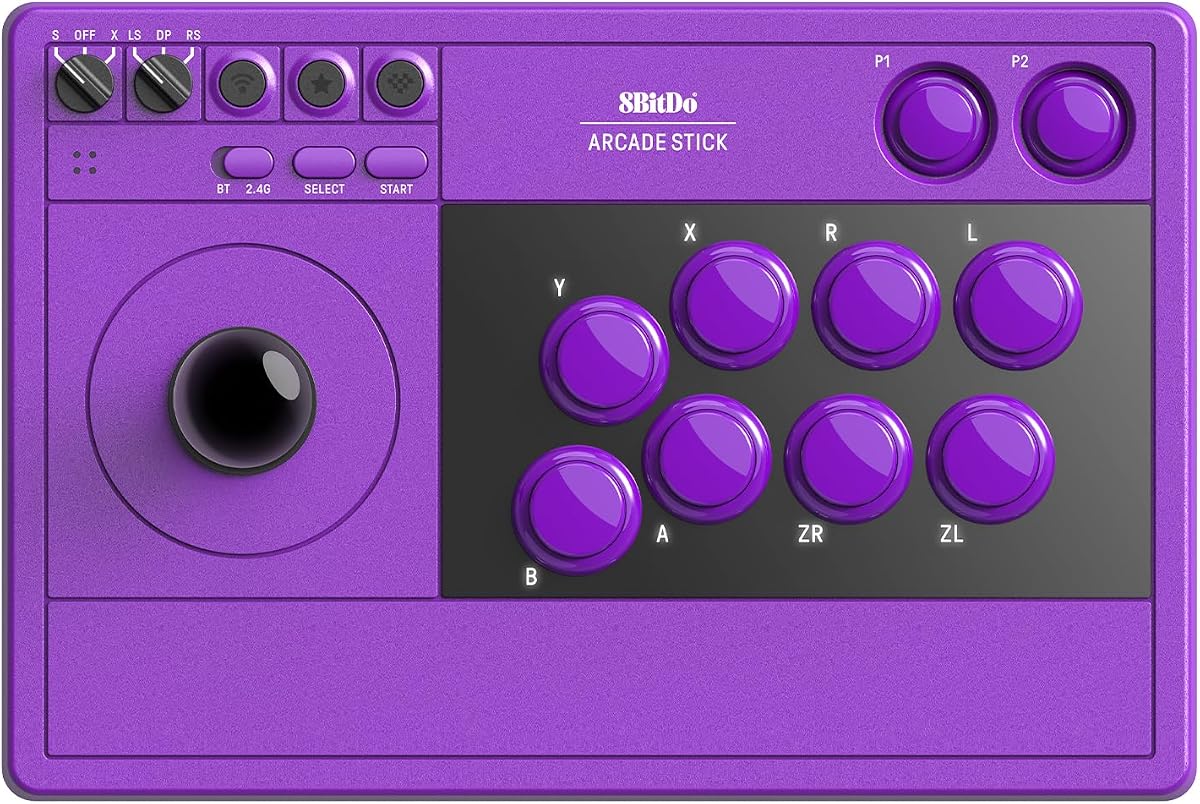
This Purple Edition of the 8BitDo stick adds style to performance. It matches the standard model with a 4.7 rating for quality. The purple finish gives it a distinct look compared to standard black.
We may earn a commission when you buy through this link, at no additional cost to you.
The tempered glass faceplate protects against scratches during use. It adds a premium feel under the fingers. Connectivity includes Bluetooth, 2.4G, and wired options for all setups. Ultimate software allows full control customization.
The glass shows fingerprints more than matte finishes. Availability may vary depending on stock. However, for those wanting a standout controller, this color choice works well. The underlying performance matches the best models.
Choose this if you want style without losing functionality. It suits players who match gear to their setup color. The features ensure it competes with top tier controllers today.
The top layer resists scratches and feels smooth. It is durable enough for daily heavy play sessions.
The purple finish adds personality to your desk. It looks great in photos and video setups.
We may earn a commission when you buy through this link, at no additional cost to you.
The Saitake Wireless offers many features for the price. With a 4.6 rating, it stands out with a display and audio jack. It connects to Switch 2, PC, and mobile devices easily.
We may earn a commission when you buy through this link, at no additional cost to you.
The screen lets you adjust volume and lighting effects directly. The 3.5mm jack allows headphones for private audio sessions. Turbo modes offer different speeds for rapid inputs. This level of customization is rare at this price.
The software interface may confuse beginners. Firmware updates can sometimes be tricky without clear guides. However, the included hardware features provide value found in expensive sticks.
Get this if you want screens and audio without extra gear. It works well for mobile and PC users. The feature set makes it a strong contender in budget segments.
Adjust settings like lighting and volume directly. This removes the need to open apps on your console.
Plug in headphones for private sound. Great for using when others are watching TV.
We may earn a commission when you buy through this link, at no additional cost to you.
The MAYFLASH F700 is optimized for fighting titles on PS5. It supports Switch 2 and Windows with a 4.5 rating. The wireless Bluetooth option reduces clutter for console setups.
We may earn a commission when you buy through this link, at no additional cost to you.
It allows Sanwa component upgrades for better precision. Audio output works via wired headsets on PS5 and PC. Turbo functions help with repetitive inputs in combos. This stick focuses purely on competitive fighting titles.
It does not support Xbox Series X or S which limits reach. Also non-fighting games might have limited compatibility. However, for fighting fans with PS5, this stick offers strong performance.
Buy this for PS5 fighting games specifically. It provides wireless freedom and solid hardware. The focus on competitive titles makes it niche but effective.
Works well for Street Fighter and Tekken on PS5. Firmware updates ensure smooth Bluetooth performance.
Designed specifically for competitive play. It prioritizes speed over general controller functions.
We may earn a commission when you buy through this link, at no additional cost to you.
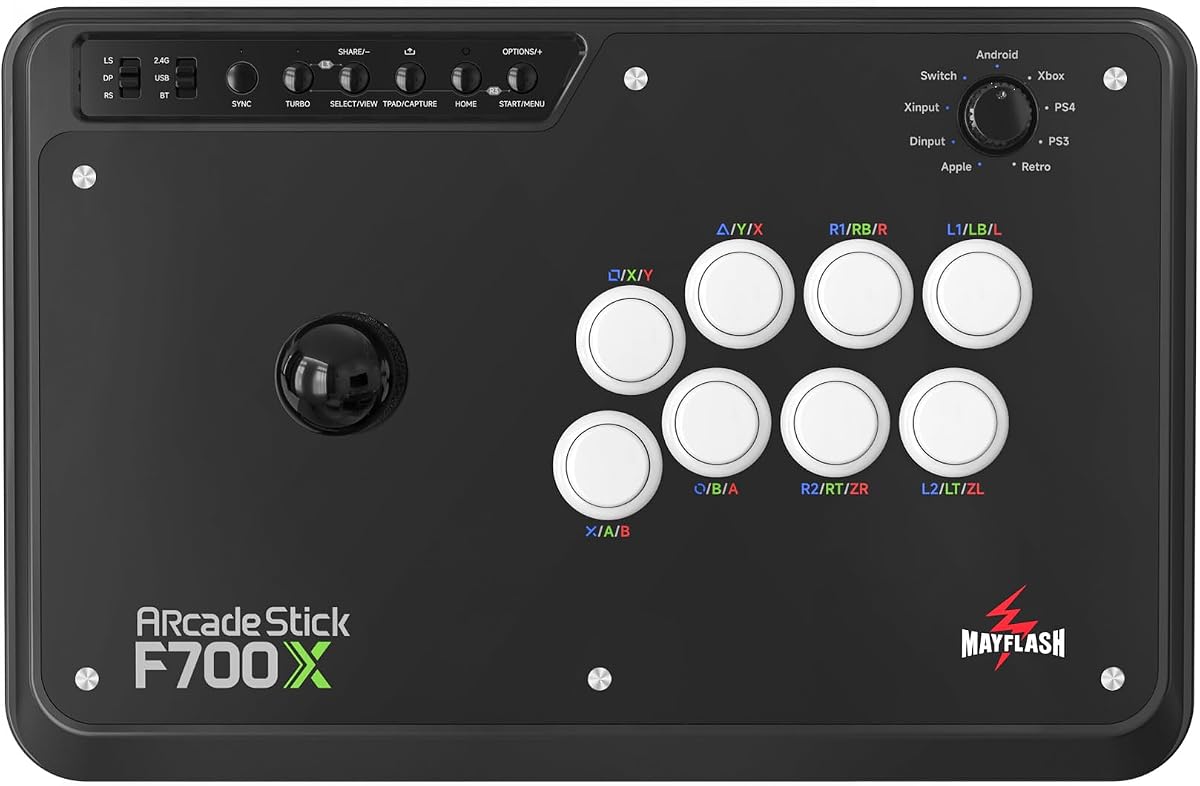
The MAYFLASH F700X targets Xbox Series owners who need a stick. It connects via Bluetooth and wired modes with a 4.2 rating. The Sanwa components allow for easy customization and replacement.
We may earn a commission when you buy through this link, at no additional cost to you.
It supports Switch 2 and Windows but lacks PS5 wireless. Turbo functions enable quick inputs for combos. Wired headset support helps with online chat. This fills a niche for Xbox players.
The rating is lower than other models, suggesting mixed experiences. PS5 wireless is not supported so buyers must verify. For Xbox users, it remains one of the few wireless choices.
Choose this if you need Xbox Series wireless specifically. It offers necessary features for that console. The compatibility ensures it works for your main gaming device.
Connects directly to Xbox Series X and S. This saves needing an adapter for wireless play.
Supports different speed settings for rapid fire. This helps execute quick inputs consistently in games.
We may earn a commission when you buy through this link, at no additional cost to you.
This POWER A model offers official licensing for Switch users. With a 4.1 rating, it provides reliable basic features. The custom face-card lets you print unique designs for style.
We may earn a commission when you buy through this link, at no additional cost to you.
The metal base ensures the stick stays in place. Battery life reaches 30 hours for long sessions. Storage for the USB-C cable adds convenience for travel. This focus on design fits casual players.
It does not support Sanwa swaps like other sticks. The features are limited to Switch specifically. For Switch fans wanting a branded product, it remains a safe choice.
Buy this for Switch customization and license security. It works best for those who want custom looks. The build quality handles daily play sessions well.
Download templates to print your own face-card. This makes your stick unique and personal.
The cable fits inside the base easily. This keeps everything organized for tournaments.
We may earn a commission when you buy through this link, at no additional cost to you.
The 8Bitdo V3 Edition brings a modern look to fighting sticks. It includes tempered glass and strong battery life. With support updates, it stays compatible with new consoles.
We may earn a commission when you buy through this link, at no additional cost to you.
The design focuses on smooth inputs and clean aesthetics. It works on Switch and Windows well. The support team responds quickly to any setup issues. This keeps the product reliable over time.
The price is higher than older models. Ratings vary slightly due to new features. But the modern design justifies the cost for many users.
Choose this for a sleek controller with long battery. It fits modern setups and looks professional. The support ensures long-term use without issues.
This large battery lasts for many gaming hours. You need less frequent charging between sessions.
Free updates ensure the stick works with new OS. This keeps the controller relevant for years.
We may earn a commission when you buy through this link, at no additional cost to you.
Choosing the right arcade fight stick involves understanding key features that impact performance. This section details the factors you should consider before purchasing.
Ensure the stick works with your Switch 2 and PC. Check for firmware updates that enable Switch 2 support. Some models are limited to fighting games on specific platforms. Verify Xbox or PS support if you play cross-platform.
Always read the product details to confirm Switch 2 readiness. Firmware updates may be needed for full functionality.
Decide between wireless Bluetooth, 2.4G wireless, or wired. Wired offers the lowest latency for competitive play. Wireless adds convenience for couch gaming. Some models include a 2.4G receiver for stable connections.
Prioritize wired or 2.4G for competitive needs. Bluetooth may lag in fast-paced matches.
Look for sturdy plastic or metal construction. Tempered glass faceplates resist scratches and feel premium. Heavy sticks stay stable during intense play. Lightweight models may slide on the table.
Check reviews for durability over time. A heavy base prevents movement during combos.
Sanwa Denshi components are preferred by pros. Some sticks allow swapping buttons for custom feel. Check if the stick supports 24mm or 30mm buttons. High-quality parts last longer under heavy use.
Prioritize Sanwa compatibility if you plan to upgrade. Better buttons mean better game feel.
Software like Ultimate Software helps customize mapping. Look for macro support and profile saving. Some sticks allow on-unit customization without PC. Firmware updates keep compatibility current.
Use software to tailor layouts for games. Profile switching saves time between sessions.
Wireless models should offer 30+ hours of play. Rechargeable batteries reduce cost and waste. USB-C charging is standard for modern sticks. Long life prevents interruptions during gaming.
Check battery specs before buying. Longer life means less charging frequency.
Budget sticks offer basic features for lower costs. Premium sticks include glass tops and better parts. Compare features against the price tag. High ratings indicate better value for money.
Balance needs with budget. Avoid overspending on unused features.
Some sticks allow face design customization. Others include anti-slip mats for stability. Check for audio jacks for private sound. These options enhance the gaming setup.
Customization adds personal touch to gear. Mats prevent stick slipping during matches.
Connect the stick to your Switch 2 using the appropriate mode. For wireless, select Bluetooth or insert the 2.4G receiver. For wired, plug in the USB-C cable for stable connection. Ensure firmware is updated for best performance.
Calibrate buttons if needed using software tools. Test inputs to ensure all responses register correctly. If the stick feels loose, tighten screws on the base. Regular checks keep the setup responsive.
Store the stick safely to avoid damage. Keep it in a cool dry place when not used. Dust the buttons and joystick regularly. Proper care extends the life of your controller.
The 8BitDo Arcade Stick for Switch 2 is our top pick for its dynamic layout and build quality. It supports Switch 2 natively with firmware. The MAYFLASH F700 Elite is great for premium Sanwa parts.
Most modern sticks require software for deep customization. However, some allow basic mapping on the unit. Check if the stick supports on-device programming. Software like Ultimate offers advanced options for PC users.
Many models support Sanwa Denshi component swaps. Check the mounting plate size for 24mm or 30mm parts. Budget sticks often allow upgrades. This extends the lifespan of the controller.
Wired offers the lowest latency for competitive play. Wireless adds convenience for living room use. For ranked matches, wired is usually better. 2.4G wireless is more stable than Bluetooth.
Lag often comes from Bluetooth or poor firmware. Ensure you update the stick via PC. Wired modes reduce lag significantly. Check if the game supports wireless controllers.
Turbo lets you execute rapid inputs automatically. It helps with quick combos in fighting games. Different sticks offer various speed settings. Use it carefully to avoid accidental inputs.
Look for Switch 2 in the product title. Check reviews mentioning Switch 2 compatibility. Firmware updates may be required for full support. Always confirm before buying if possible.
Sanwa parts provide better responsiveness and feel. They are durable for heavy play. Many pros prefer them. If you want a premium feel, upgrading is recommended.
We highlighted ten top arcade sticks for Switch 2 users. The 8BitDo Purple Edition leads with premium features. Budget fans may prefer the MAYFLASH F300 for affordability.
Prioritize connectivity and build quality when deciding. Wireless is great for comfort, wired for speed. Match the stick to your main gaming platform.
Always check current prices before buying. Deals fluctuate often, so compare listings. Choose the stick that fits your setup and style best.