
Ducky OK-M
4.4Editor score
Gasket-mount design
Five-layer dampening
Multi-device wireless
This comprehensive guide compares ten top Ducky Keyboard models to help you find the best mechanical typing experience for gaming and productivity needs today.
Finding the right mechanical keyboard can transform your daily computing experience. Ducky has built a reputation for quality build materials and excellent typing feel across their lineup. Whether you need wireless connectivity or specific switch types, there is likely a perfect match for your setup.
We have analyzed ten distinct Ducky models based on their design, features, and user feedback. Our comparison looks at connectivity options, switch types, keycap quality, and overall value. This list covers everything from budget-friendly entries to premium wireless options with advanced features.
Each pick highlights unique strengths to help you narrow down your choices quickly. Note that stock and availability can change frequently on major retail platforms. Always verify current listings before making your final purchase decision to ensure you get the exact configuration you want.
4.4Editor score

4.7Editor score

3.8Editor score
The following table provides a side-by-side view of the key specifications and features for all ten Ducky keyboards reviewed in this guide.


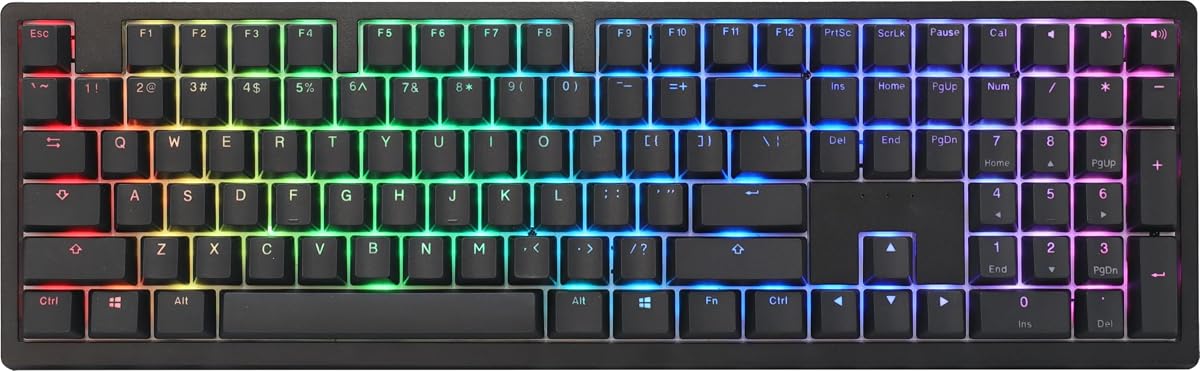


The Ducky OK-M stands out as an accessible entry point into premium mechanical typing without breaking the bank. It holds a strong 4.4 rating from users who appreciate its balance of cost and performance. The gasket-mount design and acoustic dampening provide a surprisingly quiet and solid typing experience.
We may earn a commission when you buy through this link, at no additional cost to you.
Key strengths include the five-layer acoustic dampening which eliminates unwanted pinging and echo effects often found in budget boards. Its versatile connectivity supports USB-C, Bluetooth, and 2.4GHz wireless making it easy to switch between devices. VIA software support allows for deep customization of keys and macros directly through a web browser.
While it offers excellent value there are some trade-offs like the limited switch options compared to full hot-swap boards. The side RGB adds a touch of flair but may not satisfy those seeking full per-key lighting. These minor points are acceptable given the price point and overall build quality.
This keyboard is ideal for users seeking a compact 98% layout with wireless capability on a budget. It fits well for office work or casual gaming where sound and feel matter. We recommend it for anyone wanting a reliable Ducky keyboard without spending premium prices.
The five-layer dampening ensures a quiet typing experience suitable for shared workspaces.
Switch seamlessly between three connection modes to manage multiple devices effortlessly.
We may earn a commission when you buy through this link, at no additional cost to you.
The Ducky Origin Vintage brings a classic look with modern conveniences like hot-swap sockets on stabilizer keys. Its 4.6 rating reflects user satisfaction with the solid construction and tactile feedback. The slim bezel design offers a modern aesthetic that complements minimalist desktop setups perfectly.
We may earn a commission when you buy through this link, at no additional cost to you.
Standout features include the Kailh yellow hotswap sockets on keys like space and enter allowing easy customization. OEM profile double-shot PBT keycaps ensure durability and a textured surface that resists shine over time. South-facing switches prevent keycap interference with RGB lighting if you choose to mod it later.
The lack of wireless connectivity might be a drawback for users who need a clean cable-free setup. Additionally the vintage theme limits color choices compared to other models in the lineup. However for wired enthusiasts the build quality and typing feel justify these limitations.
Ideal for gamers and typists who prefer a sturdy wired connection with easy modding potential. It pairs well with setups where desktop space is limited due to its narrow profile. We suggest this model for those prioritizing tactile feedback and long-term keycap durability.
Hotswap sockets on stabilizer keys make it easy to change key feel without soldering.
Double-shot PBT keycaps maintain texture and color clarity through years of heavy use.
We may earn a commission when you buy through this link, at no additional cost to you.
The Ducky Origin Black offers a clicky experience with Cherry MX Blue switches that provide clear auditory feedback. Users rate it at 4.5 for its reliable performance and sturdy construction. The black color scheme combined with a slim bezel gives it a sleek professional look on any desk.
We may earn a commission when you buy through this link, at no additional cost to you.
Key strengths include the hot-swap capability on stabilizer keys which allows for easy maintenance or upgrade. The detachable braided USB-C cable adds convenience for transport or replacement. The bonus random color enter key adds a unique personal touch that stands out in a black setup.
The audible click may not suit quiet environments such as libraries or open offices. Wireless functionality is also absent which limits flexibility for users moving between stations. These factors are trade-offs for those who prioritize tactile response and budget-friendly pricing.
This keyboard fits best for users who enjoy the sound of mechanical switches and need a reliable wired board. It is great for gaming sessions where clear key registration is essential. We recommend it for enthusiasts looking for a classic clicky experience with modern features.
Cherry MX Blue switches provide distinct bumps and clicks for precise typing confirmation.
The detachable braided cable makes packing the keyboard for travel simple and safe.
We may earn a commission when you buy through this link, at no additional cost to you.
The Ducky Zero 6108 brings wireless freedom to a 60% form factor appealing to minimalists. It holds a 4.1 rating reflecting mixed feedback on the compact layout but praise for its build. The Cherry MX2A Red switches ensure smooth linear keystrokes perfect for rapid gaming inputs.
We may earn a commission when you buy through this link, at no additional cost to you.
Its tri-mode connectivity allows seamless switching between wired USB 2.4GHz and Bluetooth. This flexibility makes it ideal for users with multiple devices like laptops and desktops. The RGB lighting is customizable to match your style while PBT keycaps ensure longevity during intense sessions.
The compact layout requires an adjustment period as function keys are accessed via layers. Some users find the rating lower due to the learning curve or specific switch preferences. These are acceptable trade-offs for those seeking portability and a clean desk footprint.
This model suits gamers and travelers who need a small footprint without sacrificing performance. It works well for setups where desk space is at a premium. We recommend it for users comfortable with 60% layouts who value wireless versatility.
Connect via Bluetooth or 2.4GHz to switch between devices instantly without cables.
Double-shot PBT keycaps resist wear and maintain a solid feel over time.
We may earn a commission when you buy through this link, at no additional cost to you.
The Ducky Origin PBT combines vintage styling with durable materials to create a unique typing tool. It earns a 4.5 rating for its reliable performance and distinctive look. The combination of Cherry MX Blue switches and PBT keycaps offers a tactile and textured experience.
We may earn a commission when you buy through this link, at no additional cost to you.
Key strengths include hot-swap sockets on stabilizer keys which facilitate easy customization. The detachable braided USB-C cable adds convenience for daily use or travel. OEM profile keycaps ensure a comfortable typing position and resist wear better than ABS alternatives.
The clicky switches may disturb others in quiet environments like shared offices. Additionally the lack of wireless means cables are always present in your setup. These points are minor for enthusiasts who prioritize build quality and specific switch feel.
Ideal for users who appreciate retro design paired with modern mechanical keyboard features. It serves well for desktop setups where aesthetics and sound are valued. We suggest it for those who want a durable wired keyboard with a classic vibe.
PBT double-shot keycaps ensure long-lasting legends and a grippy texture for fingers.
The detachable cable allows for easy removal when storing or transporting the device.
We may earn a commission when you buy through this link, at no additional cost to you.
The Ducky One 2 Pro Mini White Edition stands out with a clean look and strong 4.6 rating. It is built with quality materials focusing on durability and feel. The compact mini layout saves significant desk space while retaining essential keys for productivity.
We may earn a commission when you buy through this link, at no additional cost to you.
Key strengths include the use of true PBT keycaps which offer better durability and texture. Cherry Brown switches provide a balanced tactile bump without being too loud. The RGB lighting adds a customizable element to match your PC build theme.
Lack of wireless connectivity might limit users who need a clean desk setup. Features are standard compared to newer models with advanced dampening. These are acceptable trade-offs for the specific white aesthetic and compact form factor.
This keyboard suits users wanting a compact white setup with reliable tactile switches. It works well for minimalist desk themes where color coordination matters. We recommend it for those who value build quality in a small package.
True PBT keycaps ensure a durable and textured typing surface that resists shine.
The mini layout reduces footprint without sacrificing essential functionality for daily tasks.
We may earn a commission when you buy through this link, at no additional cost to you.
The Ducky One X Wireless represents the cutting edge of keyboard technology with analog inductive switches. It holds a 3.8 rating reflecting early adoption challenges but promises high performance. The gasket-mount and seven-layer dampening deliver a typing feel that is both solid and smooth.
We may earn a commission when you buy through this link, at no additional cost to you.
Key strengths include analog switches offering rapid trigger and greater accuracy over traditional mechanical ones. High-durability PBT keycaps resist shine even after years of heavy use. Web-based software allows intuitive settings adjustments without consuming local system resources.
The higher price may be a barrier for budget-conscious buyers seeking standard features. Some early users report inconsistency in rating which may improve with software updates. These are acceptable for those wanting premium features and future-proof technology.
Ideal for enthusiasts and competitive gamers who need rapid trigger and custom actuation. It serves well in professional setups demanding high precision and reliability. We recommend it for users willing to invest in next-gen input technology.
Inductive switches provide linear and consistent performance with rapid trigger capability.
Access intuitive settings online without installing heavy software on your computer.
We may earn a commission when you buy through this link, at no additional cost to you.
The Ducky One 3 Matcha leads with a top 4.7 rating from satisfied users. It features the QUACK Mechanics design philosophy aimed at reducing typing noise and improving feel. The Matcha theme offers a unique aesthetic that stands out from standard black options.
We may earn a commission when you buy through this link, at no additional cost to you.
Key strengths include dual-layer sound dampeners and thick PBT double-shot keycaps for a premium feel. Exclusive Kailh yellow hotswap sockets ensure easy customization of your switch choices. The remapped macro layout provides more efficient macro programming for complex tasks.
The specific colorway might not fit all users preferences for desk setups. It is also limited to wired connectivity which may not suit mobile needs. These points are acceptable given the exceptional build quality and user satisfaction.
Ideal for typists and gamers seeking a high-quality wired experience with a unique look. It works well for setups where sound dampening is a priority. We recommend it for those who value build quality and unique aesthetics.
Dual layers of silicone and EVA foam ensure a quiet and consistent typing sound.
Exclusive hotswap sockets make swapping switches on stabilizer keys effortless.
We may earn a commission when you buy through this link, at no additional cost to you.
The Ducky One 3 TKL Matcha offers a tenkeyless layout for balanced desk space usage. It holds a 4.3 rating for its reliable performance and robust build. The Matcha design brings a fresh visual touch to a classic keyboard form factor.
We may earn a commission when you buy through this link, at no additional cost to you.
Key strengths include the dual-layer sound dampeners for a smooth typing experience. V2 stabilizers ensure that the space bar feels solid and consistent. The detachable braided USB-C cable adds convenience for transport or cleaning tasks.
Lack of wireless limits mobility for users switching between devices regularly. The specific color theme might not appeal to those preferring neutral tones. These trade-offs are minor for the solid performance and layout efficiency.
Ideal for users who need number pad functionality in a compact form factor. It suits well for gaming setups where extra mouse space is required. We recommend it for those seeking a sturdy TKL board with modern acoustic features.
Tenkeyless design saves desk space while keeping essential keys for work and play.
V2 stabilizers eliminate rattle for a consistent feel across larger keys.
We may earn a commission when you buy through this link, at no additional cost to you.
The Ducky One 2 80% delivers a traditional reliable experience with a proven layout. It holds a 4.3 rating for its consistent performance and broad appeal. This model uses Cherry MX Red switches for smooth linear keystrokes suitable for gaming.
We may earn a commission when you buy through this link, at no additional cost to you.
Key strengths include support for the latest RGB software allowing extensive visual customization. PBT Double Shot keycaps ensure durability and resistance to wear over time. Three adjustable feet let you find the perfect typing angle for your wrists.
It lacks newer features like advanced sound dampening found in One 3 models. Wireless connectivity is also absent limiting its versatility for mobile users. These points are acceptable for those preferring a straightforward wired experience.
Ideal for users seeking a standard 80% layout with reliable performance and RGB. It works well for setups needing a balanced footprint without modern acoustic features. We recommend it for those who value consistency and broad software support.
Access Ducky's newest RGB software for extensive lighting customization options.
Three adjustable feet allow you to customize the typing angle for comfort.
We may earn a commission when you buy through this link, at no additional cost to you.
Selecting the right mechanical keyboard involves considering several key factors that impact your daily experience.
Consider how much desk space you have and whether you need a number pad. Sizes range from 60% compact layouts to full-size 100% keyboards. A TKL or 80% layout often offers the best balance for most users.
Mechanical switches come in linear tactile and clicky varieties that feel different under your fingers. Choose based on whether you prefer quiet smooth presses or audible feedback. Match the switch to your typical usage like gaming or writing.
Decide between wired and wireless options based on your need for mobility and desk cleanliness. Wireless keyboards offer freedom from cables but may have slight latency. Wired models ensure stable performance for competitive gaming.
PBT keycaps are generally more durable and resistant to shine compared to ABS plastic. They provide a textured feel that many users prefer for typing accuracy. Check if the keyboard uses PBT for long-term satisfaction.
Look for features like silicone layers or gasket mounts if you want a quieter typing experience. Acoustic dampening reduces the hollow sound common in budget keyboards. This is crucial for office environments or shared spaces.
Hot-swap sockets allow you to change switches without soldering giving you flexibility. RGB software lets you tailor lighting effects to match your aesthetic. These features add longevity and personalization to your setup.
Solid construction ensures your keyboard lasts for years under daily use. Check for metal frames or high-density plastics that feel sturdy. Ducky is known for high build standards across most models.
Set a clear price range before shopping to narrow down your options effectively. Higher price often brings better materials or wireless features. Balance your needs with what you are willing to spend.
Clean your keyboard regularly with compressed air to remove dust and debris from between keys. Use a soft brush to gently dislodge any stuck particles that affect key feel. Wipe the keycaps with a slightly damp cloth to remove oils and grime.
Many modern Ducky models feature hot-swap sockets allowing you to change switches without soldering. Check specific product details for support on key stabilizers as well.
Some Ducky models offer wireless options via Bluetooth or 2.4GHz receivers. Wired models are available if you prefer stable connections without battery concerns.
QUACK Mechanics refers to Ducky's design philosophy focusing on sound dampening and build quality. It aims to provide a smoother and quieter typing experience.
Most newer Ducky keyboards use PBT keycaps for durability and texture. Always verify product descriptions to confirm the material used for keycaps.
Yes many models support Ducky's RGB software for extensive customization of lighting effects. Some even offer side lighting or multi-zone controls for personalization.
Yes most Ducky keyboards are compatible with Mac systems with basic functionality. Some keys may need remapping but the hardware works seamlessly across platforms.
We have reviewed ten top models offering unique layouts and features for different needs. Whether you prefer a compact 60% board or a full-size wireless option there is a fit for every user. Our top picks highlight the best budget premium and overall values in the lineup.