
SSK Portable SSD 1TB External Solid State
4.5Editor score
Lightweight aluminum case design
Up to 1050MB/s speed
USB C and USB A cables
Find the best External SSD for MacBook Air with our expert guide comparing speed, durability, and compatibility for seamless Mac storage expansion and
Modern MacBook Air users need reliable external storage to handle large files and creative projects. An External SSD for MacBook Air offers the speed and portability required for efficient workflows.
We compared ten top models based on performance, build quality, and Mac compatibility. Our analysis focuses on real-world speed, durability ratings, and essential features for laptop users.
Each pick highlights specific strengths like ruggedness or value. Prices fluctuate often so check current listings before buying. This guide ensures you find the right drive for your needs.
4.5Editor score

4.7Editor score

4.6Editor score
This side-by-side comparison highlights key specs across all ten models. Use this table to quickly identify which drive matches your speed and durability requirements.






This Samsung T7 Portable SSD earns top marks for its balance of speed and durability. It delivers read speeds up to 1050MB/s which is ideal for 4K video editing on a MacBook Air.
We may earn a commission when you buy through this link, at no additional cost to you.
The solid aluminum unibody construction not only feels premium but also helps dissipate heat during long transfers. It supports high-resolution video recording directly onto the drive for mobile devices.
While the included cable is functional it may be short for some desk setups. The drive can get warm during heavy use but the thermal design prevents throttling.
It is the best choice for creatives needing reliable storage that fits easily in a laptop bag. The included software makes encryption and management straightforward for Mac users.
The NVMe technology ensures files move quickly between your Mac and the drive without bottlenecks.
Shock resistance up to six feet protects your data even if the drive is dropped accidentally.
We may earn a commission when you buy through this link, at no additional cost to you.
The SSK Portable SSD offers exceptional value for those needing fast storage without spending a premium. It matches the speed of higher-end models at a lower price.
We may earn a commission when you buy through this link, at no additional cost to you.
Its slim aluminum case keeps the weight down to just 36.6 grams which makes it easy to carry anywhere. The cooling design keeps temperatures low even during large file transfers.
While it lacks the ruggedness of some competitors it is sturdy enough for everyday travel. The included cables support both USB-C and USB-A connections for broad compatibility.
This is the perfect choice for students or casual users who need reliable capacity. It handles 4K ProRes recording on iPhones making it versatile for mobile content creators.
The aluminum case and smart caching keep the drive cool to maintain steady performance.
Weighing under 40 grams it disappears in your pocket or laptop sleeve easily.
We may earn a commission when you buy through this link, at no additional cost to you.
The Samsung T9 delivers top-tier performance for professionals who need to move massive files quickly. Its speeds can reach up to 2000MB/s when paired with compatible ports on newer MacBooks.
We may earn a commission when you buy through this link, at no additional cost to you.
Dynamic Thermal Guard technology actively manages heat to ensure sustained high speeds during long workflows. The sturdy design ensures the drive can withstand daily use and travel conditions.
To get the full speed you need a Mac with USB 3.2 Gen 2×2 support. Older models will still work but at standard USB 3.2 Gen 2 speeds.
If budget is secondary to speed this is the best premium option available. It is ideal for video editors and designers who require instant access to large project folders.
Thermal controls prevent slowdowns so you can transfer large videos without interruption.
Magician Software helps monitor health and apply updates to keep the drive optimized.
We may earn a commission when you buy through this link, at no additional cost to you.
This model focuses on durability with IP65 water and dust resistance to survive harsh environments. It is perfect for photographers or videographers working outdoors where elements are a concern.
We may earn a commission when you buy through this link, at no additional cost to you.
The 3-meter drop protection ensures your data is safe even if you drop the drive from a height. The carabiner loop allows you to secure it to your backpack or belt loop.
While the rubberized casing adds bulk it is necessary for the rugged build. The included software helps protect private files with 256-bit AES hardware encryption.
It is a top choice for field work where reliability is paramount. You get generous storage space without worrying about accidental spills or drops affecting performance.
IP65 rating means the drive can handle rain and dust without compromising internal components.
Hardware encryption keeps sensitive files private with password protection capabilities.
We may earn a commission when you buy through this link, at no additional cost to you.
The Lexar ES3 is designed to be nearly invisible in your bag with a thin 10.5mm profile. It slips into pockets easily which is great for on-the-go storage needs.
We may earn a commission when you buy through this link, at no additional cost to you.
At just 42 grams it adds almost no weight to your backpack or laptop case. The performance matches other fast drives with read speeds up to 1050MB/s.
It does not offer the same level of rugged protection as some others but it is durable enough for office use. The included DataShield software helps protect your files from unauthorized access.
This is a great option for those who prioritize pocketability. If you want a drive that feels light and looks sleek this model delivers on both fronts.
The thin profile fits easily in tight spaces like a small pouch or wallet.
Built-in encryption tools ensure your data stays secure even if the drive is lost.
We may earn a commission when you buy through this link, at no additional cost to you.
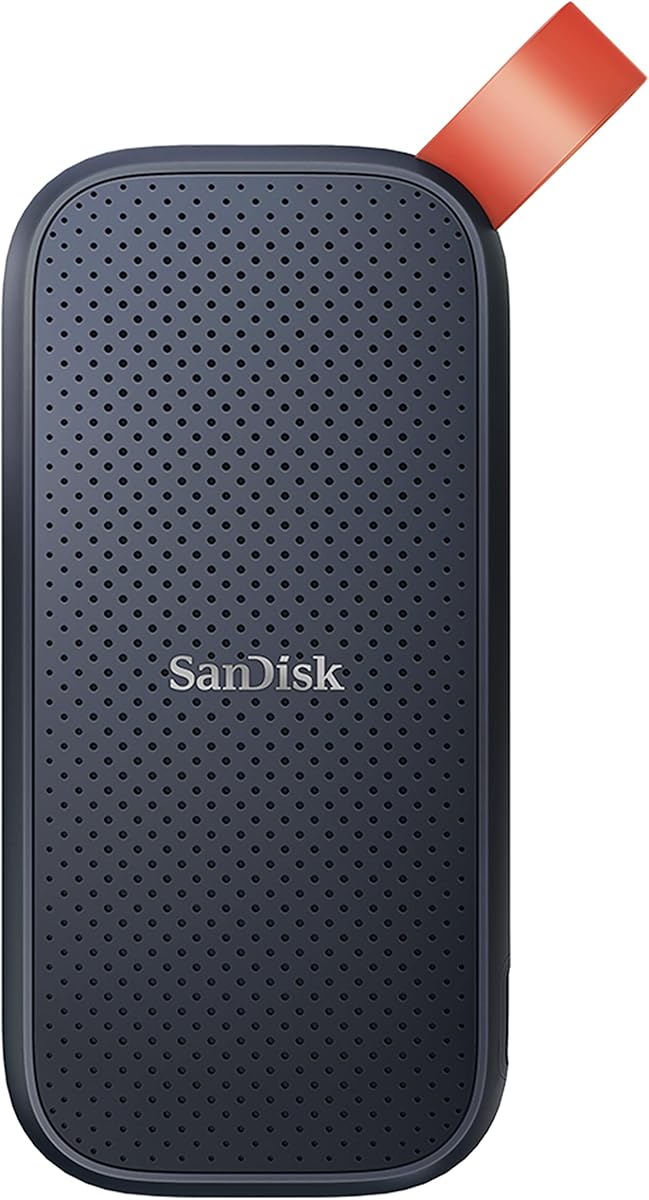
This older model still offers reliable performance for general storage tasks at a lower price. It provides up to 800MB/s read speeds which is sufficient for photos and documents.
We may earn a commission when you buy through this link, at no additional cost to you.
The rubberized shell offers good protection against drops up to two meters. It includes a hook so you can attach it to your bag for easy carrying on trips.
While it is not as fast as the latest NVMe models it is perfectly adequate for backups. The simplicity of use makes it a good choice for non-technical users.
It is a solid budget option for those who do not need top speeds. The trusted brand ensures long term reliability for storing your memories and files.
SanDisk is a trusted name in storage so you can count on consistent quality.
Drop protection ensures the drive survives normal handling and accidental slips.
We may earn a commission when you buy through this link, at no additional cost to you.
This Lexar model doubles the capacity to 2TB while maintaining the fast speeds of the smaller ES3 variant. It is ideal for users who need large space for media libraries.
We may earn a commission when you buy through this link, at no additional cost to you.
The internal graphite layers help conduct heat away from the drive to prevent overheating during use. The drop resistance ensures your large file collection is safe from accidents.
The included 2-in-1 cable works with almost any device you might have. It is a practical solution for expanding storage without sacrificing portability.
If you need a lot of space this is a great choice. The combination of capacity and performance makes it useful for storing 4K video and large game files.
Two terabytes allows you to store months of files without running out of room.
Double layer graphite sheets keep the drive cool during long data transfers.
We may earn a commission when you buy through this link, at no additional cost to you.
This unique unit combines a portable SSD with a four-port USB hub for ultimate connectivity. It is designed to simplify your setup when working with cameras and peripherals.
We may earn a commission when you buy through this link, at no additional cost to you.
The hub allows you to plug in keyboards, mice, or other drives without using your laptop ports. The drive itself supports 4K recording with no dropped frames during capture.
While the hub adds some size it reduces cable clutter on your desk. The included cables ensure you have everything you need to get started immediately.
It is perfect for photographers and videographers who need connectivity and storage in one. This kit is a convenient solution for mobile workstations and creative studios.
The hub ports allow you to expand your laptop interface without extra dongles.
Direct recording support means you can capture footage straight to the drive.
We may earn a commission when you buy through this link, at no additional cost to you.
This PRO version delivers top tier speeds with a durable design for professionals on the go. The aluminum chassis acts as a heatsink to maintain high performance under load.
We may earn a commission when you buy through this link, at no additional cost to you.
It features IP65 resistance and a 3 meter drop rating for safety in harsh environments. The included carabiner helps secure the drive so it does not get lost easily.
While it is an older model it still outperforms many modern options in terms of raw speed. The software suite helps you manage files and free up space automatically.
It is a great choice for those who need a mix of speed and toughness. You can rely on it for heavy workloads and outdoor shoots without worry.
Forged aluminum keeps the drive cool so it does not slow down during transfers.
Password protection keeps your private files safe from unauthorized access anywhere.
We may earn a commission when you buy through this link, at no additional cost to you.
This model is known for exceptional reliability and a high customer satisfaction rating. It offers solid speeds for general use with a rugged build that can take a beating.
We may earn a commission when you buy through this link, at no additional cost to you.
The shock resistant core ensures data safety even in high vibration environments. It comes with a three-year limited manufacturer warranty which adds peace of mind for buyers.
While it is slower than the latest NVMe drives it is very consistent in performance. The compact size still fits in a pocket despite the rugged exterior.
It is the best choice for those who want a drive that simply works reliably. With its warranty and brand reputation you get a product designed for longevity.
Three year warranty covers defects ensuring you get a drive that lasts for years.
Works with both Mac and PC without any special setup or drivers required.
We may earn a commission when you buy through this link, at no additional cost to you.
Choosing the right external storage requires balancing speed, durability, and budget. This section breaks down the key factors to consider before making your purchase.
Look for USB 3.2 Gen 2 or newer interfaces for fast data transfers. Read speeds above 1000MB/s are ideal for video editing on your MacBook Air.
Higher speeds save time during backups and large file moves. Ensure your Mac ports match the drive interface to avoid bottlenecks.
Determine how much space you need based on your media files and projects. 1TB is usually sufficient for general users while 2TB is better for video editors.
More capacity means you can store more data without multiple drives. Consider future growth when selecting the right size for your needs.
If you travel often check for IP ratings and drop protection specs. Drives with IP65 and 3-meter drop protection are safest for outdoor work.
Rugged designs protect your data from accidental drops or water exposure. A durable build ensures the drive lasts longer during daily use.
Aluminum bodies help dissipate heat better than plastic. Good cooling prevents the drive from slowing down during heavy transfers.
Metal construction also adds to the premium feel and durability. Check reviews for heat management to ensure steady performance.
Hardware encryption ensures your private files stay safe if the drive is lost. Look for 256-bit AES hardware encryption in the product details.
Password protection software adds an extra layer of security. This is essential for business users storing sensitive data.
Check if the drive includes both USB-C and USB-A cables for flexibility. Some models come with hubs or adapters for extra utility.
A good cable bundle saves you from buying extras later. Ensure the cables are sturdy enough for frequent use.
Some drives include management apps for automatic backups and health checks. These tools help you stay organized and monitor drive status.
Look for Mac compatible software if you need extra features. Basic plug-and-play is often enough for most users though.
Compare prices relative to capacity and performance features. A higher price often means better durability or faster speeds.
Check the warranty length to protect your investment. A longer warranty often indicates higher build quality and trust.
Always eject the drive properly from macOS before unplugging it. This prevents data corruption and keeps your files safe on the drive.
Avoid leaving the drive in direct sunlight or extreme heat. High temperatures can damage the internal components and reduce lifespan.
Keep the USB ports clean and free of dust. Use a soft cloth to wipe the casing and prevent dirt buildup.
Most modern MacBook Air models have USB-C ports so you can plug in the drive directly. Older models might need a USB-C to USB-A adapter if the drive uses USB-A.
Yes many of these drives support iPhone 15 ProRes recording with the correct cable. Check the specific product data for iPhone compatibility details.
All the drives listed support Windows and Mac. They come formatted for both systems or work with basic file systems like ExFAT.
Use the included encryption software to password protect files. Regular backups to a separate location also help secure your important data.
It is normal for SSDs to get warm during large file transfers. If it feels too hot ensure it is on a flat surface for cooling.
Yes these drives are compatible with macOS Time Machine backups. Just format the drive to APFS or Mac OS Extended for best results.
The Samsung T7 and SSK options offer great performance for most users. If you need top speeds the Samsung T9 is the premium choice.
Prioritize speed and durability if you work with video files. For general storage value the budget picks provide reliable capacity.
Remember to check current prices and availability before buying. These models are often discounted so you may find great deals online.